
直播开发思路

1、推流服务器搭建
windows下nginx的安装及使用
或者开通腾讯云直播
2、使用AForge.Video.DirectShow 调用设备
AForge 帮助类
public static class CameraHelper
{
    private static FilterInfoCollection _cameraDevices;
    public static VideoCaptureDevice div = null;
    private static VideoSourcePlayer sourcePlayer = new VideoSourcePlayer();
    private static bool _isDisplay = false;
    //指示_isDisplay设置为true后,是否设置了其他的sourcePlayer,若未设置则_isDisplay重设为false
    private static bool isSet = false;

    /// <summary>
    /// 获取或设置摄像头设备,无设备为null
    /// </summary>
    public static FilterInfoCollection CameraDevices
    {
        get
        {
            return _cameraDevices;
        }
        set
        {
            _cameraDevices = value;
        }
    }
    /// <summary>
    /// 指示是否显示摄像头视频画面
    /// 默认false
    /// </summary>
    public static bool IsDisplay
    {
        get { return _isDisplay; }
        set { _isDisplay = value; }
    }
    /// <summary>
    /// 获取或设置VideoSourcePlayer控件,
    /// 只有当IsDisplay设置为true时,该属性才可以设置成功
    /// </summary>
    public static VideoSourcePlayer SourcePlayer
    {
        get { return sourcePlayer; }
        set
        {
            if (_isDisplay)
            {
                sourcePlayer = value;
                isSet = true;
            }

        }
    }
    /// <summary>
    /// 更新摄像头设备信息
    /// </summary>
    public static void UpdateCameraDevices()
    {
        _cameraDevices = new FilterInfoCollection(FilterCategory.VideoInputDevice);
    }
    /// <summary>
    /// 设置使用的摄像头设备
    /// </summary>
    /// <param name="index">设备在CameraDevices中的索引</param>
    /// <returns><see cref="bool"/></returns>
    public static bool SetCameraDevice(string MonikerString)
    {
        if (!isSet) _isDisplay = false;
        //无设备,返回false
        if (_cameraDevices.Count <= 0) return false;
        if (string.IsNullOrEmpty(MonikerString)) return false;
        // 设定初始视频设备
        div = new VideoCaptureDevice(MonikerString);
        sourcePlayer.VideoSource = div;
        div.Start();
        sourcePlayer.Start();
        return true;
    }
    /// <summary>
    /// 截取一帧图像并保存
    /// </summary>
    /// <param name="filePath">图像保存路径</param>
    /// <param name="fileName">保存的图像文件名</param>
    /// <returns>如果保存成功,则返回完整路径,否则为 null</returns>
    public static string CaptureImage(string filePath, string fileName = null)
    {
        if (sourcePlayer.VideoSource == null) return null;
        if (!Directory.Exists(filePath))
        {
            Directory.CreateDirectory(filePath);
        }
        try
        {
            Image bitmap = sourcePlayer.GetCurrentVideoFrame();
            if (fileName == null) fileName = DateTime.Now.ToString("yyyy-MM-dd-HH-mm-ss");
            string fullPath = Path.Combine(filePath, fileName + "-cap.jpg");
            bitmap.Save(fullPath, ImageFormat.Jpeg);
            bitmap.Dispose();
            return fullPath;
        }
        catch (Exception e)
        {
            MessageBox.Show(e.Message.ToString());
            return null;
        }
    }
    /// <summary>
    /// 关闭摄像头设备
    /// </summary>
    public static void CloseDevice()
    {
        if (div != null && div.IsRunning)
        {
            sourcePlayer.Stop();
            div.SignalToStop();
            div = null;
            _cameraDevices = null;
        }
    }
}
调用摄像头列表
CameraHelper.IsDisplay = true;
CameraHelper.SourcePlayer = player;
CameraHelper.UpdateCameraDevices();

if (CameraHelper.CameraDevices.Count > 0)
{
    cnbDevices.ItemsSource = CameraHelper.CameraDevices;
    cnbDevices.DisplayMemberPath = "Name";//显示出来的值
    cnbDevices.SelectedValuePath = "MonikerString";//实际选中后获取的结果的值
}
选择摄像头
private void OpenCamera_Click(object sender, RoutedEventArgs e)
{
    if (CameraHelper.CameraDevices.Count > 0)
    {
        string MonikerString = cnbDevices.SelectedValue.ToString();
        CameraHelper.SetCameraDevice(MonikerString);
    }
}
摄像头截图
private void Capture_Click(object sender, EventArgs e)
{
    string fullPath = CameraHelper.CaptureImage(AppDomain.CurrentDomain.BaseDirectory + @"\Capture");

    BitmapImage bit = new BitmapImage();
    bit.BeginInit();
    bit.UriSource = new Uri(fullPath);
    bit.EndInit();
    imgCapture.Source = bit;
}
3、下载YY开播
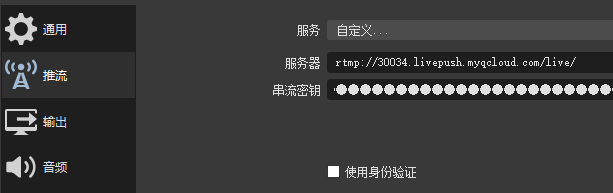
4、下载OBS,选择YY开播摄像头,设置推流地址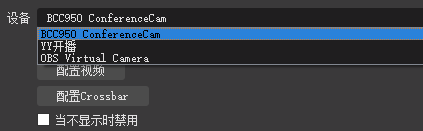

 浙公网安备 33010602011771号