

google earth 应用
如同与上一篇中的VEMap的应用一样,需要在html头中添加javascript脚本,在body中将地图加载并设定其大小,所不同的是,google earth需要一个密钥,这个密钥可以在http://code.google.com/intl/zh-CN/apis/maps/signup.html这个页面里申请。
本人所写一个一个html文件内容如下:
<html>
<head>
<title>Google Earth Test</title>
<meta content="text/html; charset=utf-8" http-equiv="content-type" >
<script type="text/javascript" src="http://www.google.com/jsapi?hl=en&key=ABQIAAAAwbkbZLyhsmTCWXbTcjbgbRSzHs7K5SvaUdm8ua-Xxy_-2dYwMxQMhnagaawTo7L1FE1-amhuQxIlXw"></script>
<!-- We'll need to walk the DOM looking for a KmlTour later -->
<script src="http://earth-api-samples.googlecode.com/svn/trunk/lib/kmldomwalk.js" type="text/javascript">
</script>
<script type="text/javascript">
var ge;
var tour = null;
google.load("earth", "1");
function init() {
google.earth.createInstance('map3d', initCallback, failureCallback);
addSampleButton('Enter Tour', enterTour);
addSampleButton('Play', playTour);
addSampleButton('Pause', pauseTour);
addSampleButton('Stop/Reset', resetTour);
addSampleButton('Exit Tour', exitTour);
}
function initCallback(instance) {
ge = instance;
ge.getWindow().setVisibility(true);
// add a navigation control
ge.getNavigationControl().setVisibility(ge.VISIBILITY_AUTO);
// add some layers
ge.getLayerRoot().enableLayerById(ge.LAYER_BORDERS, true);
ge.getLayerRoot().enableLayerById(ge.LAYER_ROADS, true);
// create the tour by fetching it out of a KML file
var href = 'http://earth-api-samples.googlecode.com/svn/trunk/examples/' +
'static/grandcanyon_tour.kmz';
google.earth.fetchKml(ge, href, function(kmlObject) {
if (!kmlObject) {
// wrap alerts in API callbacks and event handlers
// in a setTimeout to prevent deadlock in some browsers
setTimeout(function() {
alert('Bad or null KML.');
}, 0);
return;
}
// Show the entire KML file in the plugin.
ge.getFeatures().appendChild(kmlObject);
// Walk the DOM looking for a KmlTour
walkKmlDom(kmlObject, function() {
if (this.getType() == 'KmlTour') {
tour = this;
return false; // stop the DOM walk here.
}
});
});
document.getElementById('installed-plugin-version').innerHTML =
ge.getPluginVersion().toString();
}
function failureCallback(errorCode) {
}
function enterTour() {
if (!tour) {
alert('No tour found!');
return;
}
ge.getTourPlayer().setTour(tour);
}
function playTour() {
ge.getTourPlayer().play();
}
function pauseTour() {
ge.getTourPlayer().pause();
}
function resetTour() {
ge.getTourPlayer().reset();
}
function exitTour() {
// just like setBalloon(null)
ge.getTourPlayer().setTour(null);
}
</script>
<style type="text/css">
.butten{
width: 10%;
orphans: 50%;
margin: 5%;
}
</style>
</head>
<body onload="if(window.pretty)prettyPrint();init();">
<div id="map3d" style="border:1px solid silver; width:100%; height: 95%;"></div>
<div style="position: absolute; top: 96%; text-align: center;">
<input type="button" onclick="enterTour()" value="Enter Tour"/>
<input type="button" onclick="playTour()" value="Play Tour"/>
<input type="button" onclick="pauseTour()" value="Pause Tour"/>
<input type="button" onclick="resetTour()" value="Reset Tour"/>
<input type="button" onclick="exitTour()" value="Exit Tour"/>
</div>
</body>
</html>
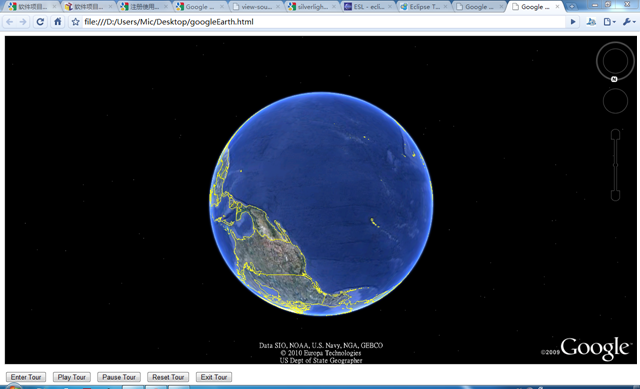
运支效果如下:

 浙公网安备 33010602011771号