
01-MYSQL基础-索引
1.MySQL索引介绍
1.1 什么是索引
相当于一本书中的目录。帮助我们快速找到需要内容的页码。
索引可以帮我们快速找到所需要行的数据页码。起到优化查询的功能。
1.2 MySQL索引类型
1 Btree索引
2 Rtree索引
3 HASH索引
4 Fulltext全文索引
5 GIS 地理位置索引
2.B+Tree结构
2.1Btree查找算法引入
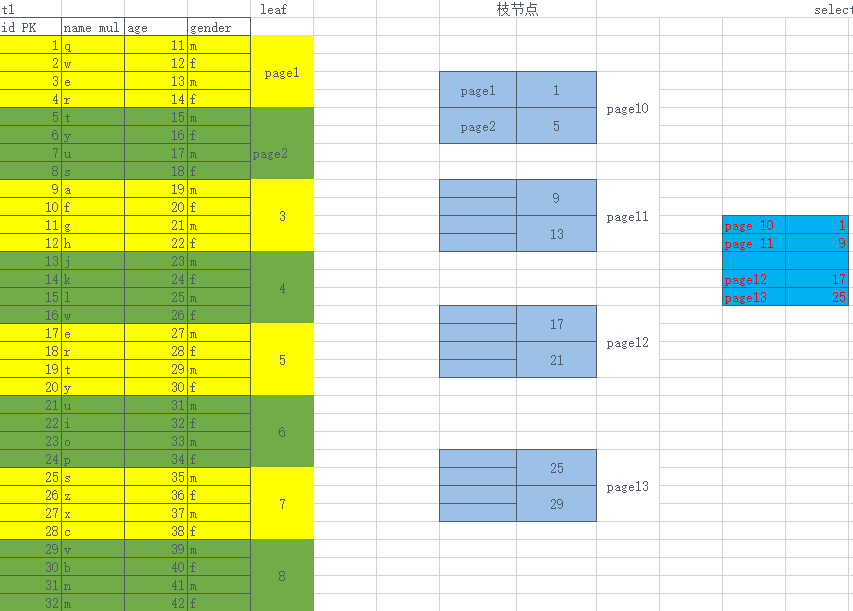
3. MySQL B+TREE索引构建过程
3.1 聚簇索引BTREE结构(InnoDB独有)
3.1.1 簇
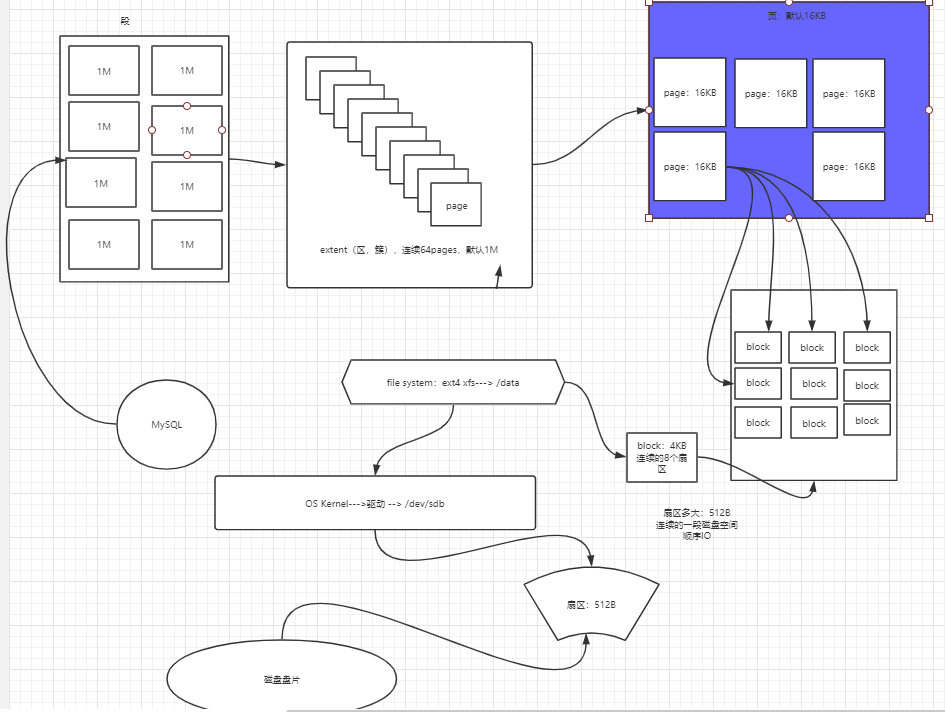
3.2作用
有了聚簇索引之后,将来插入的数据行,在同一个区内,都会按照ID值的顺序,有序在磁盘存储数据。
MySQL InnoDB 表 聚簇索引组织存储数据表。
3.3构建前提
1. 建表时,指定了主键列,MySQL InnoDB 会将主键作为聚簇索引列,比如ID not null primary key
2. 没有指定主键,自动选择唯一键(unique)的列,作为聚簇索引。
3. 以上都没有,生成隐藏聚簇索引
3.4辅助索引BTREE结构
1 使用普通列作为条件构建的索引。需要人为创建。
2 优化非聚簇索引列之外的查询条件的优化。
3.5辅助索引的BTREE构建过程
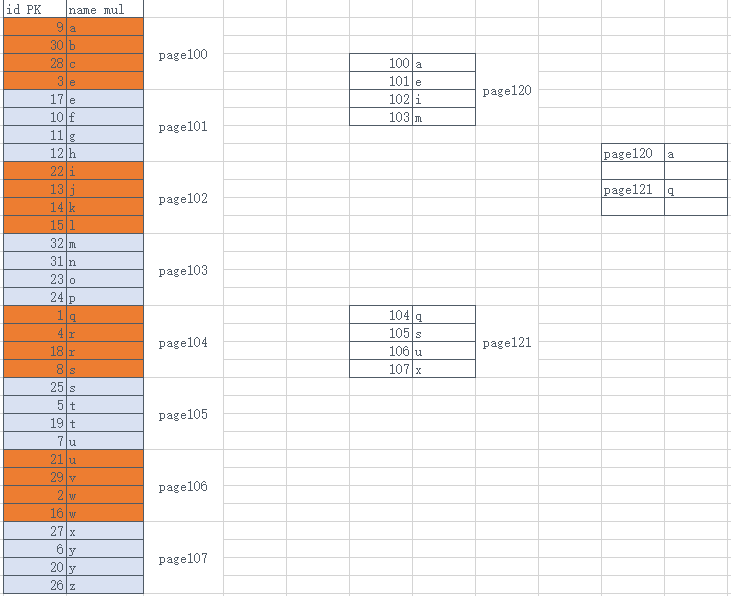
3.6索引的细分
(1)单列索引
(2)联合索引
  说明: 使用多列组合一个索引。
  联合索引,注意最左原则。
    1. 查询条件中,必须要包含最左列,上面列子就是a列
    2. 建立联合索引时,一定要选择重复值少的列,作为最左列。
  例如 : idx(a,b,c)  ----> a   ab    abc
全部覆盖:
select * from t1 where a= and b= and c=
select * from t1 where a in and b in and c in
select * from t1 where b= and c= and a=
select * from t1 where a and b order by c
部分覆盖:
select * from t1 where a= and b=
select * from t1 where a=
select * from t1 where a= and c=
select * from t1 where a= and b > < >= <= like and c=
select xxx from t1 where a order by b
不覆盖:
bc
b
c
(3) 前缀索引
前缀索引是针对于,我们所选择的索引列值长度过长,会导致索引树高度增高。
所以可以选择大字段的前面部分字符作为索引生成条件。
会导致索引应用时,需要读取更多的索引数据页
MySQL中建议索引树高度3-4层。
3.7 B+tree索引树高度影响因素
 1. 索引字段较长:  前缀索引
 2. 数据行过多  :  分区表,归档表(pt-archive),分布式架构(大企业)
 3. 数据类型    :  选择合适的数据类型。
4.索引的管理命令
4.1什么时候创建索引?
并不是将所有列都建立索引。不是索引越多越好。
按照业务语句的需求创建合适的索引。
将索引建立在,经常 where   group by  order by   join on ....的条件。
为什么不能乱建索引?
1. 如果冗余索引过多, 表的数据变化的时候,很有可能会导致索引频繁更新。会阻塞很多正常的业务更新的请求。
2. 索引过多,会导致优化器选择出现偏差。
4.2索引的管理命令
    1. 查询表的索引情况
    mysql> desc city;
    key:  PRI聚簇索引   MUL辅助索引    UNI唯一索引
    mysql> show index from city;
    2. 建立索引
    分析业务语句:
    mysql> select * from city where name='wuhan';
        mysql> alter table city add index idx_na(name);
    mysql> alter table city add index idx_n_c(name,countrycode);
    mysql> alter table city add index idx_d(district(5));
        mysql> show index from city;
    3. 删除索引
    mysql> alter table city drop index idx_na;
    mysql> alter table city drop index idx_d;
    mysql> alter table city drop index idx_n_c;
4.3压力测试
1. 导入100w的测试表
source t100w.sql

2. 压测命令: 未建立索引
mysqlslap --defaults-file=/etc/my.cnf  \
--concurrency=100 --iterations=1 --create-schema='test'  \
--query="select * from test.t100w where k2='780p'" engine=innodb  \
--number-of-queries=200 -uroot -p123 -verbose

=====================
mysqlslap: [Warning] Using a password on the command line interface can be insecure.
Benchmark
    Running for engine rbose
    Average number of seconds to run all queries: 77.739 seconds
    Minimum number of seconds to run all queries: 77.739 seconds
    Maximum number of seconds to run all queries: 77.739 seconds
    Number of clients running queries: 100
    Average number of queries per client: 2
======================

3. 建立合适索引

mysql> use test
mysql> alter table t100w add index idx_k2(k2);

4. 再次 压测

mysqlslap --defaults-file=/etc/my.cnf  \
--concurrency=100 --iterations=1 --create-schema='test'  \
--query="select * from test.t100w where k2='780p'" engine=innodb  \
--number-of-queries=200 -uroot -p123 -verbose

[root@db01 world]# mysqlslap --defaults-file=/etc/my.cnf  \
> --concurrency=100 --iterations=1 --create-schema='test'  \
> --query="select * from test.t100w where k2='780p'" engine=innodb  \
> --number-of-queries=200 -uroot -p123 -verbose
mysqlslap: [Warning] Using a password on the command line interface can be insecure.
Benchmark
    Running for engine rbose
    Average number of seconds to run all queries: 0.263 seconds
    Minimum number of seconds to run all queries: 0.263 seconds
    Maximum number of seconds to run all queries: 0.263 seconds
    Number of clients running queries: 100
    Average number of queries per client: 2

 浙公网安备 33010602011771号