
Asp.net Core3.1集成Quartz做项目心跳(1)
本次是解决一个job,一个trigger 的问题;下次解决多个job同时运行的问题!
1.先下载nuget包Quartz(我用的是3.2.4版本)
2.创建CronJobFactory类(我这里没有用到,下个会用到)
public class CronJobFactory : IJobFactory
{
public IJob NewJob(TriggerFiredBundle bundle, IScheduler scheduler)
{
throw new NotImplementedException();
}
public void ReturnJob(IJob job)
{
throw new NotImplementedException();
}
}
3.创建Job类
public class HelloJob : IJob
{
public async Task Execute(IJobExecutionContext context)
{
await Console.Out.WriteLineAsync($"{DateTime.Now:HH:mm:ss}--->测试中...");
}
}
4.创建SchedulerCenter类(这个类比较重要,传说中的调度类)
public class SchedulerCenter
{
private readonly IJobFactory _ijobFactory;//创建任务工厂
private readonly ISchedulerFactory _ischedulerFactory;//创建调度器的工厂
private IScheduler _scheduler;//创建调度实例
public SchedulerCenter(IJobFactory ijobFactory, ISchedulerFactory ischedulerFactory)
{
_ijobFactory = ijobFactory;
_ischedulerFactory = ischedulerFactory;
}
/// <summary>
/// 开启调度
/// </summary>
public async void StartScheduler()
{
//1.从工厂获取调度程序实例
_scheduler = await _ischedulerFactory.GetScheduler();
//2.打开调度器
await _scheduler.Start();
//3.定义作业详细信息并将其与hellojob任务相关联
IJobDetail job = JobBuilder.Create<HelloJob>().WithIdentity("HeartJob", "HeartJobGroup").Build();
//4.配置触发条件:当即触发作业运行,而后每10s重复一次
ITrigger trigger = TriggerBuilder.Create()
.WithIdentity("HeartJob", "HeartJobGroup")
.StartNow()
.WithSimpleSchedule(
x=>x.WithIntervalInSeconds(10).RepeatForever())
.Build();
//5.将作业与触发条件添加到调度实例并进行关联
await _scheduler.ScheduleJob(job,trigger);
}
/// <summary>
/// 终止调度
/// </summary>
public void StopScheduler()
{
_scheduler?.Shutdown(true).Wait(30000);
_scheduler = null;
}
}
5.在startup类中的ConfigureServices中进行注入 (这里要用单例模式注入)
services.AddSingleton<SchedulerCenter>();//注入调度中心
//注入 Quartz任何工厂及调度工厂
services.AddSingleton<IJobFactory, CronJobFactory>();
services.AddSingleton<ISchedulerFactory, StdSchedulerFactory>();
//注入HelloJob
services.AddSingleton<HelloJob>();
6.在Configure中使用如下代码:(注意,参数注入要加上IHostApplicationLifetime lifetime)
//获取调度中心实例
var quartz = app.ApplicationServices.GetRequiredService<SchedulerCenter>();
lifetime.ApplicationStarted.Register(() =>
{
quartz.StartScheduler();//启动项目后, 启动调度中心
});
lifetime.ApplicationStopped.Register(() =>
{
quartz.StopScheduler();//项目终止后,关闭调度中心
});
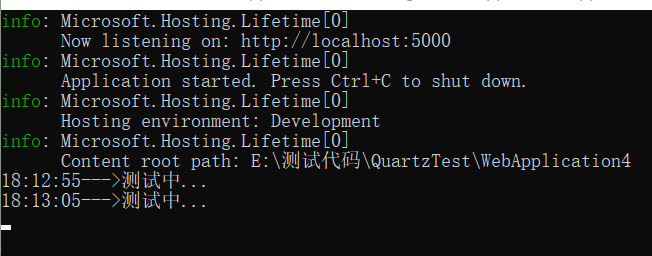
7.至此代码就写完了,用控制台可以看到上边Job的效果了
posted on 2022-01-19 18:14 泰坦尼克号上的活龙虾 阅读(179) 评论(0) 收藏 举报

 浙公网安备 33010602011771号