
【Android】TableLayout子View拉伸教程
stretchColumns表示拉伸某一列的宽度,用型号*表示拉伸全部。
layout_span表示该控件占多少列,如果不需要自适应宽度而是固定他的宽度,则把宽度设为0dp即可
<TableLayout xmlns:android="http://schemas.android.com/apk/res/android"
    android:layout_width="match_parent"
    android:layout_height="wrap_content"
    android:stretchColumns="*">

    <TableRow>


        <Button
            android:layout_height="200dp"
            android:layout_span="1" />

        <TableLayout

            android:layout_span="1">

            <Button
                android:layout_height="50dp"
                android:text="123123123123123123123123123" />

            <Button android:layout_height="50dp" />

            <Button android:layout_height="50dp" />

            <Button android:layout_height="50dp" />
        </TableLayout>
    </TableRow>
</TableLayout>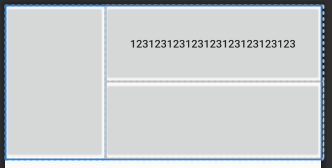
等比拉伸宽度(设置android:layout_width="0dp",span默认为1,所以可设值可不设):
<TableLayout xmlns:android="http://schemas.android.com/apk/res/android"
    android:layout_width="match_parent"
    android:layout_height="wrap_content"
    android:stretchColumns="*">
    <TableRow>
        <Button
            android:text="233"
            android:layout_width="0dp"
            android:layout_height="200dp" />
        <TableLayout
            android:layout_width="0dp">
            <Button
                android:layout_height="100dp"
                android:text="123123123123123123123123123" />
            <Button
                android:layout_height="100dp"
                android:text="666" />
        </TableLayout>
    </TableRow>
</TableLayout>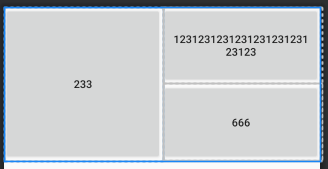

 浙公网安备 33010602011771号