
.NET大作业--图书管理系统 进行中
今天实验课完成数据的添加功能
窗体如下
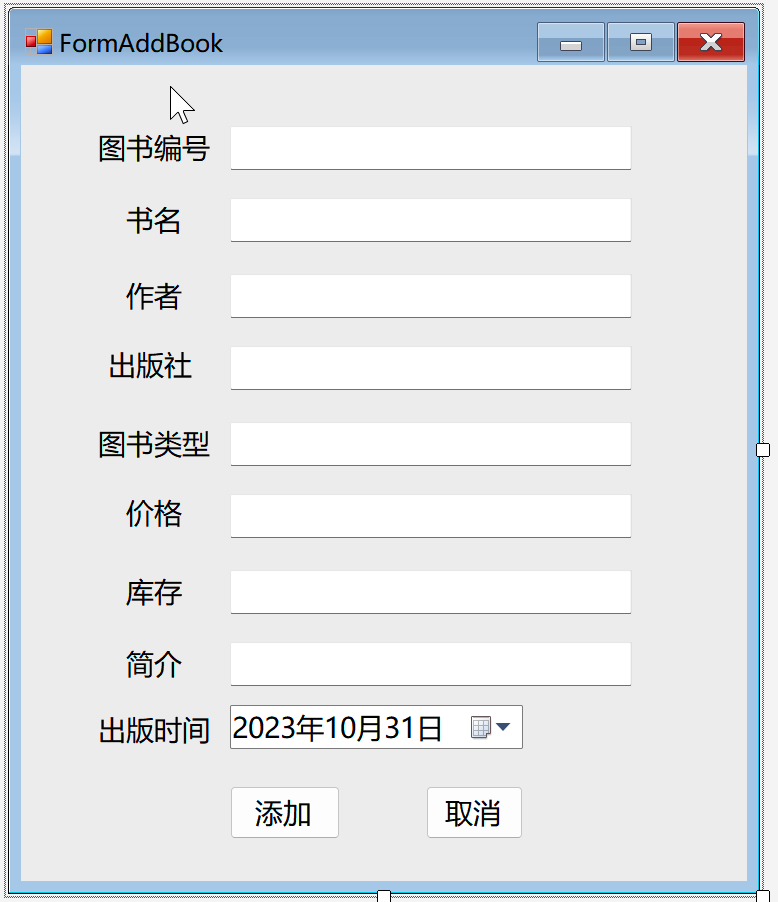
代码如下
 private void btnAdd_Click(object sender, EventArgs e)
        {
            //如果文本框输入有空,返回
            if(txtAuthor.Text.Trim()==""|| txtID.Text.Trim() == "" ||
                txtIntroduce.Text.Trim() == "" || txtName.Text.Trim() == "" ||
                txtNum.Text.Trim() == "" || txtPrice.Text.Trim() == "" ||
                txtType.Text.Trim() == "" || txtPublisher.Text.Trim() == "" ||
                dtpPBDate.Text.Trim() == "" )
            {
                MessageBox.Show("有空项", "消息", MessageBoxButtons.OK, MessageBoxIcon.Warning);
                return;
            }
            //添加图书
            Dao dao = new Dao();
            dao.connect();
            string sql = $"insert into T_Book values('{int.Parse(txtID.Text)}','{txtName.Text}','{txtAuthor.Text}'," +
                $"'{txtPublisher.Text}','{dtpPBDate.Value}','{txtType.Text}','{float.Parse(txtPrice.Text)}'," +
                $"'{int.Parse(txtNum.Text)}','{txtIntroduce.Text}','0')";
            try
            {
                if (dao.Execute(sql) > 0)
                {
                    //添加成功
                    dao.DaoClose();
                    MessageBox.Show("添加成功", "消息", MessageBoxButtons.OK, MessageBoxIcon.Information);
                    this.Close();
                }
                else
                {
                    dao.DaoClose();
                    MessageBox.Show("添加失败", "消息", MessageBoxButtons.OK, MessageBoxIcon.Information);
                }
            }
            catch
            {
                MessageBox.Show("添加失败", "消息", MessageBoxButtons.OK, MessageBoxIcon.Error);
            }
        }
查看数据库

成功

 浙公网安备 33010602011771号