fastadmin学习笔记
阿里oss上传,增加已存在的判断
www/addons/alioss/controller/Index.php
function upload
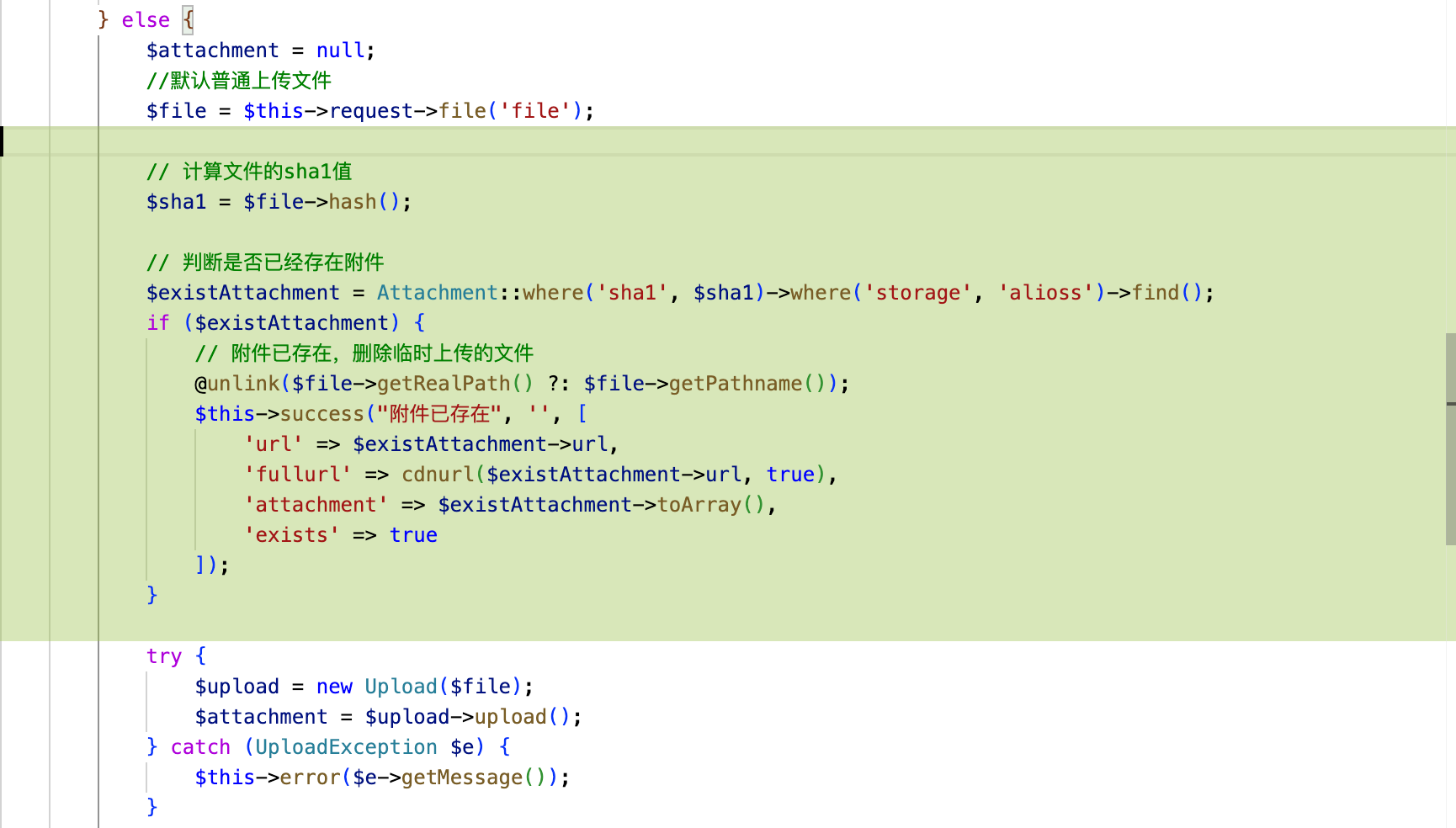
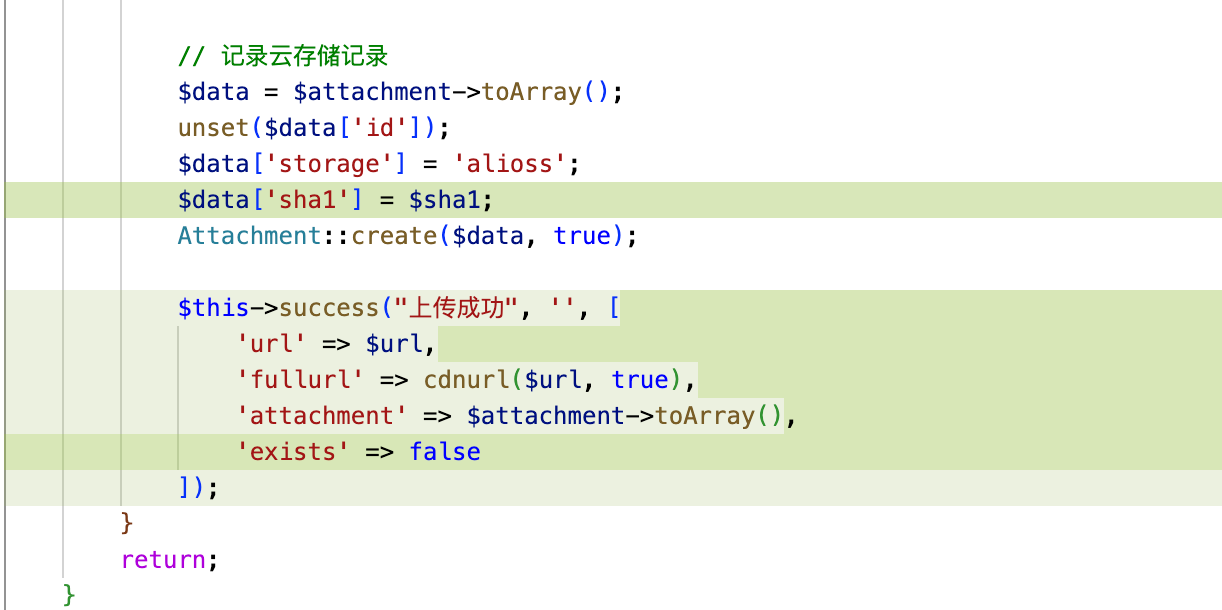
/**
     * 服务器中转上传文件
     * 上传分片
     * 合并分片
     * @param bool $isApi
     */
    public function upload($isApi = false)
    {
        \think\Log::write('-------------bbeebb----------------');

        $config = get_addon_config('alioss');
        if ($isApi === true) {
            if (!Auth::isModuleAllow()) {
                $this->error("请登录后再进行操作");
            }
        } else {
            $this->check();
        }
        $oss = new OssClient($config['accessKeyId'], $config['accessKeySecret'], $config['endpoint']);

        //检测删除文件或附件
        $checkDeleteFile = function ($attachment, $upload, $force = false) use ($config) {
            //如果设定为不备份则删除文件和记录 或 强制删除
            if ((isset($config['serverbackup']) && !$config['serverbackup']) || $force) {
                if ($attachment && !empty($attachment['id'])) {
                    $attachment->delete();
                }
                if ($upload) {
                    //文件绝对路径
                    $filePath = $upload->getFile()->getRealPath() ?: $upload->getFile()->getPathname();
                    @unlink($filePath);
                }
            }
        };

        $chunkid = $this->request->post("chunkid");
        if ($chunkid) {
            $action = $this->request->post("action");
            $chunkindex = $this->request->post("chunkindex/d");
            $chunkcount = $this->request->post("chunkcount/d");
            $filesize = $this->request->post("filesize");
            $filename = $this->request->post("filename");
            $method = $this->request->method(true);
            $key = $this->request->post("key");
            $uploadId = $this->request->post("uploadId");

            if ($action == 'merge') {
                $attachment = null;
                $upload = null;
                //合并分片
                if ($config['uploadmode'] == 'server') {
                    //合并分片文件
                    try {
                        $upload = new Upload();
                        $attachment = $upload->merge($chunkid, $chunkcount, $filename);
                    } catch (UploadException $e) {
                        $this->error($e->getMessage());
                    }
                }

                $etags = $this->request->post("etags/a", []);
                if (count($etags) != $chunkcount) {
                    $checkDeleteFile($attachment, $upload, true);
                    $this->error("分片数据错误");
                }
                $listParts = [];
                for ($i = 0; $i < $chunkcount; $i++) {
                    $listParts[] = array("PartNumber" => $i + 1, "ETag" => $etags[$i]);
                }
                try {
                    $ret = $oss->completeMultipartUpload($config['bucket'], $key, $uploadId, $listParts);
                } catch (\Exception $e) {
                    $checkDeleteFile($attachment, $upload, true);
                    $this->error($e->getMessage());
                }

                $result = json_decode(json_encode(simplexml_load_string($ret['body'], "SimpleXMLElement", LIBXML_NOCDATA)), true);
                if (!isset($result['Key'])) {
                    $checkDeleteFile($attachment, $upload, true);
                    $this->error("上传失败(1001)");
                } else {
                    $checkDeleteFile($attachment, $upload);
                    $this->success("上传成功", '', ['url' => "/" . $key, 'fullurl' => cdnurl("/" . $key, true)]);
                }
            } else {
                //默认普通上传文件
                $file = $this->request->file('file');
                try {
                    $upload = new Upload($file);
                    $file = $upload->chunk($chunkid, $chunkindex, $chunkcount);
                } catch (UploadException $e) {
                    $this->error($e->getMessage());
                }
                try {
                    //上传分片到OSS
                    $ret = $oss->uploadPart($config['bucket'], $key, $uploadId, ['fileUpload' => $file->getRealPath(), 'partNumber' => $chunkindex + 1]);
                } catch (\Exception $e) {
                    $this->error($e->getMessage());
                }

                $this->success("上传成功", "", [], 3, ['ETag' => $ret]);
            }
        } else {
            $attachment = null;
            //默认普通上传文件
            $file = $this->request->file('file');

            // 计算文件的sha1值
            $sha1 = $file->hash();

            // 判断是否已经存在附件
            $existAttachment = Attachment::where('sha1', $sha1)->where('storage', 'alioss')->find();
            if ($existAttachment) {
                // 附件已存在,删除临时上传的文件
                @unlink($file->getRealPath() ?: $file->getPathname());
                $this->success("附件已存在", '', [
                    'url' => $existAttachment->url,
                    'fullurl' => cdnurl($existAttachment->url, true),
                    'exists' => true
                ]);
            }

            try {
                $upload = new Upload($file);
                $attachment = $upload->upload();
            } catch (UploadException $e) {
                $this->error($e->getMessage());
            }

            //文件绝对路径
            $filePath = $upload->getFile()->getRealPath() ?: $upload->getFile()->getPathname();

            $url = $attachment->url;

            try {
                $ret = $oss->uploadFile($config['bucket'], ltrim($attachment->url, "/"), $filePath);
                //成功不做任何操作
            } catch (\Exception $e) {
                $checkDeleteFile($attachment, $upload, true);
                \think\Log::write($e->getMessage());
                $this->error("上传失败(1002)");
            }
            $checkDeleteFile($attachment, $upload);

            // 记录云存储记录
            $data = $attachment->toArray();
            unset($data['id']);
            $data['storage'] = 'alioss';
            $data['sha1'] = $sha1;
            Attachment::create($data, true);

            $this->success("上传成功", '', [
                'url' => $url,
                'fullurl' => cdnurl($url, true),
                'exists' => false
            ]);
        }
        return;
    }
表格选中行
table.bootstrapTable('checkBy', { field: 'id', values: [44, 43] })
手动添加下拉菜单
1.控制器添加selectpage 方法
    /**
     * 下拉列表
     */
    public function selectpage()
    {
        return parent::selectpage();
    }
2.页面中使用 formbuilder生成下拉菜单
{:Form::selectpages('failure_code', '', 'com/module/selectpage', 'name', 'code', ['multiple'=>'multiple','data-rule'=>'required','data-params'=>['custom[q_type]'=>'qi']])}
消息通知插件的二开 https://www.fastadmin.net/store/notice.html
消息接口代码 \addons\notice\controller\Api.php
分为两种类型:
addons\notice\controller\Api.php中调用hook进行发送
\Think\Hook::listen('send_notice', $noticeParams);
Hook在application\extra\addons.php中定义
  'send_notice' => [
            'notice',
        ],
引用插件 addons\notice\Notice.php
    /**
     * 发送消息
     */
    public function sendNotice($params)
    {
        return NoticeClient::instance()->trigger($params['event'], $params['params']);
    }
根据传来的参数,去触发 NoticeClient ,对内容进行模板运算
        $noticeParams = [
            'event' => 'module_notify',  //后台消息事件区分
            'params' => array(
                // 'receiver_admin_ids' => $userid,
                'receiver_admin_ids' => '',
                'receiver_admin_group_ids' => '1',
                'module' => $module,
                'content' => $content,
                'user_id' => $user_id,
            )
        ];
后端上传/控制器中直接调用文件上传
se app\common\exception\UploadException;
use app\common\library\Upload;

public function test()
{
        $file = $this->request->file('file');
        try {
            $upload = new Upload($file);
            $attachment = $upload->upload();
        } catch (UploadException $e) {
            $this->error($e->getMessage());
        }
}
hasOne:有一个,加上主谓语应该是 ,A 有一个 B
hasMany:有很多,A 有很多 B
belongsTo:属于, A 属于 B
Fastadmin和Thinkphp5.0.24详解
https://www.kancloud.cn/wllper/fatp/2712607
模型事件
| 方法 | 事件名 | 触发文件/类 | 触发方法/位置 | 触发时机简述 |
|---|---|---|---|---|
|
beforeWrite
|
before_write | Model.php, Merge.php | save() | 数据写入前(新增/更新前) |
|
beforeUpdate
|
before_update | Model.php, Merge.php | save() | 数据更新前 |
|
beforeInsert
|
before_insert | Model.php, Merge.php | save() | 数据插入前 |
|
beforeDelete
|
before_delete | Model.php, Merge.php, SoftDelete.php | delete() | 删除前 |
| before_select | Query.php | select() | 查询多条数据前 | |
| before_find | Query.php | find() | 查询单条数据前 | |
|
afterInsert
|
after_insert | Model.php, Merge.php, Query.php | save(), insert() | 数据插入后 |
|
afterUpdate
|
after_update | Model.php, Merge.php, Query.php | save(), update() | 数据更新后 |
|
afterWrite
|
after_write | Model.php, Merge.php | save() | 数据写入后(新增/更新后) |
|
afterDelete
|
after_delete | Model.php, Merge.php, SoftDelete.php, Query.php | delete() | 删除后 |
FA页面渲染时后端传递数据给前端的方式
后台把数据在渲染视图时直接写成一个js变量,然后前端js就可以使用这个变量:
$this->assignconfig('row', $userInfo); 最后在实际的控制器js使用时,就可以直接调用了:
Config.row
fastadmin的前端 js 中,Layer有哪些功能:
在 FastAdmin 前端 JS 文件中,Layer 是一个常用的弹窗插件,提供了以下常用的功能:
layer.open():打开弹窗,参数包括弹窗的样式、内容、宽度、高度、标题等。
layer.close(index):关闭弹窗,参数是弹窗的索引值(可选)。
layer.msg():在页面中间弹出一条消息,参数包括消息内容、显示时长、消息类型等。
layer.confirm():弹出确认框,参数包括确认框标题、内容、按钮文字等,确认后可执行回调函数。
layer.prompt():弹出提示框,参数包括提示框标题、类别、默认值、回调函数等,显示后用户可输入内容。
layer.load():在页面中间显示加载框,参数包括加载框类型、加载文字、遮罩层等。
layer.tips():在页面某个元素的旁边显示提示框,参数包括提示内容、目标元素、方向等。
layer.iframe():打开一个带有指定 URL 的 iframe 弹窗,参数包括 URL、标题、宽度、高度等。
在搜索栏添加联动搜索:
在js文件的Controller.index中添加以下代码
    var mediatypetpl =
    '<div class="row">' +
    '  <div class="col-xs-12">' +
    '    <div class="form-inline" data-toggle="cxselect" data-selects="media_type_main,media_type_sub">' +
    '      <select class="media_type_main form-control" name="media_type_main" data-value="id" data-url="uran/showtype/searchList2" ></select>' +
    '      <select class="media_type_sub form-control" name="media_type_sub" data-url="uran/media/searchList2" data-query-name="uran_showtype_id"></select>' +
    '      <input type="hidden" class="operate" data-name="media_type_sub" value="=" />' +
    '      <input type="hidden" class="operate" data-name="media_type_main" value="=" />' +
    '    </div>' +
    '  </div>' +
    '</div>';

                //在普通搜索渲染后
    table.on('post-common-search.bs.table', function (event, table) {
              // 添加媒体分类联动下拉框
        if ($('#mediatypetpl').length === 0) {
          var $form = $(table.$commonsearch || '#commonsearch');
          var $group = $('<div class="form-group col-xs-12 col-sm-6 col-md-4 col-lg-3" id="mediatypetpl"></div>');
          // 新增:添加label和col-xs-8包裹
          var $label = $('<label for="uran_taskscodc_id" class="control-label col-xs-4">分类</label>');
          var $content = $('<div class="col-xs-8"></div>');
          $content.html(mediatypetpl);
          $group.append($label).append($content);
          // 插入到倒数第1个form-group之前(即按钮组前)
          var $formGroups = $form.find('.form-group');
          if ($formGroups.length > 1) {
              $formGroups.eq(-1).before($group);
          } else {
              $form.append($group);
          }
          // 初始化联动
          Form.events.cxselect($form);
          Form.events.selectpage($form);

      }


    });
在
,
      queryParams: function (params) {
        //这里可以追加搜索条件
        var filter = JSON.parse(params.filter);
        var op = JSON.parse(params.op);
        //这里可以追加搜索条件
        var filter = JSON.parse(params.filter);
        var op = JSON.parse(params.op);
        // 获取media_type_main下拉框选中项的中文标签
        // 只有当media_type_main或media_type_sub的值不为"请选择"时,才进行过滤
        var media_type_main = $(".form-commonsearch select[name='media_type_main'] option:selected").text();
        if (media_type_main && media_type_main !== "请选择") {
          filter.media_type_main = media_type_main;
          op.media_type_main = "=";
          params.filter = JSON.stringify(filter);
          params.op = JSON.stringify(op);
        }
        var media_type_sub = $(".form-commonsearch select[name='media_type_sub'] option:selected").text();
        if (media_type_sub && media_type_sub !== "请选择") {
          filter.media_type_sub = media_type_sub;
          op.media_type_sub = "=";
          params.filter = JSON.stringify(filter);
          params.op = JSON.stringify(op);
        }
                return params;

    },
后台下拉数据接口代码:
    public function searchList2()
    {
        $list = $this->model->field('id as value, name')->select();
        $this->success('', null, $list);
    }
根据条件显示按钮
                 {
                            name: "企微用户",
                            text: "企微用户",
                            classname: "btn btn-xs btn-primary btn-contact btn-addtabs",
                            icon: "fa fa-comments",
                            url: "fastscrm/crm/customer?fl_remark_mobiles={moble}",
                            title: "企微用户",
                            hidden:function(row){
                                if(row.convert_status != '1'){
                                    return true;
                                }
                            }
                        }
表格顶部默认选中指定标签面
    // 点击标签页切换状态,2-待审,1-审核通过,0-审核不通过
    $('.panel-heading a[data-toggle="tab"]').on('shown.bs.tab', function (e) {
      var field = 'data_check_status'; ///筛选的字段
      var value = $(this).attr("href").replace('#', '');
      var options = table.bootstrapTable('getOptions');
      options.pageNumber = 1;
      var queryParams = options.queryParams;
      options.queryParams = function (params) {
          params = queryParams(params);
          var filter = params.filter ? JSON.parse(params.filter) : {};
          if (value !== '' && value != 'all') {
              filter[field] = value;
          } else {
              delete filter[field];
          }
          params.filter = JSON.stringify(filter);
          return params;
      };
      table.bootstrapTable('refresh', {});
          return false;
  });

    table.on('post-common-search.bs.table', function (event, table) {
        //默认选中待审核标签
        $('ul.nav-tabs li a[data-value="2"]').trigger('click');
        $(".form-commonsearch select[name=data_check_status]").val("2");

    });
修改createtime
formbuilder中接口传参
{:Form::selectpages('failure_code', '', 'uran/qmstandard/selectpage', 'name', 'code', ['multiple'=>'multiple','data-params'=>['custom[q_type]'=>'qc']])}
like条件
fastadmin软删除的回收站功能
控制器
    public function trashed()
    {
        //设置过滤方法
        $this->request->filter(['strip_tags', 'trim']);
        if (false === $this->request->isAjax()) {
            return $this->view->fetch();
        }

        [$where, $sort, $order, $offset, $limit] = $this->buildparams();

        $list = \app\admin\model\uran\Codcpoi::onlyTrashed()
            ->where($where)
            ->order($sort, $order)
            ->paginate($limit);
        $result = ['total' => $list->total(), 'rows' => $list->items(),'sql'=>$this->model->getLastSql()];
        return json($result);
    }
恢复按钮
      $(document).on('click', '.btn-restore', function (event) {
        var ids = Table.api.selectedids($("#table"));
        Fast.api.ajax({ url: "uran/codcpoi/restore", data: { ids: ids } }, function (data, ret) {
            $(".btn-refresh").trigger("click");
        });
      });
表单下拉多选表单增改
后台控制器:
/**
     * 添加
     *
     * @return string
     * @throws \think\Exception
     */
    public function add()
    {
        if (false === $this->request->isPost()) {
            return $this->view->fetch();
        }
        $params = $this->request->post('row/a');
        if (empty($params)) {
            $this->error(__('Parameter %s can not be empty', ''));
        }
        $params = $this->preExcludeFields($params);

        // 数组转字符串:如果遇到数组的形式,逗号分割
        foreach ($params as $key => $val) {

            if (is_array($val)) {
                $params[$key] = implode(',', $val);
            } else {
                continue;
            }
        }

        if ($this->dataLimit && $this->dataLimitFieldAutoFill) {
            $params[$this->dataLimitField] = $this->auth->id;
        }
        $result = false;
        Db::startTrans();
        try {
            //是否采用模型验证
            if ($this->modelValidate) {
                $name = str_replace("\\model\\", "\\validate\\", get_class($this->model));
                $validate = is_bool($this->modelValidate) ? ($this->modelSceneValidate ? $name . '.add' : $name) : $this->modelValidate;
                $this->model->validateFailException()->validate($validate);
            }
            $result = $this->model->allowField(true)->save($params);
            Db::commit();
        } catch (ValidateException | PDOException | Exception $e) {
            Db::rollback();
            $this->error($e->getMessage());
        }
        if ($result === false) {
            $this->error(__('No rows were inserted'));
        }
        $this->success();
    }

    public function edit($ids = null)
    {
        $row = $this->model->get($ids);
        if (!$row) {
            $this->error(__('No Results were found'));
        }
        $adminIds = $this->getDataLimitAdminIds();
        if (is_array($adminIds) && !in_array($row[$this->dataLimitField], $adminIds)) {
            $this->error(__('You have no permission'));
        }
        if (false === $this->request->isPost()) {
            $this->view->assign('row', $row);
            return $this->view->fetch();
        }
        $params = $this->request->post('row/a');
        if (empty($params)) {
            $this->error(__('Parameter %s can not be empty', ''));
        }
        \think\Log::info($params);
        \think\Log::write('-------------test----------------');
        $params = $this->preExcludeFields($params);
        // 数组转字符串:如果遇到数组的形式,逗号分割
        foreach ($params as $key => $val) {

            if (is_array($val)) {
                $params[$key] = implode(',', $val);
            } else {
                continue;
            }
        }
        $result = false;
        Db::startTrans();
        try {
            //是否采用模型验证
            if ($this->modelValidate) {
                $name = str_replace("\\model\\", "\\validate\\", get_class($this->model));
                $validate = is_bool($this->modelValidate) ? ($this->modelSceneValidate ? $name . '.edit' : $name) : $this->modelValidate;
                $row->validateFailException()->validate($validate);
            }
            $result = $row->allowField(true)->save($params);
            Db::commit();
        } catch (ValidateException | PDOException | Exception $e) {
            Db::rollback();
            $this->error($e->getMessage());
        }
        if (false === $result) {
            $this->error(__('No rows were updated'));
        }
        $this->success();
    }
前台add.html / edit.html:
新增
{:Form::selectpickers('row[city][]', ['南京'=>'南京', '惠州'=>'惠州'], '', ['data-rule'=>'required'])}
修改
{:Form::selectpickers('row[city][]', ['南京'=>'南京', '惠州'=>'惠州'], explode(',',$row.city), ['data-rule'=>'required'])}
指定表格标签页为第二个
            // 指定第一个 tab 为激活状态,且获取对应、有效的数据列表
            table.on('post-common-search.bs.table', function (event, table) {
                console.log('table');
                $('ul.nav-tabs li a[data-value="1"]').trigger('click');
                $(".form-commonsearch select[name=status]").val("1");
            });
FormBuilder使用
https://ask.fastadmin.net/article/5567.html
Form::xxx(string $name, string $value = null, array $options = [])
$name 通常为我们组件的名称,我们在后台接收时可以通过这个名称来获取到它所对应的值$value 通常为我们数据库中的值,在新增的时候通常为空,在修改的时候通常需要是数据库中对应字段的值$options 组件的扩展属性,通常为一一键值匹配并最终渲染在组件的属性中,通常我们使用的有data-rule/disabled/readonly/multiple等等,也常用于自定义组件属性。
{:Form::upload('row[upload]', $row.apk_url,['data-rule'=>'required'])}
网站发布
修改.env和application/config.php里面的
然后打包静态文件
//一键压缩打包前后台的JS和CSS
php think min -m all -r all
//一键压缩打包后台的JS和CSS
php think min -m backend -r all
//一键压缩打包前后台的JS
php think min -m all -r js
//一键压缩打包后台的CSS
php think min -m backend -r css
//使用uglify进行一键压缩打包后台的JS文件
php think min -m backend -r js -o uglify
空值查询方法
在搜索栏输入null或""
调试
\think\Log::write('-------------test----------------');
找到站点下面最新的日志文件并输出
tail -f $(find /www/wwwroot/www.yoursite.com/runtime/log -type f -name "*.log" -printf "%T@ %p\n" | grep -v "_cli" | sort -n | tail -1 | cut -d' ' -f2-)
表格中增加自定义表单
Model添加init 同步其他表,监听afterUpdate
    protected static function init()
    {

        self::afterUpdate(function ($row) {
            Db::name('uran_codcpoi')->where(['media_code' => $row['media_code']])->where(['city' => $row['city']])->update(['location' => $row['location']]);
        });

    }
在表格中打开本地vscode或cursor
                        {
                        field: "cmdname",
                        title: __('Cmdname'),
                        operate: "LIKE",
                        sortable: true,
                        formatter: function (value, row, index) {
                            var cmddir = 'C:\\pro\\uran\\python\\pycmd\\';
                            var path = row.localpath ? row.localpath : cmddir + value+'.py';
                            return '<a href="cursor://file/' + path + '" >' + value + "</a>";
                            }
                        },
关于tab选项卡的两种用法,可用于多字段
- fastadmin 表格按钮点击打开弹窗自定义窗口标题
 buttons: [
                                {
                                    name: 'detail',
                                    text: __('点位管理'),
                                    title: function (row) {
                                        return  row.name + '点位管理';
                                    },
- API接口生成器插件的统一index参数化调用
https://www.fastadmin.net/store/buiapi.html
接口调用示例:
var data = {
                page: this.page,
                limit: 100,
                filter: '{ "user_id": ' + app.globalData.user_openinfo.user_id + ' }',
                op: '{ "user_id": "FIND_IN_SET" }'
            };

ikz.requestPost(path, data, res =>
fastadmin 后台 API controller中添加以下代码:
protected $_search_field = ['user_id'];
首页接口支持的搜索条件规则
# 示例 POST GET
http://www.example.com/index.php/api/TestOrder/index
?op={"name":"LIKE"}&filter={"pay_channel":"J91"}

# 等于(=)(<>)(>)(>=)(<)(<=)
|filter: {"name":"王小"}
|op: {"name":"="}

# 模糊查询(LIKE)(NOT LIKE)(LIKE %...%)(NOT LIKE %...%)
|filter: {"name":"王小"}
|op: {"name":"LIKE"}

#是否为空(NULL)(IS NULL)(NOT NULL)(IS NOT NULL)
|filter: {"name":""}
|op: {"name":"IS NULL"}

# 在范围内[IN] [IN(...)] [NOT IN] [NOT IN(...)]
|filter: {"type":"people"}
|op: {"type":"IN"}

# 筛选范围之间(BETWEEN)(NOT BETWEEN)
|filter: {"create_time":"1501451057,1601451057"}
|op: {"create_time":"BETWEEN"}

# 筛选范围包含(FINDIN)(FINDINSET)(FIND_IN_SET)
|mysql field data:11,110,111
|filter: {"tags":"11"}
|op: {"tags":"FIND_IN_SET"}
- 增加前端组件
在requirejs中增加组件
public\assets\js\require-backend.js
- 提示时间修改
后台
- 在表格中自定义filter
- 快速搜索
protected $searchFields = "id,school_name";
- 如果关联查询有相同字段冲突,可以在控制中添加
- 直接更新
          $result = Db::name('tb_upoi')->where('id', $id)->update([
                                'images' => $imgurl,
                                'updatetime' => time()
                            ]);
- 前端打开弹窗样式
- 内容为空时,表格显示的字符定义
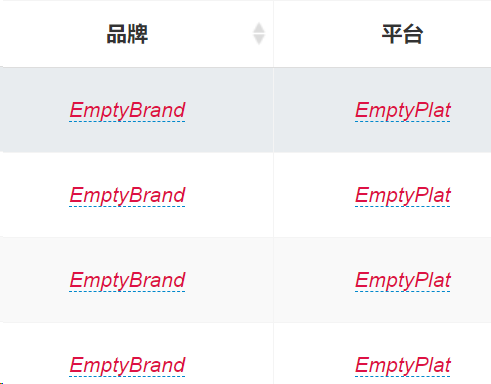
- FASTADMIN 控制台命令
cd fastadmin
php think crud -t test -u 1
命令解释:
一,添加了以下文件
#   new file:   application/admin/controller/Test.php
#   new file:   application/admin/lang/zh-cn/test.php
#   new file:   application/admin/model/Test.php
#   new file:   application/admin/validate/Test.php
#   new file:   application/admin/view/test/add.html
#   new file:   application/admin/view/test/edit.html
#   new file:   application/admin/view/test/index.html
#   new file:   application/admin/view/test/recyclebin.html
#   new file:   public/assets/js/backend/test.js
|
id |
type | pid | name | title | icon | url | condition | remark | ismenu | menutype | extend | py | pinyin | createtime | updatetime | weigh | status |
| 85 | file | 0 | test | 测试管理 | fa fa-circle-o | 1 | csgl | ceshiguanli | 1733211196 | 1733211196 | 0 | normal | |||||
| 86 | file | 85 | test/index | 查看 | fa fa-circle-o | 0 | zk | zhakan | 1733211196 | 1733211196 | 0 | normal | |||||
| 87 | file | 85 | test/recyclebin | 回收站 | fa fa-circle-o | 0 | hsz | huishouzhan | 1733211196 | 1733211196 | 0 | normal | |||||
| 88 | file | 85 | test/add | 添加 | fa fa-circle-o | 0 | tj | tianjia | 1733211196 | 1733211196 | 0 | normal | |||||
| 89 | file | 85 | test/edit | 编辑 | fa fa-circle-o | 0 | bj | bianji | 1733211196 | 1733211196 | 0 | normal | |||||
| 90 | file | 85 | test/del | 删除 | fa fa-circle-o | 0 | sc | shanchu | 1733211196 | 1733211196 | 0 | normal | |||||
| 91 | file | 85 | test/destroy | 真实删除 | fa fa-circle-o | 0 | zssc | zhenshishanchu | 1733211196 | 1733211196 | 0 | normal | |||||
| 92 | file | 85 | test/restore | 还原 | fa fa-circle-o | 0 | hy | huanyuan | 1733211196 | 1733211196 | 0 | normal | |||||
| 93 | file | 85 | test/multi | 批量更新 | fa fa-circle-o | 0 | plgx | pilianggengxin | 1733211196 | 1733211196 | 0 | normal |
fastadmin表单中添加下拉树表单

CREATE TABLE IF NOT EXISTS `fa_tree_data` (
  `id` int(10) unsigned NOT NULL AUTO_INCREMENT COMMENT 'ID',
  `pid` int(10) DEFAULT NULL COMMENT '父节点',
  `name` varchar(200) DEFAULT NULL COMMENT '名称',
  PRIMARY KEY (`id`)
) ENGINE=InnoDB AUTO_INCREMENT=7 DEFAULT CHARSET=utf8mb4 COMMENT='树表数据';
controller 添加
use fast\Tree;
        $tree = Tree::instance();
        $tree->init(collection($this->model->order('id desc')->select())->toArray(), 'pid');
        $this->categorylist = $tree->getTreeList($tree->getTreeArray(0), 'name');
        $categorydata = [0 => ['type' => 'all', 'name' => __('None')]];
        foreach ($this->categorylist as $k => $v) {
            $categorydata[$v['id']] = $v;
        }
        $this->view->assign("parentList", $categorydata);
在add.html中添加
            <select id="c-pid" data-rule="required" class="form-control selectpicker" name="row[pid]">
                {foreach name="parentList" item="vo"}
                <option value="{$key}" {in name="key" value="" }selected{/in}>{$vo.name}</option>
                {/foreach}
            </select>
在edit.html中添加
            <select id="c-pid" data-rule="required" class="form-control selectpicker" name="row[pid]">
                {foreach name="parentList" item="vo"}
                <option value="{$key}" {in name="key" value="$row.pid" }selected{/in}>{$vo.name}
                </option>
                {/foreach}
            </select>
表单打开高德地图选择定位和地址


    <div class="form-group">
        <label class="control-label col-xs-12 col-sm-2">{:__('Address')}:</label>
        <div class="col-xs-12 col-sm-8">
            <div class="input-group">
                <input id="c-address" class="form-control" name="row[address]" type="text">
                <div class="input-group-addon no-border no-padding">
                    <span></span>
                    <span><button type="button" class="btn btn-primary" data-toggle="addresspicker"
                            data-input-id="c-address" data-lng-id="c-lng"
                            data-lat-id="c-lat">打开地图选择地址/经纬度</button></span>
                </div>
                <span class="msg-box n-right" for="c-address"></span>
            </div>
        </div>
    </div>
    <div class="form-group">
        <label class="control-label col-xs-12 col-sm-2">经纬度:</label>
        <div class="col-xs-12 col-sm-8">
            <div class="row no-padding">
                <div class="col-md-6">
                    <input id="c-lng" class="form-control" name="row[lng]" type="text">
                </div>
                <div class="col-md-6">
                    <input id="c-lat" class="form-control" name="row[lat]" type="text">
                </div>
            </div>
        </div>
    </div>
如果需要整个控制器不使用布局
定义$layout属性为false
protected $layout = false;

如果需要在控制器的某个方法不使用布局,可以$this->view->engine->layout(false);一对多关联表快速开发


1.在模块.js中 表格的columns中添加按钮
{
                            field: 'buttons',
                            width: "120px",
                            title: __('广告位'),
                            table: table,
                            events: Table.api.events.operate,
                            buttons: [
                                {
                                    name: 'detail',
                                    text: __('管理广告位'),
                                    title: __('管理广告位'),
                                    classname: 'btn btn-xs btn-primary btn-dialog',
                                    icon: 'fa fa-list',
                                    url: 'uran/adslot/index?upoi_id={id}',
                                    callback: function (data) {
                                        Layer.alert("接收到回传数据:" + JSON.stringify(data), { title: "回传数据" });
                                    },
                                    visible: function (row) {
                                        //返回true时按钮显示,返回false隐藏
                                        return true;
                                    }
                                }
                            ],
                            formatter: Table.api.formatter.buttons
                        },
注意加粗的部分,向子表的index方法传递参数,参数需要严格匹配表字段,则子表自动条件过滤.
2.修改子表的添加按钮,将参数传递给add.html ,在子表的js中add_url后台添加
add_url: 'corp/adslot/add' + location.search,
3.在添加页面中自动选中主表选框值,使用thinkphp5的页面传参语法
<input id="c-corp_upoi_id" data-rule="required" data-source="corp/upoi/index"
                class="form-control selectpage" name="row[corp_upoi_id]" type="text"
                value="{$Think.get.corp_upoi_id|default=''}">
完成
表格中的列显示为关联表中的名称字符

第一步:在表的js文件中添加或修改多个关联列为下面的格式
{ field: 'placetype.name', title: __('placetype_id'), operate: 'FIND_IN_SET' },
{ field: 'position.name', title: __('Position'), operate: 'FIND_IN_SET' },
....
第二步,在PHP文件中添加index方法,使用with关联表语法,如果是多个关联列,在数组中添加
    /**
     * 查看
     */
    public function index()
    {
        $this->relationSearch = true;
        $this->searchFields = "admin.username,id";
        if ($this->request->isAjax()) {
            list($where, $sort, $order, $offset, $limit) = $this->buildparams();
            $list = $this->model
                // ->with("admin")
                ->with(['placetype','position','media','admin'])
                ->where($where)
                ->order($sort, $order)
                ->paginate($limit);

            $result = array("total" => $list->total(), "rows" => $list->items());

            return json($result);
        }
        return $this->view->fetch();
    }
第三步,在model中添加with引用的方法
    public function admin()
    {
        return $this->belongsTo('app\admin\model\Admin', 'admin_id')->setEagerlyType(0);
    }

    public function placetype()
    {
        return $this->belongsTo('app\common\model\Category', 'corp_placetype_id')->setEagerlyType(0);
    }

    public function position()
    {
        return $this->belongsTo('app\common\model\Category', 'position')->setEagerlyType(0);
    }
    public function media()
    {
        return $this->belongsTo('app\admin\model\corp\Media', 'corp_media_id')->setEagerlyType(0);
    }
fastadmin自定义弹窗功能完整示例
1.添加打开弹窗的按钮
                        <!-- 测试弹窗 添加spec_add_btn样式 -->
                        <a data-url="meetricetest/popup" href="javascript:;" class="btn btn-primary spec_add_btn"  data-title="弹窗示例">弹窗示例</a>
                        <!-- 测试弹窗 -->
2.在模块的js文件中添加该按钮的点击事件
define(['jquery', 'bootstrap', 'backend', 'table', 'form'], function ($, undefined, Backend, Table, Form) {

    // 为弹窗按钮绑定点击事件 开始
    $(document).on('click', '.spec_add_btn', function (event) {
        let is_reload = true;
        var url = $(this).attr('data-url');
        if (!url) return false;
        var msg = $(this).attr('data-title');
        var width = $(this).attr('data-width');
        var height = $(this).attr('data-height');
        var area = [$(window).width() > 800 ? (width ? width : '800px') : '95%', $(window).height() > 600 ? (height ? height : '600px') : '95%'];
        var options = {
            shadeClose: false,
            shade: [0.3, '#393D49'],
            area: area,
            callback: function (value) {
                $(".btn-refresh").trigger("click");//刷新当前页面的数据
                // CallBackFun(value.id, value.name);//在回调函数里可以调用你的业务代码实现前端的各种逻辑和效果
            }
        };
        Fast.api.open(url, msg, options);
    });
    // 为弹窗按钮绑定点击事件 结束

    var Controller = {
.....
3.在php文件添加弹窗方法popup
    public function popup()
    {
     //如果是表单提交则保存返回结果,否则打开模板页面
        if ($this->request->isPost()) {
            $params = $this->request->post("row/a");
            if ($params) {
                $result = $this->model->allowField(true)->save($params);
                if ($result !== false) {
                    $data['name'] = "test";
                    $this->success('success', null, $data);//这里$data就是返回给第三步js的那个data。这里要根据业务需要返回指定的数据,否则前端接收不到数据。
                }
            }
            $this->error(__('Parameter %s can not be empty', ''));
        }

        $this->view->assign("prefix", "");
        return $this->view->fetch();
    }
4.增加模板页面
<form id="add-form" class="form-horizontal" role="form" data-toggle="validator" method="POST" action="">

    <div class="form-group">
        <label class="control-label col-xs-12 col-sm-2">{:__('Testtext')}:</label>
        <div class="col-xs-12 col-sm-8">
            <input id="c-testtext" data-rule="required" class="form-control" name="row[testtext]" type="text" value="">
        </div>
    </div>
    <div class="form-group">
        <label class="control-label col-xs-12 col-sm-2">{:__('Mnumnumber')}:</label>
        <div class="col-xs-12 col-sm-8">
            <input id="c-weigh" class="form-control" name="row[weigh]" type="number" value="0">
        </div>
    </div>

    <div class="form-group layer-footer">
        <label class="control-label col-xs-12 col-sm-2"></label>
        <div class="col-xs-12 col-sm-8">
            <button type="submit" class="btn btn-primary btn-embossed">{:__('OK')}</button>
        </div>
    </div>
</form>
完结.
fastadmin新增页面自定义事件
        add: function () {
            Form.api.bindevent($("form[role=form]"), function (data, ret) {
                //这里是表单提交处理成功后的回调函数,接收来自php的返回数据

                //Fast.api.close(data); 关闭弹窗

            }, function (data, ret) {
                //PHP返回失败时处理

            }, function (success, error) {
                //bindevent的第三个参数为提交前的回调
                //如果我们需要在表单提交前做一些数据处理,则可以在此方法处理
                //注意如果我们需要阻止表单,可以在此使用return false;即可
                //如果我们处理完成需要再次提交表单则可以使用submit提交,如下
                //Form.api.submit(this, success, error);
                // return false;

                layer.confirm('请仔细核对比例,避免比例出错!', {
                    btn: ['确定', '取消'] //按钮
                }, function (index) {
                    Form.api.submit($("form[role=form]"), function (data, ret) {
                        Fast.api.close(data);
                        // parent.$("#table").bootstrapTable('refresh', {
                        //     silent: true //静默刷新
                        // });

              //更简洁的写法,与上面的方法两者都可以
                        parent.$(".btn-refresh").trigger("click");

                    });
                    Layer.close(index);
                }, function () {
                    $(".btn-refresh").trigger("click");
                });
                return false;


            });

            // Controller.api.bindevent();
        },
build_category_select 下拉树函数用法

    /**
     * 生成分类下拉列表框
     * @param string $name  名称
     * @param string $type   category表中的type值
     * @param mixed  $selected  选中值 ,后台赋值传参$row['placetype_id']
     * @param array  $attr 自定义属性 ,如 :['data-demo'=>'123']
     * @param array  $header 自定义选项,如: 标题项[0=>"请选择分类"]
     * @return string
     */
function build_category_select($name, $type, $selected = null, $attr = [], $header = [])
在html页面中的用法:
{:build_category_select('row[uran_placetype_id]','place-position',$row['uran_placetype_id'])}
后端公共方法
# 商业转载请联系作者获得授权,非商业转载请注明出处。
# For commercial use, please contact the author for authorization. For non-commercial use, please indicate the source.
# 协议(License):署名-非商业性使用-相同方式共享 4.0 国际 (CC BY-NC-SA 4.0)
# 作者(Author):Tad
# 链接(URL):http://tad.mucaotree.com/archives/fastadmin-zhong-auth-de-fang-fa
# 来源(Source):Tad

//获取当前管理员ID
$this->id

//检测是否登录
$this->auth->isLogin();

//获取当前请求的URI
$this->auth->getRequestUri();

//获取管理员用户组
$this->auth->getGroups($uid);

//获取管理员信息
$this->auth->getUserInfo($uid);

//是否为超级管理员
$this->auth->isSuperAdmin();

//获取管理员所属于的分组ID
$this->auth->getGroupIds($uid);

//取出当前管理员所拥有权限的分组
//$withself 是否包含自身
$this->auth->getChildrenGroupIds($withself = false);

//取出当前管理员所拥有权限的管理员
//$withself 是否包含自身
$this->auth->getChildrenAdminIds($withself = false);

//获得面包屑导航
$this->auth->getBreadCrumb($path);
视图端公共方法
# 商业转载请联系作者获得授权,非商业转载请注明出处。
# For commercial use, please contact the author for authorization. For non-commercial use, please indicate the source.
# 协议(License):署名-非商业性使用-相同方式共享 4.0 国际 (CC BY-NC-SA 4.0)
# 作者(Author):Tad
# 链接(URL):http://tad.mucaotree.com/archives/fastadmin-zhong-auth-de-fang-fa
# 来源(Source):Tad

//分类select选择表
{:build_category_select('row[cid]', 'page',$row['cid'])}

//前端语言检测
{$config.language=='zh-cn'?$news['title_cn']:$news['title_en']}

//输出成功内容
$this->success('成功', $detail);

//输出失败内容
$this->error('失败', $detail);

//后端识别当前语言
$this->request->langset();

//识别是否移动羰
$this-request->isMobile();

//识别是否是https
$this->request->scheme();

//获取ip地址
$this-request->ip();

//识别是否是AJAX
$this->request->isAjax();

//是否为POST请求
$this->request->isPost();

//是否为GET请求
$this->request->isGet();

//设置或获取当前URL 不含QUERY_STRING
$this->request->baseUrl();

//设置或获取当前完整URL 包括QUERY_STRING
$this->request->url();

//设置或获取当前包含协议的域名
$this->request->domain();
thinkphp数据库操作
# 商业转载请联系作者获得授权,非商业转载请注明出处。
# For commercial use, please contact the author for authorization. For non-commercial use, please indicate the source.
# 协议(License):署名-非商业性使用-相同方式共享 4.0 国际 (CC BY-NC-SA 4.0)
# 作者(Author):Tad
# 链接(URL):http://tad.mucaotree.com/archives/thinkphp-shu-ju-ku-cao-zuo
# 来源(Source):Tad

//查询多条
$this->model->select();
//查询单条
$this->model->find();
//查询多条,最后一个字段'id'为下标
$this->model->column('字段','字段'...,'id')
//更新记录$data=array()
$this->model->update($data);
//插入记录
$this->model->insert($data);
//批量插入记录 $dataSet 数据集
$this->model->insertAll($dataSet);
//插入记录并获取自增ID
$this->model->insertGetId($data);
//指定查询数量
$this->model->limit(起始位置,查询数量)->select();
//获取最近插入的ID
$this->model->getLastInsID();
//查询日期或者时间条件 $field 日期字段名  $op  比较运算符或者表达式 $range 比较范围
$this->model->whereTime($field, $op, $range = null)->select();
//删除记录
$this->model->delete();
//得到某个字段的值
$this->model->value('字段名')
//COUNT查询 获取条数
$this->model->count('字段名'=*)
//SUM查询 获取字段总合
$this->model->sum('字段名')
//MIN查询 获取字段最小值
$this->model->min('字段名')
//MAX查询 获取字段最大值
$this->model->max('字段名')
//AVG查询 获取字段平均值
$this->model->avg('字段名')
//设置记录的某个字段值
$this->model->setField($field, $value = '')

//分页设置
//@param int|array $listRows 每页数量 数组表示配置参数
//     * @param int|bool  $simple   是否简洁模式或者总记录数
//     * @param array     $config   配置参数
//     *                            page:当前页,
//     *                            path:url路径,
//     *                            query:url额外参数,
//     *                            fragment:url锚点,
//     *                            var_page:分页变量,
//     *                            list_rows:每页数量
//     *                            type:分页类名
$this->model->paginate($listRows = null, $simple = false, $config = [])


//指定默认的数据表名(不含前缀)
name('表名')->
//执行查询 返回数据集
query('sql指令')->
//查询SQL组装 关联
join(‘关联的表名’,'条件','类型:LEFT,INNER')->
//指定查询字段 支持字段排除和指定数据表 $except是否是排除指定字段
field('查询字段',$except = false)->
//指定查询数量
limit('起始位置','查询数量')->
//指定排序 order('id','desc') 或者 order(['id'=>'desc','create_time'=>'desc'])
order()->
//指定数据表别名 和join()一起用
alias('数据表别名')->
//网络图片保存
urlImageSave($url)
fastadmin 视图组件
# 商业转载请联系作者获得授权,非商业转载请注明出处。
# For commercial use, please contact the author for authorization. For non-commercial use, please indicate the source.
# 协议(License):署名-非商业性使用-相同方式共享 4.0 国际 (CC BY-NC-SA 4.0)
# 作者(Author):Tad
# 链接(URL):http://tad.mucaotree.com/archives/fastadmin-shi-tu-zu-jian
# 来源(Source):Tad

//千万别忘记在对应的JS方法中添加代码Form.api.bindevent("form[role=form]");进行组件初始化,否则部分组件会不生效

//生成Token
Form::token()
//Label标签
Form::label(string $name, string $value = null, array $options = [])
//按类型生成文本框
Form::input($type, $name, string $value = null, array $options = [])
//普通文本框
Form::text(string $name, string $value = null, array $options = [])
//密码文本框
Form::password(string $name, array $options = [])
//隐藏文本框
Form::hidden(string $name, string $value = null, array $options = [])
//Email文本框
Form::email(string $name, string $value = null, array $options = [])
//URL文本框
Form::url(string $name, string $value = null, array $options = [])
//文件组件
Form::file(string $name, array $options = [])
//多行文本框
Form::textarea(string $name, string $value = null, array $options = [])
//富文本编辑器
Form::editor(string $name, string $value = null, array $options = [])
//下拉列表组件
Form::select(string $name, array $list = [], string $selected = null, array $options = [])
//下拉列表组件(多选)
Form::selects(string $name, array $list = [], string $selected = null, array $options = [])
//下拉列表组件(友好)
Form::selectpicker(string $name, array $list = [], string $selected = null, array $options = [])
//下拉列表组件(友好)(多选)
Form::selectpickers(string $name, array $list = [], string $selected = null, array $options = [])
//动态下拉列表组件
Form::selectpage(string $name, string $value, string $url, string $field = null, string $primaryKey = null, array $options = [])
//动态下拉列表组件(多选)
Form::selectpages(string $name, string $value, string $url, string $field = null, string $primaryKey = null, array $options = [])
//城市选择组件
Form::citypicker(string $name, string $value, array $options = [])
//开关组件
Form::switcher(string $name, string $value, array $options = [])
//日期选择组件
Form::datepicker(string $name, string $value, array $options = [])
//时间选择组件
Form::timepicker(string $name, string $value, array $options = [])
//日期时间选择组件
Form::datetimepicker(string $name, string $value, array $options = [])
//日期区间组件
Form::daterange(string $name, string $value, array $options = [])
//时间区间组件
Form::timerange(string $name, string $value, array $options = [])
//日期时间区间组件
Form::datetimerange(string $name, string $value, array $options = [])
//字段列表组件
Form::fieldlist(string $name, string $value, string $title = null, string $template = null, array $options = [])
//联动组件
Form::cxselect(string $url, array $names = [], array $values = [], array $options = [])
//选择数字区间
Form::selectRange(string $name, string $begin, string $end, string $selected = null, array $options = [])
//选择年
Form::selectYear(string $name, string $begin, string $end, string $selected = null, array $options = [])
//选择月
Form::selectMonth(string $name, string $selected = null, array $options = [], string $format = '%m')
//单个复选框
Form::checkbox(string $name, string $value = '1', string $checked = null, array $options = [])
//一组复选框
Form::checkboxs(string $name, array $list = [], string $checked = null, array $options = [])
//单个单选框
Form::radio(string $name, string $value = null, string $checked = null, array $options = [])
//一组单选框
Form::radios(string $name, array $list = [], string $checked = null, array $options = [])
//上传图片组件
Form::image(string $name = null, string $value, array $inputAttr = [], array $uploadAttr = [], array $chooseAttr = [], array $previewAttr = [])
//上传图片组件(多图)
Form::images(string $name = null, string $value, array $inputAttr = [], array $uploadAttr = [], array $chooseAttr = [], array $previewAttr = [])
//上传文件组件
Form::upload(string $name = null, string $value, array $inputAttr = [], array $uploadAttr = [], array $chooseAttr = [], array $previewAttr = [])
//上传文件组件(多文件)
Form::uploads(string $name = null, string $value, array $inputAttr = [], array $uploadAttr = [], array $chooseAttr = [], array $previewAttr = [])
//表单button
Form::button(string $value = null, array $options = [])
完整示例
# 商业转载请联系作者获得授权,非商业转载请注明出处。
# For commercial use, please contact the author for authorization. For non-commercial use, please indicate the source.
# 协议(License):署名-非商业性使用-相同方式共享 4.0 国际 (CC BY-NC-SA 4.0)
# 作者(Author):Tad
# 链接(URL):http://tad.mucaotree.com/archives/fastadmin-shi-tu-zu-jian
# 来源(Source):Tad

<form id="add-form" class="form-horizontal" role="form" data-toggle="validator" method="POST" action="">
    <div class="form-group">
        <label class="control-label col-xs-12 col-sm-2">{:__('文本框')}:</label>
        <div class="col-xs-12 col-sm-8">
            {:Form::text('row[text]', '', ['data-rule'=>'required'])}
        </div>
    </div>

    <div class="form-group">
        <label class="control-label col-xs-12 col-sm-2">{:__('多行文本框')}:</label>
        <div class="col-xs-12 col-sm-8">
            {:Form::textarea('row[textarea]', '', ['data-rule'=>'required'])}
        </div>
    </div>

    <div class="form-group">
        <label class="control-label col-xs-12 col-sm-2">{:__('富文本编辑器')}:</label>
        <div class="col-xs-12 col-sm-8">
            {:Form::editor('row[editor]', '', ['data-rule'=>'required'])}
        </div>
    </div>

    <div class="form-group">
        <label class="control-label col-xs-12 col-sm-2">{:__('单选')}:</label>
        <div class="col-xs-12 col-sm-8">
            {:Form::radios('row[radio]', ['aa'=>'AA', 'bb'=>'BB'], 'aa', ['data-rule'=>'required'])}
        </div>
    </div>

    <div class="form-group">
        <label class="control-label col-xs-12 col-sm-2">{:__('复选')}:</label>
        <div class="col-xs-12 col-sm-8">
            {:Form::checkboxs('row[checkbox]', ['aa'=>'AA', 'bb'=>'BB'], 'aa', ['data-rule'=>'required'])}
        </div>
    </div>

    <div class="form-group">
        <label class="control-label col-xs-12 col-sm-2">{:__('下拉列表')}:</label>
        <div class="col-xs-12 col-sm-8">
            {:Form::select('row[select]', ['aa'=>'AA', 'bb'=>'BB'], 'aa', ['data-rule'=>'required'])}
        </div>
    </div>

    <div class="form-group">
        <label class="control-label col-xs-12 col-sm-2">{:__('下拉列表(多选)')}:</label>
        <div class="col-xs-12 col-sm-8">
            {:Form::selects('row[select]', ['aa'=>'AA', 'bb'=>'BB'], 'aa', ['data-rule'=>'required'])}
        </div>
    </div>

    <div class="form-group">
        <label class="control-label col-xs-12 col-sm-2">{:__('下拉列表(友好)')}:</label>
        <div class="col-xs-12 col-sm-8">
            {:Form::selectpicker('row[selectpicker]', ['aa'=>'AA', 'bb'=>'BB'], 'aa', ['data-rule'=>'required'])}
        </div>
    </div>

    <div class="form-group">
        <label class="control-label col-xs-12 col-sm-2">{:__('下拉列表(友好)(多选)')}:</label>
        <div class="col-xs-12 col-sm-8">
            {:Form::selectpickers('row[selectpickers]', ['aa'=>'AA', 'bb'=>'BB'], 'aa', ['data-rule'=>'required'])}
        </div>
    </div>

    <div class="form-group">
        <label class="control-label col-xs-12 col-sm-2">{:__('动态下拉列表')}:</label>
        <div class="col-xs-12 col-sm-8">
            {:Form::selectpage('row[select]', 2, 'category/selectpage', null, null, ['data-rule'=>'required'])}
        </div>
    </div>

    <div class="form-group">
        <label class="control-label col-xs-12 col-sm-2">{:__('动态下拉列表(多选)')}:</label>
        <div class="col-xs-12 col-sm-8">
            {:Form::selectpages('row[select]', 2, 'category/selectpage', null, null, ['data-rule'=>'required'])}
        </div>
    </div>

    <div class="form-group">
        <label class="control-label col-xs-12 col-sm-2">{:__('城市选择框')}:</label>
        <div class="col-xs-12 col-sm-8">
            {:Form::citypicker('row[citypicker]', 2, ['data-rule'=>'required'])}
        </div>
    </div>

    <div class="form-group">
        <label class="control-label col-xs-12 col-sm-2">{:__('日期')}:</label>
        <div class="col-xs-12 col-sm-8">
            {:Form::datepicker('row[datepicker]', '', ['data-rule'=>'required'])}
        </div>
    </div>

    <div class="form-group">
        <label class="control-label col-xs-12 col-sm-2">{:__('时间')}:</label>
        <div class="col-xs-12 col-sm-8">
            {:Form::timepicker('row[timepicker]', '', ['data-rule'=>'required'])}
        </div>
    </div>

    <div class="form-group">
        <label class="control-label col-xs-12 col-sm-2">{:__('日期时间')}:</label>
        <div class="col-xs-12 col-sm-8">
            {:Form::datetimepicker('row[timepicker]', '', ['data-rule'=>'required'])}
        </div>
    </div>

    <div class="form-group">
        <label class="control-label col-xs-12 col-sm-2">{:__('日期区间')}:</label>
        <div class="col-xs-12 col-sm-8">
            {:Form::daterange('row[daterange]', '', ['data-rule'=>'required'])}
        </div>
    </div>

    <div class="form-group">
        <label class="control-label col-xs-12 col-sm-2">{:__('时间区间')}:</label>
        <div class="col-xs-12 col-sm-8">
            {:Form::timerange('row[timerange]', '', ['data-rule'=>'required'])}
        </div>
    </div>

    <div class="form-group">
        <label class="control-label col-xs-12 col-sm-2">{:__('日期时间区间')}:</label>
        <div class="col-xs-12 col-sm-8">
            {:Form::datetimerange('row[datetimerange]', '', ['data-rule'=>'required'])}
        </div>
    </div>

    <div class="form-group">
        <label class="control-label col-xs-12 col-sm-2">{:__('动态字段列表')}:</label>
        <div class="col-xs-12 col-sm-8">
            {:Form::fieldlist('row[fieldlist]', ['aa'=>'AA', 'bb'=>'BB'], null, '', ['data-rule'=>'required'])}
        </div>
    </div>

    <div class="form-group">
        <label class="control-label col-xs-12 col-sm-2">{:__('单图')}:</label>
        <div class="col-xs-12 col-sm-8">
            {:Form::image('row[image]', '/uploads/2018/20180629/b83227ea668e7b2d61def9812bbce3da.png', ['data-rule'=>'required'])}
        </div>
    </div>

    <div class="form-group">
        <label class="control-label col-xs-12 col-sm-2">{:__('多图')}:</label>
        <div class="col-xs-12 col-sm-8">
            {:Form::images('row[images]', '', ['data-rule'=>'required'])}
        </div>
    </div>

    <div class="form-group">
        <label class="control-label col-xs-12 col-sm-2">{:__('单文件')}:</label>
        <div class="col-xs-12 col-sm-8">
            {:Form::upload('row[upload]', '', ['data-rule'=>'required'])}
        </div>
    </div>

    <div class="form-group">
        <label class="control-label col-xs-12 col-sm-2">{:__('多文件')}:</label>
        <div class="col-xs-12 col-sm-8">
            {:Form::uploads('row[uploads]', '', ['data-rule'=>'required'])}
        </div>
    </div>

    <div class="form-group">
        <label class="control-label col-xs-12 col-sm-2">{:__('开关')}:</label>
        <div class="col-xs-12 col-sm-8">
            {:Form::switcher('row[switcher1]', '0', ['color'=>'success'])}
            {:Form::switcher('row[switcher2]', '1', ['color'=>'yellow', 'disabled'=>true])}
            {:Form::switcher('row[switcher3]', 'Y', ['color'=>'navy', 'yes'=>'Y', 'no'=>'N'])}
            {:Form::switcher('row[switcher4]', '1', ['color'=>'info'])}
            {:Form::switcher('row[switcher4]', '1', ['color'=>'danger', 'disabled'])}
        </div>
    </div>

    <div class="form-group">
        <label class="control-label col-xs-12 col-sm-2">{:__('联动选择')}:</label>
        <div class="col-xs-12 col-sm-8">
            {:Form::cxselect('ajax/area', ['province','city'], ['province'=>37, 'city'=>38])}
        </div>
    </div>

    <div class="form-group layer-footer">
        <label class="control-label col-xs-12 col-sm-2"></label>
        <div class="col-xs-12 col-sm-8">
            <button type="submit" class="btn btn-success btn-embossed disabled">{:__('Submit')}</button>
            <button type="reset" class="btn btn-default btn-embossed">{:__('Reset')}</button>
        </div>
    </div>
</form>
admin/common.php 前端函数说明
控制器中向前端输出自定义列表,代码片段
        $model = model('app\admin\model\uran\Media');
        $medialist = $model->order('id', 'desc')->select();
        $medias = [];
        foreach ($medialist as $k => $v) {
            $medias[$v['id']] = $v['name'];
        }
        $this->view->assign('medias', $medias);
 {foreach name="medias" item="vo"}
                <label for="row[status]-{$key}">
                    <input id="row[status]-{$key}" name="row[status]" type="radio" value="{$key}" > {$vo}
                </label>
                {/foreach}
表格自定义按钮和定义事件,并打开弹窗
                        {
                            field: 'buttons',
                            width: "120px",
                            title: __('Adimage'),
                            table: table,
                            events: Table.api.events.operate,
                            buttons: [
                                {
                                    title: __('弹出窗口打开'),
                                    classname: 'btn btn-xs btn-primary btn-dialog btn-click',
                                    icon: 'fa fa-link',
                                    // url: '{adimage}?',
                                    click: function (data, val) {
                                        console.log(val.adimage);
                                        Fast.api.open(val.adimage, "FastAdmin");

                                    }
                                }
                            ],
                            formatter: Table.api.formatter.buttons
                        },
修复表格开启行内编辑后,导出excel列为空白的bug
找到public\assets\libs\tableExport.jquery.plugin\tableExport.js
修改parseString 方法,在这个位置,添加以下代码:


  if ($(this).is("a") && $cell.find("a").eq(0).attr("data-value"))//该行为为a标签且有data-value数据,则data-value赋给htmlData
                  htmlData += $cell.find("a").eq(0).attr('data-value');//
                else
在控制中增加方法单独更新某一字段
    public function mark($ids = null)
    {
        if ($this->request->isPost()) {
            $this->model::event('before_update', function ($row) {
                return $row->coordinates = "xxxxxxxxxxxxx";
            });
            return parent::edit($ids);
        }
        return $this->view->fetch();
    }
如果没有特殊逻辑,直接调用父方法
    public function mark($ids = null)
    {
        if ($this->request->isPost()) {
            return parent::edit($ids);
        }
        $row = $this->model->get($ids);
        $this->view->assign('row', $row);
        return $this->view->fetch();
    }

 浙公网安备 33010602011771号