
Servlet知识总结(5)——ServletContext
5.ServletContext
web容器启动时,会为每个web程序创建一个对应的ServletContext对象,代表了当前的web应用,即在一个web应用中ServletContext是共有的(唯一)
1.共享数据
在一个Servlet中保存的数据能在另一个Servlet中获取到
public class HelloServlet extends HttpServlet {
    @Override
    protected void doGet(HttpServletRequest req, HttpServletResponse resp) throws ServletException, IOException {
//        this.getServletContext()  servlet上下文
//        this.getInitParameterNames()  初始化参数
//        this.getServletConfig()  servlet配置
        ServletContext context = this.getServletContext();
        String userName = "meeseek";
        context.setAttribute("name",userName);
        System.out.println(" hello");
    }

    @Override
    protected void doPost(HttpServletRequest req, HttpServletResponse resp) throws ServletException, IOException {
        super.doGet(req, resp);
    }
}
public class GetServlet extends HttpServlet {
    @Override
    protected void doGet(HttpServletRequest req, HttpServletResponse resp) throws ServletException, IOException {
        //解决中文乱码问题
        resp.setContentType("text/html");
        resp.setCharacterEncoding("utf-8");

        ServletContext servletContext = this.getServletContext();
        String username = (String) servletContext.getAttribute("name");
        resp.getWriter().print("名字为" + username);
    }

    @Override
    protected void doPost(HttpServletRequest req, HttpServletResponse resp) throws ServletException, IOException {
        doGet(req, resp);
    }
}
<servlet>
    <servlet-name>hello</servlet-name>
    <servlet-class>com.shida.servlet.HelloServlet</servlet-class>
  </servlet>
  <servlet-mapping>
    <servlet-name>hello</servlet-name>
    <url-pattern>/hello</url-pattern>
  </servlet-mapping>

  <servlet>
    <servlet-name>getc</servlet-name>
    <servlet-class>com.shida.servlet.GetServlet</servlet-class>
  </servlet>
  <servlet-mapping>
    <servlet-name>getc</servlet-name>
    <url-pattern>/getc</url-pattern>
  </servlet-mapping>
测试访问结果即可
2.获取初始化参数
<!--  配置一些web初始参数-->
  <context-param>
    <param-name>url</param-name>
    <param-value>jdbc:mysql://localhost:3306/mybatis</param-value>
  </context-param>
protected void doGet(HttpServletRequest req, HttpServletResponse resp) throws ServletException, IOException {
        ServletContext context = this.getServletContext();
        String url = context.getInitParameter("url");
        resp.getWriter().print(url);
    }
<servlet>
    <servlet-name>sd3</servlet-name>
    <servlet-class>com.shida.servlet.ServletDemo03</servlet-class>
  </servlet>
  <servlet-mapping>
    <servlet-name>sd3</servlet-name>
    <url-pattern>/sd3</url-pattern>
  </servlet-mapping>
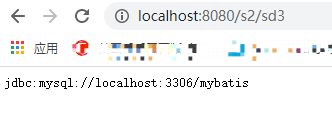
启动测试结果:
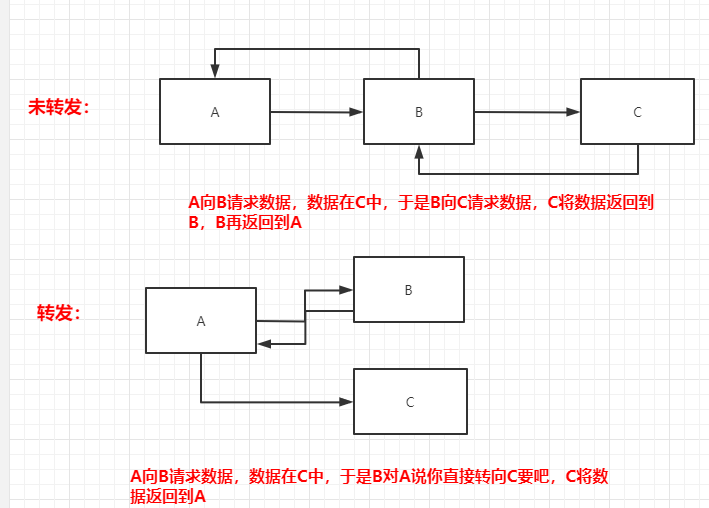
进入的是sd4,但是请求被转发到了sd3,收到的也是sd3的响应
4.读取资源文件
Properties
-
在Java目录下新建properties
在java目录下新建时,需要在当前module的pom.xml中配置
<!--在build中配置resources,来防止我们资源导出失败的问题-->
    <build>
        <resources>
            <resource>
                <directory>src/main/resources</directory>
                <includes>
                    <include>**/*.properties</include>
                    <include>**/*.xml</include>
                </includes>
                <filtering>true</filtering>
            </resource>
            <resource>
                <directory>src/main/java</directory>
                <includes>
                    <include>**/*.properties</include>
                    <include>**/*.xml</include>
                </includes>
                <filtering>true</filtering>
            </resource>
        </resources>
    </build>
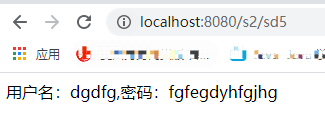
username = dgdfg password = fgfegdyhfgjhgprotected void doGet(HttpServletRequest req, HttpServletResponse resp) throws ServletException, IOException { InputStream stream = this.getServletContext().getResourceAsStream("/WEB-INF/classes/com/shida/servlet/aa.properties"); Properties properties = new Properties(); properties.load(stream); resp.setContentType("text/html"); resp.setCharacterEncoding("utf-8"); String name = properties.getProperty("username"); String pwd = properties.getProperty("password"); resp.getWriter().print("用户名:" + name + ",密码:" + pwd); }
测试结果为
-
在resources目录下新建properties
username = root
password = 123456
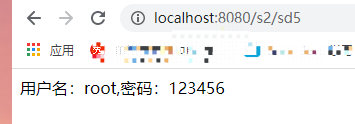
protected void doGet(HttpServletRequest req, HttpServletResponse resp) throws ServletException, IOException { InputStream stream = this.getServletContext().getResourceAsStream("/WEB-INF/classes/db.properties"); Properties properties = new Properties(); properties.load(stream); resp.setContentType("text/html"); resp.setCharacterEncoding("utf-8"); String name = properties.getProperty("username"); String pwd = properties.getProperty("password"); resp.getWriter().print("用户名:" + name + ",密码:" + pwd); }<servlet> <servlet-name>sd5</servlet-name> <servlet-class>com.shida.servlet.ServletDemo05</servlet-class> </servlet> <servlet-mapping> <servlet-name>sd5</servlet-name> <url-pattern>/sd5</url-pattern> </servlet-mapping>测试结果为

 浙公网安备 33010602011771号