
重定向
什么是重定向?
将原本要输出在屏幕中的内容,重新定向输出到指定的文件或设备中。
为什么要使用重定向?
1.备份时,我们需要知道备份的结果
2.屏幕上输出信息,比较重要的时候,我们想要保存下来
3.定时任务,我们需要知道结果
4.执行命令时,明知道会报错,我们会使用重定向,将结果 放入 /dev/null
5.执行命令时,正确 结果和错误 结果会同时输出,将正确结果输出到常规日志,将错误结果输出到错误日志
重定向的分类
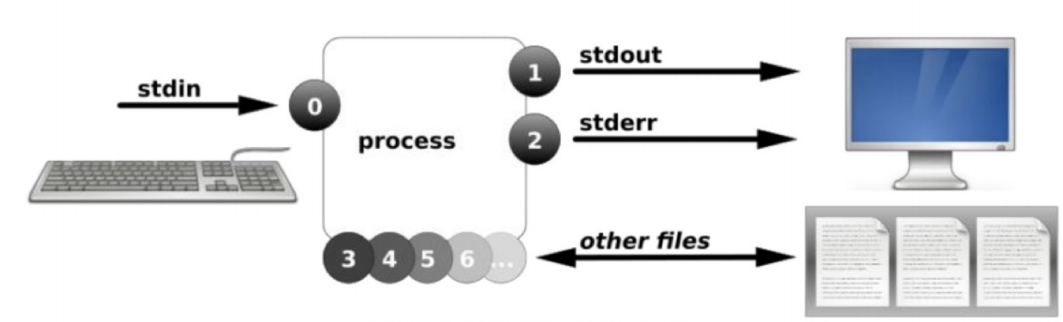
- 标准输入
- 标准输出
| 名称 | 文件描述符 | 作用 |
|---|---|---|
| 标准输入(stdin) | 0 | 通常键盘(其他输入命令的终端设备) |
| 标准输出(stdout) | 1 | 默认输出到屏幕 |
| 错误输出(stderr) | 2 | 默认输出到屏幕 |
| 文件名(filename) | 3+ |
[root@localhost ~]# ll /dev/std*
lrwxrwxrwx 1 root root 15 3月  25 10:36 /dev/stderr -> /proc/self/fd/2
lrwxrwxrwx 1 root root 15 3月  25 10:36 /dev/stdin -> /proc/self/fd/0
lrwxrwxrwx 1 root root 15 3月  25 10:36 /dev/stdout -> /proc/self/fd/1

[root@localhost ~]# ll /proc/121169/fd/
总用量 0
lrwx------ 1 root root 64 4月   7 11:28 0 -> /dev/pts/3
lrwx------ 1 root root 64 4月   7 11:28 1 -> /dev/pts/3
lrwx------ 1 root root 64 4月   7 11:27 2 -> /dev/pts/3
lr-x------ 1 root root 64 4月   7 11:28 3 -> /var/log/messages
输出重定向
/dev/null
/dev/pts/0
/dev/pts/1
/tmp/zls.txt
/root/1.txt
| 类型 | 符号 | 用途 | 备注 |
|---|---|---|---|
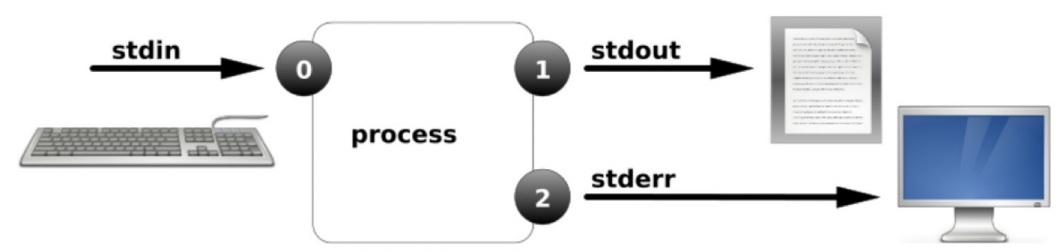
| 标准覆盖输出重定向 | 1> | 将命令执行的正确结果默认输出的位置,修改为指定的文件或者终端(覆盖原有内容) | 通常'>'即可,1可以不写,默认就是1 |
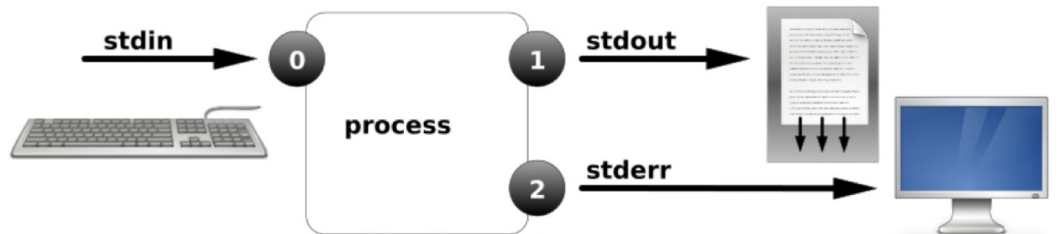
| 标准追加输出重定向 | >> | 将命令执行的正确结果,输出到指定文件的末尾(不覆盖原有内容) | |
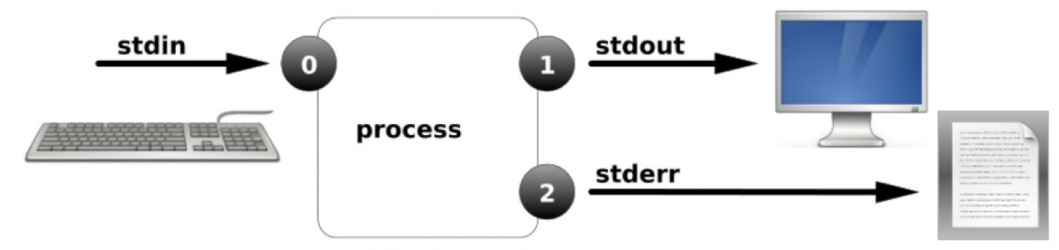
| 错误覆盖输出重定向 | 2> | 将命令执行的错误结果默认输出的位置,修改为指定的文件或者终端(覆盖原有内容) | |
| 错误追加输出重定向 | 2>> | 将命令执行的错误结果,输出到指定文件的末尾(不覆盖原有内容) | |
| 标准输入重定向 | 0< | 将命令中接收输入内容由默认的键盘,改为命令或者文件 | 通常'<'即可0可以写也可以不写,默认0 |
| 标准输入追加重定向 | 0<< | 将命令中接收输入内容由默认的键盘,改为命令或者文件 |
# 标准覆盖输出重定向
[root@localhost ~]# echo zls>/tmp/1.txt

[root@localhost ~]# cat /tmp/1.txt
zls

[root@localhost ~]# echo 321>/tmp/2.txt

[root@localhost ~]# cat /tmp/2.txt

[root@localhost ~]# echo zls1>/tmp/3.txt
[root@localhost ~]# cat /tmp/3.txt
zls1
# 标准追加输出重定向
[root@localhost ~]# echo 456 >> /var/log/messages
[root@localhost ~]# echo 123 >> /var/log/messages
# 错误输出重定向
[cdx@localhost ~]$ find /etc/ -type d
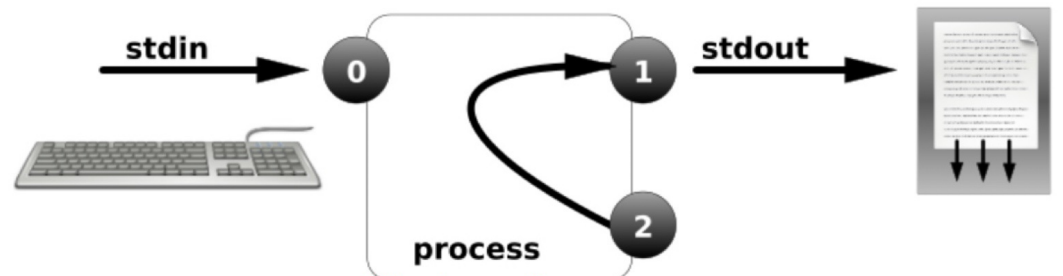
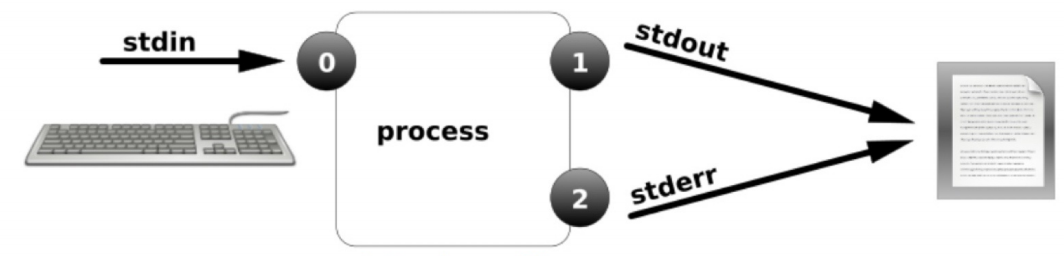
# 将标准输出和错误输出都输出到相同的文件中
[cdx@localhost ~]$ find /etc/ -type d > /tmp/100.txt 2>&1

[cdx@localhost ~]$ find /etc/ -type d &> /tmp/101.txt
#将错误输出,重定向到黑洞
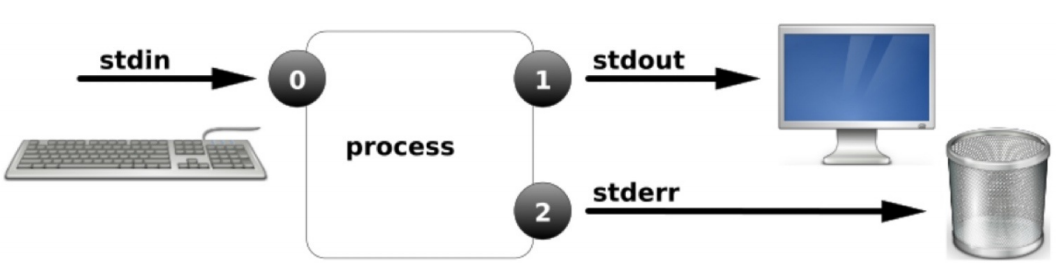
[root@localhost ~]# ls / /ooo 2>/dev/null
# 脚本中使用重定向
#!/bin/bash

. /etc/init.d/functions

read -p "请输入要检测的IP:" IP

ping -c1 -W1 $IP &>/dev/null

if [ $? -eq 0 ];then
        action "$IP" /bin/true >> /tmp/IP_OK.txt
else
        action "$IP" /bin/false >> /tmp/IP_FAILD.txt
fi
输入重定向
[root@localhost ~]# mail -s "$(date +%F-%T)_test" 133411023@qq.com < /etc/passwd

 浙公网安备 33010602011771号