
JUC并发编程(二)
JUC并发编程(二)
8、常用的工具类
8.1 CountDownLatch
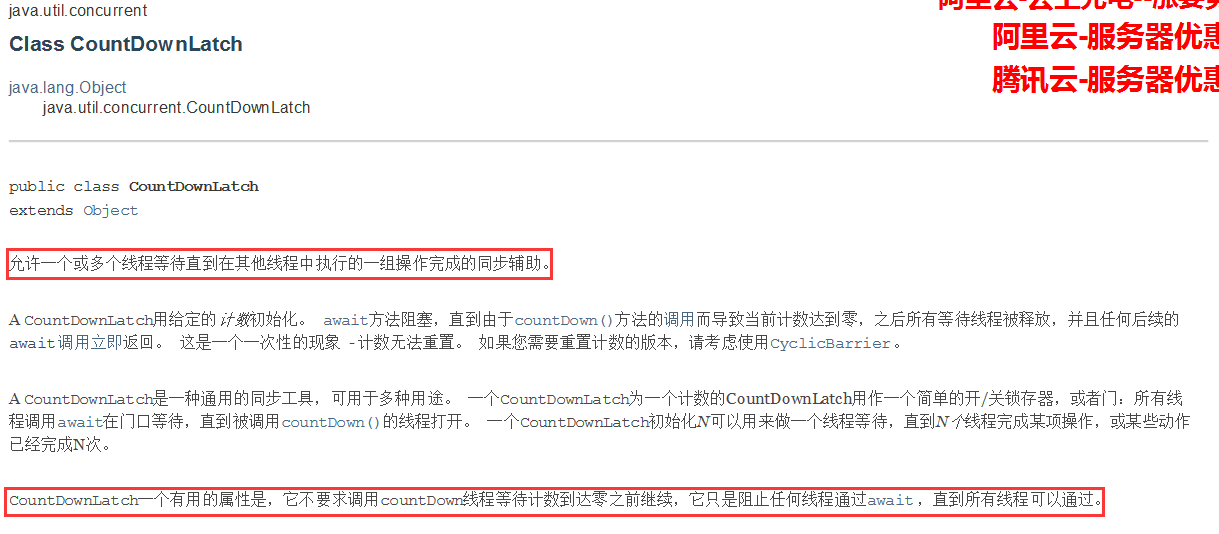
什么是CountDownLatch?
直接上代码
//计数器
public class CountDownLatchTest {
    public static void main(String[] args) {
        //减法计数器
        CountDownLatch countDownLatch = new CountDownLatch(6);
        for (int i = 0; i < 6; i++) {
            new Thread(() -> {
                System.out.println(Thread.currentThread().getName());
                countDownLatch.countDown();//-1
            },String.valueOf(i)).start();
        }
        try {
            //等待计数器归零然后再向下执行
            countDownLatch.await();
        } catch (InterruptedException e) {
            e.printStackTrace();
        }
        System.out.println("close");
    }
}
原理:
countDownLatch.countDown() 数量-1,
countDownLatch.await() 等待计数器归零然后再向下执行
每次有线程调用countDownLatch.countDown() 数量-1,如果计数器为零countDownLatch.await() 就会被唤醒,继续向下执行。
8.2 CyclicBarrier
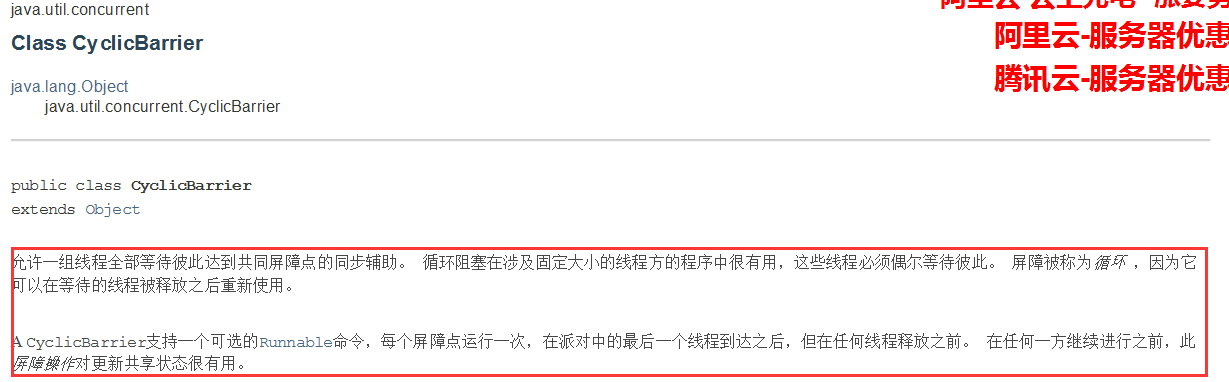
什么是CyclicBarrier
直接上代码
//加法计数器
public class CyclicBarrierTest {
    public static void main(String[] args) {
        //聚齐七颗龙珠召唤神龙
        CyclicBarrier cyclicBarrier = new CyclicBarrier(7,() ->{
            System.out.println("已聚齐7颗龙珠,召唤神龙!");
        });
        for (int i = 0; i < 7; i++) {
            final int temp = i;
            new Thread(() ->{
                System.out.println("收集"+temp+"颗龙珠!");
                try {
                    cyclicBarrier.await();//等待
                } catch (InterruptedException e) {
                    e.printStackTrace();
                } catch (BrokenBarrierException e) {
                    e.printStackTrace();
                }
            }).start();
        }
    }
}
8.3 Semaphore
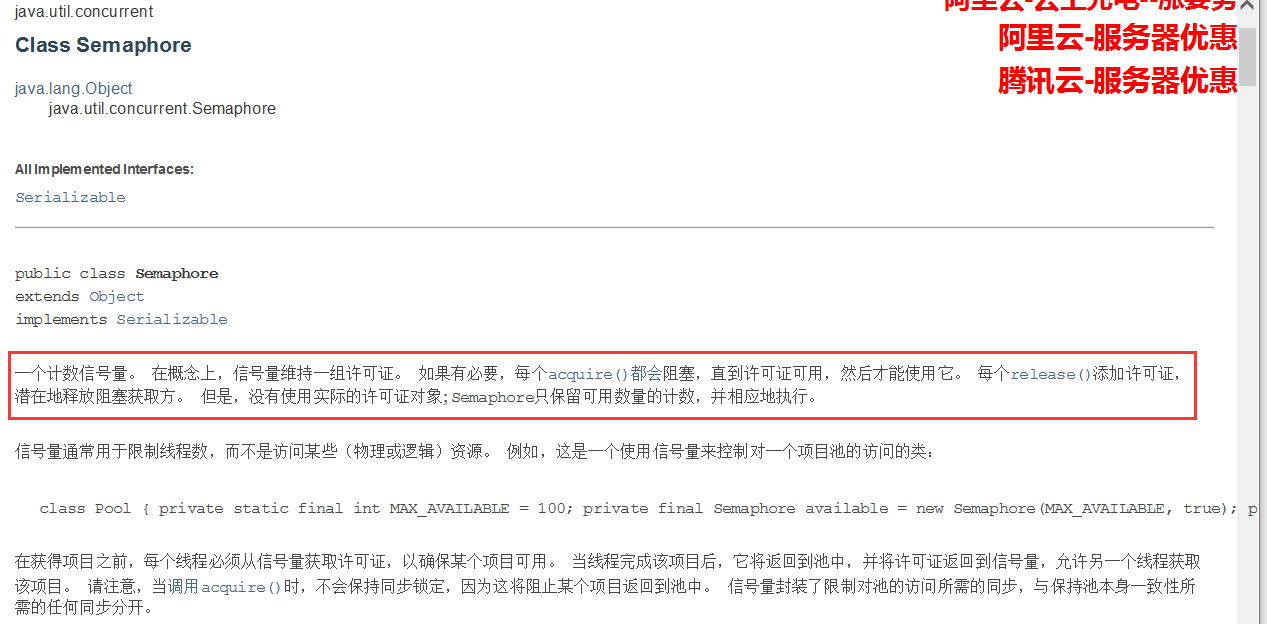
什么是Semaphore?
上代码
//模拟抢车位
public class SemaphoreTest {

    public static void main(String[] args) {
        //设置线程数:相当于车位数
        Semaphore semaphore = new Semaphore(3);
        //模拟6辆车去抢这3个车位
        for (int i = 0; i < 6; i++) {
            new Thread(()->{
                try {
                   semaphore.acquire();//得到
                   //业务代码
                   System.out.println("车辆"+Thread.currentThread().getName()+"抢到了车位");
                   TimeUnit.SECONDS.sleep(2);
                   System.out.println("车辆"+Thread.currentThread().getName()+"离开了车位");
                } catch (InterruptedException e) {
                    e.printStackTrace();
                }finally {
                    semaphore.release();//释放
                }
            },String.valueOf(i)).start();
        }
    }
}
原理:
semaphore.acquire();获得,如果已经满了,就进入等到,直到被唤醒为止
semaphore.release();释放,会将当前的信号量加1,然后唤醒等待中的线程
作用:
多个共享资源互斥的使用!并发限流,控制最大线程数!
9、可重入读写锁(ReentrantReadWriteLock)
9.1 性质
- 1、可重入
如果你了解过synchronized关键字,一定知道他的可重入性,可重入就是同一个线程可以重复加锁,每次加锁的时候count值加1,每次释放锁的时候count减1,直到count为0,其他的线程才可以再次获取。
- 2、读写分离
我们知道,对于一个数据,不管是几个线程同时读都不会出现任何问题,但是写就不一样了,几个线程对同一个数据进行更改就可能会出现数据不一致的问题,因此想出了一个方法就是对数据加锁,这时候出现了一个问题:线程写数据的时候加锁是为了确保数据的准确性,但是线程读数据的时候再加锁就会大大降低效率,这时候怎么办呢?那就对写数据和读数据分开,加上两把不同的锁,不仅保证了正确性,还能提高效率。
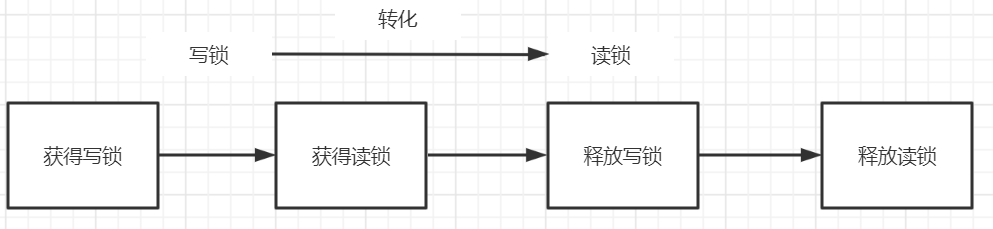
- 4、可以锁降级
线程获取写入锁后可以获取读取锁,然后释放写入锁,这样就从写入锁变成了读取锁,从而实现锁降级的特性。
-
5、不可锁升级
线程获取读锁是不能直接升级为写入锁的。需要释放所有读取锁,才可获取写锁
9.2 模拟读写锁进行写入和读取操作
public class ReadWriteLockTest {

    public static void main(String[] args) {

        MyMemory myMemory = new MyMemory();

        for (int i = 0; i < 10; i++) {
            final int temp = i;
            new Thread( () ->{
                myMemory.put(String.valueOf(temp),temp+"V");
            },"K"+i).start();
        }

        for (int i = 0; i < 10; i++) {
            final int temp = i;
            new Thread( () ->{
                myMemory.get(String.valueOf(temp));
            },"V"+i).start();
        }

    }

}

class MyMemory{

    Map<String,String> memoryMap = new ConcurrentHashMap<>();

    ReadWriteLock readWriteLock = new ReentrantReadWriteLock();

    public void put(String key,String value){

        readWriteLock.writeLock().lock();
        try {
            System.out.println(Thread.currentThread().getName()+"准备写入操作");
            memoryMap.put(key,value);
            System.out.println(Thread.currentThread().getName()+":写入操作完成");
        } catch (Exception e) {
            e.printStackTrace();
        }finally {
            readWriteLock.writeLock().unlock();
        }
    }

    public String get(String key){
        String value = null;
        readWriteLock.readLock().lock();
        try {
            System.out.println(Thread.currentThread().getName()+"准备读取操作");
            value = memoryMap.get(key);
            System.out.println(Thread.currentThread().getName()+":进行了读取操作,读取到了值====》"+value);
        } catch (Exception e) {
            e.printStackTrace();
        }finally {
            readWriteLock.readLock().unlock();
        }
        return value;
    }
}
10、阻塞队列
10.1 什么是阻塞队列
阻塞队列是一个队列,在数据结构中起的作用如下图:
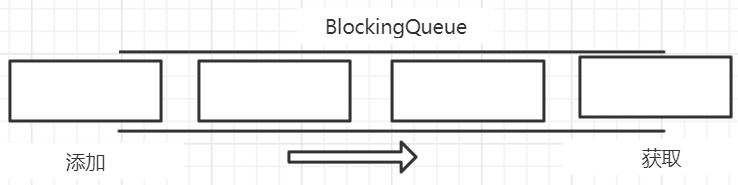
添加:当队列是满的,向队列中添加元素将会被阻塞
获取:当队列是空的,从队列中获取元素将会被阻塞
**阻塞队列的作用 **:所谓阻塞,在某些情况下会挂起线程(wait、await),一旦条件满足被阻塞的线程又会被唤醒(notify、signal)。使用阻塞队列的好处是我们不需要关心什么时候去挂起线程、什么时候去唤醒线程,这一切都由BlockingQueue操办。
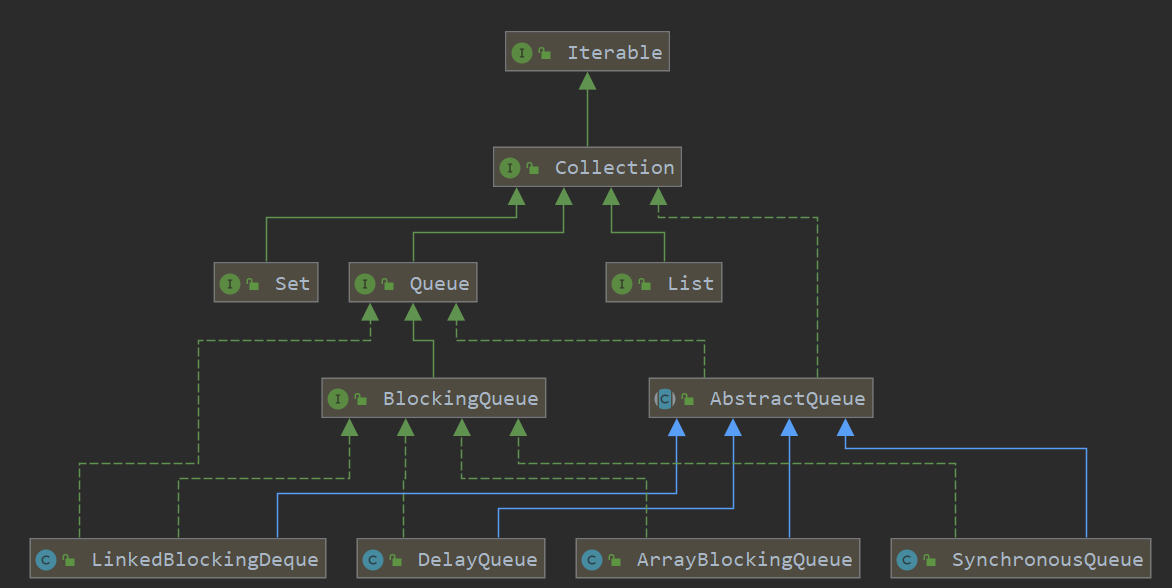
10.2 BlockingQueue四组API
| 方法类型 | 抛出异常 | 不抛出异常,有返回值 | 阻塞 等待 | 超时 等待 |
|---|---|---|---|---|
| 添加 | add(e) | offer(e) | put(e) | offer(e,long,timeunit) |
| 移除 | remove() | poll() | take() | offer(long,timeunit) |
| 判断队首 | element() | peek() | - | - |
/**
 * 抛出异常
 */
public static void test1(){

    BlockingQueue blockingQueue = new ArrayBlockingQueue(3);

    System.out.println(blockingQueue.add("a"));
    System.out.println(blockingQueue.add("b"));
    System.out.println(blockingQueue.add("c"));
    //获取队首
    System.out.println(blockingQueue.element());

    //抛出异常 java.lang.IllegalStateException: Queue full
    //System.out.println(blockingQueue.add("d"));

    System.out.println("===========================");

    System.out.println(blockingQueue.remove());
    System.out.println(blockingQueue.remove());
    System.out.println(blockingQueue.remove());

    //抛出异常 java.util.NoSuchElementException
    System.out.println(blockingQueue.remove());
}
/**
 * 不抛出异常
 */
public static void test2(){

    BlockingQueue blockingQueue = new ArrayBlockingQueue(3);

    System.out.println(blockingQueue.offer("a"));
    System.out.println(blockingQueue.offer("b"));
    System.out.println(blockingQueue.offer("c"));
    //不抛出异常 返回false
    System.out.println(blockingQueue.offer("d"));

    //获取队首
    System.out.println(blockingQueue.peek());
    //java.lang.IllegalStateException: Queue full
    //System.out.println(blockingQueue.add("d"));

    System.out.println("===========================");

    System.out.println(blockingQueue.poll());
    System.out.println(blockingQueue.poll());
    System.out.println(blockingQueue.poll());
    //不抛出异常 返回null
    System.out.println(blockingQueue.poll());
    //获取队首,不抛出异常 返回null
    //System.out.println(blockingQueue.peek());
}
/**
 * 阻塞,一直等待
 */
public static void test3() throws InterruptedException {

    BlockingQueue blockingQueue = new ArrayBlockingQueue(3);

    blockingQueue.put("a");
    blockingQueue.put("b");
    blockingQueue.put("c");
    //一直等待
    //blockingQueue.put("d");

    System.out.println(blockingQueue.take());
    System.out.println(blockingQueue.take());
    System.out.println(blockingQueue.take());
    //一直等待
    //System.out.println(blockingQueue.take());
}
/**
 * 阻塞指定的时间
 */
public static void test4() throws InterruptedException {
    BlockingQueue blockingQueue = new ArrayBlockingQueue(3);

    System.out.println(blockingQueue.offer("a", 1, TimeUnit.SECONDS));
    System.out.println(blockingQueue.offer("b", 1, TimeUnit.SECONDS));
    System.out.println(blockingQueue.offer("c", 1, TimeUnit.SECONDS));

    //阻塞1S,1秒后返回false
    System.out.println(blockingQueue.offer("d", 1, TimeUnit.SECONDS));

    System.out.println("=============");

    System.out.println(blockingQueue.poll(1, TimeUnit.SECONDS));
    System.out.println(blockingQueue.poll(1, TimeUnit.SECONDS));
    System.out.println(blockingQueue.poll(1, TimeUnit.SECONDS));
    //阻塞1S,1S后返回null
    System.out.println(blockingQueue.poll(1, TimeUnit.SECONDS));
}
10.3 同步队列(SynchronousQueue)
没有容量,进去一个元素,必须等待取出来之后才能再放下一个元素。
public static void main(String[] args) {
    BlockingQueue synchronousQueue = new SynchronousQueue();

    new Thread( () ->{
        try {
            System.out.println(Thread.currentThread().getName()+":put 1");
            synchronousQueue.put("1");
            System.out.println(Thread.currentThread().getName()+":put 2");
            synchronousQueue.put("2");
            System.out.println(Thread.currentThread().getName()+":put 3");
            synchronousQueue.put("3");
        } catch (InterruptedException e) {
            e.printStackTrace();
        }
    },"T1").start();

    new Thread( () ->{
        try {
            TimeUnit.SECONDS.sleep(1);
            System.out.println(Thread.currentThread().getName()+":get "+synchronousQueue.take());

            TimeUnit.SECONDS.sleep(1);
            System.out.println(Thread.currentThread().getName()+":get "+synchronousQueue.take());

            TimeUnit.SECONDS.sleep(1);
            System.out.println(Thread.currentThread().getName()+":get "+synchronousQueue.take());
        } catch (Exception e) {
            e.printStackTrace();
        }
    },"T2").start();
}
11、线程池(重点)
11.1 为什么要使用线程池
池化技术:提前准备一些资源,需要使用时可以重复使用这些准备好的资源。常见的池化技术有:数据库连接池、线程池、内存池、HttpClient连接池。
线程池作为池化技术的一种实践,其本质也是提前备好资源以备不时之需。相较与临时创建线程,线程池具有以下优点:
- **降低资源消耗 **:通过重复利用已创建的线程可以较少创建和销毁线程带来的资源消耗;
- **提高响应速度 **:当任务到达时,不需要等待线程创建就能执行;
- **提高线程的可管理性 **:线程是稀缺资源,如果任意的创建不仅会带来资源的消耗还会影响系统的稳定性。
11.2 当一个线程进入线程池会发生什么
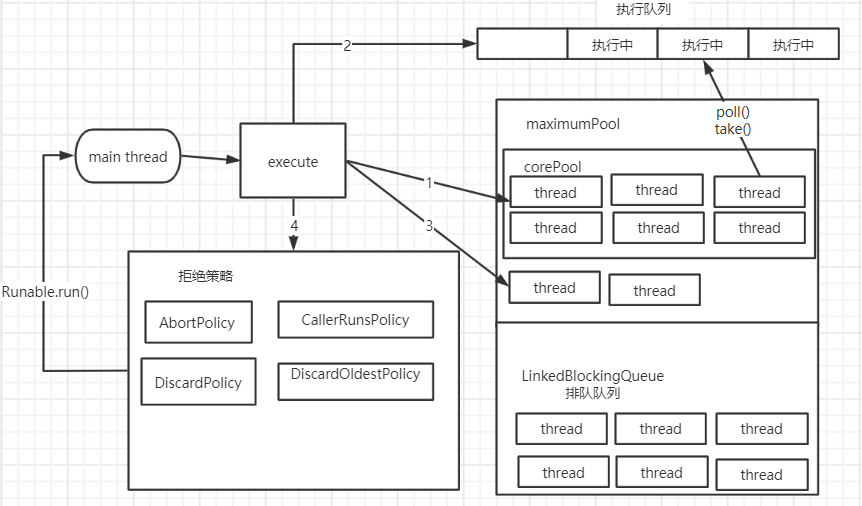
如上图所示,一个新任务进入到线程池时,处理流程如下:
- 判断核心线程池中的线程是否都在执行任务,如果不是则创建一个新线程来执行人物
- 当核心线程池中线程满了的时候进入到排队队列等待
- 当排队队列已满,判断是否达到最大线程数(maximumPool+排队队列容量),如果没有,创建一个新的线程来执行此任务
- 如果排队队列和maximumPool都满了,则交由拒绝策略来处理此任务
11.3 如何使用一个线程池
线程池的三大方法
//Executors 工具类   3大方法
public static void main(String[] args) {
    //单个线程
    //ExecutorService executorService = Executors.newSingleThreadExecutor();
    //固定的线程的线程池
    //ExecutorService executorService = Executors.newFixedThreadPool(5);
    //可伸缩的线程池
    ExecutorService executorService = Executors.newCachedThreadPool();
    try {
        for (int i = 0; i < 100; i++) {
            executorService.execute(() ->{
                System.out.println(Thread.currentThread().getName() + "===========>ok");
            });
        }
    }finally {
        executorService.shutdown();
    }
}
Executors.newSingleThreadExecutor() 源码
public static ExecutorService newSingleThreadExecutor() {
    return new FinalizableDelegatedExecutorService
        (new ThreadPoolExecutor(1, //核心线程池大小1
                                1,//最大线程数1
                                0L, //释放时间0
                                TimeUnit.MILLISECONDS,//释放时间单位
                                new LinkedBlockingQueue<Runnable>()//阻塞队列 允许队列长度Integer.MAX_VALUE  容易 OOM
                               ));
}
Executors.newFixedThreadPool(5) 源码
public static ExecutorService newFixedThreadPool(int nThreads) {
    return new ThreadPoolExecutor(nThreads, //核心线程数为传入的值
                                  nThreads,//最大线程数为传入的值
                                  0L,
                                  TimeUnit.MILLISECONDS,
                                  new LinkedBlockingQueue<Runnable>());//阻塞队列 允许队列长度Integer.MAX_VALUE  容易 OOM
}
Executors.newCachedThreadPool() 源码
public static ExecutorService newCachedThreadPool() {
    return new ThreadPoolExecutor(0, //核心线程数0
                                  Integer.MAX_VALUE,//最大线程数 约21亿  容易 OOM
                                  60L,
                                  TimeUnit.SECONDS,
                                  new SynchronousQueue<Runnable>());
}
根据阿里巴巴java开发手册关于线程池创建的规定,如下图:

我们在创建线程池的过程中,使用底层的new ThreadPollExecutor,其源码如下:
public ThreadPoolExecutor(int corePoolSize,
                              int maximumPoolSize,
                              long keepAliveTime,
                              TimeUnit unit,
                              BlockingQueue<Runnable> workQueue,
                              ThreadFactory threadFactory,
                              RejectedExecutionHandler handler) {
    if (corePoolSize < 0 ||
        maximumPoolSize <= 0 ||
        maximumPoolSize < corePoolSize ||
        keepAliveTime < 0) //检查输入参数是否异常
        throw new IllegalArgumentException();
    if (workQueue == null || threadFactory == null || handler == null)
        throw new NullPointerException(); //检查工作队列、线程工厂、拒绝策略是否空指针
    //对属性开始赋值
    this.acc = System.getSecurityManager() == null ?
        null :
    AccessController.getContext();
    this.corePoolSize = corePoolSize;
    this.maximumPoolSize = maximumPoolSize;
    this.workQueue = workQueue;
    this.keepAliveTime = unit.toNanos(keepAliveTime);
    this.threadFactory = threadFactory;
    this.handler = handler;
}
七大参数:
int corePoolSize:核心线程池大小
int maximumPoolSize:最大线程池大小
long keepAliveTime:释放时间,最大多长时间没有调用该线程将会被释放
TimeUnit unit:释放时间单位
BlockingQueue
ThreadFactory threadFactory:线程创建工厂
RejectedExecutionHandler handler:拒绝策略
手动创建一个线程池
public static void main(String[] args) {
        ThreadPoolExecutor threadPoolExecutor = new ThreadPoolExecutor(
                2, 5, 1L, TimeUnit.SECONDS,
                new LinkedBlockingDeque<>(3),Executors.defaultThreadFactory(),
                new ThreadPoolExecutor.AbortPolicy()//max、LinkedBlockingDeque 满了不处理这个抛出异常
        );
        try {//最大承载量 = maximunPoolSize + LinkedBlockingDeque容量
            for (int i = 0; i < 9; i++) {
                threadPoolExecutor.execute( () ->{
                    System.out.println(Thread.currentThread().getName() + "=======>ok");
                });
            }
        }finally {
            threadPoolExecutor.shutdown();
        }
    }
- 四个拒绝策略:
AbortPolicy :抛异常
CallerRunsPolicy :哪来的去哪里,就是谁调的这个线程,谁去执行这个任务
DiscardPolicy:线程满了会丢掉任务,不抛出异常
DiscardOldestPolicy :线程满了会尝试竞争第一个线程,如果竞争失败会丢掉任务,也不抛出异常
11.4 最大线程数如何确定
即maximunPoolSize 的值应该设为多大?
-
CPU密集型
设为当前服务器最大CPU数:Runtime.getRuntime().availableProcessors()
-
IO密集型
判断程序中十分耗IO的线程数,maximunPoolSize 值设置为大于耗IO的线程数,一般是他的两倍。
12、四大函数式接口
函数式接口:有且只有一个方法的接口。比例 Runnable、FunctionInterface
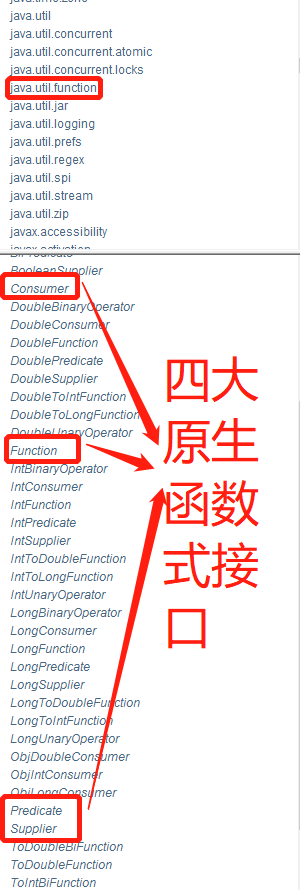
12.1 function接口
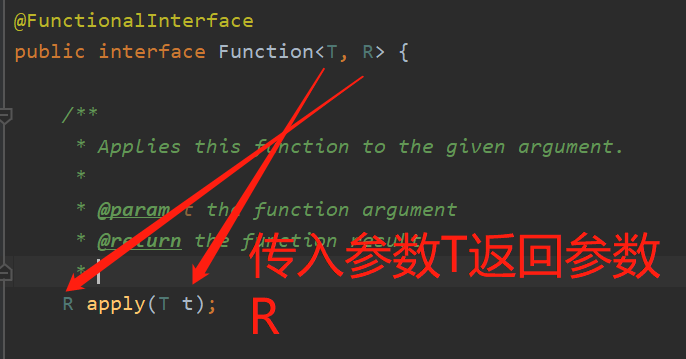
public static void main(String[] args) {
    Function function = new Function<String,String>() {
        @Override
        public String apply(String o) {
            return o+"====>ok";
        }
    };
    System.out.println(function.apply("test"));
}
//lambda表达式简化后代码
public static void main(String[] args) {
    Function function = (o) ->{
        return o+"=======>ok";
    };
    System.out.println(function.apply("test"));
}
12.2 predicate接口 断定型接口
public static void main(String[] args) {
    Predicate predicate = new Predicate<String>() {
        @Override
        public boolean test(String o) {
            //判断字符串是否为空
            return o.isEmpty();
        }
    };
    System.out.println(predicate.test(""));
}
//lambda 表达式简化
public static void main(String[] args) {
    Predicate<String> predicate = (str) -> {
        //判断字符串是否为空
        return o.isEmpty();
    };
    System.out.println(predicate.test(""));
}
12.3 consumer 消费型接口
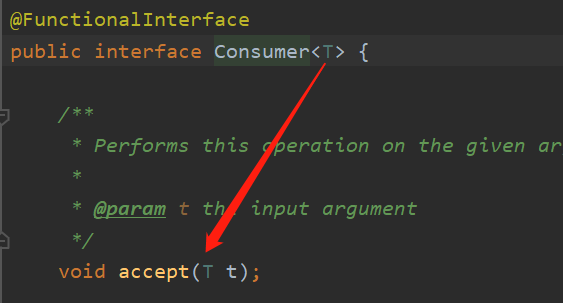
只有输入,没有返回值。
public static void main(String[] args) {
    Consumer<String> consumer = (str) ->{
        //打印输入的字符串
        System.out.println(str);
    };
    consumer.accept("abc");
}
12.4 Supplier 供给型接口
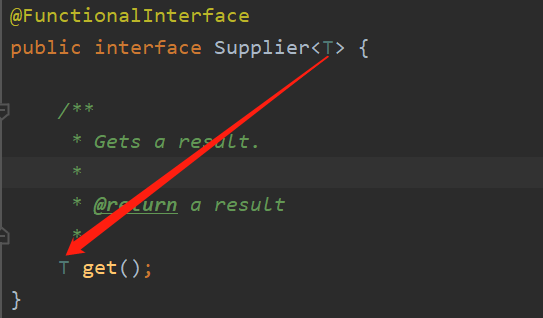
只有返回值,没有参数
public static void main(String[] args) {
    Supplier<String> supplier = () ->{
        return "bcd";
    };
    System.out.println(supplier.get());
}
13、Stream流计算
什么是Stream流计算
大数据 : 存储 + 计算
数据库、集合的本质是用来存储数据的
**计算都应该交给流来操作 **
/**
 * 题目要求:一分钟完成,只能用一行代码实现!
 *  给定五个用户计划,按以下要求筛选。
 *  1. 只要ID为偶数的用户
 *  2.年龄必须大于23
 *  3.用户名转为大写
 *  4.用户名字母按倒叙排
 *  5.只输出一个用户
 *
 */
public class UserTest {
    public static void main(String[] args) {
        User user1 = new User(1,"a",21);
        User user2 = new User(2,"b",22);
        User user3 = new User(3,"c",23);
        User user4 = new User(4,"d",24);
        User user5 = new User(6,"e",25);

        List<User> userList = Arrays.asList(user1,user2,user3,user4,user5);
        userList.stream().filter( user -> user.getId()%2==0)
                .filter(user -> user.getAge()>23)
                .map( user ->{return user.getName().toUpperCase();})
                .sorted((uu1,uu2) ->{return uu2.compareTo(uu1);})
                .limit(1).forEach(user -> System.out.println(user));
    }
}
class User{

    private Integer id;
    private String name;
    private Integer age;
    public User(Integer id, String name, Integer age) {
        this.id = id;
        this.name = name;
        this.age = age;
    }
    public Integer getId() {
        return id;
    }
    public void setId(Integer id) {
        this.id = id;
    }

    public String getName() {
        return name;
    }
    public void setName(String name) {
        this.name = name;
    }
    public Integer getAge() {
        return age;
    }
    public void setAge(Integer age) {
        this.age = age;
    }
}
14、ForkJoin (了解其思想)
什么是ForkJoin
ForkJoin在jdk1.7 ,并行执行任务!提高效率,大数据量!
Map Reduce 把任务拆分成多个子任务
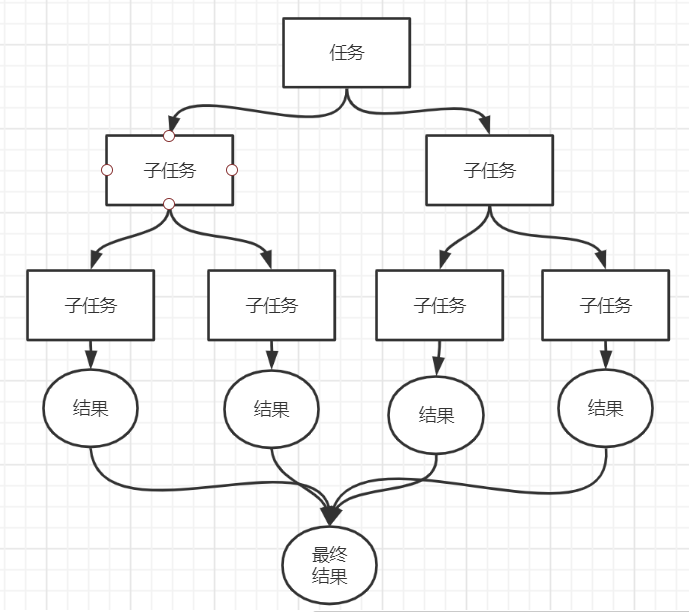
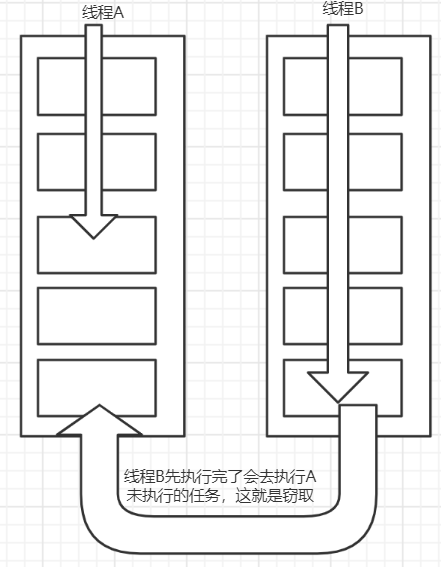
ForkJoin的特点:工作窃取
这个里面维护的都是双端队列
/**
 * 如何使用forkjoin
 *  1. 通过forkjoinpool来执行
 *  2. 计算任务 forkjoinpool.execute(ForkJoinTask<?> task)
 *  3. 继承 RecursiveTask
 */
public class ForkjoinDemo extends RecursiveTask<Long> {
    private long start;

    private long end;

    //临界值
    private long tempt = 10000L;

    public ForkjoinDemo(long start, long end) {
        this.start = start;
        this.end = end;
    }


    //计算的方法
    @Override
    protected Long compute() {
        if ((end-start)<=tempt){//小于等于阈值,则直接进行计算
            long sum=0L;
            for (Long i = start; i <= end; i++) {
                sum+=i;
            }
            return sum;
        }else{//每个任务必须相等?    不等会报错Could not initialize class java.util.concurrent.locks 为什么呢?
            long middle = (end+start)/2;
            //拆分任务
            ForkjoinDemo task1 = new ForkjoinDemo(start,middle);
            //将拆分的任务压入线程
            task1.fork();

            ForkjoinDemo task2 = new ForkjoinDemo(middle+1,end);
            task2.fork();

            return task1.join()+task2.join();
        }
    }
}

public class Test {


    public static void main(String[] args) throws ExecutionException, InterruptedException {
        //test1();//sum 500000000500000000 时间=364
        //test2();//sum 时间=292
        test3(); //sum 时间=244
    }


    public static void test1(){
        long start = System.currentTimeMillis();
        long sum = 0L;
        for(long i=1;i<=10_0000_0000;i++){
            sum += i;
        }
        long end = System.currentTimeMillis();
        System.out.println(sum);
        System.out.println("sum 时间="+(end - start));
    }

    public static void test2() throws ExecutionException, InterruptedException {
        long start = System.currentTimeMillis();
        ForkJoinPool forkJoinPool = new ForkJoinPool();
        ForkJoinTask<Long> task = new ForkjoinDemo(1L, 10_0000_0000L);
        long sum = forkJoinPool.invoke(task);
        long end = System.currentTimeMillis();
        System.out.println(sum);
        System.out.println("sum 时间="+(end - start));
    }
    //stream 并行流操作
    public static void test3(){
        long start = System.currentTimeMillis();
        Long sum = LongStream.rangeClosed(0L,10_0000_0000L).parallel().reduce(0,Long::sum);
        long end = System.currentTimeMillis();
        System.out.println(sum);
        System.out.println("sum 时间="+(end - start));
    }

}

 浙公网安备 33010602011771号