


朱汉自动化运维专题(十):项目案例之Pipeline分布式流水线发布JAVA项目
自动化运维专题(十):项目案例之Pipeline分布式流水线发布JAVA项目
Jenkins自动化运维专题
六,项目案例二:流水线自动化发布JAVA项目
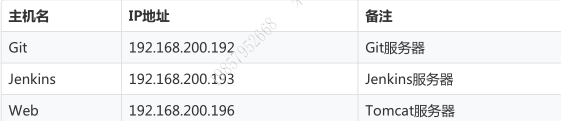
#所有服务器进行如下操作[root@localhost ~]# cat /etc/redhat-releaseCentOS Linux release 7.5.1804 (Core)[root@localhost ~]# uname -r3.10.0-862.el7.x86_64[root@localhost ~]# systemctl stop firewalld[root@localhost ~]# systemctl disable firewalldRemoved symlink /etc/systemd/system/multi-user.target.wants/firewalld.service.Removed symlink /etc/systemd/system/dbus-org.fedoraproject.FirewallD1.service.[root@localhost ~]# systemctl stop NetworkManager[root@localhost ~]# systemctl disable NetworkManagerRemoved symlink /etc/systemd/system/multi-user.target.wants/NetworkManager.service.Removed symlink /etc/systemd/system/dbus-org.freedesktop.NetworkManager.service.Removed symlink /etc/systemd/system/dbus-org.freedesktop.nm-dispatcher.service.
6.1 Tomcat服务器环境部署
#在tomcat服务器进行如下操作#部署jdk[root@localhost ~]# lsanaconda-ks.cfg apache-tomcat-8.5.31.tar.gzapache-maven-3.5.0-bin.tar.gz jdk-8u171-linux-x64.tar.gz[root@localhost ~]# tar xf jdk-8u171-linux-x64.tar.gz -C /usr/local/[root@localhost ~]# cd /usr/local/[root@localhost local]# mv jdk1.8.0_171 jdk[root@localhost local]# ln -s /usr/local/jdk/bin/java /usr/local/bin/[root@localhost local]# java -versionjava version "1.8.0_171"Java(TM) SE Runtime Environment (build 1.8.0_171-b11)Java HotSpot(TM) 64-Bit Server VM (build 25.171-b11, mixed mode)#部署java变量[root@localhost local]# sed -i.org '$a export JAVA_HOME=/usr/local/jdk/' /etc/profile[root@localhost local]# sed -i.org '$a export PATH=$PATH:$JAVA_HOME/bin' /etc/profile[root@localhost local]# sed -i.org '$a export CLASSPATH=.$CLASSPATH:$JAVA_HOME/lib:$JAVA_HOME/lib/tools.jar' /etc/profile[root@localhost local]# tail -3 /etc/profileexport JAVA_HOME=/usr/local/jdk/export PATH=$PATH:$JAVA_HOME/binexport CLASSPATH=.$CLASSPATH:$JAVA_HOME/lib:$JAVA_HOME/lib/tools.jar[root@localhost local]# source /etc/profile#部署maven[root@localhost ~]# lsanaconda-ks.cfg apache-tomcat-8.5.31.tar.gzapache-maven-3.5.0-bin.tar.gz jdk-8u171-linux-x64.tar.gz[root@localhost ~]# tar xf apache-maven-3.5.0-bin.tar.gz -C /usr/local/[root@localhost ~]# cd /usr/local/[root@localhost local]# mv apache-maven-3.5.0 maven[root@localhost local]# ln -s /usr/local/maven/bin/mvn /usr/local/bin/[root@localhost local]# mvn -versionApache Maven 3.5.0 (ff8f5e7444045639af65f6095c62210b5713f426; 2017-04-04T03:39:06+08:00)Maven home: /usr/local/mavenJava version: 1.8.0_171, vendor: Oracle CorporationJava home: /usr/local/jdk/jreDefault locale: zh_CN, platform encoding: UTF-8OS name: "linux", version: "3.10.0-862.el7.x86_64", arch: "amd64", family: "unix"#部署maven环境变量[root@localhost local]# vim /etc/profile[root@localhost local]# tail -2 /etc/profileexport MAVEN_HOME=/usr/local/mavenexport PATH=$PATH:${MAVEN_HOME}[root@localhost local]# source /etc/profile#解压tomcat[root@localhost ~]# lsanaconda-ks.cfg apache-tomcat-8.5.31.tar.gzapache-maven-3.5.0-bin.tar.gz jdk-8u171-linux-x64.tar.gz[root@localhost ~]# tar xf apache-tomcat-8.5.31.tar.gz -C /usr/local/[root@localhost ~]# cd /usr/local/[root@localhost local]# mv apache-tomcat-8.5.31 tomcat[root@localhost local]# cd tomcat/[root@localhost tomcat]# lsbin conf lib LICENSE logs NOTICE RELEASE-NOTES RUNNING.txt temp webapps work[root@localhost tomcat]# rm -rf webapps/*[root@localhost tomcat]# ls webapps/#部署tomcat环境变量[root@localhost tomcat]# vim /etc/profile[root@localhost tomcat]# tail -1 /etc/profileexport TOMCAT_HOME=/usr/local/tomcat[root@localhost tomcat]# source /etc/profile#自动部署需要解压maven构建后的war包,因此需要安装unzip[root@localhost tomcat]# yum -y install unzip[root@localhost tomcat]# which unzip/usr/bin/unzip#自动部署需要git远程仓库代码,因此需要安装git[root@localhost tomcat]# yum -y install git
6.2 构建一个B-JAVA流水线项目
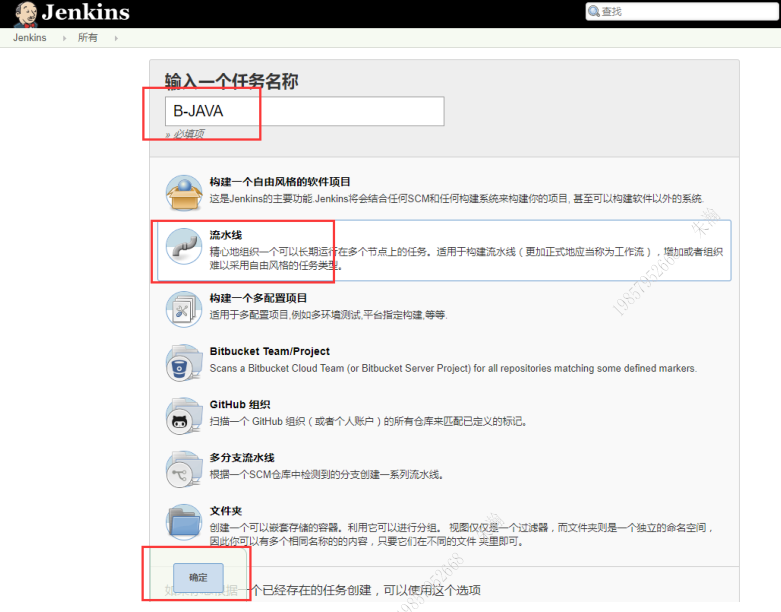


6.3 下载solo项目源代码并上传Git远程仓库
solo源代码下载地址 https://github.com/b3log/solo
#在Git服务器创建用于存放solo源代码的仓库[git@localhost ~]$ hostname -I192.168.200.189[git@localhost ~]$ cd /home/git/repos/[git@localhost repos]$ lsapp.git jenkinsfile wordpress[git@localhost repos]$ mkdir solo.git[git@localhost repos]$ chown git.git solo.git[git@localhost repos]$ cd solo.git/[git@localhost solo.git]$ git --bare init初始化空的 Git 仓库于 /home/git/repos/solo.git/[git@localhost solo.git]$ cd ..[git@localhost repos]$ chown -R git.git solo.git#在jenkins服务器上进行如下操作#解压solo.tar.gz源代码包[root@localhost ~]# tar xf solo.tar.gzmk[root@localhost ~]# mkdir -p /mycode/[root@localhost ~]# cd /mycode/[root@localhost mycode]# lsapp[root@localhost mycode]# rm -rf *[root@localhost mycode]# git clone git@192.168.200.189:/home/git/repos/solo.git正克隆到 'solo'...warning: 您似乎克隆了一个空版本库。[root@localhost mycode]# lssolo[root@localhost solo]# mv /root/solo .[root@localhost solo]# lssolo[root@localhost solo]# mv solo/* .[root@localhost solo]# rm -rf solo/[root@localhost solo]# lsCHANGE_LOGS.html Dockerfile LICENSE pom.xml README_zh_CN.mddocker-compose.yml gulpfile.js package.json README.md src#为了最后的测试,我们需要修改源代码的一个配置文件[root@localhost solo]# lsCHANGE_LOGS.html Dockerfile LICENSE pom.xml README_zh_CN.mddocker-compose.yml gulpfile.js package.json README.md src[root@localhost solo]# cd src/main/resources/[root@localhost resources]# ll latke.properties-rw-r--r--. 1 root root 1241 10月 18 2018 latke.properties[root@localhost resources]# sed -n '29p;31p' latke.propertiesserverHost=localhostserverPort=8080[root@localhost resources]# vim latke.properties[root@localhost resources]# sed -n '29p;31p' latke.propertiesserverHost=192.168.200.200serverPort=8080#将solo源代码提交到git仓库[root@localhost solo]# cd /mycode/solo/[root@localhost solo]# git add *[root@localhost solo]# git commit -m "x"[root@localhost solo]# git push -u origin masterCounting objects: 2099, done.Compressing objects: 100% (2044/2044), done.Writing objects: 100% (2099/2099), 27.44 MiB | 19.06 MiB/s, done.Total 2099 (delta 367), reused 0 (delta 0)To git@192.168.200.189:/home/git/repos/solo.git* [new branch] master -> master分支 master 设置为跟踪来自 origin 的远程分支 master。#将代码克隆到本地进行克隆认证[root@localhost solo]# cd /test/[root@localhost test]# lsjenkinsfile[root@localhost test]# rm -rf *[root@localhost test]# git clone git@192.168.200.189:/home/git/repos/solo.git正克隆到 'solo'...remote: 对象计数中: 2099, 完成.remote: 压缩对象中: 100% (1677/1677), 完成.remote: Total 2099 (delta 367), reused 2099 (delta 367)接收对象中: 100% (2099/2099), 27.44 MiB | 0 bytes/s, done.处理 delta 中: 100% (367/367), done.[root@localhost test]# cd solo/[root@localhost solo]# lsCHANGE_LOGS.html Dockerfile LICENSE pom.xml README_zh_CN.mddocker-compose.yml gulpfile.js package.json README.md src
6.4 创建一个流水线脚本并提交Git远程仓库
#在jenkins服务器上进行如下操作[root@localhost solo]# mkdir -p /jenkinsfile[root@localhost solo]# cd /jenkinsfile/[root@localhost jenkinsfile]# git clone git@192.168.200.189:/home/git/repos/jenkinsfile正克隆到 'jenkinsfile'...remote: 对象计数中: 16, 完成.remote: 压缩对象中: 100% (11/11), 完成.remote: Total 16 (delta 2), reused 0 (delta 0)接收对象中: 100% (16/16), done.处理 delta 中: 100% (2/2), done.[root@localhost jenkinsfile]# lsjenkinsfile[root@localhost jenkinsfile]# cd jenkinsfile/[root@localhost jenkinsfile]# lsitemA[root@localhost jenkinsfile]# mkdir itemB[root@localhost jenkinsfile]# lsitemA itemB[root@localhost jenkinsfile]# vim itemB/jenkinsfile-java-solo[root@localhost jenkinsfile]# cat itemB/jenkinsfile-java-solonode ("B-JAVA") {stage('git checkout') {checkout([$class: 'GitSCM', branches: [[name: '${branch}']], extensions: [],userRemoteConfigs: [[credentialsId: 'ea8eec2d-4809-4035-8fd1-244598f7eba4',url: 'git@192.168.200.189:/home/git/repos/solo.git']]])}stage('maven build') {sh '/usr/local/maven/bin/mvn clean package -Dmaven.test.skip=true'}stage('deploy') {sh '''WWWROOT=/usr/local/tomcat/webapps/ROOT[ -d /data/backup ] || mkdir -p /data/backupif [ -d $WWWROOT ];thenmv $WWWROOT /data/backup/tomcat-$(date +%F_%T)fiunzip ${WORKSPACE}/target/*.war -d $WWWROOTPID=$(ps -ef | grep tomcat | egrep -v "grep|$$" | awk \'{print $2}\')[ -n "$PID" ] && kill -9 $PID/bin/bash /usr/local/tomcat/bin/startup.sh'''}stage('test') {sh 'echo susses'}}
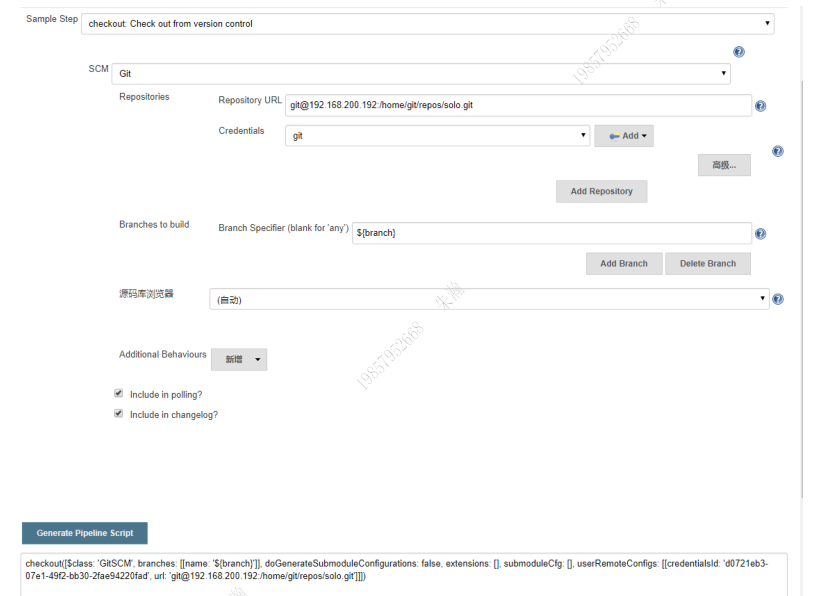
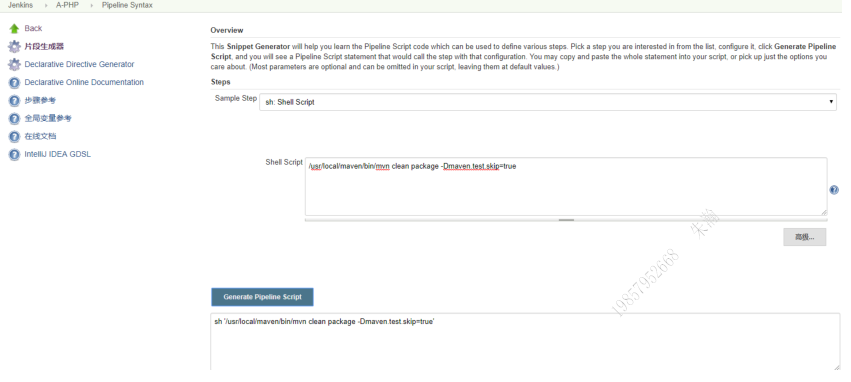
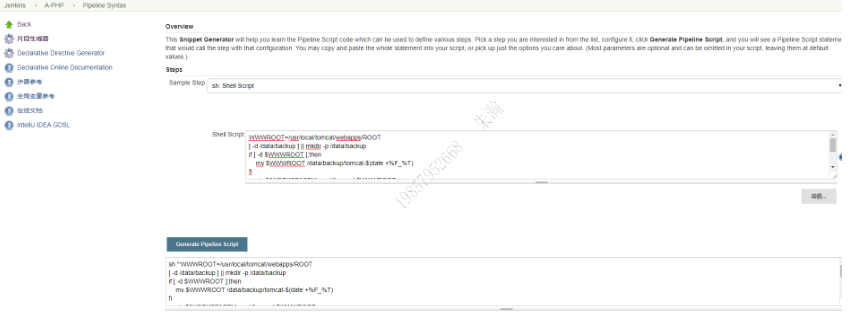
#推送本地仓库到远程git[root@localhost jenkinsfile]# git add *[root@localhost jenkinsfile]# git commit -m "test"[master 9ac23dd] test1 file changed, 24 insertions(+)create mode 100644 itemB/jenkinsfile-java-solo[root@localhost jenkinsfile]# git push -u origin masterCounting objects: 5, done.Compressing objects: 100% (3/3), done.Writing objects: 100% (4/4), 860 bytes | 0 bytes/s, done.Total 4 (delta 0), reused 0 (delta 0)To git@192.168.200.189:/home/git/repos/jenkinsfile081e971..9ac23dd master -> master分支 master 设置为跟踪来自 origin 的远程分支 master。#进行流水线脚本克隆测试[root@localhost jenkinsfile]# cd /test/[root@localhost test]# lssolo[root@localhost test]# rm -rf *[root@localhost test]# git clone git@192.168.200.189:/home/git/repos/jenkinsfile正克隆到 'jenkinsfile'...remote: 对象计数中: 20, 完成.remote: 压缩对象中: 100% (14/14), 完成.remote: Total 20 (delta 2), reused 0 (delta 0)接收对象中: 100% (20/20), done.处理 delta 中: 100% (2/2), done.[root@localhost test]# lsjenkinsfile[root@localhost test]# cd jenkinsfile/[root@localhost jenkinsfile]# lsitemA itemB[root@localhost jenkinsfile]# ls itemBjenkinsfile-java-solo
6.5 设置分布式构建的slave管理节点
6.5.1 添加用于ssh连接的账户和密码
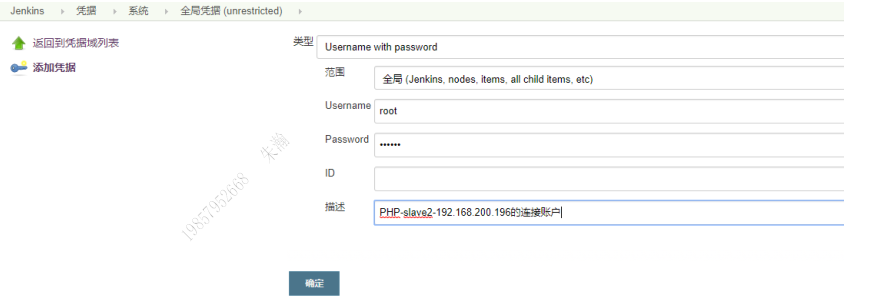
6.5.2 配置slave从节点

6.6 进行流水线的单slave从节点分布式构建测试
如果不出意外,构建会失败在最后一步(tomcat进程未启动)
jenkins没办法启动tomcat的socket进程
原因在于pipeline
流水线在启动一个脚本程序的时候,这个脚本程序会运行在后台
当是当pipeline结束以后,jenkins会自动kill掉所有和pipeline有关的派生子进程
因此,我们需要在流水线脚本里加一个变量参数,不让pipeline杀掉才行
- JENKINS_NODE_COOKIE=dontkillme
node ("B-JAVA") {stage('git checkout') {checkout([$class: 'GitSCM', branches: [[name: '${branch}']], extensions: [],userRemoteConfigs: [[credentialsId: 'ea8eec2d-4809-4035-8fd1-244598f7eba4',url: 'git@192.168.200.189:/home/git/repos/solo.git']]])}stage('maven build') {sh '/usr/local/maven/bin/mvn clean package -Dmaven.test.skip=true'}stage('deploy') {sh '''WWWROOT=/usr/local/tomcat/webapps/ROOTJENKINS_NODE_COOKIE=dontkillme[ -d /data/backup ] || mkdir -p /data/backupif [ -d $WWWROOT ];thenmv $WWWROOT /data/backup/tomcat-$(date +%F_%T)fiunzip ${WORKSPACE}/target/*.war -d $WWWROOTPID=$(ps -ef | grep tomcat | egrep -v "grep|$$" | awk \'{print $2}\')[ -n "$PID" ] && kill -9 $PID/bin/bash /usr/local/tomcat/bin/startup.sh'''}stage('test') {sh 'echo susses'}}#提交远程git仓库[root@localhost itemB]# git add *[root@localhost itemB]# git commit -m "xxx"[root@localhost itemB]# git push -u origin master
进行分布式构建测试

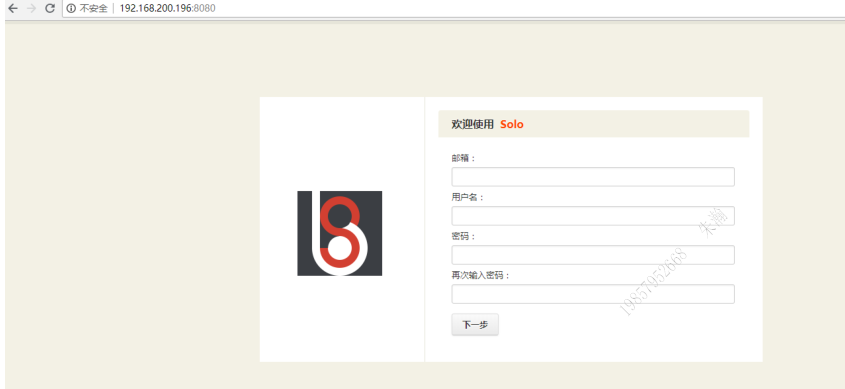
6.7 进行流水线的单slave从节点ssh远程分布式构建测试
克隆一台tomcat服务器,进行ssh远程构建

6.7.1 安装SSH Pipeline Steps插件
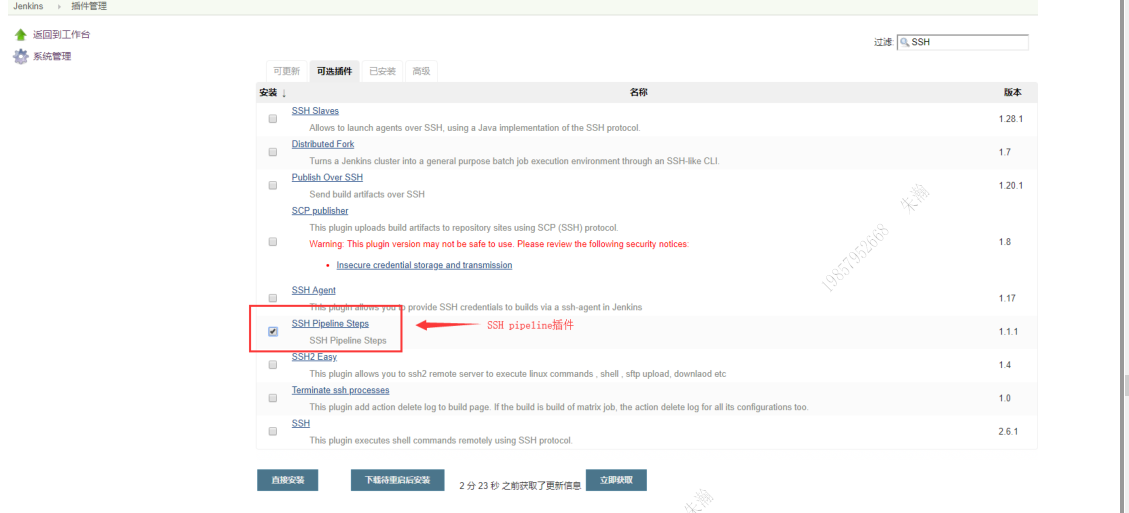

6.7.2 修改流水线脚本,并提交Git仓库
#修改流水线脚本,并提交Git仓库node ("B-JAVA") {//def mvnHomedef remote = [:]stage('git checkout') {sh 'hostname -I'checkout([$class: 'GitSCM', branches: [[name: '${branch}']], extensions: [],userRemoteConfigs: [[credentialsId: 'ea8eec2d-4809-4035-8fd1-244598f7eba4',url: 'git@192.168.200.189:/home/git/repos/solo.git']]])}stage('maven build') {sh '/usr/local/maven/bin/mvn clean package -Dmaven.test.skip=true'}stage('Remote SSH 200.189') {remote.name = 'test'remote.host = '192.168.200.189'remote.user = 'git'remote.password = '123123'remote.allowAnyHosts = truewriteFile file: '189.sh', text: 'echo "`hostname -I`"'sshScript remote: remote, script: "189.sh"}stage('Remote SSH 192.168.200.201') {remote.name = 'test'remote.host = '192.168.200.201'remote.user = 'root'remote.password = '635509'remote.allowAnyHosts = truewriteFile file: '201.sh', text: 'echo "`hostname -I`"'sshScript remote: remote, script: "201.sh"}}
6.7.3 进行分布式构建测试
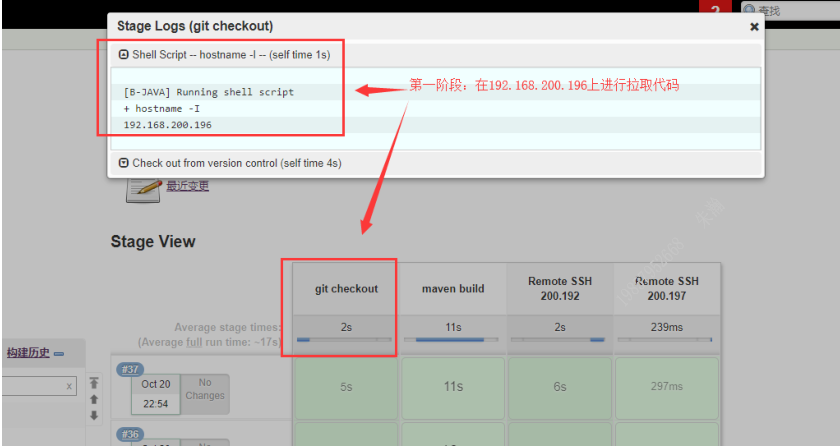
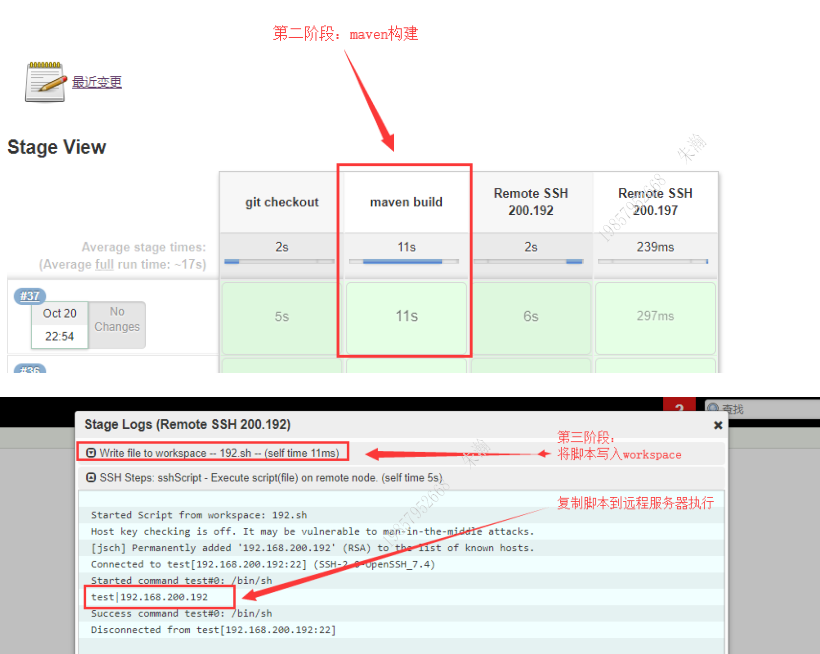

6.8 进行流水线的多slave从节点分布式构建测试
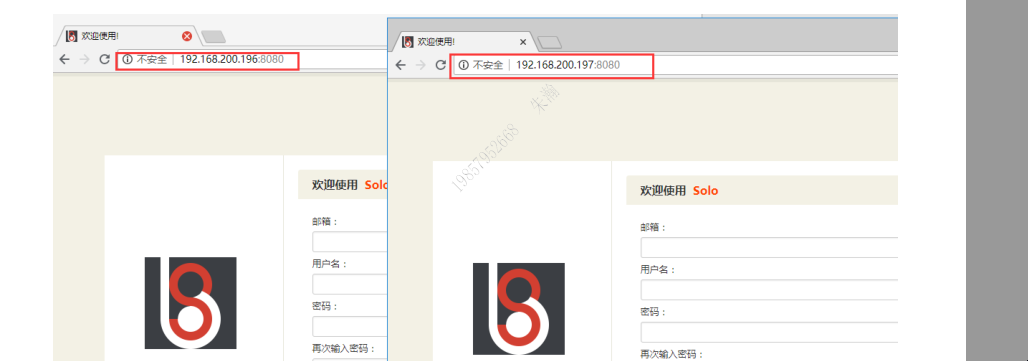
添加slave从节点,并进行多节点构建
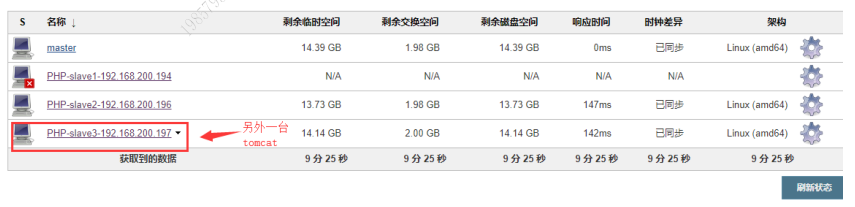
#修改流水线脚本,并提交Git仓库node ("B-JAVA") {//def mvnHomestage('Git checkout') {checkout([$class: 'GitSCM', branches: [[name: '${branch}']], extensions: [],userRemoteConfigs: [[credentialsId: 'ea8eec2d-4809-4035-8fd1-244598f7eba4',url: 'git@192.168.200.189:/home/git/repos/solo.git']]])}stage('Maven Build') {sh '/usr/local/maven/bin/mvn clean package -Dmaven.test.skip=true'}stage('Deploy') {sh '''JENKINS_NODE_COOKIE=dontkillmeWWWROOT=/usr/local/tomcat/webapps/ROOT[ -d /data/backup ] || mkdir -p /data/backupif [ -d $WWWROOT ];thenmv $WWWROOT /data/backup/tomcat-$(date +%F_%T)fiunzip ${WORKSPACE}/target/*.war -d $WWWROOTPID=$(ps -ef | grep tomcat | egrep -v "grep|$$" | awk \'{print $2}\')[ -n "$PID" ] && kill -9 $PID/bin/bash /usr/local/tomcat/bin/startup.sh'''}stage('Test') {echo "success"}}node ("B-JAVA2") {//def mvnHomestage('git checkout') {checkout([$class: 'GitSCM', branches: [[name: '${branch}']], extensions: [],userRemoteConfigs: [[credentialsId: 'ea8eec2d-4809-4035-8fd1-244598f7eba4',url: 'git@192.168.200.189:/home/git/repos/solo.git']]])}stage('Maven Build') {sh '/usr/local/maven/bin/mvn clean package -Dmaven.test.skip=true'}stage('Deploy') {sh '''JENKINS_NODE_COOKIE=dontkillmeWWWROOT=/usr/local/tomcat/webapps/ROOT[ -d /data/backup ] || mkdir -p /data/backupif [ -d $WWWROOT ];thenmv $WWWROOT /data/backup/tomcat-$(date +%F_%T)fiunzip ${WORKSPACE}/target/*.war -d $WWWROOTPID=$(ps -ef | grep tomcat | egrep -v "grep|$$" | awk \'{print $2}\')[ -n "$PID" ] && kill -9 $PID/bin/bash /usr/local/tomcat/bin/startup.sh'''}stage('Test') {echo "success"}}

 浙公网安备 33010602011771号