
初次使用高德地图+vue-amap实现标记点+label功能
效果图:
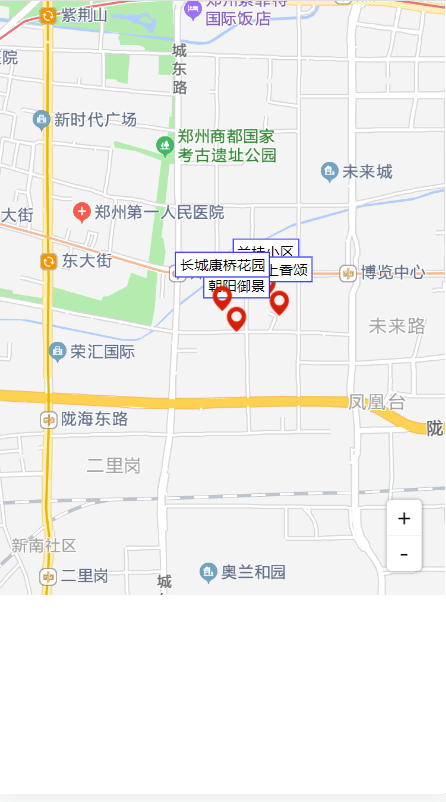
步骤:
1. npm安装
npm install vue-amap --save
2. 安装后在main.js中设置以下内容
import VueAMap from 'vue-amap';

Vue.use(VueAMap);
VueAMap.initAMapApiLoader({
  key: '你申请的key',
  plugin: ["AMap.Driving", "AMap.ToolBar"],
  v: '2.0'
});
3 .应用
<template>
  <div class="amap-wrapper">
    <el-amap class="amap-box" :amap-manager="amapManager" :events="events" vid="amapContainer">
    </el-amap>
  </div>
</template>

<script>
import { AMapManager, lazyAMapApiLoaderInstance } from 'vue-amap'
const amapManager = new AMapManager()
export default {
  name: 'MapShow',

  data() {
    return {
      amapManager,
      events: {},
      markerList: [
        {marker: [113.697791,34.746216], name: '兰桂小区'},
        {marker: [113.698758,34.745175], name: '海上香颂'},
        {marker: [113.695714,34.74422], name: '朝阳御景'},
        {marker: [113.69469,34.745463], name: '长城康桥花园'},
      ],
      iconPoint: require('../assets/ico.png')
    };
  },
  mounted() {
    lazyAMapApiLoaderInstance.load().then(() => {

      this.map = new window.AMap.Map('amapContainer', {
        center: [113.69469, 34.745463], //地图显示的中心位置
        zoom: 14, //地图缩放比例
      })
      this.map.addControl(new window.AMap.ToolBar({
            // 简易缩放模式,默认为 false
            liteStyle: true
      }));
     //地图标记点方法
      this.createMark()
    })
  },

  methods: {
    createMark() {
      const icon = new window.AMap.Icon({
        size: new window.AMap.Size(24, 24),
        image: this.iconPoint,
        imageSize: new window.AMap.Size(24, 24)
      })
      var labelOffset = new window.AMap.Pixel(0, -5);
      this.markerList.forEach((item) => {
        const labelContent = "<div class='labelContent'>"+item.name+"</div>"
        const marker = new window.AMap.Marker({
          position: item.marker,
          icon: icon,
          anchor: 'center', //设置锚点
          offset: new window.AMap.Pixel(0,0), //设置偏移量
          label: {
            direction: 'top',
            content: labelContent,
            offset: labelOffset,
          }
        })
        // this.map.add(marker)
        marker.setMap(this.map)
      })
    },
    eventsFun() {
      const self = this
      return {
        // 地图加载完成时执行的方法
        complete() {
          self.createMark()
        }
      }
    }
  },
};
</script>

<style lang="less" scoped>
  .amap-wrapper {
    width: 100%;
    height: 500px;
  }
</style>

 浙公网安备 33010602011771号