
Autofac的基本使用---2、普通类型
准备
使用的表是Student,创建相关的IDAL、DAL、IBLL、BLL层。
使用EF,创建一个Model层,存放edmx文件。
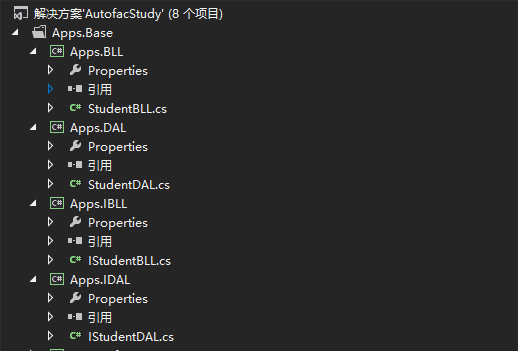

控制台程序的使用
using System;
using System.Collections.Generic;
using System.Linq;
using System.Text;
using System.Threading.Tasks;
using Apps.BLL;
using Apps.DAL;
using Apps.IBLL;
using Apps.IDAL;
using Apps.Model;
using Autofac;

namespace Apps.Con
{
    class Program
    {
        static void Main(string[] args)
        {
            #region 普通类型---Student
            // 创建组件/服务注册的容器
            var builder = new ContainerBuilder();

            // 注册类型公开接口
            builder.RegisterType<StudentDAL>().As<IStudentDAL>();
            builder.RegisterType<StudentBLL>().As<IStudentBLL>();

            // 编译容器完成注册且准备对象解析
            var container = builder.Build();

            // 现在你可以使用 Autofac 解析服务. 例如,这行将执行注册的lambda表达式对于 IConfigReader 服务.
            //但是我们不推荐直接操作容器,这会导致内存泄漏。
            //当我们解析出一个组件时,依赖于我们定义的lifetime scope,一个新的对象实例会被创建。
            using (var scope = container.BeginLifetimeScope())
            {
                //从容器中解析需要使用的组件
                var iStudentBLL = scope.Resolve<IStudentBLL>();
                //调用解析后的组件中的方法
                List<Student> list = iStudentBLL.GetList().ToList();

                Console.WriteLine("List中的数据行:"+list.Count);
            }
            #endregion

            #region 泛型类型---Teacher

            #endregion

            Console.ReadKey();
        }
    }
}
(1)使用流程
专业介绍:
参见:https://www.cnblogs.com/mantgh/p/5106149.html
将Autofac集成进你的应用的基本模式:
在脑海中构造基于控制反转(IoC)的应用程序架构
添加Autofac引用.
在应用启动配置流程...
创建一个 ContainerBuilder.
注册组件(components).
build定义的ContainerBuilder生成Autofac容器,并存储它以供后续使用.
在程序运行时...
从Autofac容器(container)创建生命周期域(lifetime scope).
使用生命周期域来解析出组件实例.
自己理解:
a.参见Autofac管理注册类的容器实例
var builder = new ContainerBuilder();
b.下面就需要为这个容器注册它可以管理的类型
builder.RegisterType<StudentDAL>().As<IStudentDAL>();
c.生成具体的实例
var container = builder.Build();
d.在应用运行期间,你需要从容器生命周期域中解析出组件实例来使用它们。
using (var scope = container.BeginLifetimeScope())  {  }
e.从容器中解析需要使用的组件
var iStudentBLL = scope.Resolve<IStudentBLL>();
f.调用解析出来的组件的方法
List<Student> list = iStudentBLL.GetList().ToList();
MVC中的使用
@model List<Apps.Model.Teacher>
@{
    Layout = null;
}

<!DOCTYPE html>

<html>
<head>
    <meta name="viewport" content="width=device-width" />
    <title>Index</title>
</head>
<body>
    <table>
        <tr>
            <th style="width: 400px">主键
            </th>
            <th style="width: 80px">姓名
            </th>
            <th style="width: 40px">年龄
            </th>
            <th style="width: 400px">创建时间
            </th>
        </tr>
        @foreach (var item in Model)
        {
            <tr>
                <td style="text-align:center">
                    @Html.DisplayFor(modelItem => item.gKey)
                </td>
                <td style="text-align:center">
                    @Html.DisplayFor(modelItem => item.sName)
                </td>
                <td style="text-align:center">
                    @Html.DisplayFor(modelItem => item.iAge)
                </td>
                <td style="text-align:center">
                    @Html.DisplayFor(modelItem => item.dAddTime)
                </td>
            </tr>
        }
    </table>
</body>
</html>
using System;
using System.Collections.Generic;
using System.Linq;
using System.Web;
using System.Web.Mvc;
using Apps.IBLL;
using Apps.Model;
using Autofac;
using Autofac.Core;

namespace Apps.Web.Controllers
{
    public class HomeController : Controller
    {
        #region 普通类型---Student
        private readonly IStudentBLL _iBLL;
        public HomeController(IStudentBLL iBLL)
        {
            this._iBLL = iBLL;
        }
        public ActionResult Index()
        {
            List<Student> lstStudent = _iBLL.GetList().ToList();

            //为了视图不要重写,将Student类赋值给Teacher类。两个类的字段完全一样
            List<Teacher> lstTeacher = new List<Teacher>();
            foreach (Student item in lstStudent)
            {
                Teacher model = new Teacher();
                model.gKey = item.gKey;
                model.sName = item.sName;
                model.iAge = item.iAge;
                model.dAddTime = item.dAddTime;
                lstTeacher.Add(model);
            }

            return View(lstTeacher);
        }
        #endregion

        #region 将容器保存在Application中---Student
        //private IStudentBLL _iBLL;
        //public ActionResult Index()
        //{
        //    if (_iBLL == null)
        //    {
        //        object oContainer = System.Web.HttpContext.Current.Application["container"];
        //        if (oContainer != null && oContainer != "")
        //        {
        //            IContainer ioc = (IContainer)oContainer;
        //            //当我们解析出一个组件时,依赖于我们定义的lifetime scope,一个新的对象实例会被创建。
        //            using (var scope = ioc.BeginLifetimeScope())
        //            {
        //                //从容器中解析需要使用的组件
        //                _iBLL = scope.Resolve<IStudentBLL>();
        //                //调用解析后的组件中的方法
        //                List<Student> list = _iBLL.GetList().ToList();

        //                Console.WriteLine("List中的数据行:" + list.Count);
        //            }
        //        }
        //        else
        //        {
        //            throw new Exception("IOC容器初始化发生错误!");
        //        }
        //    }
        //    List<Student> lstStudent = _iBLL.GetList().ToList();

        //    //为了视图不要重写,将Student类赋值给Teacher类。两个类的字段完全一样
        //    List<Teacher> lstTeacher = new List<Teacher>();
        //    foreach (Student item in lstStudent)
        //    {
        //        Teacher model = new Teacher();
        //        model.gKey = item.gKey;
        //        model.sName = item.sName;
        //        model.iAge = item.iAge;
        //        model.dAddTime = item.dAddTime;
        //        lstTeacher.Add(model);
        //    }

        //    return View(lstTeacher);
        //}
        #endregion
    }
}
using System;
using System.Collections.Generic;
using System.Linq;
using System.Reflection;
using System.Web;
using System.Web.Mvc;
using System.Web.Routing;
using Apps.BLL;
using Apps.DAL;
using Apps.IBLL;
using Apps.IDAL;
using Apps.Web.Controllers;
using Autofac;
using Autofac.Integration.Mvc;

namespace Apps.Web
{
    public class MvcApplication : System.Web.HttpApplication
    {
        protected void Application_Start()
        {
            AreaRegistration.RegisterAllAreas();
            RouteConfig.RegisterRoutes(RouteTable.Routes);

            #region 普通类型---Student
            // 创建组件/服务注册的容器
            var builder = new ContainerBuilder();

            // 注册类型公开接口
            builder.RegisterType<StudentDAL>().As<IStudentDAL>();
            builder.RegisterType<StudentBLL>().As<IStudentBLL>();

       //方式1:单个Controller的注册(项目中有多少个Controller就要写多少次)
            builder.RegisterType<HomeController>().InstancePerDependency();
            //方式2:使用Autofac提供的RegisterControllers扩展方法来对程序集中所有的Controller一次性的完成注册
            //builder.RegisterControllers(Assembly.GetExecutingAssembly());

            //生成具体的实例
            var container = builder.Build();
            //下面就是使用MVC的扩展 更改了MVC中的注入方式.
            DependencyResolver.SetResolver(new AutofacDependencyResolver(container));
            #endregion

            #region 泛型类型---Teacher

            #endregion
        }
    }
}
前面两个Index.cshtml和HomeCotroller.cs只是数据的展示,所以被折叠起来。
重点在Global.asax中的配置。
(1)使用流程
自己理解
a.参见Autofac管理注册类的容器实例
var builder = new ContainerBuilder();
b.下面就需要为这个容器注册它可以管理的类型
builder.RegisterType<StudentDAL>().As<IStudentDAL>();
c.注册Controller,这个有两个方式。一、手动对项目中所有的Controller进行注册。二、使用Autofac的方法对程序集中所有的Controller一次性完成注册
builder.RegisterType<HomeController>().InstancePerDependency();//手动注册单个
builder.RegisterControllers(Assembly.GetExecutingAssembly());//自动注册全部
d.生成具体的实例
var container = builder.Build();
e.依赖关系解析.就是使用MVC的扩展 更改了MVC中的注入方式.
DependencyResolver.SetResolver(new AutofacDependencyResolver(container));
存在的疑问
(1)MVC使用中多的步骤一,注册Controller控制器。且不注册的话,运行时会提示。这个步骤是做什么的?
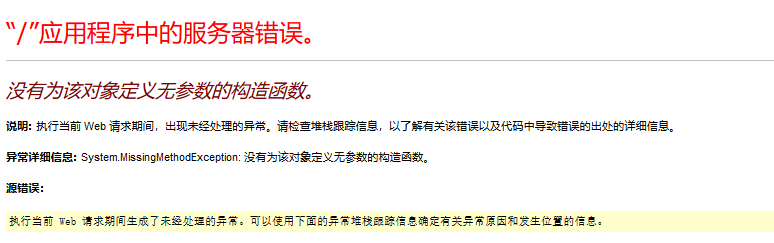
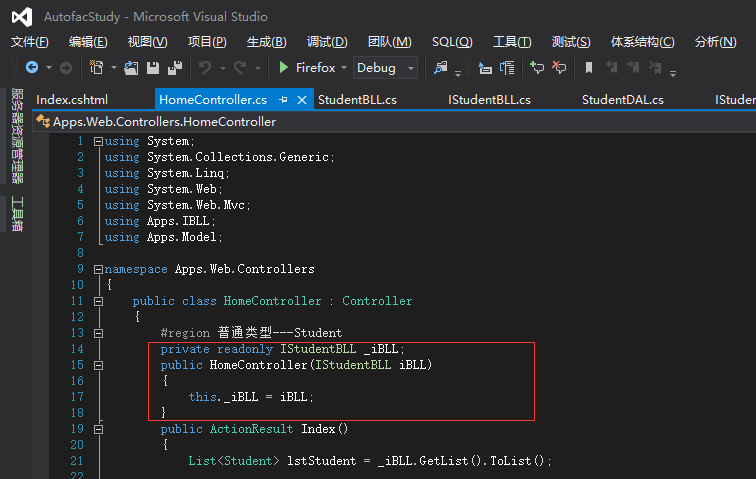
(2)MVC中多的步骤二,依赖关系解析.添加了该步骤后,Controller中的组件配置为构造或属性注入(如下图配置为构造注入),
在程序运行时,申明的组件已经被实例化了。
省略了控制台程序中,去手动解析需要使用的组件
(3)MVC中免去了手动解析的步骤,那么在ASP.NET Webform项目中应该怎么使用呢?
公司的ASP.NET Webform项目中,使用的是Unity进行依赖注入。
使用步骤:
a.在Application_Start方法中进行注册
UnityRegister.Register(Application);
b.详细代码
using System;
using System.Collections.Generic;
using System.Linq;
using System.Web;
using Microsoft.Practices.Unity;

namespace BF.Web.App_Code
{
    public class UnityRegister
    {
        public static void Register(HttpApplicationState Application)
        {
            IUnityContainer unityContainer = new UnityContainer();
            //注册关系
            unityContainer.RegisterType<IIcCardLogBLL, IcCardLogBLL>(new HttpContextLifetimeManager<IIcCardLogBLL>());
            unityContainer.RegisterType<IIcCardLogDAL, IcCardLogDAL>(new HttpContextLifetimeManager<IIcCardLogDAL>());
            //将配置信息保存到Application
            Application.Add("UnityContainer", unityContainer);
        }
    }
}
c.使用时
IIcCardLogBLL iIcCardLogBLL= IOCFactory.GetIOCResolve<IIcCardLogBLL>();
d.详细代码
using System;
using System.Collections.Generic;
using System.Linq;
using System.Text;
using Microsoft.Practices.Unity;
using System.Web;
using System.Configuration;
using Microsoft.Practices.Unity.Configuration;

namespace BF.UnityFactory
{
    public static class IOCFactory
    {

        public static T GetIOCResolve<T>()
        {
            if (HttpContext.Current.Application["UnityContainer"] != null && HttpContext.Current.Application["UnityContainer"] != "")
            {
                //从Application获取容器
                IUnityContainer ioc = HttpContext.Current.Application["UnityContainer"] as UnityContainer;
                //从容器中解析组件
                return ioc.Resolve<T>();
            }
            else
            {
                throw new Exception("IOC容器初始化发生错误!");
            }
        }
    }
}
(4)在MVC中尝试上面的方法,修改HomeController 和Application_Start的代码
using System;
using System.Collections.Generic;
using System.Linq;
using System.Reflection;
using System.Web;
using System.Web.Mvc;
using System.Web.Routing;
using Apps.BLL;
using Apps.DAL;
using Apps.IBLL;
using Apps.IDAL;
using Apps.Infrastructure.BaseObject;
using Apps.Infrastructure.IBaseInterface;
using Apps.Web.Controllers;
using Autofac;
using Autofac.Integration.Mvc;

namespace Apps.Web
{
    public class MvcApplication : System.Web.HttpApplication
    {
        protected void Application_Start()
        {
            AreaRegistration.RegisterAllAreas();
            RouteConfig.RegisterRoutes(RouteTable.Routes);

            #region 普通类型---Student
            //// 创建组件/服务注册的容器
            //var builder = new ContainerBuilder();

            //// 注册类型公开接口
            //builder.RegisterType<StudentDAL>().As<IStudentDAL>();
            //builder.RegisterType<StudentBLL>().As<IStudentBLL>();

            ////方式1:单个Controller的注册(项目中有多少个Controller就要写多少次)
            //builder.RegisterType<HomeController>().InstancePerDependency();
            ////方式2:使用Autofac提供的RegisterControllers扩展方法来对程序集中所有的Controller一次性的完成注册
            ////builder.RegisterControllers(Assembly.GetExecutingAssembly());

            ////生成具体的实例
            //var container = builder.Build();
            ////下面就是使用MVC的扩展 更改了MVC中的注入方式.
            //DependencyResolver.SetResolver(new AutofacDependencyResolver(container));
            #endregion

            #region 将容器保存在Application中---Student
            // 创建组件/服务注册的容器
            var builder = new ContainerBuilder();

            // 注册类型公开接口
            builder.RegisterType<StudentDAL>().As<IStudentDAL>();
            builder.RegisterType<StudentBLL>().As<IStudentBLL>();

            //方式1:单个Controller的注册(项目中有多少个Controller就要写多少次)
            //builder.RegisterType<HomeController>().InstancePerDependency();
            //方式2:使用Autofac提供的RegisterControllers扩展方法来对程序集中所有的Controller一次性的完成注册
            //builder.RegisterControllers(Assembly.GetExecutingAssembly());

            //生成具体的实例
            var container = builder.Build();
            //下面就是使用MVC的扩展 更改了MVC中的注入方式.
            //DependencyResolver.SetResolver(new AutofacDependencyResolver(container));

            Application.Add("container", container);
            #endregion

            #region 泛型类型---Teacher
            //// 创建组件/服务注册的容器
            //var builder = new ContainerBuilder();

            //// 注册类型公开接口

            //builder.RegisterGeneric(typeof(UnitOfWork<>)).As(typeof(IUnitOfWork<>)).SingleInstance();
            //builder.RegisterGeneric(typeof(DatabaseFactory<>)).As(typeof(IDatabaseFactory<>)).SingleInstance();

            //builder.RegisterType<TeacherBLL>().As<ITeacherBLL>();
            //builder.RegisterType<TeacherDAL>().As<ITeacherDAL>();

            ////方式1:单个Controller的注册(项目中有多少个Controller就要写多少次)
            ////builder.RegisterType<HomeController>().InstancePerDependency();
            ////方式2:使用Autofac提供的RegisterControllers扩展方法来对程序集中所有的Controller一次性的完成注册
            //builder.RegisterControllers(Assembly.GetExecutingAssembly());

            ////生成具体的实例
            //var container = builder.Build();
            ////下面就是使用MVC的扩展 更改了MVC中的注入方式.
            //DependencyResolver.SetResolver(new AutofacDependencyResolver(container));
            #endregion
        }
    }
}
using System;
using System.Collections.Generic;
using System.Linq;
using System.Web;
using System.Web.Mvc;
using Apps.IBLL;
using Apps.Model;
using Autofac;
using Autofac.Core;

namespace Apps.Web.Controllers
{
    public class HomeController : Controller
    {
        #region 普通类型---Student
        //private readonly IStudentBLL _iBLL;
        //public HomeController(IStudentBLL iBLL)
        //{
        //    this._iBLL = iBLL;
        //}
        //public ActionResult Index()
        //{
        //    List<Student> lstStudent = _iBLL.GetList().ToList();

        //    //为了视图不要重写,将Student类赋值给Teacher类。两个类的字段完全一样
        //    List<Teacher> lstTeacher = new List<Teacher>();
        //    foreach (Student item in lstStudent)
        //    {
        //        Teacher model = new Teacher();
        //        model.gKey = item.gKey;
        //        model.sName = item.sName;
        //        model.iAge = item.iAge;
        //        model.dAddTime = item.dAddTime;
        //        lstTeacher.Add(model);
        //    }

        //    return View(lstTeacher);
        //}
        #endregion

        #region 将容器保存在Application中---Student
        private IStudentBLL _iBLL;
        public ActionResult Index()
        {
            if (_iBLL == null)
            {
                object oContainer = System.Web.HttpContext.Current.Application["container"];
                if (oContainer != null && oContainer != "")
                {
                    IContainer ioc = (IContainer)oContainer;
                    //当我们解析出一个组件时,依赖于我们定义的lifetime scope,一个新的对象实例会被创建。
                    using (var scope = ioc.BeginLifetimeScope())
                    {
                        //从容器中解析需要使用的组件
                        _iBLL = scope.Resolve<IStudentBLL>();
                        //调用解析后的组件中的方法
                        List<Student> list = _iBLL.GetList().ToList();

                        Console.WriteLine("List中的数据行:" + list.Count);
                    }
                }
                else
                {
                    throw new Exception("IOC容器初始化发生错误!");
                }
            }
            List<Student> lstStudent = _iBLL.GetList().ToList();

            //为了视图不要重写,将Student类赋值给Teacher类。两个类的字段完全一样
            List<Teacher> lstTeacher = new List<Teacher>();
            foreach (Student item in lstStudent)
            {
                Teacher model = new Teacher();
                model.gKey = item.gKey;
                model.sName = item.sName;
                model.iAge = item.iAge;
                model.dAddTime = item.dAddTime;
                lstTeacher.Add(model);
            }

            return View(lstTeacher);
        }
        #endregion
    }
}
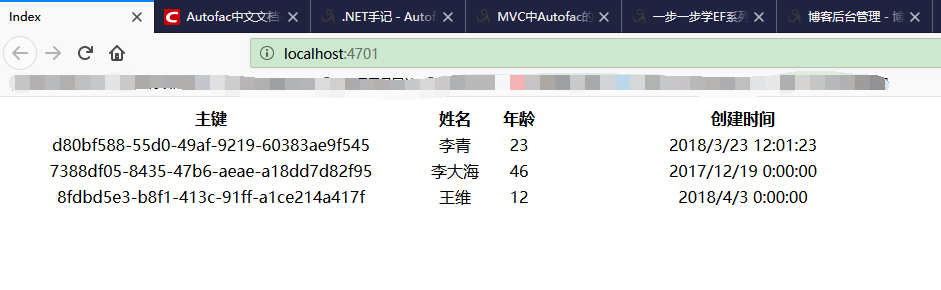
同样能获取到数据。
注意:Application_Start中没有进行Controller的注册和依赖关系解析这两步操作。
但是,个人感觉这样处理不是太合适。
第一,将数据保存在Application中,是不是存在数据丢失和安全的问题。
第二,在使用时,还是需要调用公用去解析组件。
总之,不如使用上面MVC自带的方法处理的方便和简洁。

 浙公网安备 33010602011771号