
05-Python数据类型
Python数据类型
变量的定义
在程序中,有时我们需要对2个数据进行求和,那么该怎样做呢?
大家类比一下现实生活中,比如去超市买东西,往往咱们需要一个菜篮子,用来进行存储物品,等到所有的物品都购买完成后,在收银台进行结账即可
如果在程序中,需要把2个数据,或者多个数据进行求和的话,那么就需要把这些数据先存储起来,然后把它们累加起来即可
在Python中,存储一个数据,需要一个叫做变量的东西,如下示例:
num1 = 100 #num1就是一个变量,就好一个小菜篮子

num2 = 99  #num2也是一个变量

result = num1 + num2 #把num1和num2这两个"菜篮子"中的数据进行累加,然后放到 result变量中
-
说明:
- 所谓变量,可以理解为
菜篮子,如果需要存储多个数据,最简单的方式是有多个变量,当然了也可以使用一个 - 程序就是用来处理数据的,而变量就是用来存储数据的
- 所谓变量,可以理解为
想一想:我们应该让变量占用多大的空间,保存什么样的数据?
程序中:
为了更充分的利用内存空间以及更有效率的管理内存,变量是有不同的类型的,如下所示:
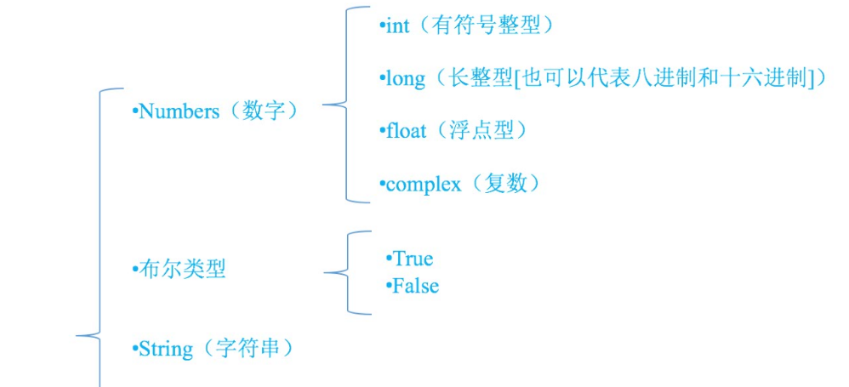
数值类型
int(整型)
在
Python中定义变量是 不需要指定类型(在其他很多高级语言中都需要)
整型,也被称之为整数。整数就是数学中的数字。
整型在Python中不受长度限制大小范围
**定义 **
使用
type函数可以查看一个变量的类型
In [1]: 1
Out[1]: 1

In [2]: type(1)
Out[2]: int
浮点型(float)
float() 函数用于将整数和字符串转换成浮点数。
小数
定义
In [1]: 1.0
Out[1]: 1.0

In [2]: type(1.0)
Out[2]: float
运算、运算符优先级与整形是一样。
布尔类型(bool)
python 中布尔值使用常量True 和 False来表示;注意大小写
bool 是 int 的子类(继承 int ),故 True == 1 False == 0 是会返回 Ture
bool 类型只有两种状态真或假
In [17]: bool(-1)
Out[17]: True

In [18]: bool(0)
Out[18]: False

In [19]: bool(None)
Out[19]: False

In [20]: bool("")
Out[20]: False

In [21]: bool(" ")
Out[21]: True

In [22]: def a():
    ...:     pass
    ...:
    ...: bool(a)
Out[22]: True
总结
True 对 False 错
布尔类型只有两种状态,True or Flase 。数字除了零之外,其余均为 True ,字符串除了空字符串之外都为True,对象除了空对象之外,其余均为 True 。
比较运算符
以下假设变量a为10,变量b为20:
| 运算符 | 描述 | 实例 |
|---|---|---|
| == | 等于 - 比较对象是否相等 | (a == b) 返回 False。 |
| != | 不等于 - 比较两个对象是否不相等 | (a != b) 返回 true. |
| <> | 不等于 - 比较两个对象是否不相等 | (a <> b) 返回 true。这个运算符类似 != |
| > | 大于 - 返回x是否大于y | (a > b) 返回 False。 |
| < | 小于 - 返回x是否小于y。 | (a < b) 返回 true。 |
| >= | 大于等于 - 返回x是否大于等于y。 | (a >= b) 返回 False。 |
| <= | 小于等于 - 返回x是否小于等于y。 | (a <= b) 返回 true。 |
逻辑运算符
Python语言支持逻辑运算符,以下假设变量 a 为 10, b为 20:
| 运算符 | 逻辑表达式 | 描述 | 实例 |
|---|---|---|---|
| and | x and y | 布尔"与" ,两个条件都满足 | (a and b) 返回 20。 |
| or | x or y | 布尔"或",两个条件中满足一个 | (a or b) 返回 10。 |
| not | not x | 布尔"非" ,否定之前的结果 | not(a and b) 返回 False |
逻辑运算符案例:
x = 1
y = 0

print(x and y)
print(x or y)
print(not x)
print(not y)

# 案例升级
x = 3 > 4
y = 5 > 4
运算符优先级
以下表格列出了从最高到最低优先级的所有运算符:
| 运算符 | 描述 |
|---|---|
| ** | 指数 (最高优先级) |
| ~ + - | 按位翻转, 一元加号和减号 (最后两个的方法名为 +@ 和 -@) |
| * / % // | 乘,除,取模和取整除 |
| + - | 加法减法 |
| >> << | 右移,左移运算符 |
| & | 位 'AND' |
| ^ | | 位运算符 |
| <= < > >= | 比较运算符 |
| <> == != | 等于运算符 |
| = %= /= //= -= += *= **= | 赋值运算符 |
| is is not | 身份运算符 |
| in not in | 成员运算符 |
| not and or | 逻辑运算符 |
运算符优先级案例:
if 4 > 2 ** 4 or True is 1 and '4' in "345":
	print(True)
    # 从右到左
    False or True and True
    	False
# 从左到有运算 左目运算符
# 从右到左的  右目运算符
字符串
序列类型
在Python中如果我想表示字母怎么办呢?
字符串创建
字符串是 Python 中最常用的数据类型。我们可以使用引号( ' 或 " )来创建字符串。
创建字符串很简单,只要为变量分配一个值即可。
单引号和双引号
在 Python 中我们都知道单引号和双引号都可以用来表示一个字符串,比如
print("好好学习,'天天向上'")

结果:
好好学习,'天天向上'

print('"python"是一门优秀的语言')

结果:
"python"是一门优秀的语言

一个单引号并不是单引号,它是字符串创建的格式
总体来说没有任何区别,只在单引号当普通字符时容易区分:如 var = "let's go"
三引号创建块字符串
# 三引号实现块注释
""" 文档注释
三引号实现块注释
"""
''''''
字符串取值
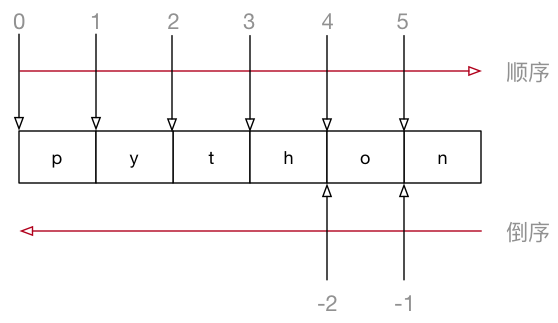
在 Python 中不仅支持 顺序索引,同时还支持 倒序索引
In [14]: s[0]
Out[14]: 'h'

In [15]: s[1]
Out[15]: 'e'
字符串切片
切片操作(slice)可以从一个字符串中获取子字符串(字符串的一部分)。我们使用一对方括号、起始偏移量start、终止偏移量end 以及可选的步长step 来定义一个分片。
顾头不顾尾
"hello world !"[start:stop:step]
"hello world !"[起始值:结束值:步长]
- 起始值,从那个位置开始
- 结束值,到那个位置结束(不包含结束位本身)
- 步长,隔几个数取一次
In [16]: s[0:5]
Out[16]: 'hello'

In [17]: s[:5]
Out[17]: 'hello'

In [18]: s[5:]
Out[18]: ' world !'

In [19]: s[:]
Out[19]: 'hello world !'

In [20]: s[::2]
Out[20]: 'hlowrd!'
字符串格式化
把不是字符类型的 转变成字符串
- 在 Python 中可以使用
print函数将信息输出到控制台 - 如果希望输出文字信息的同时,一起输出 数据,就需要使用到 格式化操作符
%被称为 格式化操作符,专门用于处理字符串中的格式- 包含
%的字符串,被称为 格式化字符串 %和不同的 字符 连用,不同类型的数据 需要使用 不同的格式化字符
- 包含
| 格式化字符 | 含义 |
|---|---|
| %s | 字符串 |
| %d | 有符号十进制整数,%06d 表示输出的整数显示位数,不足的地方使用 0 补全 |
| %f | 浮点数,%.2f 表示小数点后只显示两位 |
| %% | 输出 % |
- 语法格式如下:
print("格式化字符串 %s" % 变量1)

print("格式化字符串" % (变量1, 变量2...))
%s
In [24]: '%s'%123
Out[24]: '123'

In [25]:  '%-10.3f '% 10.3 # 总共占位十个,小数位三个
Out[25]: '10.300     '

In [26]:  '%-10.2f '% 10.3
Out[26]: '10.30      '
| 格式化字符 | 含义 |
|---|---|
| %s | 字符串 |
| %d | 有符号十进制整数,%06d 表示输出的整数显示位数,不足的地方使用 0 补全 |
| %f | 浮点数,%.2f 表示小数点后只显示两位 |
| %% | 输出 % |
| %c | %ASCII字符 |
| %o | %8进制 |
| %x | %16进制 |
| %e | %科学计数法 |
format
# 保留小数点后两位
In [1]: '{:.2f}'.format(12.333)
Out[1]: '12.33'

In [2]: '{a:.2f}'.format(a=12.333)
Out[2]: '12.33'

In [3]: '{a:6.2f}'.format(a=12.333)
Out[3]: ' 12.33'
对齐输出
# 左对齐 utf-8 万国码
In [5]: '{a:<10}'.format(a=12.3,b=13.44)
Out[5]: '12.3      '

# 数字补x (填充右边, 宽度为4)
In [6]: '{a:0<10}'.format(a=12.3,b=13.44)
Out[6]: '12.3000000'

# 两边对齐...
In [7]: '{a:0^10}'.format(a=12.3,b=13.44)
Out[7]: '00012.3000'
f
name = "hello"
f'{ name }'
字符串的常用操作
- 在
ipython中定义一个 字符串,例如:hello_str = "" - 输入
hello_str.按下TAB键,ipython会提示 字符串 能够使用的 方法 如下:
In [1]: hello_str.
hello_str.capitalize    hello_str.isidentifier  hello_str.rindex
hello_str.casefold      hello_str.islower       hello_str.rjust
hello_str.center        hello_str.isnumeric     hello_str.rpartition
hello_str.count         hello_str.isprintable   hello_str.rsplit
hello_str.encode        hello_str.isspace       hello_str.rstrip
hello_str.endswith      hello_str.istitle       hello_str.split
hello_str.expandtabs    hello_str.isupper       hello_str.splitlines
hello_str.find          hello_str.join          hello_str.startswith
hello_str.format        hello_str.ljust         hello_str.strip
hello_str.format_map    hello_str.lower         hello_str.swapcase
hello_str.index         hello_str.lstrip        hello_str.title
hello_str.isalnum       hello_str.maketrans     hello_str.translate
hello_str.isalpha       hello_str.partition     hello_str.upper
hello_str.isdecimal     hello_str.replace       hello_str.zfill
hello_str.isdigit       hello_str.rfind
提示:正是因为 python 内置提供的方法足够多,才使得在开发时,能够针对字符串进行更加灵活的操作!应对更多的开发需求!
常用的高级方法
| 方法 | 说明 |
|---|---|
| string.strip() | 截掉 string 左右两边的空白字符 |
| string.split(str="") | 以 str 为分隔符拆分 string,如果 num 有指定值, 则仅分隔 num + 1 个子字符串,str 默认包含 '\r', '\t', '\n' 和空格 |
| string.join(seq) | 以 string 作为分隔符,将 seq 中所有的元素(的字符串表示) 合并为一个新的字符串 |
| string.replace(old_str, new_str) | 把 string 中的 old_str 替换成 new_str |
常用高级方法案例:
In [4]: h = h.strip()

In [5]: h
Out[5]: 'hello world !'

In [6]: h.split()
Out[6]: ['hello', 'world', '!']

In [7]: h = h.split()

In [8]: h
Out[8]: ['hello', 'world', '!']

In [9]: " ".join(h)
Out[9]: 'hello world !'

In [10]: " hello world ! ".strip()
Out[10]: 'hello world !'

In [11]: " hello world ! ".strip().split()
Out[11]: ['hello', 'world', '!']

In [12]: 'hello world'.replace('world', 'python')
Out[12]: 'hello python'
判断类型
| 方法 | 说明 |
|---|---|
| string.isalnum() | 如果 string 至少有一个字符并且所有字符都是字母或数字则返回 True |
| string.isalpha() | 如果 string 至少有一个字符并且所有字符都是字母则返回 True |
| string.isdecimal() | 如果 string 只包含数字则返回 True,全角数字 |
| string.isdigit() | 如果 string 只包含数字则返回 True,全角数字、⑴、\u00b2 |
| string.isnumeric() | 如果 string 只包含数字则返回 True,全角数字,汉字数字 |
| string.istitle() | 如果 string 是标题化的(每个单词的首字母大写)则返回 True |
| string.isspace() | 如果 string 中只包含空格,则返回 True |
| string.islower() | 如果 string 中包含至少一个区分大小写的字符,并且所有这些(区分大小写的)字符都是小写,则返回 True |
| string.isupper() | 如果 string 中包含至少一个区分大小写的字符,并且所有这些(区分大小写的)字符都是大写,则返回 True |
# 1. 判断空白字符
space_str = "      \t\n\r"

print(space_str.isspace())

# 2. 判断字符串中是否只包含数字
# 1> 都不能判断小数
# num_str = "1.1"
# 2> unicode 字符串
# num_str = "\u00b2"
# 3> 中文数字
num_str = "一千零一"

print(num_str)
print(num_str.isdecimal())
print(num_str.isdigit())
print(num_str.isnumeric())
查找和替换
| 方法 | 说明 |
|---|---|
| string.startswith(str) | 检查字符串是否是以 str 开头,是则返回 True |
| string.endswith(str) | 检查字符串是否是以 str 结束,是则返回 True |
| string.find(str, start=0, end=len(string)) | 检测 str 是否包含在 string 中,如果 start 和 end 指定范围,则检查是否包含在指定范围内,如果是返回开始的索引值,否则返回 -1 |
| string.rfind(str, start=0, end=len(string)) | 类似于 find(),不过是从右边开始查找 |
| string.index(str, start=0, end=len(string)) | 跟 find() 方法类似,不过如果 str 不在 string 会报错 |
| string.rindex(str, start=0, end=len(string)) | 类似于 index(),不过是从右边开始 |
| string.replace(old_str, new_str, num=string.count(old)) | 把 string 中的 old_str 替换成 new_str 如果 num 指定,则替换不超过 num 次 |
大小写转换
| 方法 | 说明 |
|---|---|
| string.capitalize() | 把字符串的第一个字符大写 |
| string.title() | 把字符串的每个单词首字母大写 |
| string.lower() | 转换 string 中所有大写字符为小写 |
| string.upper() | 转换 string 中的小写字母为大写 |
| string.swapcase() | 翻转 string 中的大小写 |
In [12]: 'hello world'.capitalize()
Out[12]: 'Hello world'

In [13]: 'hello world'.title()
Out[13]: 'Hello World'
文本对齐
| 方法 | 说明 |
|---|---|
| string.ljust(width) | 返回一个原字符串左对齐,并使用空格填充至长度 width 的新字符串 |
| string.rjust(width) | 返回一个原字符串右对齐,并使用空格填充至长度 width 的新字符串 |
| string.center(width) | 返回一个原字符串居中,并使用空格填充至长度 width 的新字符串 |
In [2]: "hello world !".center(20)
Out[2]: '   hello world !    '
去除空白字符
| 方法 | 说明 |
|---|---|
| string.lstrip() | 截掉 string 左边(开始)的空白字符 |
| string.rstrip() | 截掉 string 右边(末尾)的空白字符 |
| string.strip() | 截掉 string 左右两边的空白字符 |
In [3]: '   hello world !    '.strip()
Out[3]: 'hello world !'
拆分和连接
| 方法 | 说明 |
|---|---|
| string.partition(str) | 把字符串 string 分成一个 3 元素的元组 (str前面, str, str后面) |
| string.rpartition(str) | 类似于 partition() 方法,不过是从右边开始查找 |
| string.split(str="", num) | 以 str 为分隔符拆分 string,如果 num 有指定值,则仅分隔 num + 1 个子字符串,str 默认包含 '\r', '\t', '\n' 和空格 |
| string.splitlines() | 按照行('\r', '\n', '\r\n')分隔,返回一个包含各行作为元素的列表 |
| string.join(seq) | 以 string 作为分隔符,将 seq 中所有的元素(的字符串表示)合并为一个新的字符串 |
字符串运算
| 运算符 | Python 表达式 | 结果 | 描述 |
|---|---|---|---|
| + | "1,2," + "3, 4" | "1, 2, 3, 4" | 合并 |
| * | "Hi! " * 4 | 'Hi! Hi! Hi! Hi!' | 重复 |
| in | '3' in "1, 2, 3" | True | 元素是否存在 |
| not in | 4 not in"1, 2, 3" | True | 元素是否不存在 |
| > >= == < <= | "2" < "3" | True | 元素比较 |
类型转化
浮点数转化为整形(显示转化)
In [3]: int(1.0)
Out[3]: 1

In [4]: float(1)
Out[4]: 1.0
隐式转化,系统背后默认进行转换
In [5]: 1/2
Out[5]: 0.5
常用的数据类型转换
| 函数 | 说明 |
|---|---|
| int(x [,base ]) | 将x转换为一个整数 |
| long(x [,base ]) | 将x转换为一个长整数 |
| float(x ) | 将x转换到一个浮点数 |
| complex(real [,imag ]) | 创建一个复数 |
| str(x ) | 将对象 x 转换为字符串 |
| repr(x ) | 将对象 x 转换为表达式字符串 |
| eval(str ) | 用来计算在字符串中的有效Python表达式,并返回一个对象 |
| tuple(s ) | 将序列 s 转换为一个元组 |
| list(s ) | 将序列 s 转换为一个列表 |
| chr(x ) | 将一个整数转换为一个字符 |
| unichr(x ) | 将一个整数转换为Unicode字符 |
| ord(x ) | 将一个字符转换为它的整数值 |
| hex(x ) | 将一个整数转换为一个十六进制字符串 |
| oct(x ) | 将一个整数转换为一个八进制字符串 |
举例
    a = '100' # 此时a的类型是一个字符串,里面存放了100这3个字符
    b = int(a) # 此时b的类型是整型,里面存放的是数字100

    print("a=%d"%b)
PS:转义字符
所有的 ASCII 码都可以用 “\” 加数字(一般是8进制数字)来表示。而C中定义了一些字母前加 "\" 来表示常见的那些不能显示的 ASCII 字符,如 \0,\t,\n 等,就称为转义字符,因为后面的字符,都不是它本来的 ASCII 字符意思了。
转义字符实现换行
特殊意义的字符
| 转义字符 | 说明 |
|---|---|
| \b | 退格符 |
| \n | 换行符 |
| \r | 回车符 |
| \t | 制表符 |
| " | 双引号 |
| ' | 单引号 |
| \ | 反斜线 |
print("三引号\n实现\n换行")

"""
一个反斜杠不是反斜杠,是转义字符
两个反斜杠才是反斜杠

windows下文件分隔符
In [12]: os.getcwd()
Out[12]: 'C:\\Users\\Administrator'

"""

var ='let\'s go'
# 转义字符直线换行
var = 'let \
\'s go '
计算机只能识别 0 与 1
总结:
- Python中常用的数据类型
str—— 字符串bool—— 布尔(真假)int—— 整数float—— 浮点数(小数)
- 在
Python中定义变量时需要指定类型吗?- 不需要
Python可以根据=等号右侧的值,自动推导出变量中存储数据的类型
- 字符串是一种什么结构?它能不能被修改?它有那些操作?
- 字符串是一种序列类型
- 字符串不能被修改
- 字符串可以切片、以及有一些高级的处理方式。

 浙公网安备 33010602011771号