一次由CellStyle.hashCode值不一致引发的HashMap.get返回null问题排查
今天在改其他人的 Excel 导出功能时,为了复用单元格样式并避免重复设置数字格式,引入了一个 Map<CellStyle, String> 缓存,用于记录每个 CellStyle 对象是否已被设置过特定的数字格式。当后续单元格使用相同 CellStyle 但需要不同单元格数字格式时,可以创建新的样式对象。
大概的代码逻辑:
String format; // 外部传入,例如:#,##0.00
CellStyle cellStyle = cell.getCellStyle();
String formatCache = formattedCellStyles.get(cellStyle);

if (formatCache == null) {
    formattedCellStyles.put(cellStyle, format); // 先放入缓存
    short formatShort = dataFormat.getFormat(format);
    cellStyle.setDataFormat(formatShort);      // 再设置格式
}
问题现象
运行时发现,尽管 cellStyle 是同一个对象(== 成立),但 formattedCellStyles.get(cellStyle) 返回 null。更奇怪的是:
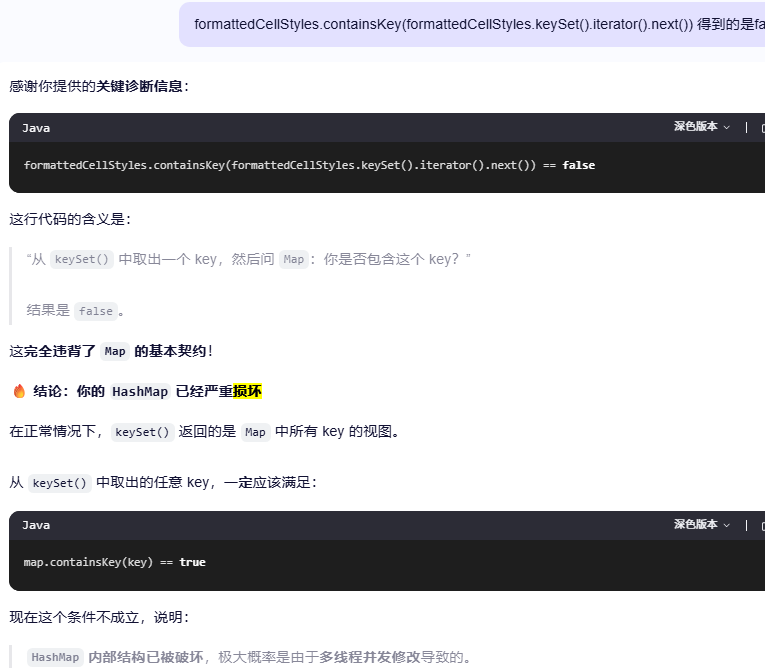
formattedCellStyles.containsKey(formattedCellStyles.keySet().iterator().next())
结果为 false。后面问AI,AI跟我说是HashMap结构损坏,我觉得这应该不可能,用的是HashMap,也不是在并发环境下。
问题排查
通过调试发现,put 和 get 时,同一个 cellStyle 对象的 hashCode() 返回值不同。
进一步查看 XSSFCellStyle 源码:
@Override
public int hashCode() {
    return _cellXf.toString().hashCode();
}
其哈希值依赖 _cellXf.toString(),即该样式的 XML 表示。例如:
<xml-fragment numFmtId="164" fontId="11" fillId="4" borderId="8" xfId="0" ...>
  <main:alignment wrapText="true" horizontal="right" vertical="center"/>
</xml-fragment>
问题出在执行顺序:
put(cellStyle, format)时,numFmtId尚未设置,toString()返回字符串 A,hashCode为 h1。- 执行
cellStyle.setDataFormat(...)后,numFmtId被更新,_cellXf.toString()返回新字符串 B。 - 后续
get(cellStyle)时,hashCode()返回 h2,而HashMap仍在 h1 对应的桶中查找,导致命中失败。
因此,同一个对象在 put 和 get 时因内部状态变化导致 hashCode 不一致,是缓存失效的根本原因。
解决方案
方案一:调整执行顺序(先设置格式,再放入缓存)
XSSFCellStyle 的 hashCode 依赖 XML 字符串,而该字符串随样式属性变化,不适合作为 HashMap 的 key。如果能确保 put 前 CellStyle 不会再改变样式,可以改成下面这种:
if (formatCache == null) {
    short formatShort = dataFormat.getFormat(format);
    cellStyle.setDataFormat(formatShort);        // 先设置
    formattedCellStyles.put(cellStyle, format);  // 再缓存
}
此方案简单,但前提是每个 CellStyle 不会被重复设置不同格式。
方案二:使用对象引用地址作为 key
改用 System.identityHashCode:
int styleKey = System.identityHashCode(cellStyle);
String formatCache = formattedCellStyles.get(styleKey);

if (formatCache == null) {
    short formatShort = dataFormat.getFormat(format);
    cellStyle.setDataFormat(formatShort);
    formattedCellStyles.put(styleKey, format);
}
自己写完文章又让AI润色了一下,果然,自己的文字描述和排版能力还有待提高。哈哈!

 浙公网安备 33010602011771号