

Css选择器

选择器

基本选择器

  1. 标签选择器

  2. 类选择器

  3. id 选择器


层次选择器

// 案例:
<body>
        <p>p1</p>
        <p class="active">p2</p>
        <p>p3</p>
        <ul>
            <li>
                <p>p4</p>
            </li>
            <li>
                <p>p5</p>
            </li>
            <li>
                <p>p6</p>
            </li>
        </ul>
        <p class="active">p3</p>
        <p>p4</p>
    </body>
  1. 后代选择器:在某个元素的后面

    body p{
       background-color: #93ffad;
  }
  1. 子选择器:一代,儿子

    body > p {
       background-color: #ff972d;
  }
  1. 相邻兄弟选择器,同辈

    /*相邻弟选择器,只有一个,相邻向下*/
   .active + p {
       background-color: #93ffad;
  }
  1. 通用选择器

    /*通用兄弟选择器,当前选中元素向下的所有元素*/
   .active ~ p {
       background-color: #9e48ff;
  }


结构伪类选择器
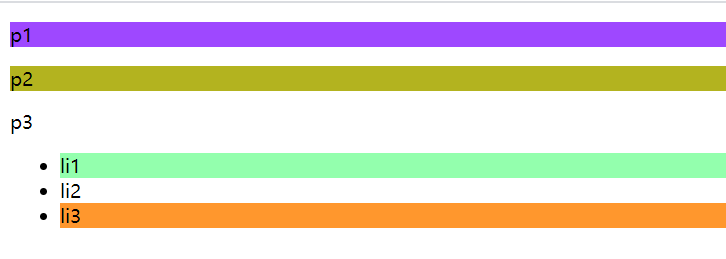
    <!DOCTYPE html>
   <html lang="en">
   <head>
       <meta charset="UTF-8">
       <title>Title</title>
       <style>
           /*选中 ul 的第一个元素*/
           ul li:first-child {
               background-color: #93ffad;
          }

           /*选中 ul 的第一个元素*/
           ul li:last-child {
               background-color: #ff972d;
          }

           /* 使用伪类方式,只选中 p1
          选中当前元素的父级元素,选中父元素的第一个,并且是当前元素才生效 按顺序 */
           p:nth-child(1) {
               background-color: #9e48ff;
          }

           /*选中父元素下的第二个p 元素 按类型*/
           p:nth-of-type(2) {
               background-color: #b3b31f;
          }
       </style>
   </head>
   <body>
   <p>p1</p>
   <p>p2</p>
   <p>p3</p>
   <ul>
       <li>li1</li>
       <li>li2</li>
       <li>li3</li>
   </ul>
   </body>
   </html>

属性选择器(常用)

    <!DOCTYPE html>
   <html lang="en">
   <head>
       <meta charset="UTF-8">
       <title>Title</title>
       <style>
           .demo a {
               float: left;
               display: block;
               width: 50px;
               height: 50px;
               border-radius: 10px;
               background: #4e58ff;
               text-align: center;
               color: rgba(41, 19, 65, 0.96);
               font: 20px/50px bolder Aharoni; /*20为字体大小,50为行高*/
               text-decoration: none;
               margin-right: 5px;
          }

           /*选中存在id 的元素 a[]{}*/
           a[id] {
               background: yellow;
          }

           /*id=first的元素*/
           a[id=last] {
               background: #ff972d;
          }

           /*class 中含有links的元素
            =为绝对等 , *=为模糊等, ^=为以。。开头, $=为以。。结尾*/
           a[class^=links] {
               background: #93ffad;
          }

           a[href$=doc] {
               background: #b3b31f;
          }

       </style>

   </head>
   <body>
   <p class="demo">
       <a href="http://www.baidu.com" class="links item first" id="first">111</a>
       <a href="" class="links active item" target="_blank" title="test">222</a>
       <a href="images/123.html" class="links item">333</a>
       <a href="images/123.png" class="links item">444</a>
       <a href="images/123.jpg" class="links item">555</a>
       <a href="abc" class="links item">666</a>
       <a href="/abc.pdf" class="links item">777</a>
       <a href="abc.doc" class="links item">888</a>
       <a href="abcd.doc" class="links item last" id="last">999</a>
   </p>
   </body>
   </html>

image-20200224115327115


posted @ 2020-02-23 09:58  Jaqen624  阅读(67)  评论(0)    收藏  举报