
性能测试监控平台搭建-redis_exporter(九)
9 .安装redis_exporter
9.1 下载redis
官方下载地址:https://download.redis.io/releases/

下载对应的redis的tar包
[root@master ~]# cd /opt/tgz/
[root@master tgz]# wget https://download.redis.io/releases/redis-7.4.1.tar.gz
--2024-10-16 20:09:40--  https://download.redis.io/releases/redis-7.4.1.tar.gz
正在解析主机 download.redis.io (download.redis.io)... 45.60.125.1
正在连接 download.redis.io (download.redis.io)|45.60.125.1|:443... 已连接。
已发出 HTTP 请求,正在等待回应... 200 OK
长度:3529512 (3.4M) [application/octet-stream]
正在保存至: “redis-7.4.1.tar.gz”

100%[=============================================================================================================================================================================>] 3,529,512   62.9KB/s 用时 51s

2024-10-16 20:10:32 (67.6 KB/s) - 已保存 “redis-7.4.1.tar.gz” [3529512/3529512])
9.2 安装redis
# 加压tar包
[root@master tgz]# tar -zxvf redis-7.4.1.tar.gz -C /usr/local

# 编译
[root@master tgz]# cd /usr/local/redis-7.4.1
[root@master redis-7.4.1]# make

# 修改配置文件
[root@master redis-7.4.1]# vim redis.conf
修改如下内容,其余的内容不修改:
# 修改访问的ip地址
bind 10.0.0.100 -::1
# 修改配置参数 为 no 运行远程连接
protected-mode no
# 修改为守护进程启动
daemonize yes

# 启动redis服务
[root@master tgz]# cd /usr/local/redis-7.4.1/src
[root@master src]# ./redis-server /usr/local/redis-7.4.1/redis.conf

# 测试服务
[root@master src]# ./redis-cli -h 10.0.0.100 -p 6379
-> set a mjh
-> get a
mjh
-> quit

# 将redis添加为系统服务
[root@master src]# vim /usr/lib/systemd/system/redis.service
内容如下:
[Unit]
Description=redis-server
After=network.target

[Service]
Type=forking
ExecStart=/usr/local/redis-7.4.1/src/redis-server /usr/local/redis-7.4.1/redis.conf
PrivateTmp=true

[Install]
WantedBy=multi-user.target

# 删除飞服务启动的reids进程
[root@master src]# ps -ef | grep redis
root       3144   1719  0 21:30 pts/0    00:00:00 grep --color=auto redis
root      88666      1  1 21:06 ?        00:00:27 ./src/redis-server 10.0.0.100:6379
[root@master src]# kill -9 88666

# 以系统服务启动
[root@master src]# systemctl start redis

# 添加到开机自启动
[root@master src]# systemctl enable redis

# 查看服务状态
[root@master src]# systemctl status redis
● redis.service - redis-server
   Loaded: loaded (/usr/lib/systemd/system/redis.service; disabled; vendor preset: disabled)
   Active: active (running) since 三 2024-10-16 21:30:40 CST; 13s ago
  Process: 3677 ExecStart=/usr/local/redis-7.4.1/src/redis-server /usr/local/redis-7.4.1/redis.conf (code=exited, status=0/SUCCESS)
 Main PID: 3678 (redis-server)
   CGroup: /system.slice/redis.service
           └─3678 /usr/local/redis-7.4.1/src/redis-server 10.0.0.100:6379

10月 16 21:30:40 master systemd[1]: Starting redis-server...
10月 16 21:30:40 master redis-server[3677]: 3677:C 16 Oct 2024 21:30:40.330 # WARNING Memory overcommit must be enabled! Without it, a background save or replication may fail under low memory condition. Being di...
10月 16 21:30:40 master systemd[1]: Started redis-server.
Hint: Some lines were ellipsized, use -l to show in full.
9.3 下载redis_exporter
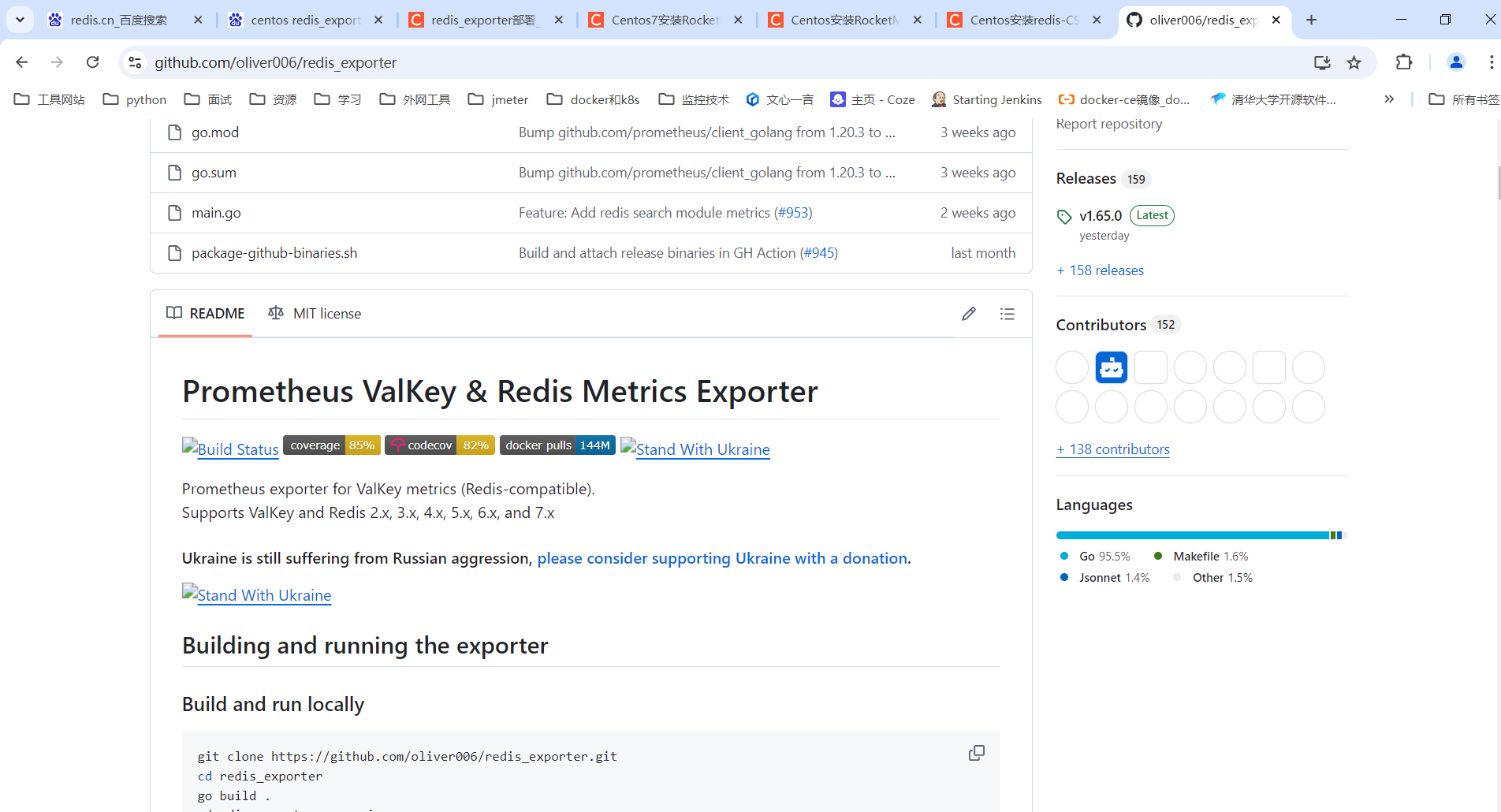
官方地址:https://github.com/oliver006/redis_exporter
[root@master ~]# cd /opt/tgz
[root@master tgz]# wget https://github.com/oliver006/redis_exporter/releases/download/v1.65.0/redis_exporter-v1.65.0.linux-amd64.tar.gz
9.4 安装redis_exporter
# 解压tar包
[root@master tgz]# tar -zxvf redis_exporter-v1.65.0.linux-amd64.tar.gz

# 修改到指定目录下
[root@master tgz]# mv redis_exporter-v1.65.0.linux-amd64 /opt/app/redis_exporter-v1.65.0

# 目录权限调整
[root@master tgz]# cd /opt/app
[root@master app]# chown -R root:root redis_exporter-v1.65.0

# 添加系统文件
[root@master app]# vim /usr/lib/systemd/system/redis_exporter.service
文件内容如下:
[Unit]
Description=Prometheus exporter for Redis metrics.
Documentation=Supports Redis 2.x, 3.x, 4.x, 5.x, and 6.x

[Service]
# reids没有密码时 -redis.password 参数可以不写
# ExecStart=/opt/app/redis_exporter-v1.65.0/redis_exporter -redis.addr 192.168.1.10:6379 -redis.password cbf123456.  -web.listen-address 192.168.1.10:9121
ExecStart=/opt/app/redis_exporter-v1.65.0/redis_exporter -redis.addr 10.0.0.100:6379  -web.listen-address 10.0.0.100:9121
Restart=on-failure

[Install]
WantedBy=multi-user.target

# 启动服务
[root@master app]# systemctl start redis_exporter

# 设置开机启动
[root@master app]# systemctl enabel redis_exporter

# 查看服务状态
[root@master app]# systemctl status redis_exporter
● redis_exporter.service - Prometheus exporter for Redis metrics.
   Loaded: loaded (/usr/lib/systemd/system/redis_exporter.service; enabled; vendor preset: disabled)
   Active: active (running) since 三 2024-10-16 22:06:06 CST; 16s ago
 Main PID: 69595 (redis_exporter)
   CGroup: /system.slice/redis_exporter.service
           └─69595 /opt/app/redis_exporter-v1.65.0/redis_exporter -redis.addr 10.0.0.100:6379 -web.listen-address 10.0.0.100:9121

10月 16 22:06:06 master redis_exporter[69595]: time="2024-10-16T22:06:06+08:00" level=info msg="Redis Metrics Exporter v1.65.0    build date: 2024-10-15-04:08:07    sha1: 7ffe57fcd7061e348b50025856...GOARCH: amd64"
10月 16 22:06:07 master redis_exporter[69595]: time="2024-10-16T22:06:07+08:00" level=info msg="Providing metrics at 10.0.0.100:9121/metrics"
10月 16 22:06:16 master systemd[1]: [/usr/lib/systemd/system/redis_exporter.service:3] Invalid URL, ignoring: Supports
10月 16 22:06:16 master systemd[1]: [/usr/lib/systemd/system/redis_exporter.service:3] Invalid URL, ignoring: Redis
10月 16 22:06:16 master systemd[1]: [/usr/lib/systemd/system/redis_exporter.service:3] Invalid URL, ignoring: 2.x,
10月 16 22:06:16 master systemd[1]: [/usr/lib/systemd/system/redis_exporter.service:3] Invalid URL, ignoring: 3.x,
10月 16 22:06:16 master systemd[1]: [/usr/lib/systemd/system/redis_exporter.service:3] Invalid URL, ignoring: 4.x,
10月 16 22:06:16 master systemd[1]: [/usr/lib/systemd/system/redis_exporter.service:3] Invalid URL, ignoring: 5.x,
10月 16 22:06:16 master systemd[1]: [/usr/lib/systemd/system/redis_exporter.service:3] Invalid URL, ignoring: and
10月 16 22:06:16 master systemd[1]: [/usr/lib/systemd/system/redis_exporter.service:3] Invalid URL, ignoring: 6.x
Hint: Some lines were ellipsized, use -l to show in full.
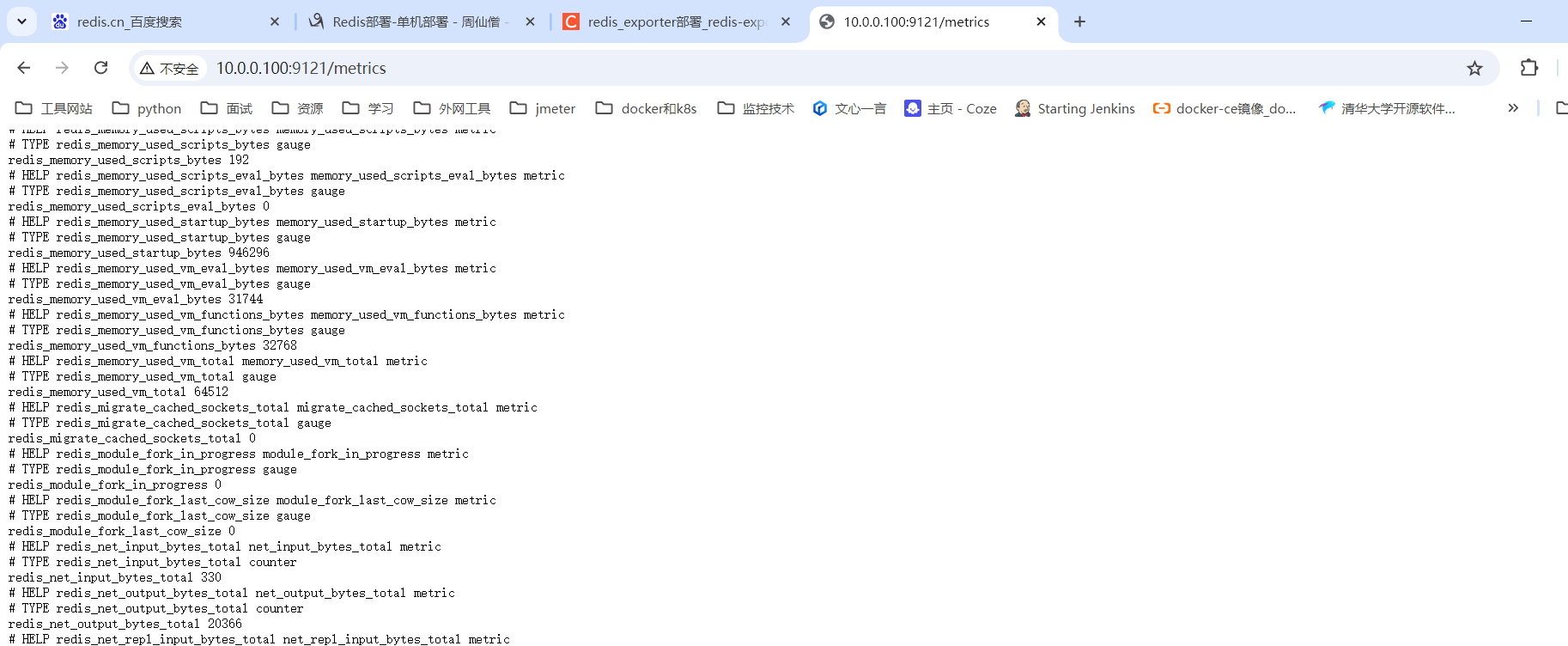
执行后再浏览器输入 http://10.0.0.100:9121/metrics 可以看到服务启动成功
9.5 添加prometheus的配置项目
修改prometheus的配置文件,用于添加对jmx_exporter的数据收集,在安装prometheus的目录下找到prometheus.yml的配置文件
[root@master ~]# cd /opt/app/prometheus-2.53.2/
[root@master prometheus-2.53.2]# ll
总用量 261328
drwxr-xr-x. 2 root root        38 8月   9 23:13 console_libraries
drwxr-xr-x. 2 root root       173 8月   9 23:13 consoles
drwxr-xr-x. 6 root root       138 10月 11 19:43 data
-rw-r--r--. 1 root root     11357 8月   9 23:13 LICENSE
-rw-r--r--. 1 root root      3773 8月   9 23:13 NOTICE
-rwxr-xr-x. 1 root root 137838575 8月   9 22:56 prometheus
-rw-r--r--. 1 root root       950 10月 11 16:14 prometheus.yml
-rwxr-xr-x. 1 root root 129735160 8月   9 22:56 promtool
-rw-r--r--. 1 root root        45 10月 11 16:11 reload-prometheus.sh

# 修改配置文件添加node_exporter的数据收集信息
[root@master prometheus-2.53.2]# vim prometheus.yml
在prometheus.yml文件中进行修改,在最后追加 redis_exporter部分的jobname
# my global config
global:
  scrape_interval: 15s # Set the scrape interval to every 15 seconds. Default is every 1 minute.
  evaluation_interval: 15s # Evaluate rules every 15 seconds. The default is every 1 minute.
  # scrape_timeout is set to the global default (10s).

# Alertmanager configuration
alerting:
  alertmanagers:
    - static_configs:
        - targets:
          # - alertmanager:9093

# Load rules once and periodically evaluate them according to the global 'evaluation_interval'.
rule_files:
  # - "first_rules.yml"
  # - "second_rules.yml"

# A scrape configuration containing exactly one endpoint to scrape:
# Here it's Prometheus itself.
scrape_configs:
  # The job name is added as a label `job=<job_name>` to any timeseries scraped from this config.
  - job_name: "prometheus"

    # metrics_path defaults to '/metrics'
    # scheme defaults to 'http'.

    static_configs:
      - targets: ["localhost:9090"]
# 添加node_exporter的配置信息
  - job_name: "node_exporter"
    static_configs:
      - targets: ["10.0.0.100:9100"]
# 添加mysqld_exporter的配置信息
  - job_name: "mysqld_exporter"
    static_configs:
      - targets: ["10.0.0.100:9104"]
# 添加jmx_exporter的配置信息
  - job_name: "jmx_exporter"
    static_configs:
      - targets: ["10.0.0.100:39081"]
# 添加nginx_exporter的配置信息
  - job_name: "nginx_exporter"
    static_configs:
      - targets: ["10.0.0.100:9113"]
# 添加reidis_exporter的配置信息
  - job_name: "reids_exporter"
    static_configs:
      - targets: ["10.0.0.100:9113"]

# 完成prometheus配置加载
[root@master prometheus-2.53.2]# curl -X POST http://10.0.0.100:9090/-/reload
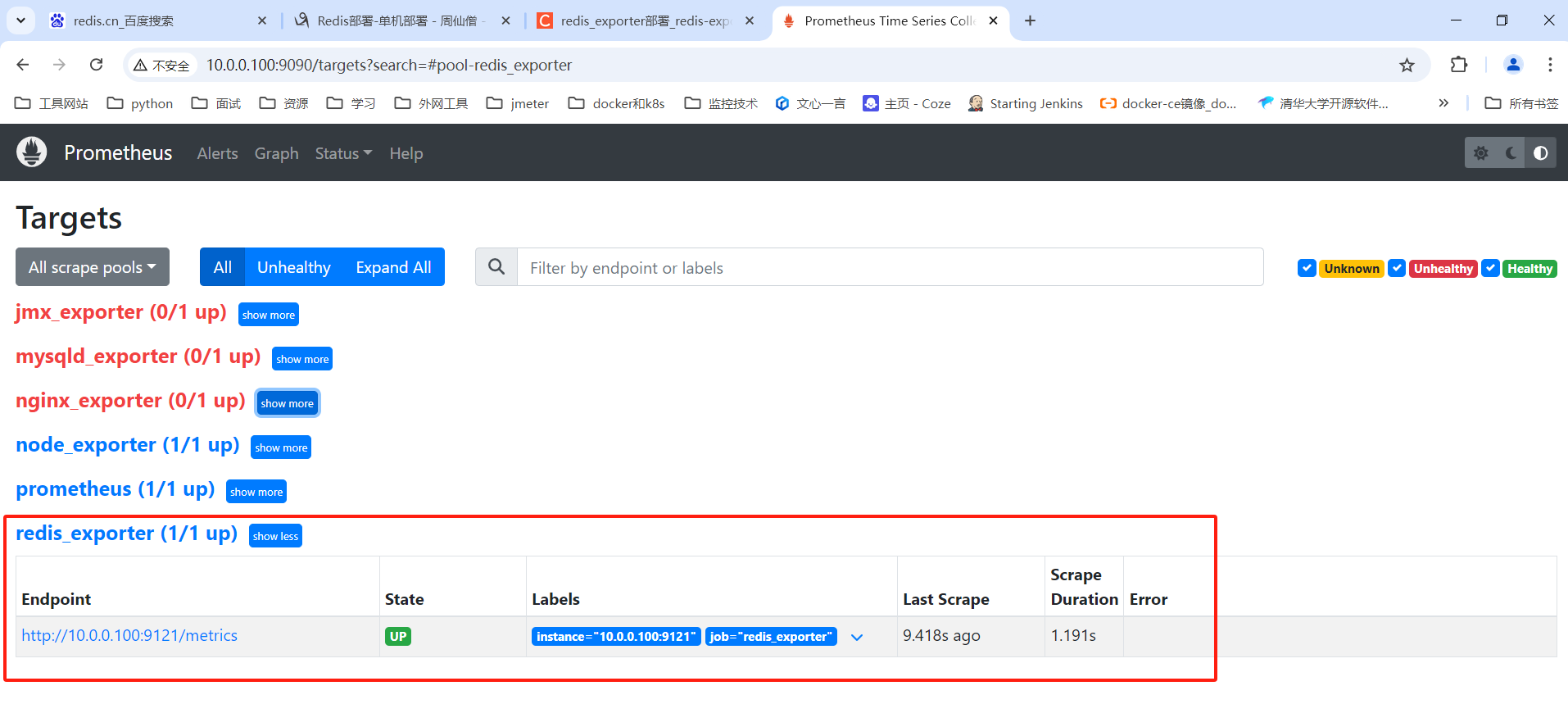
通过浏览器地址访问 http://10.0.0.100:9090 的地址访问(ip地址使用实际的地址),在Status->Targets 下 看到 redis_exporter启动成功的记录

 浙公网安备 33010602011771号