
使用easypoi clone sheet
简单来说就是模板中一个sheet,导出多个sheet
/**
   * 导出文件通过模板解析只有模板,没有集合
   * 每个sheet对应一个list,按照数量进行导出排序,key是sheet的NUM
   * @param params
   *            导出参数类
   * @param map
   *            模板集合
   * @return
   */
  public static Workbook exportExcelClone(Map<Integer, List<Map<String, Object>>> map,
                                     TemplateExportParams params) {
      return new ExcelExportOfTemplateUtil().createExcelCloneByTemplate(params, map);
  }
配置如下:
<commons.io.version>2.11.0</commons.io.version>
<easypoi.version>4.3.0</easypoi.version>

<!-- io常用工具类 -->
<dependency>
    <groupId>commons-io</groupId>
    <artifactId>commons-io</artifactId>
    <version>${commons.io.version}</version>
</dependency>

<dependency>
    <groupId>cn.afterturn</groupId>
    <artifactId>easypoi-base</artifactId>
    <version>${easypoi.version}</version>
</dependency>
<dependency>
    <groupId>cn.afterturn</groupId>
    <artifactId>easypoi-web</artifactId>
    <version>${easypoi.version}</version>
</dependency>
<dependency>
    <groupId>cn.afterturn</groupId>
    <artifactId>easypoi-annotation</artifactId>
    <version>${easypoi.version}</version>
</dependency>
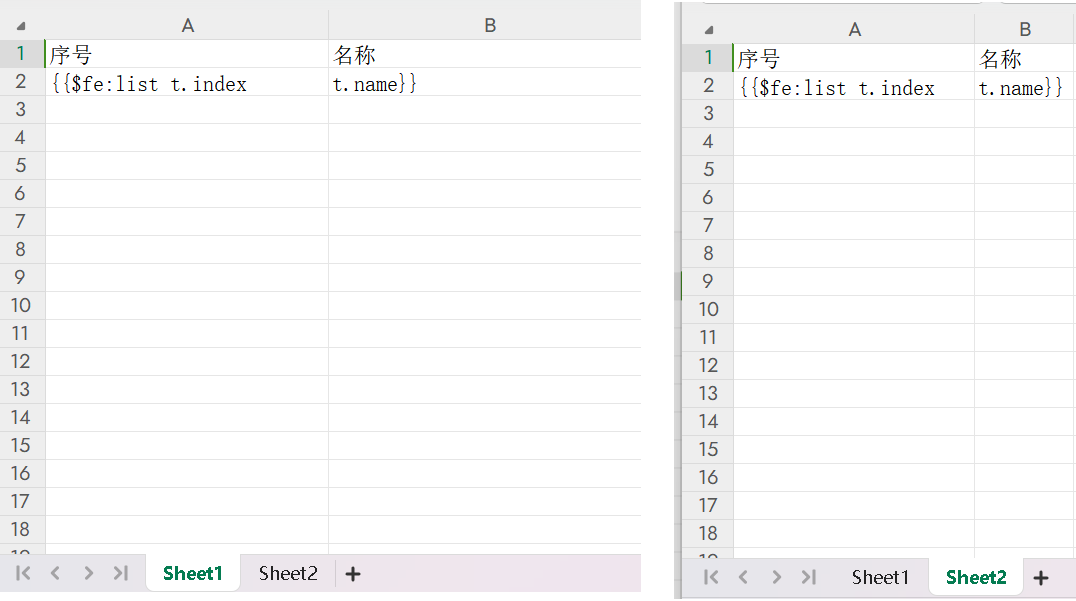
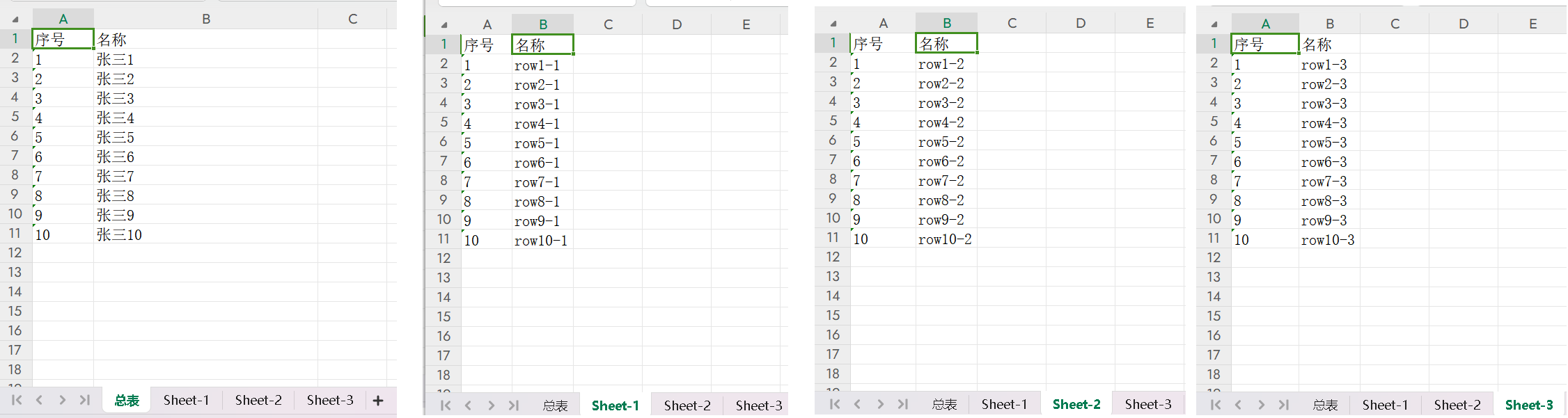
模板中的Sheet1作为总表来使用,也就是导出的时候只有一张总表。Sheet2作为待复制的表,生成多张表。具体的代码就是:
import cn.afterturn.easypoi.excel.ExcelExportUtil;
import cn.afterturn.easypoi.excel.entity.TemplateExportParams;
import org.apache.commons.io.FileUtils;
import org.apache.poi.ss.usermodel.Workbook;
import org.junit.jupiter.api.Test;
import org.springframework.boot.test.context.SpringBootTest;

import java.io.File;
import java.io.FileOutputStream;
import java.io.IOException;
import java.util.*;

import static cn.afterturn.easypoi.excel.ExcelExportUtil.SHEET_NAME;
@Test
void testExcel() throws IOException {

    List<Map<String, Object>> numOneList = new ArrayList<>();
    numOneList.add(this.getMap());

    Map<Integer, List<Map<String, Object>>> realMap = new HashMap<>();
    realMap.put(0, numOneList);
    realMap.put(1, this.listTwoMap());

    File sourceFile = new File("demo.xlsx");
    FileUtils.copyInputStreamToFile(getClass().getClassLoader().getResourceAsStream("static/docs/模板.xlsx"), sourceFile);
    String path = sourceFile.getAbsolutePath();

    TemplateExportParams params = new TemplateExportParams(path, "Sheet2", 1);
    params.setHeadingRows(2);
    params.setHeadingStartRow(2);

    Workbook workbook = ExcelExportUtil.exportExcelClone(realMap, params);
    FileOutputStream fos = new FileOutputStream(path);
    workbook.write(fos);
    fos.close();
}

private Map<String, Object> getMap() {
    List<Map<String, String>> listMap = new ArrayList<>();

    for (int i = 1; i < 11; i++) {
        Map<String, String> map = new HashMap<>();
        map.put("index", String.valueOf(i));
        map.put("name", "张三" + i);
        listMap.add(map);
    }

    Map<String, Object> excelMap = new HashMap<>();
    excelMap.put("list", listMap);
    excelMap.put(SHEET_NAME, "总表");
    return excelMap;
}

private List<Map<String, Object>> listTwoMap() {
    List<Map<String, Object>> list = new ArrayList<>();
    // 3张sheet
    for (int i = 1; i <= 3; i++) {
        List<Map<String, Object>> listMap = new ArrayList<>();
        // 每个sheet是10行数据
        for (int j = 1; j <= 10; j++) {
            Map<String, Object> map = new HashMap<>();
            map.put("index", j);
            map.put("name", "row" + j  + "-"+ i);
            listMap.add(map);
        }
        Map<String, Object> map = new HashMap<>();
        map.put("list", listMap);
        map.put(SHEET_NAME, "Sheet-" + i);
        list.add(map);
    }
    Collections.reverse(list);
    return list;
}
模板设置:
生成的文件:

 浙公网安备 33010602011771号