


thinkphp 分块返回数据 Transfer-Encoding: chunked
class Chat extends Common
{


    public function chat()
    {
        // 设置响应类型和编码方式
        header('Content-Type: text/plain');
        header('Transfer-Encoding: chunked');
        header('Connection: keep-alive'); // 保持连接
        header('Cache-Control: no-cache'); // 防止缓存

        // 使用原生PHP输出数据块
        echo "\r\n"; // 开始块
        ob_flush();
        flush(); // 刷新输出缓冲区

        app()->debug(false);


        foreach ($result as $chunk) {
            if (!empty($chunk['role']) && $chunk['role'] == 'assistant' && $chunk['type'] == 'answer' && empty($chunk['created_at'])) {
                $data = json_encode(['content' => $chunk['content']]);
                echo $data . "\r\n";
                ob_flush();
                flush(); // 刷新输出缓冲区,发送数据块
            }
        }

        echo "\r\n"; // 结束块
        return;
    }


}
js 请求输出
            // 这里替换为你的实际API端点
            const response = await fetch('/Chat/index', {
                method: 'POST',
                headers: {
                    'Content-Type': 'application/json',
                },
                body: JSON.stringify({content: message})
            });

            if (!response.ok) {
                throw new Error(`HTTP error! status: ${response.status}`);
            }


            // 处理流式响应
            const reader = response.body.getReader();
            const decoder = new TextDecoder();
            let aiResponse = '';
            let buffer = '';

            while (true) {
                const {done, value} = await reader.read();
                if (done) break;
                // 将新接收的数据添加到缓冲区
                buffer = decoder.decode(value, {stream: true});
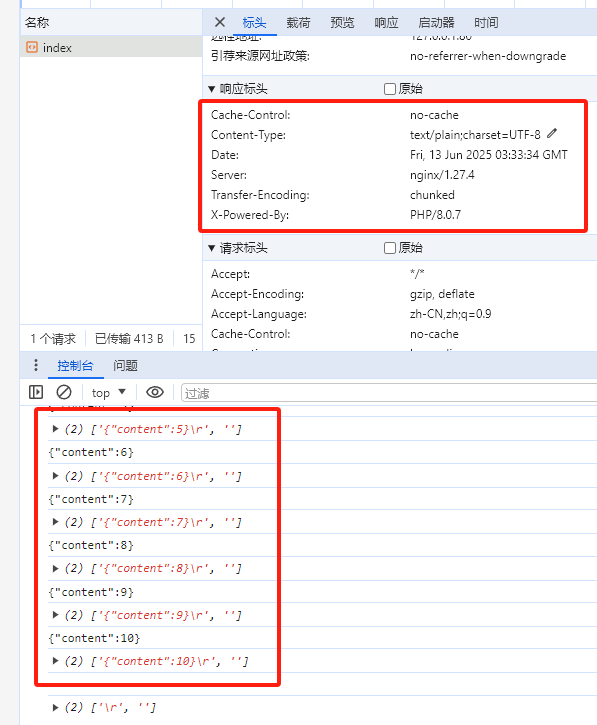
                console.log(buffer);

            }
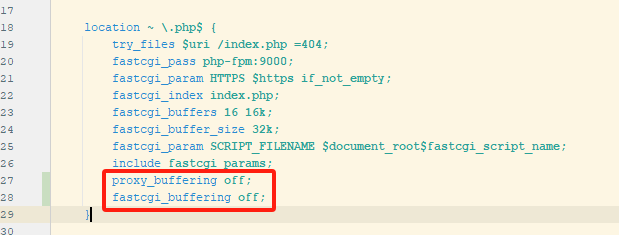
如果使用了nginx 则配置里面可能需要关闭缓冲
        proxy_buffering off;
        fastcgi_buffering off;

 浙公网安备 33010602011771号