EF Code First 初体验

项目结构如图:新建一个MVC项目,一个类库(数据访问)
实体类说明
UserInfo 与 UserDetail 是一对一的关系,没有通过Map映射文件进行关联
Category与 Product 是一对多
Product 与 Category 是多对一的关系 这两个类通过Map映射文件进行关联
 public class UserInfo
    {
        [Key]
        public string UserId { get; set; }

        [Required]
        [StringLength(20)]
        public string UserName { get; set; }

    }
public class UserDetail
    {
        [Key]
        public string DetailId { get; set; }


        public string UserId { get; set; }


        public UserInfo User1 { get; set; }

        public string Sheng { get; set; }

        public string Shi { get; set; }

        public string Xian { get; set; }

        public string address { get; set; }

        public string workAddress { get; set; }


    }
public class Category
    {
        /// <summary>
        /// 分类ID
        /// </summary>
        public Guid CategoryID { get; set; }

        /// <summary>
        /// 分类名称
        /// </summary>
        public string CategoryName { get; set; }

        /// <summary>
        /// 产品
        /// </summary>
        public virtual ICollection<Product> Products { get; set; }
    }
 public class Product
    {
        /// <summary>
        /// 产品ID
        /// </summary>
        public Guid ProductID { get; set; }

        /// <summary>
        /// 产品名称
        /// </summary>
        public string ProductName { get; set; }

        /// <summary>
        /// 单价
        /// </summary>
        public decimal UnitPrice { get; set; }

        /// <summary>
        /// 数量
        /// </summary>
        public Nullable<int> Quantity { get; set; }

        /// <summary>
        /// 库存
        /// </summary>
        public Nullable<int> UnitsInStock { get; set; }

        /// <summary>
        /// 产品类别ID
        /// </summary>
        public Guid CategoryID { get; set; }

        /// <summary>
        /// 产品类别
        /// </summary>
        public virtual Category Category { get; set; }
    }
public class ProductMap : EntityTypeConfiguration<Product>
    {
        public ProductMap()
        {
            // Primary Key
            this.HasKey(t => t.ProductID);

            // Properties
            this.Property(t => t.ProductID)
                .HasDatabaseGeneratedOption(DatabaseGeneratedOption.Identity);
            this.Property(t => t.ProductName).IsRequired()
                .HasMaxLength(100);
            this.Property(t => t.UnitPrice).HasPrecision(10, 2);

            // Table & Column Mappings
            this.ToTable("Product");
            this.Property(t => t.ProductID).HasColumnName("ProductID");
            this.Property(t => t.ProductName).HasColumnName("ProductName");
            this.Property(t => t.UnitPrice).HasColumnName("UnitPrice");
            this.Property(t => t.Quantity).HasColumnName("Quantity");
            this.Property(t => t.UnitsInStock).HasColumnName("UnitsInStock");
            this.Property(t => t.CategoryID).HasColumnName("CategoryID");

            // Relationships
            this.HasRequired(t => t.Category)
                .WithMany(t => t.Products)
                .HasForeignKey(t => t.CategoryID)
                .WillCascadeOnDelete(false);
        }
    }
public class CategoryMap : EntityTypeConfiguration<Category>
    {
        public CategoryMap()
        {
            // Primary Key
            this.HasKey(t => t.CategoryID);

            // Properties
            this.Property(t => t.CategoryID)
                .HasDatabaseGeneratedOption(DatabaseGeneratedOption.Identity);
            this.Property(t => t.CategoryName).IsRequired()
                .HasMaxLength(100);

            // Table & Column Mappings
            this.ToTable("Category");
            this.Property(t => t.CategoryID).HasColumnName("CategoryID");
            this.Property(t => t.CategoryName).HasColumnName("CategoryName");
        }
    }
public class UserPowerContext : DbContext
    {
        public UserPowerContext() :
            base("name=UserPowerContext")
        {
            //Database.SetInitializer(new DropCreateDatabaseIfModelChanges<UserPowerContext>());

            Database.SetInitializer<UserPowerContext>(null);
        }


        public DbSet<UserInfo> UserInfos { get; set; }
        public DbSet<UserDetail> UserDetails { get; set; }

        public DbSet<Category> Categories { get; set; }
        public DbSet<Product> Products { get; set; }

        protected override void OnModelCreating(DbModelBuilder modelBuilder)
        {
            //modelBuilder.Configurations.Add(new UserInfoMap());
            //modelBuilder.Configurations.Add(new UserDetailMap());
            modelBuilder.Configurations.Add(new CategoryMap());
            modelBuilder.Configurations.Add(new ProductMap());
        }
    }
<connectionStrings>
    <add name="UserPowerContext" providerName="System.Data.SqlClient" connectionString="Server=.;Initial Catalog=zmuserpower;User ID=sa;Password=123@abcd;Trusted_Connection=true" />
  </connectionStrings>
实体类文件修改后,使用数据迁移 同步类与数据库
注意点:
在数据迁移的过程中,发现一个问题,数据库无法同步,每次都没有任何的变动,经过调整发现一下几点
1.在dal类库中的app.config 配置文件中,必须有数据库的配置信息
2.Context上下文,也必须在dal类库中,
其他的解决方式没有找到,等找到了再回来更新这段

第一步是运行如下的命令:
- 在 Package Manager Console 下运行命令 Enable-Migrations

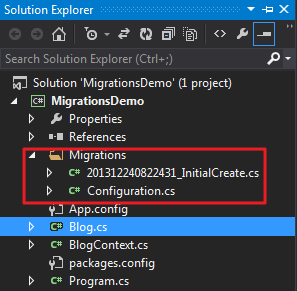
这个命令将在项目下创建文件夹 Migrations
- The Configuration class 这个类允许你去配置如何迁移,对于本文将使用默认的配置(在本文中因为只有一个 Context, Enable-Migrations 将自动对 context type 作出适配);
- An InitialCreate migration (本文为 201312240822431_InitialCreate.cs)这个迁移之所以存在是因为我们之前用 Code First 创建了数据库, 在启用迁移前,scaffolded migration 里的代码表示在数据库中已经创建的对象,本文中即为表 Blog (列 BlogId 和 Name). 文件名包含一个 timestamp 以便排序(如果之前数据库没有被创建,那么 InitialCreate migration 将不会被创建,相反,当我们第一次调用 Add-Migration 的时候所有表都将归集到一个新的migration 中)
生成、运行迁移
Code First Migrations 有两个你需要熟悉的命令:
- Add-Migration 将 scaffold 创建下一次基于上一次迁移以来的更改的迁移;
- Update-Databse 将任何挂起的迁移应用到数据库
我们需要脚手架(scaffold 直译)一个迁移,以上面的 Url 属性为例,命令 Add-Migration 允许我们对迁移命名,我们姑且称之为 AddBlogUrl
- 在 Package Manager Console 中运行命令 Add-Migration AddBlogUrl;
- 一个新的迁移(名称包含 timestamp 前缀)在目录 Migrations 中创建成功

我们现在可以对这个迁移进行编辑或者增加,但似乎看起来还不错,那我们就直接用 Update-Database 来应用到数据库吧
- 在 Package Manager Console 中运行命令 Update-Database ;
- AddBlogUrl 迁移将会被应用到数据库(表 Blogs 增加一列 Url)

定制化迁移
到目前为止我们生成并运行了一个迁移,但是没有对迁移做任何更改,下面我们将尝试做一些更改:在类 Bolg 上增加一属性 Rating
public int Rating { get; set; }
新建 Post

public class Post
{
    public int PostId { get; set; }
    [MaxLength(200)]
    public string Title { get; set; }
    public string Content { get; set; }

    public int BlogId { get; set; }
    public Blog Blog { get; set; }
}
在 Blog 中添加 Post 的集合
public virtual ICollection<Post> Posts { get; set; }
在 Package Manager Console 中运行命令 Add-Migration AddPostClass
生成的迁移如下
 View Code
接下来我们对迁移做些更改:
- 在 Posts.Title 列上增加唯一索引;
- 使 Blogs.Rating 列非空,对于表中已经存在的数据,新列都会被赋值成 CLR 的默认数据类型(如 Rating 是整型,故默认值为0),但是我们想指定默认值为3,这样存在的记录将会有一个合理的评分。
更改后的代码如下
namespace MigrationsDemo.Migrations
{
    using System;
    using System.Data.Entity.Migrations;

    public partial class AddPostClass : DbMigration
    {
        public override void Up()
        {
            CreateTable(
                "dbo.Posts",
                c => new
                    {
                        PostId = c.Int(nullable: false, identity: true),
                        Title = c.String(maxLength: 200),
                        Content = c.String(),
                        BlogId = c.Int(nullable: false),
                    })
                .PrimaryKey(t => t.PostId)
                .ForeignKey("dbo.Blogs", t => t.BlogId, cascadeDelete: true)
                .Index(t => t.BlogId)
                .Index(p => p.Title, unique: true);

            AddColumn("dbo.Blogs", "Rating", c => c.Int(nullable: false, defaultValue: 3));
        }

        public override void Down()
        {
            DropIndex("dbo.Posts", new[] { "Title" });
            DropForeignKey("dbo.Posts", "BlogId", "dbo.Blogs");
            DropIndex("dbo.Posts", new[] { "BlogId" });
            DropColumn("dbo.Blogs", "Rating");
            DropTable("dbo.Posts");
        }
    }
}
在 Package Manager Console 中运行命令 Update-Database –Verbose
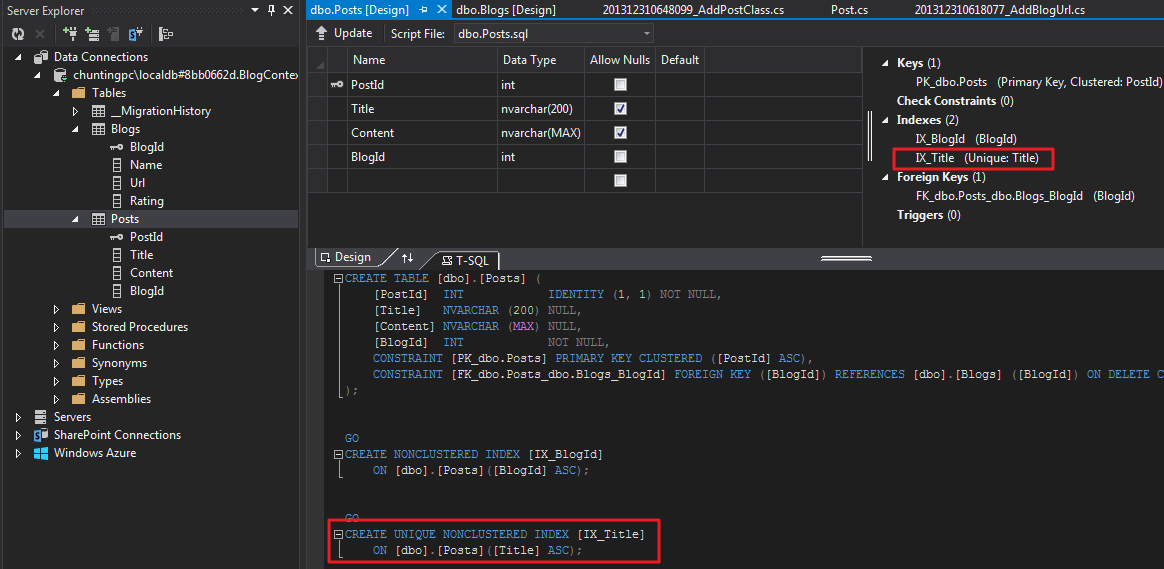
参考文章:http://www.cnblogs.com/panchunting/p/entity-framework-code-first-migrations.html
http://www.cnblogs.com/libingql/archive/2013/01/31/2888201.html


 浙公网安备 33010602011771号