MySQL5.7二进制安装
1.几个基础概念
DBMS:数据库管理系统
RDBMS:关系型数据库管理系统,是指采用关系模型来组织数据的数据库,以和列存储数据,关系模型可以简单理解为二维表格模型,而一个关系型数据库就是由二维表及其之间的关系组成的一个数据组织。
NoSQL:非关系型数据库
NewSQL:新型的分布式解决方案
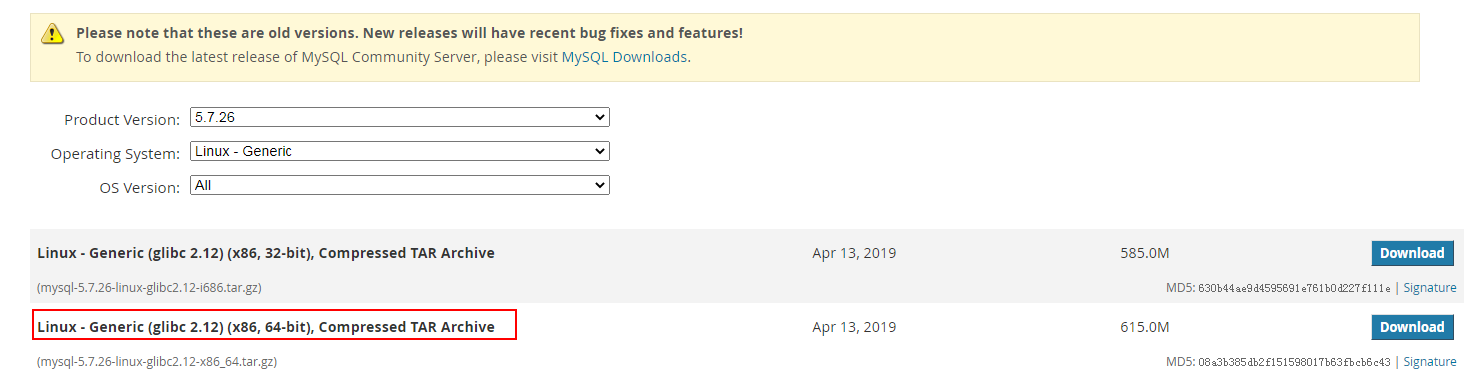
2. 下载安装软件
https://downloads.mysql.com/archives/community/
3.清理环境
[root@localhost tools]# rpm -qa | grep mysql
[root@localhost tools]# rpm -qa | grep mariadb
mariadb-libs-5.5.64-1.el7.x86_64
[root@localhost tools]# yum remove mariadb-libs-5.5.64-1.el7.x86_64
已加载插件:fastestmirror, langpacks
正在解决依赖关系
--> 正在检查事务
---> 软件包 mariadb-libs.x86_64.1.5.5.64-1.el7 将被 删除
--> 正在处理依赖关系 libmysqlclient.so.18()(64bit),它被软件包 2:postfix-2.10.1-7.el7.x86_64 需要
--> 正在处理依赖关系 libmysqlclient.so.18(libmysqlclient_18)(64bit),它被软件包 2:postfix-2.10.1-7.el7.x86_64 需要
4.安装依赖包新建用户上传软件并解压
[root@localhost mysql]# yum install -y libaio-devel
[root@localhost mysql]# useradd -s /sbin/nologin mysql
[root@localhost tools]# tar -zxvf mysql-5.7.16-linux-glibc2.5-x86_64.tar.gz
[root@localhost tools]# mkdir -p /application
[root@localhost tools]# mv mysql-5.7.16-linux-glibc2.5-x86_64 /application/mysql
5.配置环境变量
[root@localhost ~]# vi /etc/profile
export PATH=/application/mysql/bin:$PATH
[root@localhost ~]# source /etc/profile
[root@localhost ~]# mysql -V
mysql Ver 14.14 Distrib 5.7.16, for linux-glibc2.5 (x86_64) using EditLine wrapper
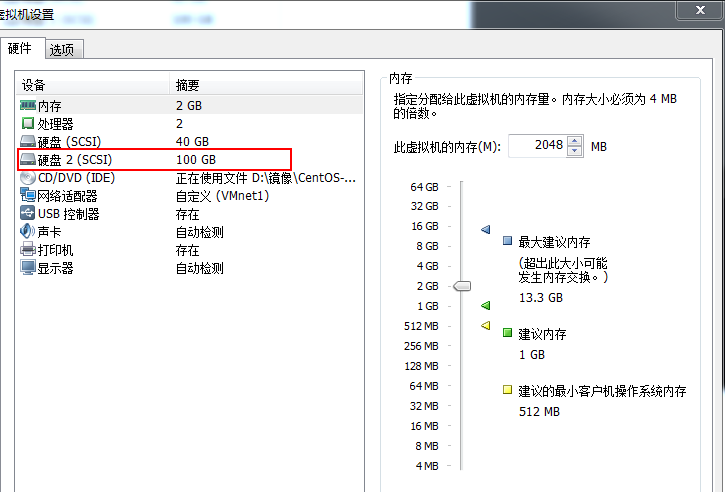
6.关机给数据库添加数据磁盘
7.分区格式化磁盘
[root@localhost ~]# fdisk /dev/sdb
磁盘 /dev/sdb:107.4 GB, 107374182400 字节,209715200 个扇区
Units = 扇区 of 1 * 512 = 512 bytes
扇区大小(逻辑/物理):512 字节 / 512 字节
I/O 大小(最小/最佳):512 字节 / 512 字节
磁盘标签类型:dos
磁盘标识符:0x69dfd2ce
设备 Boot Start End Blocks Id System
/dev/sdb1 2048 109715199 54856576 8e Linux LVM
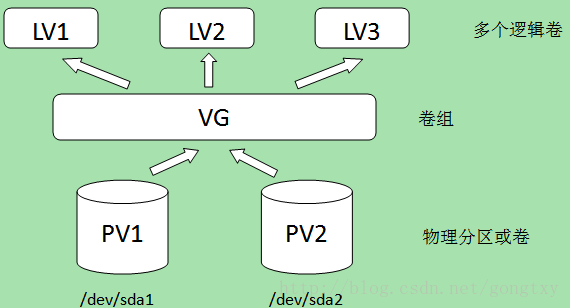
[root@localhost ~]# pvcreate /dev/sdb1
  Physical volume "/dev/sdb1" successfully created.
[root@localhost ~]# vgcreate myvolum /dev/sdb1
  Volume group "myvolum" successfully created
[root@localhost ~]# lvcreate -L +14G -n mysql_volumn myvolum
  Logical volume "mysql_volumn" created.
[root@localhost ~]# lvdisplay
--- Logical volume ---
LV Path /dev/myvolum/mysql_volumn
LV Name mysql_volumn
VG Name myvolum
LV UUID O5GLaL-nH7A-lovJ-1zpV-8wcy-i660-W1jtV4
LV Write Access read/write
LV Creation host, time localhost.localdomain, 2022-07-07 09:07:01 +0800
LV Status available
# open 0
LV Size 14.00 GiB
Current LE 3584
Segments 1
Allocation inherit
Read ahead sectors auto
- currently set to 8192
Block device 253:2
[root@localhost ~]# mkfs.xfs /dev/myvolum/mysql_volumn
meta-data=/dev/myvolum/mysql_volumn isize=512 agcount=4, agsize=917504 blks
= sectsz=512 attr=2, projid32bit=1
= crc=1 finobt=0, sparse=0
data = bsize=4096 blocks=3670016, imaxpct=25
= sunit=0 swidth=0 blks
naming =version 2 bsize=4096 ascii-ci=0 ftype=1
log =internal log bsize=4096 blocks=2560, version=2
= sectsz=512 sunit=0 blks, lazy-count=1
realtime =none extsz=4096 blocks=0, rtextents=0
[root@localhost ~]# mount /dev/myvolum/mysql_volumn /data
[root@localhost ~]# df -h
文件系统 容量 已用 可用 已用% 挂载点
devtmpfs 894M 0 894M 0% /dev
tmpfs 910M 0 910M 0% /dev/shm
tmpfs 910M 11M 900M 2% /run
tmpfs 910M 0 910M 0% /sys/fs/cgroup
/dev/mapper/centos-root 36G 7.4G 29G 21% /
/dev/sda1 497M 177M 321M 36% /boot
tmpfs 182M 12K 182M 1% /run/user/42
tmpfs 182M 0 182M 0% /run/user/0
/dev/mapper/myvolum-mysql_volumn 14G 33M 14G 1% /data
vi /etc/fstab
UUID="7d9ab699-1236-4439-ab21-fc93af48eecd" /data xfs defaults 0 0
8.给文件授权
[root@localhost data]# chown -R mysql:mysql /application/*
[root@localhost /]# mkdir -p /data/mysql/data
[root@localhost data]# chown -R mysql:mysql /data/
9.初始化
[root@localhost mysql]# mysqld --initialize --user=mysql --basedir=/application/mysql --datadir=/data/mysql/data
2022-07-07T02:01:05.556562Z 0 [Warning] TIMESTAMP with implicit DEFAULT value is deprecated. Please use --explicit_defaults_for_timestamp server option (see documentation for more details).
2022-07-07T02:01:06.187070Z 0 [Warning] InnoDB: New log files created, LSN=45790
2022-07-07T02:01:06.317752Z 0 [Warning] InnoDB: Creating foreign key constraint system tables.
2022-07-07T02:01:06.397484Z 0 [Warning] No existing UUID has been found, so we assume that this is the first time that this server has been started. Generating a new UUID: a99a829e-fd98-11ec-9933-000c29d9caa0.
2022-07-07T02:01:06.400830Z 0 [Warning] Gtid table is not ready to be used. Table 'mysql.gtid_executed' cannot be opened.
2022-07-07T02:01:06.424995Z 1 [Note] A temporary password is generated for root@localhost: MydI*&GHl6w<
初始化以后查看data目录下的文件
[root@localhost data]# ll
总用量 110628
-rw-r-----. 1 mysql mysql       56 7月   7 10:01 auto.cnf
-rw-r-----. 1 mysql mysql      413 7月   7 10:01 ib_buffer_pool
-rw-r-----. 1 mysql mysql 12582912 7月   7 10:01 ibdata1
-rw-r-----. 1 mysql mysql 50331648 7月   7 10:01 ib_logfile0
-rw-r-----. 1 mysql mysql 50331648 7月   7 10:01 ib_logfile1
drwxr-x---. 2 mysql mysql     4096 7月   7 10:01 mysql
drwxr-x---. 2 mysql mysql     8192 7月   7 10:01 performance_schema
drwxr-x---. 2 mysql mysql     8192 7月   7 10:01 sys
10.编辑配置文件
vi   /etc/my.cnf

[mysqld]
user=mysql
basedir=/application/mysql
datadir=/data/mysql/data
socket=/tmp/mysql.sock
server_id=6
port=3306

[mysql]
socket=/tmp/mysql.sock
11.编辑启动文件
[root@localhost etc]# vi /etc/systemd/system/mysqld.service
[Unit]
Description=MySQL Server
Documentation=man:mysqld(8)
Documentation=http://dev.mysql.com/doc/refman/en/using-systemd.html
After=network.target
After=syslog.target
[Install]
WantedBy=multi-user.target
[Service]
User=mysql
Group=mysql
ExecStart=/application/mysql/bin/mysqld --defaults-file=/etc/my.cnf
LimitNOFILE=5000
[root@localhost etc]# ps -ef | grep mysql
mysql 61926 1 2 10:57 ? 00:00:01 /application/mysql/bin/mysqld --defaults-file=/etc/my.cnf
root 61968 10136 0 10:58 pts/0 00:00:00 grep --color=auto mysql
[root@localhost etc]# netstat -ntlp | grep 3306
tcp6 0 0 :::3306 :::* LISTEN 61926/mysqld
12.登陆修改密码
mysql> alter user root@'localhost' identified by 'Password@123';
Query OK, 0 rows affected (0.00 sec)
另外一种修改密码的方法:
[root@localhost ~]# mysqladmin -uroot -p password Password@1234
Enter password:
mysqladmin: [Warning] Using a password on the command line interface can be insecure.
Warning: Since password will be sent to server in plain text, use ssl connection to ensure password safety.
13.另外一种方法启动数据库可以看到启动日志
[root@localhost data]# /application/mysql/bin/mysqld --defaults-file=/etc/my.cnf
2022-07-07T06:40:07.152590Z 0 [Warning] TIMESTAMP with implicit DEFAULT value is deprecated. Please use --explicit_defaults_for_timestamp server option (see documentation for more details).
2022-07-07T06:40:07.152958Z 0 [Note] --secure-file-priv is set to NULL. Operations related to importing and exporting data are disabled
2022-07-07T06:40:07.152992Z 0 [Note] /application/mysql/bin/mysqld (mysqld 5.7.16) starting as process 2377 ...
2022-07-07T06:40:07.161065Z 0 [Note] InnoDB: PUNCH HOLE support not available
2022-07-07T06:40:07.161096Z 0 [Note] InnoDB: Mutexes and rw_locks use GCC atomic builtins
2022-07-07T06:40:07.161103Z 0 [Note] InnoDB: Uses event mutexes
2022-07-07T06:40:07.161110Z 0 [Note] InnoDB: GCC builtin __sync_synchronize() is used for memory barrier
2022-07-07T06:40:07.161115Z 0 [Note] InnoDB: Compressed tables use zlib 1.2.3
2022-07-07T06:40:07.161121Z 0 [Note] InnoDB: Using Linux native AIO
2022-07-07T06:40:07.161480Z 0 [Note] InnoDB: Number of pools: 1
2022-07-07T06:40:07.161592Z 0 [Note] InnoDB: Using CPU crc32 instructions
2022-07-07T06:40:07.163990Z 0 [Note] InnoDB: Initializing buffer pool, total size = 128M, instances = 1, chunk size = 128

 浙公网安备 33010602011771号