

uniapp 引入腾讯地图并且进行定位
首先:https://lbs.qq.com/miniProgram/plugin/pluginGuide/routePlan 这是腾讯地图地址
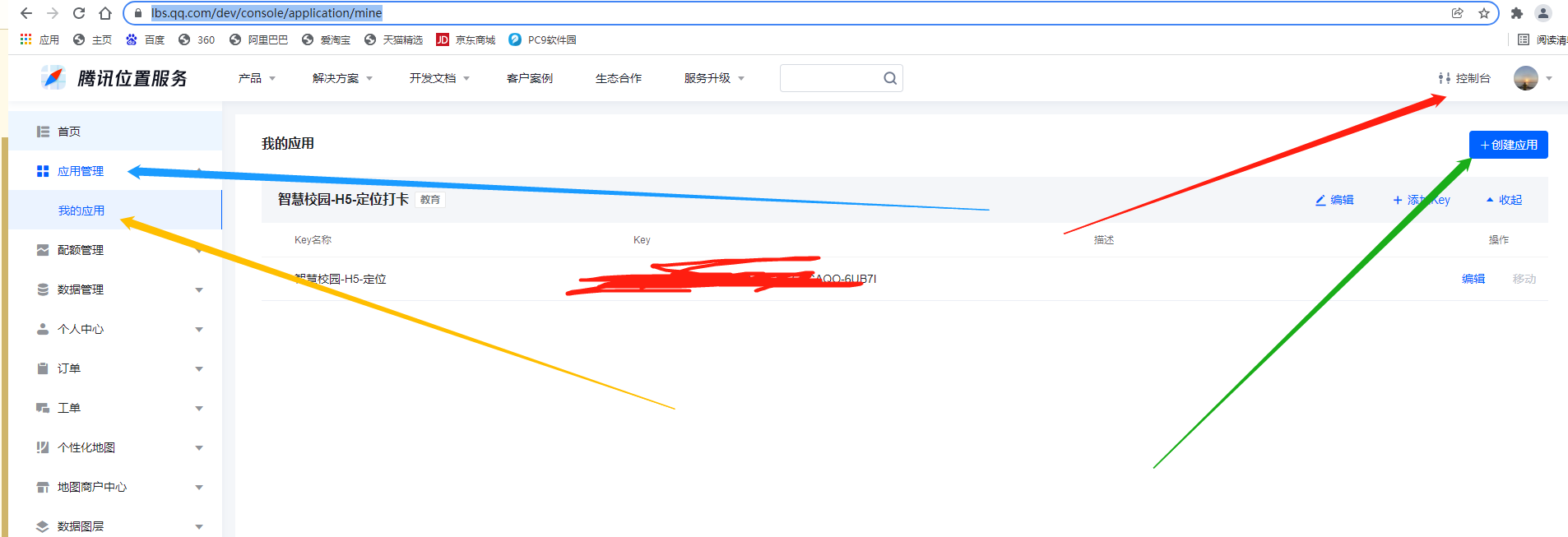

安装一波( 这是为了防止出现腾讯地图跨域问题 )
npm i --save vue-jsonp
在 main.js 文件
// 引入腾讯地图
import {VueJsonp} from 'vue-jsonp'
Vue.use(VueJsonp)
manifest.json 文件开始配置
复制进去就行
搜索:usingComponents

"plugins": {
            "routePlan": {
            "version": "1.0.12",
            "provider": " 小程序的APPID "
            }
        },
        "permission": {
            "scope.userLocation": {
                "desc": "位置信息效果展示"
            }
        }
配置上自己的小程序appid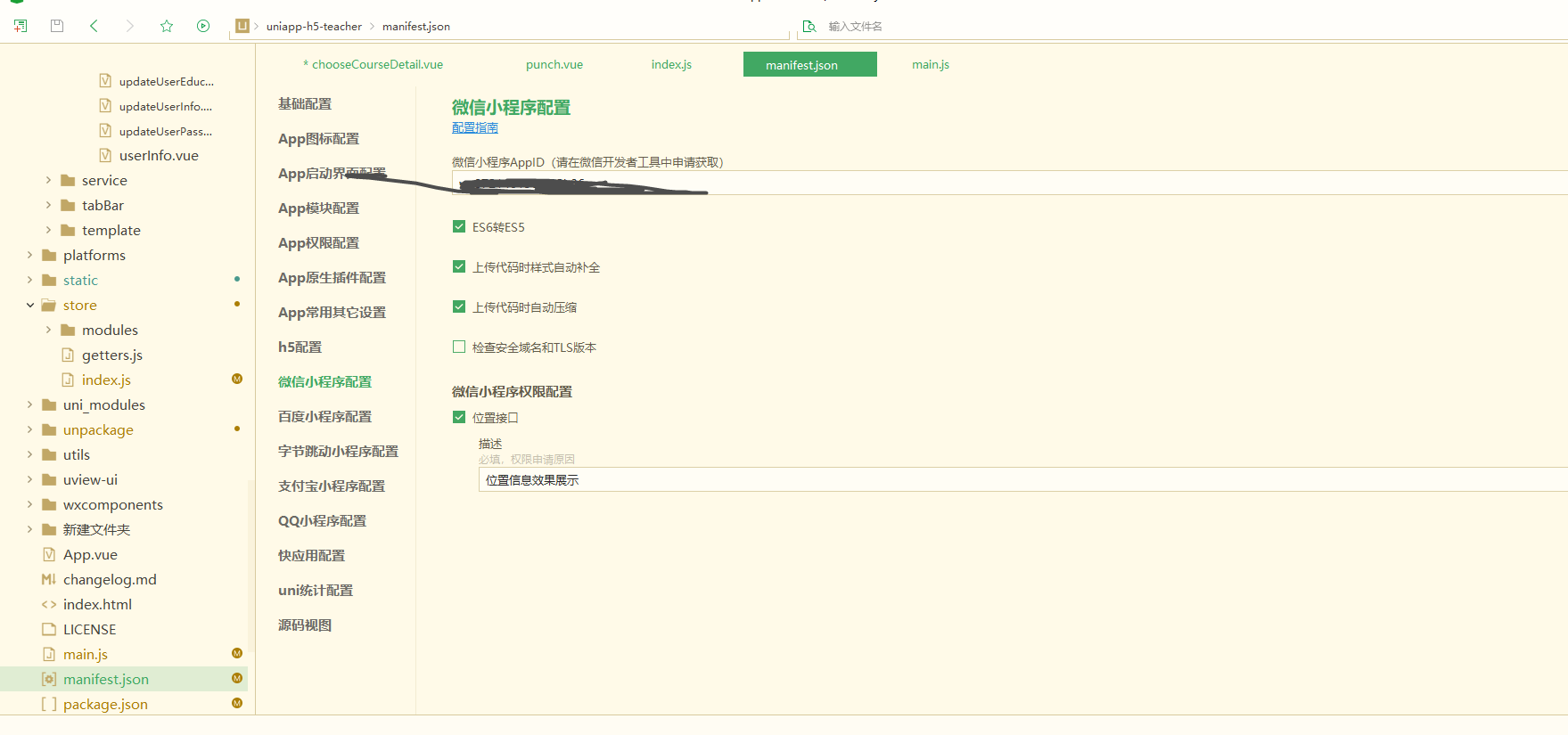
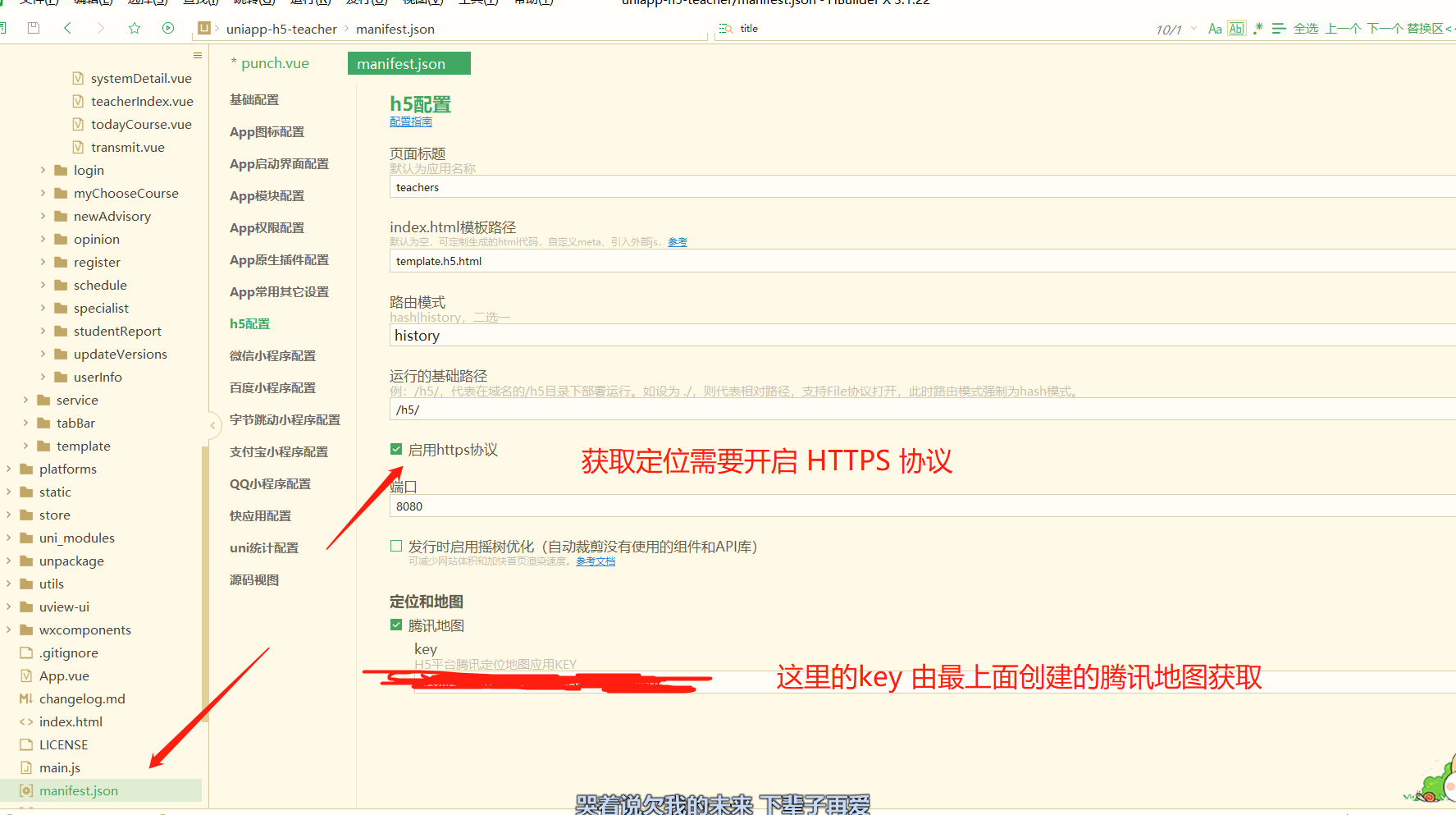
配置上去腾讯地图创建的key
最后,在应用的文件
<!-- :polyline="polyline" --> //点 连城线,需要的可以自己配置
		<map style="width: 100%; height: 300px;" :circles="circles" :scale="scale"
			:latitude="latitude" :longitude="longitude" :markers="covers">
			<!-- <cover-view class="cover-view" @click="onControltap"></cover-view> -->
		</map>
data定义 显示默认定位
// title: 'map',
				latitude: 22.571164, // 默认的经纬度
				longitude: 113.926937,
				covers: [{
						// 开始的经纬度
						latitude: 22.573164, //纬度
						longitude: 113.926937, //经度
						// #ifdef APP-PLUS
						iconPath: '../../../static/image/location@3x.png', //显示的图标
						// #endif
						// #ifndef APP-PLUS
						iconPath: '../../../static/location.png', //显示的图标
						// #endif
						// title: '阿打算', //标注点名
						label: {
							//为标记点旁边增加标签
							// content: '文本1', //文本
							color: '#F76350', //文本颜色
							// anchorX: 0, //label的坐标,原点是 marker 对应的经纬度
							// anchorY: -80, //label的坐标,原点是 marker 对应的经纬度
							bgColor: '#fff', //背景色
							padding: 5, //文本边缘留白
							borderWidth: 1, //边框宽度
							borderColor: '#D84C29', //边框颜色
							textAlign: 'right' //文本对齐方式。
						},
						callout: {
							content: '当前所在',
							color: '#F76350',
							fontSize: 12
						}
					},
					{
						// 圆圈所在的点 =》 终点
						latitude: 22.57147,
						longitude: 113.92663,
						// #ifdef APP-PLUS
						iconPath: '../../../static/image/location@3x.png', //显示的图标
						// #endif
						// #ifndef APP-PLUS
						iconPath: '../../../static/location.png', //显示的图标
						// #endif
						// iconPath: '../../static/image/personal_center.png',
						// title: '阿迪达斯',
						// x: 39.9,
						// y: 116.399,
						label: {
							// content: '打卡范围',
							color: '#F76350',
							bgColor: '#fff',
							padding: 5,
							borderRadius: 4
						},
						callout: {
							content: '打卡范围',
							color: '#F76350',
							fontSize: 12
						}
					}
				],
				scale: 15, //地图层级
				// controls: [{
				// 	//在地图上显示控件,控件不随着地图移动
				// 	id: 1, //控件id
				// 	// iconPath: '../../static/image/equipment_deployment_two.png', //显示的图标
				// 	position: {
				// 		//控件在地图的位置
				// 		left: 15,
				// 		top: 15,
				// 		width: 50,
				// 		height: 50
				// 	}
				// }],
				//在地图上显示圆
				circles: [{
					latitude: 22.57147,
					longitude: 113.92663,

					fillColor: '#AACCEE32', //填充颜色
					color: '#AACCEE', //描边的颜色
					radius: 100, //半径
					strokeWidth: 2 //描边的宽度
				}],
				// polyline: [{ //根据点画线
				// 	//指定一系列坐标点,从数组第一项连线至最后一项 => 第一个输入开始点, 第二个输入结束点
				// 	// points: [{ latitude: 22.57147, longitude: 113.92663 }, { latitude: 22.57091694019413, longitude: 113.9270532131195 }],
				// 	points: [],
				// 	color: '#0000AA', //线的颜色
				// 	width: 2, //线的宽度
				// 	dottedLine: true, //是否虚线
				// 	arrowLine: true //带箭头的线 开发者工具暂不支持该属性
				// }]
methods 方法 /=
//坐标转腾讯地图坐标
			bMapTransQQMap(lng, lat) {
				let locationObj = lat + ',' + lng;
				let url = 'https://apis.map.qq.com/ws/coord/v1/translate';
				var that = this
				this.$jsonp(url, {
					key: 'KKSBZ-53WRP-GBSD7-LE373-SGAQO-6UB7I',
					locations: locationObj,
					type: 1,
					output: 'jsonp'
				}).then(res => {

					that.latitude = res.locations[0].lat
					that.longitude = res.locations[0].lng

					that.covers[0].latitude = res.locations[0].lat
					that.covers[0].longitude = res.locations[0].lng
					//判断是否在规定打卡距离以内
					that.GetDistance(that.covers[0].latitude, that.covers[0].longitude, that.covers[1].latitude,
						that.covers[1].longitude)

				})

			},
			//获取当前位置 =》 由于腾讯地图获取定位会飘,因此采用原生获取定位的方法。目前项目应用中属于最准确的一个,没有之一。
			getAddress() {
				if (navigator.geolocation) {
					var that = this
					var timer = navigator.geolocation.watchPosition(
						function(ev) { //step3:用经纬度描述具体位置
							// alert(parseFloat(ev.coords.longitude));
							// alert(parseFloat(ev.coords.latitude));
							that.bMapTransQQMap(parseFloat(ev.coords.longitude), parseFloat(ev.coords.latitude))
						},
						function(err) {
							alert('定位超时,请稍后再试!')
							// alert(err.code)
							// alert(err.message)
							//清除多次地理位置定位
							navigator.geolocation.clearWatch(timer);
						}, {
							/*数据收集 :  json的形式
							 enableHighAcuracy  :  更精确的查找,默认false
							 timeout  :指定获取地理位置的超时时间,默认不限时,单位为毫秒
							 maximumAge :最长有效期,在重复获取地理位置时,此参数指定多久再次获取位置。
							 */
							enableHighAccuracy: true,
							maximumAge: 2000
						})
				} else {
					alert('您的浏览器不支持geolocation定位!,请更换浏览器');
				}
			},

			// 方法定义 lat,lng  计算距离
			GetDistance(lat1, lng1, lat2, lng2) {
				var radLat1 = lat1 * Math.PI / 180.0;
				var radLat2 = lat2 * Math.PI / 180.0;
				var a = radLat1 - radLat2;
				var b = lng1 * Math.PI / 180.0 - lng2 * Math.PI / 180.0;
				var s = 2 * Math.asin(Math.sqrt(Math.pow(Math.sin(a / 2), 2) +
					Math.cos(radLat1) * Math.cos(radLat2) * Math.pow(Math.sin(b / 2), 2)));
				s = s * 6378137.0; // EARTH_RADIUS;
				s = Math.round(s * 10000) / 10000;
				this.dakajuli = parseFloat(s)
			},
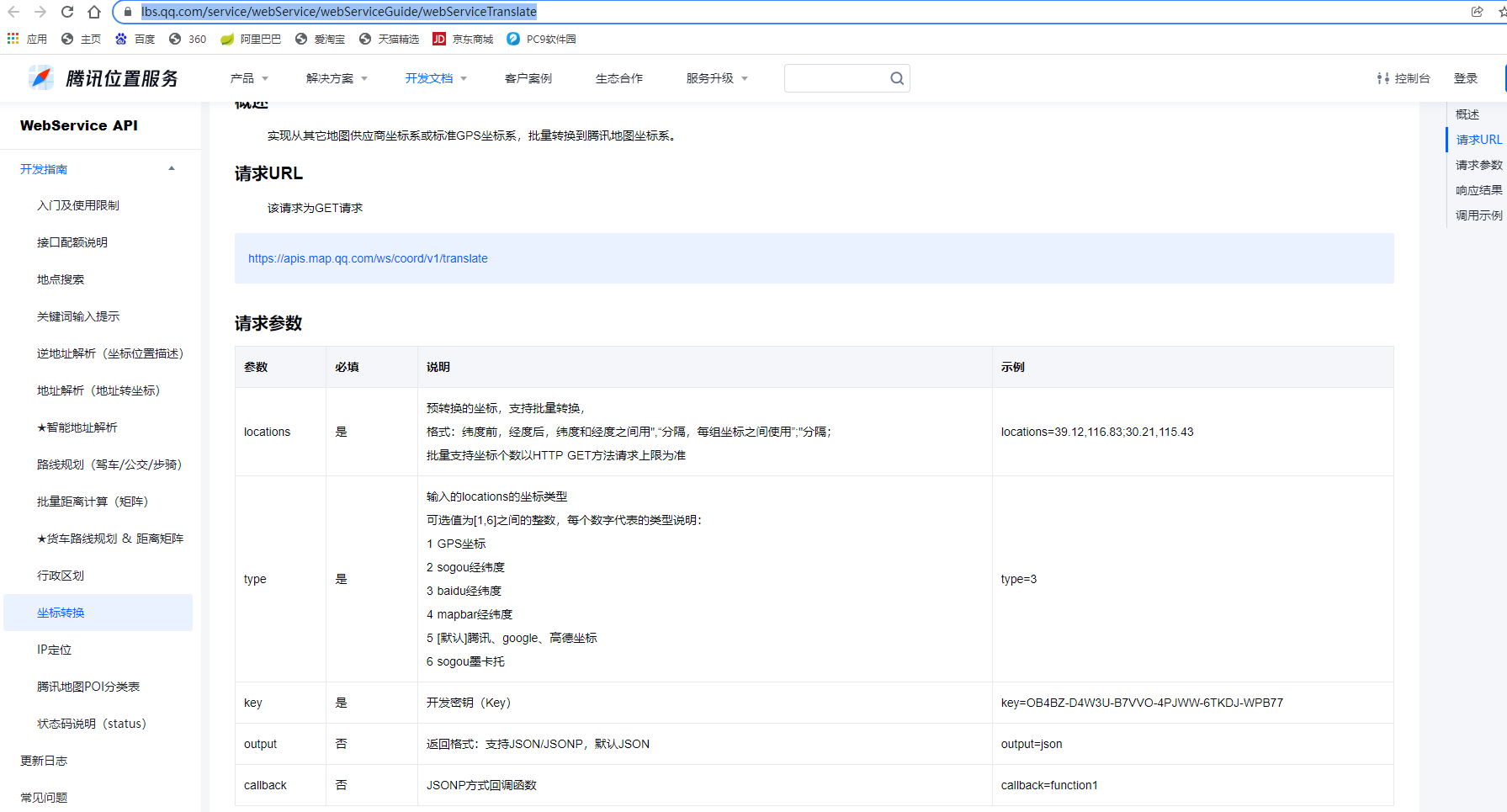
腾讯地图坐标转换API: https://lbs.qq.com/service/webService/webServiceGuide/webServiceTranslate

 浙公网安备 33010602011771号