
nahamcon 2025 CTF
misc
quartet
题目描述:Ah, a quartet is a collection of its unique and individuals parts... and together, this has all my favorite kinds of instruments!

quartet.z01
识别为Zip多卷分档的第一个分卷,包含分卷头信息,需与其他分卷一起解压。
quartet.z02 和 quartet.z03
虽然显示为普通数据文件(data),但它们实际上是后续的分卷。可能是由于文件头未正确识别导致file命令误判。
quartet.z04
作为最后一个分卷,包含Zip的中央目录记录,因此被识别为标准的Zip归档。
直接将quartet.z04重命名为quartet.zip即可正确解压缩,得到一个quartet.jpeg
搜索quartet.jpeg的内容可以直接得到flag

Screenshot
题目描述:Oh shoot! I accidentally took a screenshot just as I accidentally opened the dump of a flag.zip file in a text editor! Whoopsies, what a crazy accidental accident that just accidented!
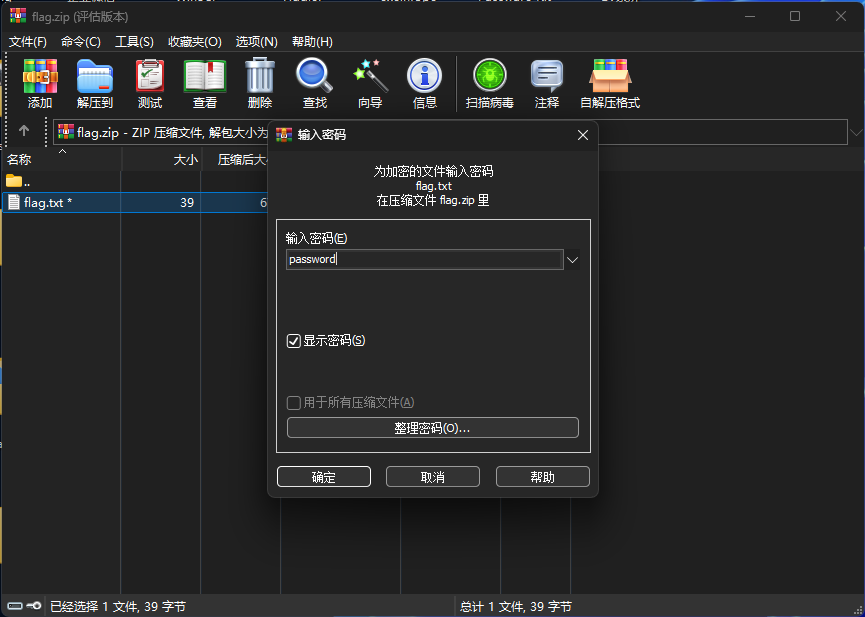
Well anyway, I think I remember the password was just password!
由描述可知,题目图片是一个zip文件的二进制内容

直接文字识别并将内容以二进制写入到文件里得到flag.zip
hex_str = (   "504b03043300010063002f02b55a00000000430000002700000008000b00666C61672e74787401990700020041450300003d42ffd1b35f95031424f68b65c3f57669f14e8df0003fe240b3ac3364859e4c2dbc3c36f2d4acc403761385afe4e3f90fbd29d91b614ba2c6efde11b71bcc907a72ed504b01023f033300010063002f02b55a00000000430000002700000008002f000000000000002080b48100000000666c61672e7478740a00200000000000010018008213854307cadb01000000000000000000000000000000000199070002004145030000504b0506000000000100010065000000740000000000"
)

with open("flag.zip", "wb") as f:
    f.write(bytes.fromhex(hex_str))

print("文件已生成:flag.zip")
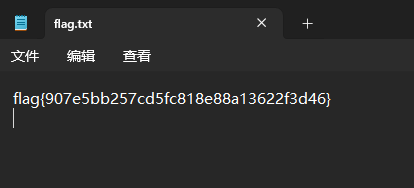
得到flag.zip后提取里面的flag.txt,根据题目描述“password is password”密码就是password,输入密码后查看flag.txt得到flag
Read The Rules
题目描述:Please follow the rules for this CTF!
直接跳转到规则页面查看网页源代码,往下翻即可找到flag

Free Flags!
题目描述:WOW!! Look at all these free flags!!
But... wait a second... only one of them is right??
NOTE, bruteforcing flag submissions is still not permitted. I will put a "max attempts" limit on this challenge at 1:00 PM Pacific to stop participants from automating submissions. There is only one correct flag, you can find a needle in a haystack if you really know what you are looking for.
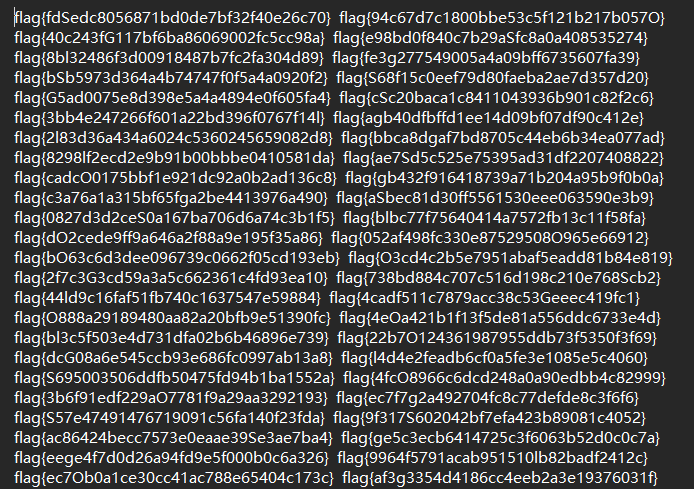
flag.txt文件如图,包含大量的flag,在比赛的规则页面提供了flag的格式 flag{[0-9a-f]{32}},即长度32位,字母仅出现小写字母,编写脚本查找符合条件的flag
import re

def find_true_flag(filename):
    flag_pattern = re.compile(r'^flag\{[a-f0-9]{32}\}$')
    valid_candidates = []
    with open(filename, 'r') as f:
        for line_num, line in enumerate(f, 1):
            raw_flags = line.strip().split()
            for flag in raw_flags:
                if not flag_pattern.match(flag):
                    continue
                else:
                    valid_candidates.append(flag)
    if valid_candidates:
        for i, flag in enumerate(valid_candidates, 1):
            print(f"{i}. {flag}")
        return valid_candidates[0]
    return None

true_flag = find_true_flag('free_flags.txt')
print("正确的flag是:", true_flag if true_flag else "未找到")
Naham-Commencement 2025
题目描述:Welcome, Naham-Hacker Class of 2025! This challenge is your official CTF opening ceremony. Enjoy the CTF, play fair, play smart, and get those flags! BEGIN! 📯
(True story: NahamSec originally contracted me to built the actual NahamCon site. I showed this to him as a prototype and he said "you know, let's actually move you to the CTF dev team...")
NOTE, we have noticed an odd gimmick with this challenge -- if you seem to repeatedly see a message An error occurred while processing your request., try changing how you connect to the Internet in case any provider oddities are getting in the way.
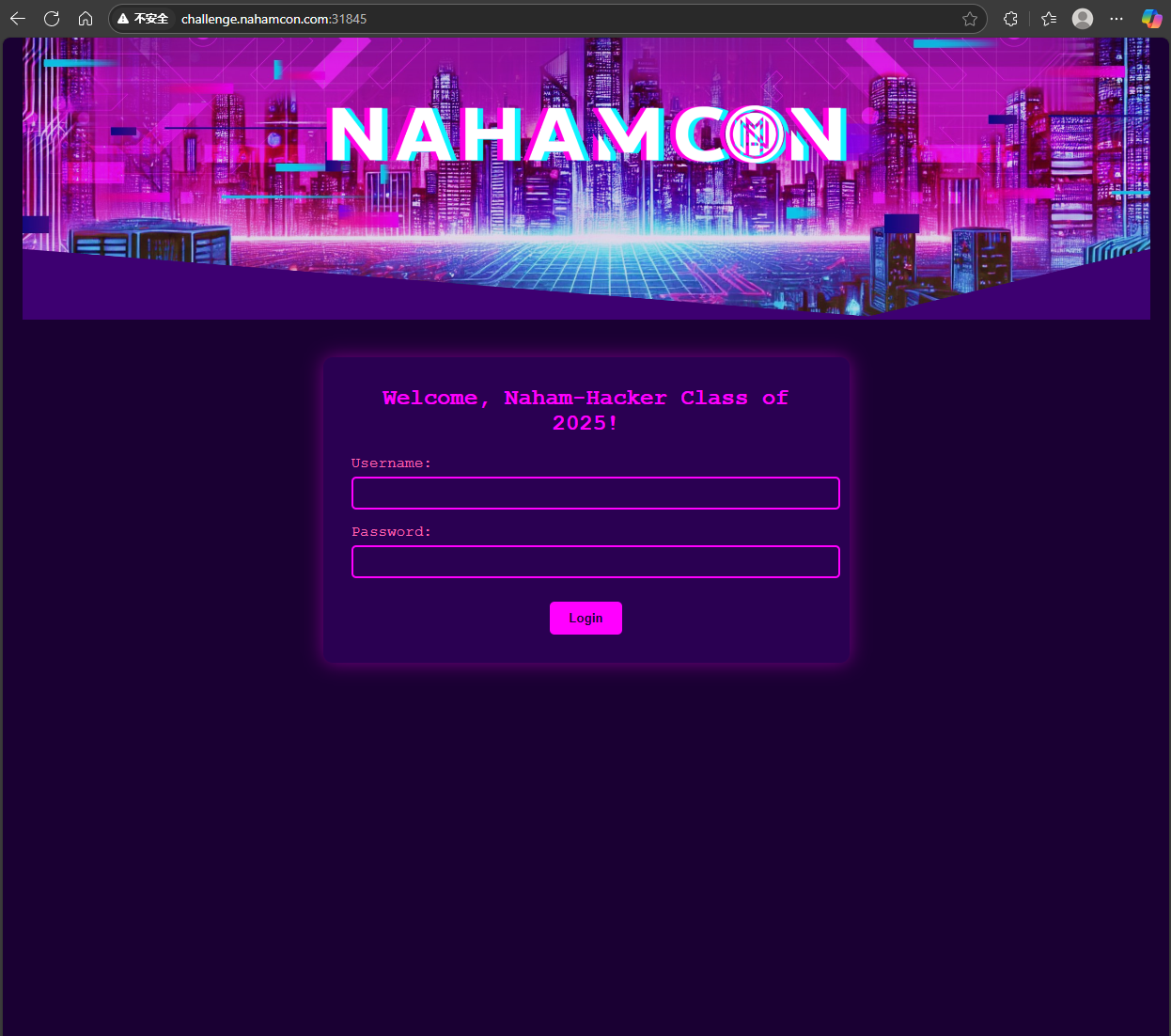
尝试sql注入未果,查看网页源代码
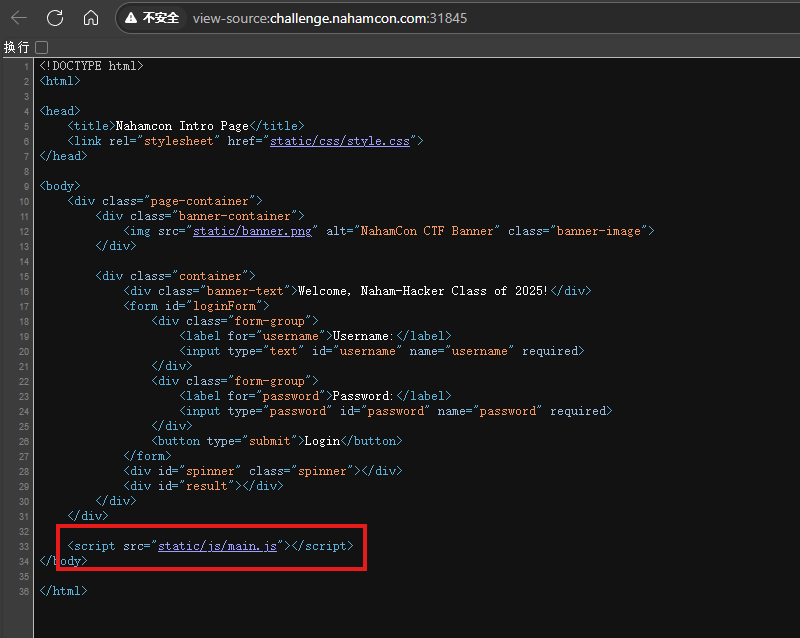
function a(t) {
    let r = '';
    for (let i = 0; i < t.length; i++) {
        const c = t[i];
        if (/[a-zA-Z]/.test(c)) {
            const d = c.charCodeAt(0);
            const o = (d >= 97) ? 97 : 65;
            const x = (d - o + 16) % 26 + o;
            r += String.fromCharCode(x);
        } else {
            r += c;
        }
    }
    return r;
}

function b(t, k) {
    let r = '';
    let j = 0;
    for (let i = 0; i < t.length; i++) {
        const c = t[i];
        if (/[a-zA-Z]/.test(c)) {
            const u = c === c.toUpperCase();
            const l = c.toLowerCase();
            const d = l.charCodeAt(0) - 97;
            const m = k[j % k.length].toLowerCase();
            const n = m.charCodeAt(0) - 97;
            const e = (d + n) % 26;
            let f = String.fromCharCode(e + 97);
            if (u) {
                f = f.toUpperCase();
            }
            r += f;
            j++;
        } else {
            r += c;
        }
    }
    return r;
}

function c(s) {
    return btoa(s);
}

document.addEventListener('DOMContentLoaded', function () {
    const x1 = "dqxqcius";
    const x2 = "YeaTtgUnzezBqiwa2025";
    const x3 = "ZHF4cWNpdXM=";
    const k = "nahamcon";


    const f = document.getElementById('loginForm');
    const u = document.getElementById('username');
    const p = document.getElementById('password');
    const s = document.getElementById('spinner');
    const d = document.getElementById('result');

    f.addEventListener('submit', function (e) {
        e.preventDefault();

        const q = u.value;
        const w = p.value;


        const q1 = a(q);

        const w1 = b(w, k);

        if (q1 !== x1 || w1 !== x2) {
            d.textContent = "Access denied. Client-side validation failed. Try again.";
            d.className = "error";
            d.style.display = "block";
            return;
        }

        s.style.display = "block";
        d.style.display = "none";

        const g = new FormData();
        g.append('username', q);
        g.append('password', w);

        fetch('/login', {
            method: 'POST',
            body: g
        })
            .then(h => h.json())
            .then(z => {
                s.style.display = "none";
                d.style.display = "block";

                if (z.success) {
                    console.log("🎉 Server authentication successful!");
                    d.innerHTML = `
                    <p>${z.message}</p>
                    <p class="flag">🙌🎉${z.flag}🎉🙌</p>
                `;
                    d.className = "success";
                } else {
                    console.log("❌ Server authentication failed");
                    d.textContent = z.message;
                    d.className = "error";
                }
            })
            .catch(err => {
                console.error("🚨 Network error:", err);
                s.style.display = "none";
                d.style.display = "block";
                d.textContent = "An error occurred while processing your request.";
                d.className = "error";
            });
    });

});
阅读网页源代码可知
函数a对用户名进行ROT16加密。已知加密后的用户名x1为"dqxqcius"。解密ROT16:每个字母逆处理(即ROT10),得到原用户名"nahamsec"。

函数b使用Vigenère加密,密钥k为"nahamcon"。已知加密后的密码x2为"YeaTtgUnzezBqiwa2025"。Vigenère解密:使用密钥k解密后,得到原密码"LetTheGamesBegin2025"。
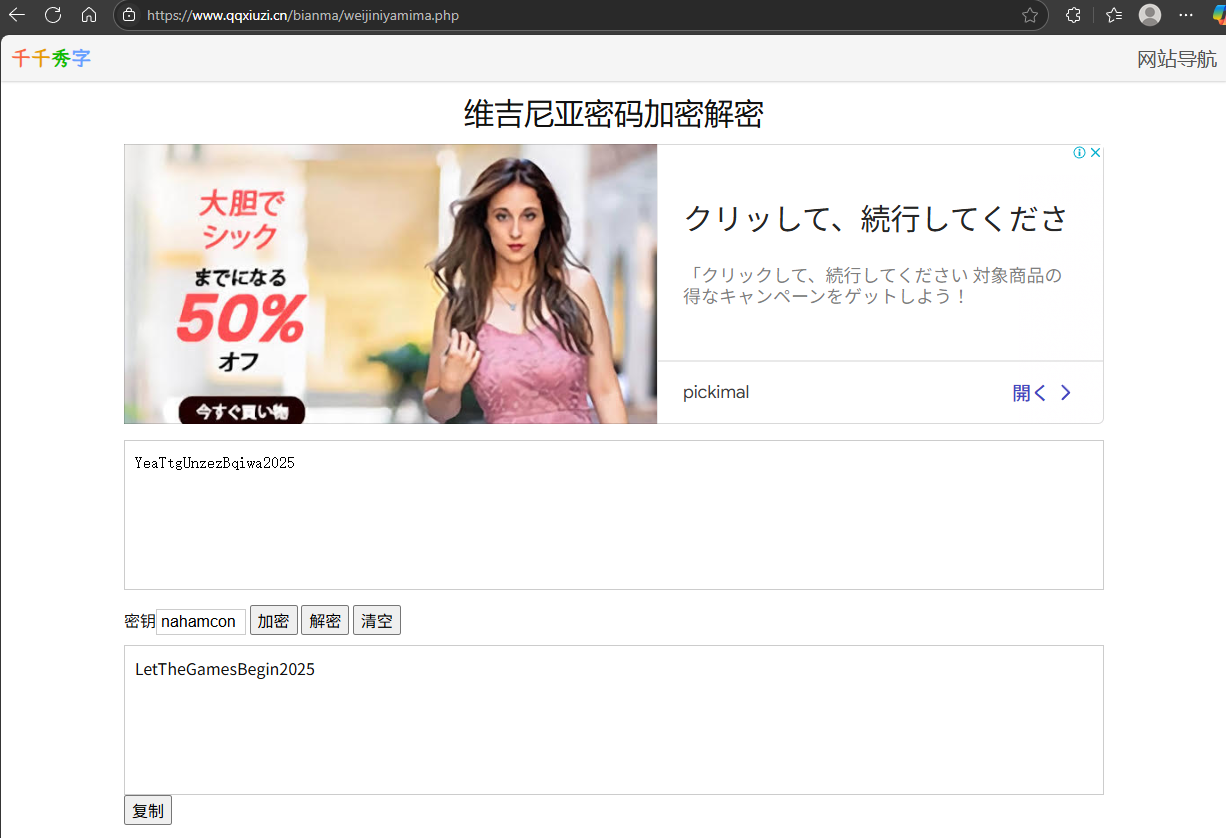
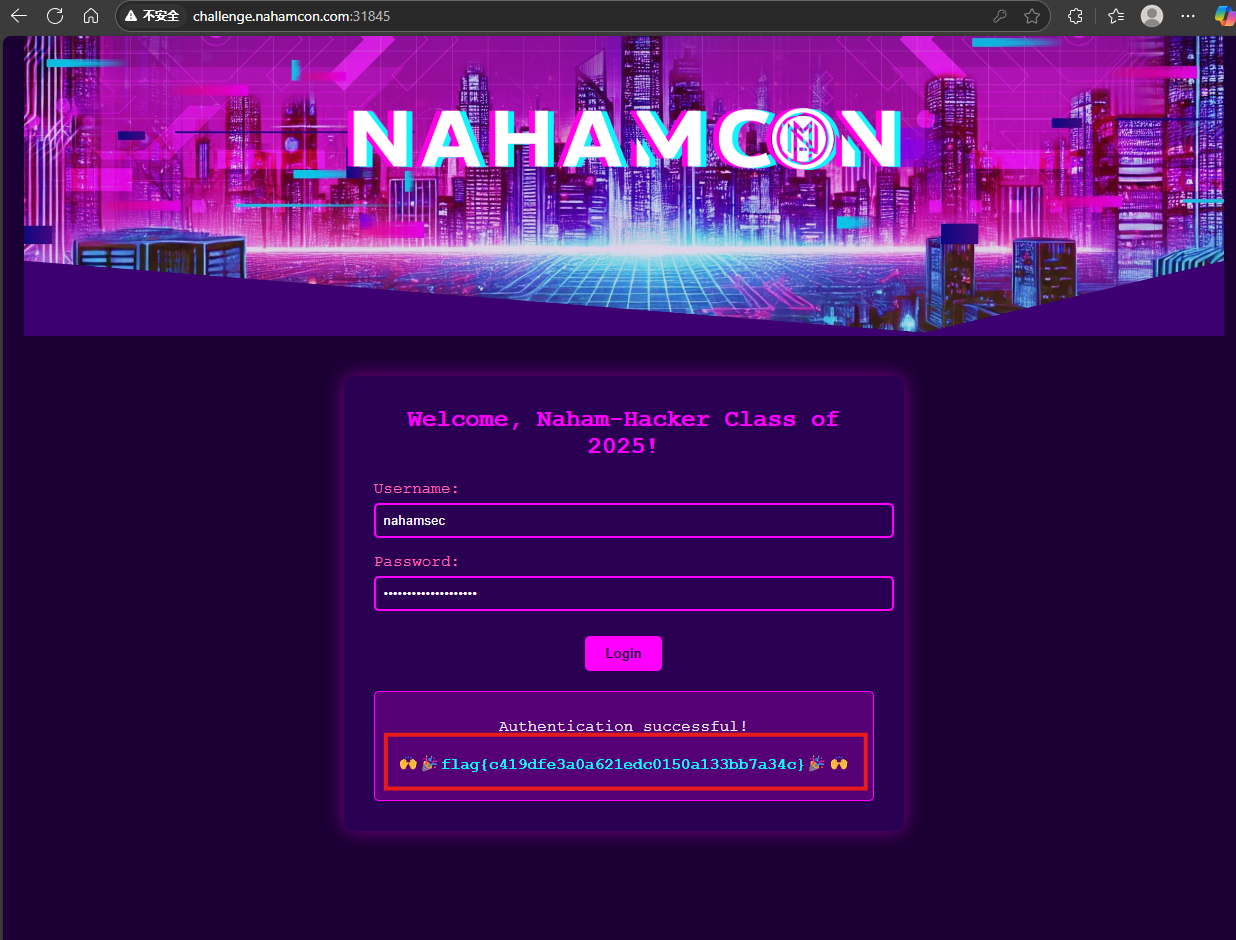
将得到的账户密码输入到主页面即可得到flag
The Oddyssey
题目描述:Remember reading The Odyssey in high school? Well I sure don't, because I never did my homework. But I really wanted to get back into the classics and give it a fair shake. The problem is I have a fourth grade reading level and that book is waaaaaay too long.
To solve this, I made a server that reads out tiny chunks of The Odyssey, one at a time, so I can take my time reading it! How is Odysseus gonna get himself out of this one?
连接到题目后每次输出一小段内容,每输入一次回车则再输出一段,故编写脚本自动触发检查内容是否包含flag
from pwn import *
import sys
import time

def main():
    server_ip = "challenge.nahamcon.com"
    server_port = 31574
    output_file = "output.txt"

    try:
        conn = remote(server_ip, server_port)
        print(f"Connected to {server_ip}:{server_port}")
        with open(output_file, "w", encoding="utf-8") as f:
            count = 0
            while True:
                try:
                    conn.sendline()
                    data = conn.recv(timeout=5).decode("utf-8", errors="ignore")
                    if not data:
                        print("Connection closed by server")
                        break
                    f.write(data)
                    f.flush()
                    print(f"[Chunk {count}] Received {len(data)} bytes")
                    if "flag{" in data.lower():
                        print("\n🔥 FLAG FOUND IN LAST RESPONSE!")
                        break

                    count += 1
                    time.sleep(0.1)

                except EOFError:
                    print("\nServer closed the connection")
                    break
                except Exception as e:
                    print(f"\nError occurred: {str(e)}")
                    break

    except ConnectionRefusedError:
        print("Connection refused. Check server IP/port")
    except KeyboardInterrupt:
        print("\nUser interrupted")
    finally:
        if 'conn' in locals():
            conn.close()
        print(f"All responses saved to {output_file}")

if __name__ == "__main__":
    main()

SNAD
题目描述:No, it's not a typo. It's not sand. It's SNAD. There's a difference!
简单看了一下,是一个类似于画板的页面,查看响应包。
HTTP/1.1 200 OK
X-Powered-By: Express
Access-Control-Allow-Origin: *
Accept-Ranges: bytes
Cache-Control: public, max-age=0
Last-Modified: Fri, 23 May 2025 18:05:31 GMT
ETag: W/"18e7-196fe5255f8"
Content-Type: application/javascript; charset=UTF-8
Content-Length: 6375
Date: Sat, 24 May 2025 02:48:07 GMT
Connection: keep-alive
Keep-Alive: timeout=5

const requiredGrains = 7, targetPositions = [{ x: 367, y: 238, colorHue: 0 }, { x: 412, y: 293, colorHue: 40 }, { x: 291, y: 314, colorHue: 60 }, { x: 392, y: 362, colorHue: 120 }, { x: 454, y: 319, colorHue: 240 }, { x: 349, y: 252, colorHue: 280 }, { x: 433, y: 301, colorHue: 320 }], tolerance = 15, hueTolerance = 20; let particles = [], grid = [], isMousePressed = !1, colorIndex = 0, flagRevealed = !1, targetIndicatorsVisible = !1, gravityStopped = !1; function getRainbowColor() { return color("hsb(" + (colorIndex = (colorIndex + 5) % 360) + ", 100%, 90%)") } function getSpecificColor(e) { return color("hsb(" + e + ", 100%, 90%)") } async function retrieveFlag() { let e = document.getElementById("flag-container"); e.style.display = "block"; try { let t = particles.filter(e => e.settled).map(e => ({ x: Math.floor(e.x), y: Math.floor(e.y), colorHue: e.colorHue })), o = await fetch("/api/verify-ctf-solution", { method: "POST", headers: { "Content-Type": "application/json" }, body: JSON.stringify({ particleData: t }) }), i = await o.json(), r = e.querySelector(".loading"); r && r.remove(), i.success ? (e.querySelector("p").textContent = "SNAD!", document.getElementById("flag-text").textContent = i.flag) : (e.querySelector("p").textContent = i.message, document.getElementById("flag-text").textContent = "", setTimeout(() => { e.style.display = "none", flagRevealed = !1 }, 3e3)) } catch (l) { console.error("Error retrieving flag:", l), document.getElementById("flag-text").textContent = "Error retrieving flag. Please try again."; let s = e.querySelector(".loading"); s && s.remove() } } function injectSand(e, t, o) { if (isNaN(e) || isNaN(t) || isNaN(o)) return console.error("Invalid parameters. Usage: injectSand(x, y, hue)"), !1; o = (o % 360 + 360) % 360; let i = new Particle(e, t, { colorHue: o, settled: !0, skipKeyCheck: !0, vx: 0, vy: 0 }); particles.push(i); let r = floor(e), l = floor(t); return r >= 0 && r < width && l >= 0 && l < height && (grid[l][r] = !0), i } function toggleGravity() { gravityStopped = !gravityStopped, console.log(`Gravity ${gravityStopped ? "stopped" : "resumed"}`) } class Particle { constructor(e, t, o = {}) { this.x = void 0 !== o.x ? o.x : e, this.y = void 0 !== o.y ? o.y : t, this.size = o.size || random(2, 4), void 0 !== o.colorHue ? (this.colorHue = o.colorHue, this.color = getSpecificColor(o.colorHue)) : (this.color = getRainbowColor(), this.colorHue = colorIndex), this.vx = void 0 !== o.vx ? o.vx : random(-.5, .5), this.vy = void 0 !== o.vy ? o.vy : random(0, 1), this.gravity = o.gravity || .2, this.friction = o.friction || .98, this.settled = o.settled || !1, o.skipKeyCheck || this.checkSpecialGrain() } checkSpecialGrain() { keyIsDown(82) ? (this.color = getSpecificColor(0), this.colorHue = 0) : keyIsDown(79) ? (this.color = getSpecificColor(40), this.colorHue = 40) : keyIsDown(89) ? (this.color = getSpecificColor(60), this.colorHue = 60) : keyIsDown(71) ? (this.color = getSpecificColor(120), this.colorHue = 120) : keyIsDown(66) ? (this.color = getSpecificColor(240), this.colorHue = 240) : keyIsDown(73) ? (this.color = getSpecificColor(280), this.colorHue = 280) : keyIsDown(86) && (this.color = getSpecificColor(320), this.colorHue = 320) } update(e) { if (this.settled || gravityStopped) return; this.vy += this.gravity, this.vx *= this.friction; let t = this.x + this.vx, o = this.y + this.vy; (t < 0 || t >= width || o >= height) && (o >= height && (o = height - 1, this.settled = !0), t < 0 && (t = 0), t >= width && (t = width - 1)); let i = min(floor(o) + 1, height - 1), r = floor(t); if (i < height && !e[i][r]) this.x = t, this.y = o; else { let l = max(r - 1, 0), s = min(r + 1, width - 1); i < height && !e[i][l] ? (this.x = t - 1, this.y = o, this.vx -= .1) : i < height && !e[i][s] ? (this.x = t + 1, this.y = o, this.vx += .1) : (this.x = r, this.y = floor(this.y), this.settled = !0) } let c = floor(this.x), a = floor(this.y); c >= 0 && c < width && a >= 0 && a < height && (e[a][c] = !0) } draw() { noStroke(), fill(this.color), circle(this.x, this.y, this.size) } } function setup() { createCanvas(windowWidth, windowHeight), resetGrid(), document.addEventListener("keydown", function (e) { "t" === e.key && (targetIndicatorsVisible = !targetIndicatorsVisible), "x" === e.key && toggleGravity() }), window.injectSand = injectSand, window.toggleGravity = toggleGravity, window.particles = particles, window.targetPositions = targetPositions, window.checkFlag = checkFlag } function resetGrid() { grid = []; for (let e = 0; e < height; e++) { grid[e] = []; for (let t = 0; t < width; t++)grid[e][t] = !1 } flagRevealed = !1; let o = document.getElementById("flag-container"); o.style.display = "none" } function draw() { if (background(30), isMousePressed && mouseX > 0 && mouseX < width && mouseY > 0 && mouseY < height) for (let e = 0; e < 3; e++) { let t = new Particle(mouseX + random(-5, 5), mouseY + random(-5, 5)); particles.push(t) } if (targetIndicatorsVisible) for (let o of (stroke(255, 150), strokeWeight(1), targetPositions)) noFill(), stroke(o.colorHue, 100, 100), circle(o.x, o.y, 30); let i = []; for (let r = 0; r < height; r++) { i[r] = []; for (let l = 0; l < width; l++)i[r][l] = !1 } for (let s of particles) { s.update(grid), s.draw(); let c = floor(s.x), a = floor(s.y); c >= 0 && c < width && a >= 0 && a < height && (i[a][c] = !0) } grid = i, checkFlag(), fill(255), textSize(16), text("Particles: " + particles.length, 10, height - 20) } function checkFlag() { if (flagRevealed) return; let e = 0, t = []; for (let o of targetPositions) { let i = !1; for (let r of particles) if (r.settled) { let l = dist(r.x, r.y, o.x, o.y), s = min(abs(r.colorHue - o.colorHue), 360 - abs(r.colorHue - o.colorHue)); if (l < 15 && s < 20) { i = !0, t.push({ targetPos: `(${o.x}, ${o.y})`, targetHue: o.colorHue, particlePos: `(${Math.floor(r.x)}, ${Math.floor(r.y)})`, particleHue: r.colorHue, distance: Math.floor(l), hueDifference: Math.floor(s) }); break } } i && e++ } e >= 7 && (flagRevealed = !0, console.log("\uD83C\uDF89 All positions correct! Retrieving flag..."), retrieveFlag()) } function mousePressed() { isMousePressed = !0 } function mouseReleased() { isMousePressed = !1 } function keyPressed() { ("c" === key || "C" === key) && (particles = [], resetGrid()) } function windowResized() { resizeCanvas(windowWidth, windowHeight), resetGrid() }
代码中定义了7个目标位置(targetPositions),每个位置有坐标和色调(colorHue):
targetPositions = [
{ x: 367, y: 238, colorHue: 0 },
{ x: 412, y: 293, colorHue: 40 },
{ x: 291, y: 314, colorHue: 60 },
{ x: 392, y: 362, colorHue: 120 },
{ x: 454, y: 319, colorHue: 240 },
{ x: 349, y: 252, colorHue: 280 },
{ x: 433, y: 301, colorHue: 320 }
];
需要将7个沙粒放置在这些位置附近(误差小于15像素),且颜色色调误差小于20。
验证条件
函数 checkFlag() 会检查是否满足以下条件:
沙粒的坐标与目标位置的距离 < tolerance(15像素)。
沙粒的色调与目标色调的差值 < hueTolerance(20)。
直接通过浏览器控制台注入沙粒,避免手动操作误差:
targetPositions.forEach(pos => {
  injectSand(pos.x, pos.y, pos.colorHue);
});
执行后会自动生成7个符合要求的沙粒,触发 retrieveFlag() 函数向服务器验证。
Cryptoclock
题目描述:Just imagine it, the Cryptoclock!! Just like you've seen in the movies, a magical power to be able to manipulate the world's numbers across time!!
题目给了一个server.py
#!/usr/bin/env python3
import socket
import threading
import time
import random
import os
from typing import Optional

def encrypt(data: bytes, key: bytes) -> bytes:
    """Encrypt data using XOR with the given key."""
    return bytes(a ^ b for a, b in zip(data, key))

def generate_key(length: int, seed: Optional[float] = None) -> bytes:
    """Generate a random key of given length using the provided seed."""
    if seed is not None:
        random.seed(int(seed))
    return bytes(random.randint(0, 255) for _ in range(length))

def handle_client(client_socket: socket.socket):
    """Handle individual client connections."""
    try:
        with open('flag.txt', 'rb') as f:
            flag = f.read().strip()

        current_time = int(time.time())
        key = generate_key(len(flag), current_time)

        encrypted_flag = encrypt(flag, key)

        welcome_msg = b"Welcome to Cryptoclock!\n"
        welcome_msg += b"The encrypted flag is: " + encrypted_flag.hex().encode() + b"\n"
        welcome_msg += b"Enter text to encrypt (or 'quit' to exit):\n"
        client_socket.send(welcome_msg)

        while True:
            data = client_socket.recv(1024).strip()
            if not data:
                break

            if data.lower() == b'quit':
                break

            key = generate_key(len(data), current_time)
            encrypted_data = encrypt(data, key)

            response = b"Encrypted: " + encrypted_data.hex().encode() + b"\n"
            client_socket.send(response)

    except Exception as e:
        print(f"Error handling client: {e}")
    finally:
        client_socket.close()

def main():
    server = socket.socket(socket.AF_INET, socket.SOCK_STREAM)
    server.setsockopt(socket.SOL_SOCKET, socket.SO_REUSEADDR, 1)

    server.bind(('0.0.0.0', 1337))
    server.listen(5)

    print("Server started on port 1337...")

    try:
        while True:
            client_socket, addr = server.accept()
            print(f"Accepted connection from {addr}")
            client_thread = threading.Thread(target=handle_client, args=(client_socket,))
            client_thread.start()
    except KeyboardInterrupt:
        print("\nShutting down server...")
    finally:
        server.close()

if __name__ == "__main__":
    main()
发送与 Flag 长度相同的全零数据(\x00 字节),服务器会用相同种子生成的密钥进行加密。由于 0 XOR key = key,响应内容即为密钥。
将加密后的 Flag 与获取的密钥进行 XOR 运算,即可解密
交互exp如下
import socket
from time import time

def exploit():
    HOST = '题目服务器地址'
    PORT = #端口

    s = socket.socket(socket.AF_INET, socket.SOCK_STREAM)
    s.connect((HOST, PORT))

    # 接收欢迎信息并解析加密 Flag
    data = s.recv(1024).decode()
    encrypted_flag_hex = data.split('The encrypted flag is: ')[1].split('\n')[0].strip()
    encrypted_flag = bytes.fromhex(encrypted_flag_hex)
    flag_length = len(encrypted_flag)

    zero_payload = b'\x00' * flag_length + b'\n'
    s.send(zero_payload)
    key_response = s.recv(1024).decode()
    key_hex = key_response.split('Encrypted: ')[1].split('\n')[0].strip()
    key = bytes.fromhex(key_hex)

    flag = bytes([a ^ b for a, b in zip(encrypted_flag, key)])
    print(f"Flag: {flag.decode()}")

if __name__ == '__main__':
    exploit()
The Martian
题目描述:Wow, this file looks like it's from outta this world!
下载后直接丢到虚拟机中对文件进行处理
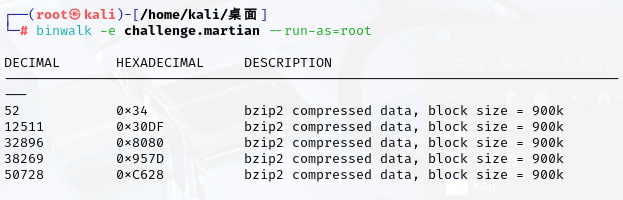
拆分后查看图片即为flag

Puzzle Pieces
题目描述:Well, I accidentally put the important data into a bunch of executables.
It was fine, until my cat stepped on my keyboard and renamed them all!
Can you help me recover the important data?
NOTE, the password for the archive is nahamcon-2025-ctf
根据题目描述所给密码解压缩后发现是很多个可执行文件,执行后输出疑似flag的碎片,按照修改时间对flag碎片进行排序即可得到flag


 浙公网安备 33010602011771号