
python模块 PyYAML--操作文件yaml
PyYAML模块说明:https://pyyaml.org/wiki/PyYAMLDocumentation
1、YAML数据
1、YAML数据简介
- YAML是"YAML Ain't a Markup Language"(YAML不是一种标记语言)的递归缩写。在开发的这种语言时,YAML的意思其实是:"Yet Another Markup Language"(仍是一种标记语言)。
- YAML的语法和其他高级语言类似,并且可以简单表达清单、散列表,标量等数据形态。它使用空白符号缩进和大量依赖外观的特色,特别适合用来表达或编辑数据结构、各种配置文件、倾印调试内容、文件大纲(例如:许多电子邮件标题格式和YAML非常接近)。
- YAML的配置文件后缀为.yml,如:runoob.yml。
- YAML流是零个或多个文档的集合。空流不包含任何文档。文件用分隔"---"。文件可以选择以结尾"..."。单个文档可能带有或未带有标记---。
2、YAML基本语法
- 大小写敏感
- 使用缩进表示层级关系
- 缩进不允许使用tab,只允许空格
- 缩进的空格数不重要,只要相同层级的元素左对齐即可
- '#'表示注释
3、YAML三种数据类型
- 对象:键值对的集合,又称为映射(mapping)/哈希(hashes)/字典(dictionary)
- 数组:一组按次序排列的值,又称为序列(sequence)/列表(list)
- 纯量(scalars):单个的、不可再分的值
1、YAML对象
- 对象的键值对( key: value)使用冒号结构表示,冒号后面要加一个空格。
1、使用缩进表示层级关系
key:
    child-key: value
    child-key2: value2
2、也可以写在一行
key:{key1: value1, key2: value2, ...}
3、复杂的对象格式
- 可以使用问号‘’?‘加一个空格” “代表一个复杂的key,配合一个冒号“:”加一个空格” “代表一个value
- 意思即对象的属性是一个数组[complexkey1,complexkey2],对应的值也是一个数组[complexvalue1,complexvalue2]
?
    - complexkey1
    - complexkey2
:
    - complexvalue1
    - complexvalue2
示例1:
import yaml
import json

yamlhh = '''    #yaml数据示例
country: 中国
name: hengha
age: 18
skill: [c, py]
'''

pythonhh = yaml.load(yamlhh, Loader=yaml.FullLoader)    #Loader=yaml.FullLoader,屏蔽警告YAMLLoadWarning: calling yaml.load() without Loader=... is deprecated
print(pythonhh, type(pythonhh))
jsonhh = json.dumps(pythonhh, ensure_ascii=False)       #ensure_ascii=False,显示中文
print(jsonhh, type(jsonhh))

<<<    #1、yaml --> python    2、python --> json
{'country': '中国', 'name': 'hengha', 'age': 18, 'skill': ['c', 'py']} <class 'dict'>
{"country": "中国", "name": "hengha", "age": 18, "skill": ["c", "py"]} <class 'str'>
示例2:复杂格式的对象
import yaml
import json

yamlhh = '''    #yaml数据示例
? !!python/tuple [0,0]
: The Hero
? !!python/tuple [0,1]
1: 1
Ture: 1
None: none
'''

pythonhh = yaml.load(yamlhh, Loader=yaml.FullLoader)
print(pythonhh, type(pythonhh))
jsonhh = json.dumps(pythonhh, skipkeys=True)    #skipkeys=True,那些字典的键不是基本对象(包括str、int、float、bool、None)的会被跳过;否则引发一个TypeError。
print(jsonhh, type(jsonhh))

<<<    #1、yaml --> python    2、python --> json
{(0, 0): 'The Hero', (0, 1): None, 1: 1, 'Ture': 1, 'None': 'none'} <class 'dict'>
{"1": 1, "Ture": 1, "None": "none"} <class 'str'>
示例3:对象套嵌对象
import yaml
import json

yamlhh = '''    #yaml数据示例
hero:
  hp: 34
  sp: 8
  level: 4
orc:
  hp: 12
  sp: 0
  level: 2
'''

pythonhh = yaml.load(yamlhh, Loader=yaml.FullLoader)
print(pythonhh, type(pythonhh))
jsonhh = json.dumps(pythonhh)
print(jsonhh, type(jsonhh))

<<<    #1、yaml --> python    2、python --> json
{'hero': {'hp': 34, 'sp': 8, 'level': 4}, 'orc': {'hp': 12, 'sp': 0, 'level': 2}} <class 'dict'>
{"hero": {"hp": 34, "sp": 8, "level": 4}, "orc": {"hp": 12, "sp": 0, "level": 2}} <class 'str'>
示例4:对象嵌套数组。注意,在这种情况下,不必缩进数组。
import yaml
import json

yamlhh = '''    #yaml数据示例
left hand:
- Teleportation
- Speed
right hand:
- 3.14
- None
- True
'''

pythonhh = yaml.load(yamlhh, Loader=yaml.FullLoader)
print(pythonhh, type(pythonhh))
jsonhh = json.dumps(pythonhh)
print(jsonhh, type(jsonhh))

<<<    #1、yaml --> python    2、python --> json
{'left hand': ['Teleportation', 'Speed'], 'right hand': [3.14, 'None', True]} <class 'dict'>
{"left hand": ["Teleportation", "Speed"], "right hand": [3.14, "None", true]} <class 'str'>
2、YAML数组
- 列表的所有成员都是以“-”开头的相同缩进级别的行(一个破折号和一个空格)
- A
- B
- C
- 也可以写在一行
[A,B,C]
示例1:
import yaml
import json

yamlhh = '''    #yaml数据示例
- The Dagger 'Narthanc'
- The Dagger 'Nimthanc'
- The Dagger 'Dethanc'
'''

pythonhh = yaml.load(yamlhh, Loader=yaml.FullLoader)
print(pythonhh, type(pythonhh))
jsonhh = json.dumps(pythonhh)
print(jsonhh, type(jsonhh))

<<<    #1、yaml --> python    2、python --> json
["The Dagger 'Narthanc'", "The Dagger 'Nimthanc'", "The Dagger 'Dethanc'"] <class 'list'>
["The Dagger 'Narthanc'", "The Dagger 'Nimthanc'", "The Dagger 'Dethanc'"] <class 'str'>
示例2:数组套嵌数组
import yaml
import json

yamlhh = '''    #yaml数据示例
-
  - HTML
  - XML
  - YAML
-
  - 3.14
  - None
  - True
'''

pythonhh = yaml.load(yamlhh, Loader=yaml.FullLoader)
print(pythonhh, type(pythonhh))
jsonhh = json.dumps(pythonhh)
print(jsonhh, type(jsonhh))

<<<    #1、yaml --> python    2、python --> json
[['HTML', 'XML', 'YAML'], [3.14, 'None', True]] <class 'list'>
[["HTML", "XML", "YAML"], [3.14, "None", true]] <class 'str'>
示例3:不换行嵌套数组
import yaml
import json

yamlhh = '''    #yaml数据示例
- python
- - HTML
  - XML
  - YAML
- - 3.14
  - None
  - True
'''

pythonhh = yaml.load(yamlhh, Loader=yaml.FullLoader)
print(pythonhh, type(pythonhh))
jsonhh = json.dumps(pythonhh)
print(jsonhh, type(jsonhh))

<<<    #1、yaml --> python    2、python --> json
['python', ['HTML', 'XML', 'YAML'], [3.14, 'None', True]] <class 'list'>
["python", ["HTML", "XML", "YAML"], [3.14, "None", true]] <class 'str'>
示例4:数组套嵌对象
import yaml
import json

yamlhh = '''    #yaml数据示例
- name: PyYAML
  status: 4
- name: PySyck
  status: 5
'''

pythonhh = yaml.load(yamlhh, Loader=yaml.FullLoader)
print(pythonhh, type(pythonhh))
jsonhh = json.dumps(pythonhh)
print(jsonhh, type(jsonhh))

<<<    #1、yaml --> python    2、python --> json
[{'name': 'PyYAML', 'status': 4}, {'name': 'PySyck', 'status': 5}] <class 'list'>
[{"name": "PyYAML", "status": 4}, {"name": "PySyck", "status": 5}] <class 'str'>
3、YAML纯量
- 纯量是最基本的,不可再分的值,包括:字符串、整数、浮点数、布尔值、Null、时间、日期。
boolean:
    - TRUE                          #true,True都可以
    - FALSE                         #false,False都可以
float:
    - 3.14
    - 6.8523015e+5                  #可以使用科学计数法
int:
    - 123
    - 0b1010_0111_0100_1010_1110    #二进制表示
null:
    nodeName: 'node'
    parent: ~                       #使用~表示null
string:
    - 哈哈
    - 'Hello world'                 #可以使用双引号或者单引号包裹特殊字符
    - newline
      newline2                      #字符串可以拆成多行,每一行会被转化成一个空格
date:
    - 2018-02-17                    #日期必须使用ISO 8601格式,即yyyy-MM-dd
datetime:
    -  2018-02-17T15:02:31+08:00    #时间使用ISO 8601格式,时间和日期之间使用T连接,最后使用+代表时区
4、标量
- YAML中有5种标量样式:普通、单引号('')、双引号("")、文字式(|)、折叠式(>)。
- 普通:纯标量不使用指示符来表示它的开始和结束,因此它是最受限制的样式。它的自然应用是属性和参数的名称。
- 单引号(''):可以表达任何不包含特殊字符的值。对于单引号标量,不会发生转义。单引号之中如果还有单引号,必须连续使用两个单引号转义。
- 双引号(""):双引号是最强大的样式,也是唯一可以表示任何标量值的样式。双引号标量允许转义。使用转义序列\x*和\u***,您可以表示任何ASCII或Unicode字符。
- 块标量样式有两种:文字式和折叠式
-
字符串可以写成多行,从第二行开始,必须有一个单空格缩进。换行符会被转为"空格"
多行字符串可以使用|保留换行符,也可以使用>折叠换行
+ 表示保留文字块末尾的换行,- 表示删除字符串末尾的换行 -
文字式(|):适用于大块文本(例如源代码)的最合适样式。
折叠式(>):折叠样式类似于文字样式,但是两条相邻的非空行连接到由空格字符分隔的单行。
-
# YAML
plain: Scroll of Remove Curse
single-quoted: 'EASY_KNOW'
double-quoted: "?"
literal: |
  by hjw              ___
     __              /.-.\
    /  )_____________\\  Y
   /_ /=== == === === =\ _\_
  ( /)=== == === === == Y   \
   `-------------------(  o  )
                        \___/
folded: >
  It removes all ordinary curses from all equipped items.
  Heavy or permanent curses are unaffected.

# Python
{'plain': 'Scroll of Remove Curse',
'literal':
    'by hjw              ___\n'
    '   __              /.-.\\\n'
    '  /  )_____________\\\\  Y\n'
    ' /_ /=== == === === =\\ _\\_\n'
    '( /)=== == === === == Y   \\\n'
    ' `-------------------(  o  )\n'
    '                      \\___/\n',
'single-quoted': 'EASY_KNOW',
'double-quoted': '?',
'folded': 'It removes all ordinary curses from all equipped items. Heavy or permanent curses are unaffected.\n'}
5、引用
- “&”锚点和“*”别名,可以用来引用
- “&”用来建立锚点,“<<”表示合并到当前数据,“*”用来引用锚点。
defaults: &defaults               #建立锚点
  adapter:  postgres
  host:     localhost
development:
  database: myapp_development
  <<: *defaults                   #将锚点引用到当前位置
test:
  database: myapp_test
  <<: *defaults

#相当于

defaults:
  adapter:  postgres
  host:     localhost
development:
  database: myapp_development
  adapter:  postgres
  host:     localhost
test:
  database: myapp_test
  adapter:  postgres
  host:     localhost
6、标签
- 没有显式定义标签的普通标量受隐式标签解析的约束。根据一组正则表达式检查标量值,如果其中一个匹配,则将相应的标记分配给标量。PyYAML允许应用程序添加自定义隐式标签解析器。
示例1:隐式标签
import yaml
import json

yamlhh = '''    #yaml数据示例
boolean: true
integer: 3
float: 3.14
'''

pythonhh = yaml.load(yamlhh, Loader=yaml.FullLoader)
print(pythonhh, type(pythonhh))
jsonhh = json.dumps(pythonhh)
print(jsonhh, type(jsonhh))

<<<    #1、yaml --> python    2、python --> json
{'boolean': True, 'integer': 3, 'float': 3.14} <class 'dict'>
{"boolean": true, "integer": 3, "float": 3.14} <class 'str'>
示例2:显示标签
import yaml
import json

yamlhh = '''    #yaml数据示例
boolean: !!bool "true"
integer: !!int "3"
float: !!float "3.14"
'''

pythonhh = yaml.load(yamlhh, Loader=yaml.FullLoader)
print(pythonhh, type(pythonhh))
jsonhh = json.dumps(pythonhh)
print(jsonhh, type(jsonhh))

<<<    #1、yaml --> python    2、python --> json
{'boolean': True, 'integer': 3, 'float': 3.14} <class 'dict'>
{"boolean": true, "integer": 3, "float": 3.14} <class 'str'>
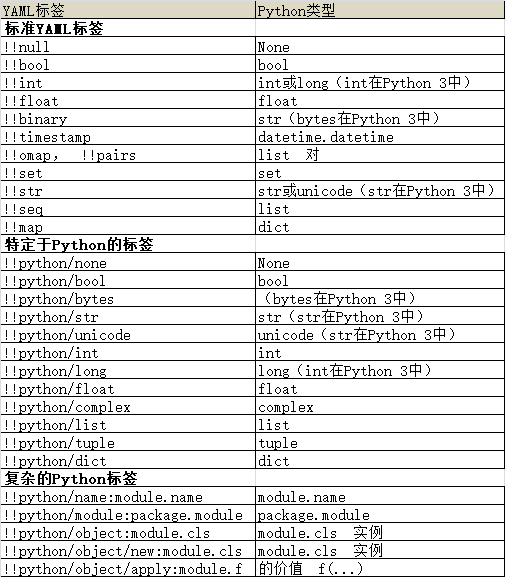
- 下表描述了具有不同标签的节点如何转换为Python对象。
2、PyYAML模块
1、安装pyyaml模块
pip install pyyaml
2、yaml.load方法
- yaml.load接受字节字符串,Unicode字符串,打开的二进制文件对象或打开的文本文件对象。字节字符串或文件必须使用utf-8,utf-16-be或utf-16-le编码进行编码。yaml.load通过检查字符串/文件开头的BOM(字节顺序标记)序列来检测编码。如果没有BOM,则假定为utf-8编码。
- yaml.load返回一个Python对象。
1、yaml.load方法的参数Loader
- BaseLoader
- Only loads the most basic YAML. All scalars are loaded as strings.
- SafeLoader
- Loads a subset of the YAML language, safely. This is recommended for loading untrusted input.
- FullLoader(load方法可能报警告,加这个参数就可以了)
- Loads the full YAML language. Avoids arbitrary code execution. This is currently (PyYAML 5.1+) the default loader called by yaml.load(input) (after issuing the warning).
- WARNING: As of pyyaml-5.3.1 there are still trivial exploits. Do not use this on untrusted data for now.
- UnsafeLoader (also called Loader for backwards compatability)
- The original Loader code that could be easily exploitable by untrusted data input.
2、使用yaml.load方法
示例1:将yaml数组转化为python列表
import yaml

yamlhh = """
- 3.14
- true
- 哈哈
- Epiplemidae
"""

loadhh = yaml.load(yamlhh, Loader=yaml.FullLoader)    #将yaml转化python
print(loadhh)

<<<
[3.14, True, '哈哈', 'Epiplemidae']
示例2:从文件中读取yaml数据
#text.txt文件
- Hesperiidae
- Papilionidae
- Apatelodidae
- Epiplemidae

#.py程序文件
import yaml

with open('text.txt', encoding='utf8') as file:
    readhh = file.read()
    loadhh = yaml.load(readhh, Loader=yaml.FullLoader)

print(readhh)
print(loadhh)

<<<
- Hesperiidae
- Papilionidae
- Apatelodidae
- Epiplemidae
['Hesperiidae', 'Papilionidae', 'Apatelodidae', 'Epiplemidae']
3、yaml.load_all方法
- 如果字符串或文件包含多个文档,则可以使用
yaml.load_all函数将它们全部加载。
示例:
#text.txt文件
---
- 3.14
- true
-
  - hello
  - 哈哈
  -
    PI: 3.14
    E: 2.187
---
name: you na xie 'yu yan'
yuyan:
  c:
    - C
    - C++
    - C#
  py: python

---
name: The Set of Gauntlets 'Paurnimmen'
description: >
  A set of handgear, freezing with unnatural cold.

#.py程序文件
import yaml

with open('text.txt', encoding='utf8') as file:
    readhh = file.read()
    loadhh = yaml.load_all(readhh, Loader=yaml.FullLoader)
for i in loadhh:
    print(i)

<<<
[3.14, True, ['hello', '哈哈', {'PI': 3.14, 'E': 2.187}]]
{'name': "you na xie 'yu yan'", 'yuyan': {'c': ['C', 'C++', 'C#'], 'py': 'python'}}
{'name': "The Set of Gauntlets 'Paurnimmen'", 'description': 'A set of handgear, freezing with unnatural cold.'}
4、yaml.dump方法
- yaml.dump函数接受一个Python对象并生成一个YAML文档。
- yaml.dump接受第二个可选参数,该参数必须是打开的文本或二进制文件。在这种情况下,yaml.dump将产生的YAML文档写入文件中。否则,yaml.dump返回产生的文档。
示例1:将python数据转化成json数据,并直接返回
import yaml

dicthh = {'name': 'Silenthand Olleander', 'race': 'Human', 'traits': ['ONE_HAND', 'ONE_EYE']}
print(yaml.dump(dicthh))

<<<
name: Silenthand Olleander
race: Human
traits:
- ONE_HAND
- ONE_EYE
示例2:将python数据转化成json数据,并保存进文件中
import yaml

dicthh = {'name': 'Silenthand Olleander', 'race': 'Human', 'traits': ['ONE_HAND', 'ONE_EYE']}
with open('text.txt', 'w') as file:
    yaml.dump(dicthh, file)

#text.txt文件
name: Silenthand Olleander
race: Human
traits:
- ONE_HAND
- ONE_EYE
示例3:explicit_start=True参数将每一个yaml段前加‘---’
#不使用explicit_start=True
import yaml
dicthh = [1, {2: 'b', 3: ['c', 'three','三']}]
print(yaml.dump(dicthh))

<<<
- 1
- 2: b
  3:
  - c
  - three
  - "\u4E09"

#使用explicit_start=True
import yaml
dicthh = [1, {2: 'b', 3: ['c', 'three', '三']}]
print(yaml.dump(dicthh, explicit_start=True))

<<<
---
- 1
- 2: b
  3:
  - c
  - three
  - "\u4E09"
示例4:中文显示问题,使用allow_unicode=True即可
import yaml
dicthh = [1, {2: 'b', 3: ['c', 'three', '三']}]
print(yaml.dump(dicthh, allow_unicode=True))

<<<
- 1
- 2: b
  3:
  - c
  - three
  - 三
5、yaml.dump_all方法
- 如果您需要将多个YAML文档转储到单个流中,请使用函数yaml.dump_all。yaml.dump_all接受列表或生成器生成。
- 和yaml.dump一样,dump_all也可以接受第二个可选参数,该参数必须是打开的文本或二进制文件。在这种情况下,yaml.dump_all将产生的YAML文档写入文件中。否则,yaml.dump_all返回产生的文档。
- yaml.dump_all将python列表的每一个元素(第一层列表)当作一个yaml段。
示例1:dump将python列表转换成一个yaml数组
import yaml
dicthh = [1, {2: 'b', 3: ['c', 'three']}, [4, 'e', {'四': 'si', 'four': 'fourhh'}], {5: 'hh'}]
print(yaml.dump(dicthh, allow_unicode=True))

<<<
- 1
- 2: b
  3:
  - c
  - three
- - 4
  - e
  - four: fourhh
    四: si
- 5: hh
示例2:dump_all将python列表的每一个元素(第一层列表)当作一个yaml段
import yaml
dicthh = [1, {2: 'b', 3: ['c', 'three']}, [4, 'e', {'四': 'si', 'four': 'fourhh'}], {5: 'hh'}]
print(yaml.dump_all(dicthh, allow_unicode=True))

<<<
1
---
2: b
3:
- c
- three
---
- 4
- e
- four: fourhh
  四: si
---
5: hh

 浙公网安备 33010602011771号