
阻塞队列
当试图向队列添加元素而队列已满, 或是想从队列移出元素而队列为空的时候, 阻塞队 列(blocking queue) 导致线程阻塞。在协调多个线程之间的合作时,阻塞队列是一个有用的 工具。工作者线程可以周期性地将中间结果存储在阻塞队列中。其他的工作者线程移出中间 结果并进一步加以修改。队列会自动地平衡负载。如果第一个线程集运行得比第二个慢, 第 二个线程集在等待结果时会阻塞。如果第一个线程集运行得快, 它将等待第二个队列集赶上 来。表 14-1 给出了阻塞队列的方法。
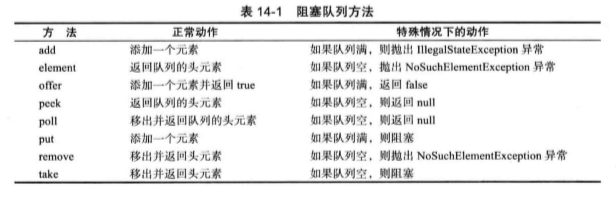
阻塞队列方法分为以下 3类, 这取决于当队列满或空时它们的响应方式。如果将队列当 作线程管理工具来使用, 将要用到 put 和 take 方法。当试图向满的队列中添加或从空的队列 中移出元素时,add、 remove 和 element 操作抛出异常。当然,在一个多线程程序中, 队列会 在任何时候空或满, 因此,一定要使用 offer、poll 和 peek方法作为替代。这些方法如果不能 完成任务,只是给出一个错误提示而不会抛出异常。
尝试在 100 毫秒的时间内在队列的尾部插人一个元素。如果成功返回 true ; 否则,达到超时 时,返回 false。类似地,下面的调用:
Object head = q.poll(100, TimeUnit.MILLISECONDS)
尝试用 100 毫秒的时间移除队列的头元素;如果成功返回头元素,否则,达到在超时时, 返回 null。
如果队列满, 则 put 方法阻塞;如果队列空, 则 take 方法阻塞。在不带超时参数时, offer 和 poll 方法等效。
PriorityBlockingQueue 是一个带优先级的队列, 而不是先进先出队列。元素按照它们的 优先级顺序被移出。该队列是没有容量上限,但是,如果队列是空的, 取元素的操作会阻 塞。
最后, DelayQueue 包含实现 Delayed接口的对象:
interface Delayed extends Comparable<Delayed> {
    long getDelay(TimeUnit unit);
}
getDelay方法返回对象的残留延迟。负值表示延迟已经结束。元素只有在延迟用完的情 况下才能从 DelayQueue 移除。还必须实现 compareTo方法。DelayQueue 使用该方法对元素 进行排序。
JavaSE 7增加了一个 TranSferQueUe 接口,允许生产者线程等待, 直到消费者准备就绪 可以接收一个元素。如果生产者调用
q.transfer(iteni);
这个调用会阻塞, 直到另一个线程将元素(item) 删除。LinkedTransferQueue 类实现了这个接口。
程序清单 14-9中的程序展示了如何使用阻塞队列来控制一组线程。程序在一个目录及它 的所有子目录下搜索所有文件, 打印出包含指定关键字的行。
//程序清单 14-9 blockingQueue/BlockingQueueTest.java package blockingQueue; import java.io.*; import java.util.*; import java.util.concurrent.*; /** * @version 1.01 2012-01-26 * @author Cay Horstmann */ public class BlockingQueueTest { public static void main(String[] args) { Scanner in = new Scanner(System.in); System.out.print("Enter base directory (e.g. /usr/local/jdk1.6.0/src): "); String directory = in.nextLine(); System.out.print("Enter keyword (e.g. volatile): "); String keyword = in.nextLine(); final int FILE_QUEUE_SIZE = 10; final int SEARCH_THREADS = 100; BlockingQueue<File> queue = new ArrayBlockingQueue<>(FILE_QUEUE_SIZE); FileEnumerationTask enumerator = new FileEnumerationTask(queue, new File(directory)); new Thread(enumerator).start(); for (int i = 1; i <= SEARCH_THREADS; i++) new Thread(new SearchTask(queue, keyword)).start(); } } /** * This task enumerates all files in a directory and its subdirectories. */ class FileEnumerationTask implements Runnable { public static File DUMMY = new File(""); private BlockingQueue<File> queue; private File startingDirectory; /** * Constructs a FileEnumerationTask. * @param queue the blocking queue to which the enumerated files are added * @param startingDirectory the directory in which to start the enumeration */ public FileEnumerationTask(BlockingQueue<File> queue, File startingDirectory) { this.queue = queue; this.startingDirectory = startingDirectory; } public void run() { try { enumerate(startingDirectory); queue.put(DUMMY); } catch (InterruptedException e) { } } /** * Recursively enumerates all files in a given directory and its subdirectories. * @param directory the directory in which to start */ public void enumerate(File directory) throws InterruptedException { File[] files = directory.listFiles(); for (File file : files) { if (file.isDirectory()) enumerate(file); else queue.put(file); } } } /** * This task searches files for a given keyword. */ class SearchTask implements Runnable { private BlockingQueue<File> queue; private String keyword; /** * Constructs a SearchTask. * @param queue the queue from which to take files * @param keyword the keyword to look for */ public SearchTask(BlockingQueue<File> queue, String keyword) { this.queue = queue; this.keyword = keyword; } public void run() { try { boolean done = false; while (!done) { File file = queue.take(); if (file == FileEnumerationTask.DUMMY) { queue.put(file); done = true; } else search(file); } } catch (IOException e) { e.printStackTrace(); } catch (InterruptedException e) { } } /** * Searches a file for a given keyword and prints all matching lines. * @param file the file to search */ public void search(File file) throws IOException { try (Scanner in = new Scanner(file)) { int lineNumber = 0; while (in.hasNextLine()) { lineNumber++; String line = in.nextLine(); if (line.contains(keyword)) System.out.printf("%s:%d:%s%n", file.getPath(), lineNumber, line); } } } }
线程安全的集合
高效的映射、集和队列
java.util.concurrent 包提供了映射、 有序集和队列的高效实现:ConcurrentHashMap、 ConcurrentSkipListMap > ConcurrentSkipListSet 和 ConcurrentLinkedQueue。
这些集合使用复杂的算法,通过允许并发地访问数据结构的不同部分来使竞争极小化。
与大多数集合不同,size方法不必在常量时间内操作。确定这样的集合当前的大小通常 需要遍历。
集合返回弱一致性(weakly consistent) 的迭代器。这意味着迭代器不一定能反映出它 们被构造之后的所有的修改,但是,它们不会将同一个值返回两次,也不会拋出 Concurrent ModificationException 异常。
映射条目的原子更新
可以使用 ConcurrentHashMap<String, Long> 吗? 考虑让计数自增的代码。显然,下面的 代码不是线程安全的:
Long oldValue = map.get(word);
Long newValue = oldValue == null ? 1: oldValue + 1 ;
map.put(word, newValue); // Error-might not replace oldValue
可能会有另一个线程在同时更新同一个计数。
Java SE 8 提供了一些可以更方便地完成原子更新的方法。调用 compute方法时可以提供 一个键和一个计算新值的函数。这个函数接收键和相关联的值(如果没有值,则为 mill), 它 会计算新值。例如,可以如下更新一个整数计数器的映射:
map.compute(word, (k, v) -> v = null ? 1: v +1 );
另外还有 computelfPresent 和 computelf bsent方法,它们分别只在已经有原值的情况下计 算新值,或者只有没有原值的情况下计算新值。可以如下更新一个 LongAdder计数器映射:
map.computelfAbsent(word, k -> new LongAdderO)_increment();
这与之前看到的 putlfAbsent 调用几乎是一样的,不过 LongAdder 构造器只在确实需要 一个新的计数器时才会调用。
首次增加一个键时通常需要做些特殊的处理。利用 merge 方法可以非常方便地做到这一 点。这个方法有一个参数表示键不存在时使用的初始值。否则, 就会调用你提供的函数来结 合原值与初始值。(与 compute 不同,这个函数不处理键。 )
map.merge(word, 1L, (existingValue, newValue) -> existingValue + newValue);
或者,更简单地可以写为:
map.merge(word, 1L, Long::sum);
再不能比这更简洁了。
对并发散列映射的批操作
批操作会遍历映射,处理遍历过程中找到的元素。无须冻结当前映射的快照。除非你恰好知道批操作运行时映射不会被修改,否则就要把结果看作是映射状态的一个近似。
有 3 种不同的操作:
•搜索(search) 为每个键或值提供一个函数,直到函数生成一个非 null 的结果。然后搜 索终止,返回这个函数的结果。
•归约(reduce) 组合所有键或值, 这里要使用所提供的一个累加函数。
•forEach 为所有键或值提供一个函数。
每个操作都有 4 个版本:
•operationKeys: 处理键。
•operatioriValues: 处理值。
•operation: 处理键和值。
•operatioriEntries: 处理 Map.Entry对象。
对于上述各个操作, 需要指定一个参数化阈值(/wa/Zefc/w /AresAoW)。如果映射包含的 元素多于这个阈值, 就会并行完成批操作。如果希望批操作在一个线程中运行,可以使用阈 值 Long.MAX_VALUE。如果希望用尽可能多的线程运行批操作,可以使用阈值 1。
例如, 假设我们希望找出第一个出现次数超过 1000 次的单词。需要搜索键和值:
String result = map.search(threshold, (k, v) -> v > 1000 ? k : null);
result 会设置为第一个匹配的单词,如果搜索函数对所有输人都返回 null, 则返回 null。 forEach方法有两种形式。第一个只为各个映射条目提供一个消费者函数, 例如:
map.forEach(threshold, (k, v) -> System.out.println(k + "-> " + v));
第二种形式还有一个转换器函数, 这个函数要先提供,其结果会传递到消费者:
map.forEach(threshold,

(k, v)> k + " -> " + v,// Transformer

System.out::println); // Consumer
转换器可以用作为一个过滤器。只要转换器返回 null, 这个值就会被悄无声息地跳过。 例如,下面只打印有大值的条目:
map.forEach(threshold, (k, v) -> v > 1000 ? k + "- > " + v : null, // Filter and transformer

System.out::println); // The nulls are not passed to the consumer
reduce 操作用一个累加函数组合其输入。例如,可以如下计算所有值的总和:
Long sum = map.reduceValues(threshold, Long::sum);
与 forEach类似,也可以提供一个转换器函数。可以如下计算最长的键的长度: Integer maxlength = map.reduceKeys(
threshold, String::length, // Transformer

Integer::max); // Accumulator
转换器可以作为一个过滤器,通过返回 null 来排除不想要的输入。 在这里,我们要统计多少个条目的值 > 1000:
Long count = map.reduceValues(threshold, v -> v > 1000 ? 1L : null, Long::sum);
并发集视图
静态 newKeySet方法会生成一个 Set<K>, 这实际上是 ConcurrentHashMap<K, Boolean〉 的一个包装器。(所有映射值都为 Boolean.TRUE, 不过因为只是要把它用作一个集,所以并 不关心具体的值。 )
Set<String> words = ConcurrentHashMap.<String>newKeySet();
当然, 如果原来有一个映射,keySet 方法可以生成这个映射的键集。这个集是可变的。 如果删除这个集的元素,这个键(以及相应的值)会从映射中删除。不过,不能向键集增加 元素,因为没有相应的值可以增加。Java SE 8 为 ConcurrentHashMap增加了第二个 keySet方 法,包含一个默认值,可以在为集增加元素时使用:
Set<String> words = map.keySet(1L);
words.add("java”);
如果 "Java”在 words 中不存在,现在它会有一个值 1。
写数组的拷贝
CopyOnWriteArrayList 和 CopyOnWriteArraySet 是线程安全的集合,其中所有的修改线 程对底层数组进行复制。如果在集合上进行迭代的线程数超过修改线程数, 这样的安排是 很有用的。当构建一个迭代器的时候, 它包含一个对当前数组的引用。如果数组后来被修改 了,迭代器仍然引用旧数组, 但是,集合的数组已经被替换了。因而,旧的迭代器拥有一致 的(可能过时的)视图,访问它无须任何同步开销。
并行数组算法
在 Java SE 8中, Arrays类提供了大量并行化操作。静态 Arrays.parallelSort 方法可以对 一个基本类型值或对象的数组排序。例如,
String contents = new String(Fi1es.readAl1Bytes(
    Paths.get("alice.txt")), StandardCharsets.UTFJ); // Read file into string
String[] words = contents.split("[\\P{L}]+"); // Split along nonletters
Arrays,parallelSort(words):
对对象排序时,可以提供一个 Comparator。
Arrays.parallelSort(words, Comparator.comparing(String::length));
对于所有方法都可以提供一个范围的边界,如:
values.parallelSort(values,length / 2, values,length); // Sort the upper half
较早的线程安全集合
从 Java 的初始版本开始,Vector 和 Hashtable类就提供了线程安全的动态数组和散列表的 实现。现在这些类被弃用了, 取而代之的是 AnayList 和 HashMap类。这些类不是线程安全 的,而集合库中提供了不同的机制。任何集合类都可以通过使用同步包装器(synchronization wrapper) 变成线程安全的:
List<E> synchArrayList = Collections,synchronizedList(new ArrayList<E>());

Map<K, V> synchHashMap = Col1ections.synchronizedMap(new HashMap<K, V>0);
结果集合的方法使用锁加以保护,提供了线程安全访问。
应该确保没有任何线程通过原始的非同步方法访问数据结构。最便利的方法是确保不保 存任何指向原始对象的引用, 简单地构造一个集合并立即传递给包装器,像我们的例子中所 做的那样。
如果在另一个线程可能进行修改时要对集合进行迭代,仍然需要使用“ 客户端” 锁定:
synchronized (synchHashMap) {
    Iterator<K> iter = synchHashMap.keySet().iterator();
    while (iter.hasNext()) . . .;
                            }
如果使用“ foreach” 循环必须使用同样的代码, 因为循环使用了迭代器。注意:如果在 迭代过程中,别的线程修改集合,迭代器会失效,抛出 ConcurrentModificationException异 常。同步仍然是需要的, 因此并发的修改可以被可靠地检测出来。
Callable 与 Future
Runnable 封装一个异步运行的任务,可以把它想象成为一个没有参数和返回值的异步方 法。Callable 与 Runnable 类似,但是有返回值。Callable 接口是一个参数化的类型, 只有一 个方法 call。
public interface Ca11able<V> {
    V call() throws Exception;
}
类型参数是返回值的类型。例如, Callable<Integer> 表示一个最终返回 Integer 对象的异 步计算。 Future 保存异步计算的结果。可以启动一个计算,将 Future 对象交给某个线程,然后忘 掉它。Future 对象的所有者在结果计算好之后就可以获得它。 Future 接口具有下面的方法:
public interface Future<V> {
    V get() throws .. .;
    V get(long timeout, TimeUnit unit) throws .. .;
    void cancel(boolean maylnterrupt);
    boolean isCancelled();
    boolean isDone();
}
第一个 get 方法的调用被阻塞, 直到计算完成。如果在计算完成之前, 第二个方法的调 用超时,拋出一个 TimeoutException 异常。如果运行该计算的线程被中断,两个方法都将拋 出 IntermptedException。如果计算已经完成, 那么 get 方法立即返回。
如果计算还在进行,isDone方法返回 false; 如果完成了, 则返回 true。
程序清单 14-10 中的程序使用了这些概念。这个程序与前面那个寻找包含指定关键字的 文件的例子相似。然而,现在我们仅仅计算匹配的文件数目。因此,我们有了一个需要长时 间运行的任务,它产生一个整数值,一个 Callable<Integer> 的例子。
class MatchCounter implements Callable<Integer〉 {
    public MatchCounter(File directory, String keyword) { . . . }
    public Integer call() { . . . } // returns the number of matching files
}
然后我们利用 MatchCounter 创建一个 FutureTask 对象, 并用来启动一个线程。
Futu「eTask<Integer> task = new FutureTask<Integer>(counter);

Thread t = new Thread(task);

t.start();
最后,我们打印结果。
System.out.println(task.get() + " matching files.");
当然, 对 get 的调用会发生阻塞, 直到有可获得的结果为止。
在 call 方法内部, 使用相同的递归机制。 对于每一个子目录, 我们产生一个新的 MatchCounter 并为它启动一个线程。此外, 把 FutureTask对象隐藏在 ArrayList<Future<Integer» 中。最后, 把所有结果加起来:
for (Future<Integer> result : results)
count += result.get();
每一次对 get 的调用都会发生阻塞直到结果可获得为止。当然,线程是并行运行的, 因 此, 很可能在大致相同的时刻所有的结果都可获得。
//程序清单 14-10 future/FutureTest.java package future; import java.io.*; import java.util.*; import java.util.concurrent.*; /** * @version 1.01 2012-01-26 * @author Cay Horstmann */ public class FutureTest { public static void main(String[] args) { Scanner in = new Scanner(System.in); System.out.print("Enter base directory (e.g. /usr/local/jdk5.0/src): "); String directory = in.nextLine(); System.out.print("Enter keyword (e.g. volatile): "); String keyword = in.nextLine(); MatchCounter counter = new MatchCounter(new File(directory), keyword); FutureTask<Integer> task = new FutureTask<>(counter); Thread t = new Thread(task); t.start(); try { System.out.println(task.get() + " matching files."); } catch (ExecutionException e) { e.printStackTrace(); } catch (InterruptedException e) { } } } /** * This task counts the files in a directory and its subdirectories that contain a given keyword. */ class MatchCounter implements Callable<Integer> { private File directory; private String keyword; private int count; /** * Constructs a MatchCounter. * @param directory the directory in which to start the search * @param keyword the keyword to look for */ public MatchCounter(File directory, String keyword) { this.directory = directory; this.keyword = keyword; } public Integer call() { count = 0; try { File[] files = directory.listFiles(); List<Future<Integer>> results = new ArrayList<>(); for (File file : files) if (file.isDirectory()) { MatchCounter counter = new MatchCounter(file, keyword); FutureTask<Integer> task = new FutureTask<>(counter); results.add(task); Thread t = new Thread(task); t.start(); } else { if (search(file)) count++; } for (Future<Integer> result : results) try { count += result.get(); } catch (ExecutionException e) { e.printStackTrace(); } } catch (InterruptedException e) { } return count; } /** * Searches a file for a given keyword. * @param file the file to search * @return true if the keyword is contained in the file */ public boolean search(File file) { try { try (Scanner in = new Scanner(file)) { boolean found = false; while (!found && in.hasNextLine()) { String line = in.nextLine(); if (line.contains(keyword)) found = true; } return found; } } catch (IOException e) { return false; } } }