
什么是线程
线程Thread
• 进程内部的一个执行单元,它是程序中一个单一的顺序控制流程。
• 线程又被称为轻量级进程(lightweight process)
• 如果在一个进程中同时运行了多个线程,用来完成不同的工作,则称之为多线程
线程特点
• 轻量级进程
• 独立调度的基本单位
• 可并发执行
• 共享进程资源
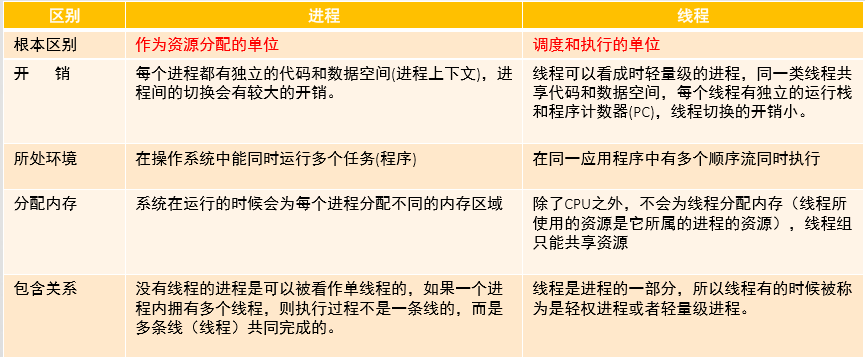
线程和进程的区别
线程的创建
•方式1:继承Java.lang.Thread类,并覆盖run() 方法
• 方式2:实现Java.lang.Runnable接口,并实现run() 方法
• 方法run( )称为线程体。
线程的启动
• 新建的线程不会自动开始运行,必须通过start( )方法启动
• 不能直接调用run()来启动线程,这样run()将作为一个普通方法立即执行,执行完毕前其他线 程无法兵法执行
• Java程序启动时,会立刻创建主线程,main就是在这个线程上运行。当不再产生新线程时, 程序是单线程的
两种线程创建方式的比较
• 继承Thread类方式的多线程
• 优势:编写简单
• 劣势:无法继承其它父类 • 实现Runnable接口方式的多线程
• 优势:可以继承其它类,多线程可共享同一个Runnable对象
• 劣势:编程方式稍微复杂,如果需要访问当前线程,需要调用Thread.currentThread()方 法
• 实现Runnable接口方式要通用一些。
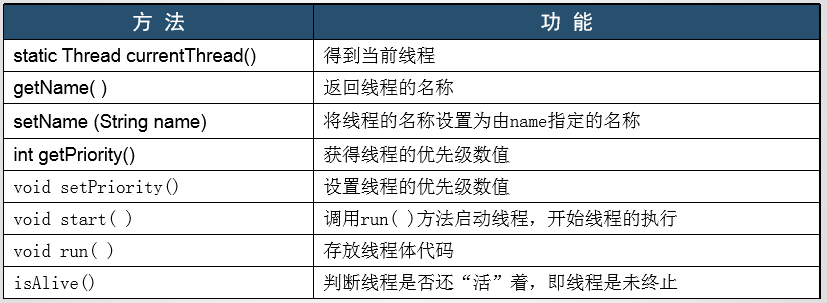
Thread类常用方法
当点击 Start 按钮时, 程序将从屏幕的左上角弹出一个球,这个球便开始弹跳。Start 按 钮的处理程序将调用 addBall 方法。这个方法循 环运行 1000 次 move。 每调用一次 move, 球就 会移动一点, 当碰到墙壁时, 球将调整方向, 并重新绘制面板。
Ball ball = new Ball();
panel.add(ball);
for (int i = 1 ;i <= STEPS;i++) {
    ball.move(panel.getBounds());
    panel,paint(panel.getCraphics());
    Thread.sleep(DELAY);
}
调用 Threadsleep 不会创建一个新线程, sleep 是 Thread 类的静态方法,用于暂停当前线 程的活动。 sleep方法可以抛出一个 IntermptedException 异常。稍后将讨论这个异常以及对它的处 理。现在,只是在发生异常时简单地终止弹跳。
程序清单14-1 ~ 程序清单 14-3 给出了这个程序的代码。
//程序清单 14-1 bounce/Bounce.java package bounce; import java.awt.*; import java.awt.event.*; import javax.swing.*; /** * Shows an animated bouncing ball. * @version 1.33 2007-05-17 * @author Cay Horstmann */ public class Bounce { public static void main(String[] args) { EventQueue.invokeLater(new Runnable() { public void run() { JFrame frame = new BounceFrame(); frame.setDefaultCloseOperation(JFrame.EXIT_ON_CLOSE); frame.setVisible(true); } }); } } /** * The frame with ball component and buttons. */ class BounceFrame extends JFrame { private BallComponent comp; public static final int STEPS = 1000; public static final int DELAY = 3; /** * Constructs the frame with the component for showing the bouncing ball and Start and Close * buttons */ public BounceFrame() { setTitle("Bounce"); comp = new BallComponent(); add(comp, BorderLayout.CENTER); JPanel buttonPanel = new JPanel(); addButton(buttonPanel, "Start", new ActionListener() { public void actionPerformed(ActionEvent event) { addBall(); } }); addButton(buttonPanel, "Close", new ActionListener() { public void actionPerformed(ActionEvent event) { System.exit(0); } }); add(buttonPanel, BorderLayout.SOUTH); pack(); } /** * Adds a button to a container. * @param c the container * @param title the button title * @param listener the action listener for the button */ public void addButton(Container c, String title, ActionListener listener) { JButton button = new JButton(title); c.add(button); button.addActionListener(listener); } /** * Adds a bouncing ball to the panel and makes it bounce 1,000 times. */ public void addBall() { try { Ball ball = new Ball(); comp.add(ball); for (int i = 1; i <= STEPS; i++) { ball.move(comp.getBounds()); comp.paint(comp.getGraphics()); Thread.sleep(DELAY); } } catch (InterruptedException e) { } } } //程序清单 14-2 bounce/Ball.java package bounce; import java.awt.geom.*; /** * A ball that moves and bounces off the edges of a rectangle * @version 1.33 2007-05-17 * @author Cay Horstmann */ public class Ball { private static final int XSIZE = 15; private static final int YSIZE = 15; private double x = 0; private double y = 0; private double dx = 1; private double dy = 1; /** * Moves the ball to the next position, reversing direction if it hits one of the edges */ public void move(Rectangle2D bounds) { x += dx; y += dy; if (x < bounds.getMinX()) { x = bounds.getMinX(); dx = -dx; } if (x + XSIZE >= bounds.getMaxX()) { x = bounds.getMaxX() - XSIZE; dx = -dx; } if (y < bounds.getMinY()) { y = bounds.getMinY(); dy = -dy; } if (y + YSIZE >= bounds.getMaxY()) { y = bounds.getMaxY() - YSIZE; dy = -dy; } } /** * Gets the shape of the ball at its current position. */ public Ellipse2D getShape() { return new Ellipse2D.Double(x, y, XSIZE, YSIZE); } }
使用线程给其他任务提供机会
下面是在一个单独的线程中执行一个任务的简单过程:
1 ) 将任务代码移到实现了 Runnable 接口的类的 run方法中。这个接口非常简单,只有 一个方法:
public interface Runnable {

  void run();

}
由于 Runnable 是一个函数式接口,可以用 lambda 表达式建立一个实例:
Runnable r = ()-> { taskcode};
2 ) 由 Runnable 创建一个 Thread 对象:
Thread t = new Thread(r);
3 ) 启动线程:
t.start();
要想将弹跳球代码放在一个独立的线程中, 只需要实现一个类 BallRunnable, 然后,将 动画代码放在 nm 方法中,如同下面这段代码:
Runnable r = ()-> {
    try {
        for (int i = 1 ; i <=: STEPS; i++) {
            ball.move(comp.getBounds());
            comp.repaint();
            Thread.sieep(DELAY);
        }
    } catch (InterruptedException e) {

    }
} ;
Thread t = new Thread(r);
t.start();
同样地, 需要捕获 sleep方法可能抛出的异常 InterruptedException。下一节将讨论这个异常。在 一般情况下, 线程在中断时被终止。因此,当发生 InterruptedException 异常时, run方法将结束执行。
完整的代码见程序清单 14-4。
//程序清单 14-4 bounceThread/BounceThread.java package bounceThread; import java.awt.*; import java.awt.event.*; import javax.swing.*; /** * Shows animated bouncing balls. * @version 1.33 2007-05-17 * @author Cay Horstmann */ public class BounceThread { public static void main(String[] args) { EventQueue.invokeLater(new Runnable() { public void run() { JFrame frame = new BounceFrame(); frame.setTitle("BounceThread"); frame.setDefaultCloseOperation(JFrame.EXIT_ON_CLOSE); frame.setVisible(true); } }); } } /** * A runnable that animates a bouncing ball. */ class BallRunnable implements Runnable { private Ball ball; private Component component; public static final int STEPS = 1000; public static final int DELAY = 5; /** * Constructs the runnable. * @param aBall the ball to bounce * @param aComponent the component in which the ball bounces */ public BallRunnable(Ball aBall, Component aComponent) { ball = aBall; component = aComponent; } public void run() { try { for (int i = 1; i <= STEPS; i++) { ball.move(component.getBounds()); component.repaint(); Thread.sleep(DELAY); } } catch (InterruptedException e) { } } } /** * The frame with panel and buttons. */ class BounceFrame extends JFrame { private BallComponent comp; /** * Constructs the frame with the component for showing the bouncing ball and Start and Close * buttons */ public BounceFrame() { comp = new BallComponent(); add(comp, BorderLayout.CENTER); JPanel buttonPanel = new JPanel(); addButton(buttonPanel, "Start", new ActionListener() { public void actionPerformed(ActionEvent event) { addBall(); } }); addButton(buttonPanel, "Close", new ActionListener() { public void actionPerformed(ActionEvent event) { System.exit(0); } }); add(buttonPanel, BorderLayout.SOUTH); pack(); } /** * Adds a button to a container. * @param c the container * @param title the button title * @param listener the action listener for the button */ public void addButton(Container c, String title, ActionListener listener) { JButton button = new JButton(title); c.add(button); button.addActionListener(listener); } /** * Adds a bouncing ball to the canvas and starts a thread to make it bounce */ public void addBall() { Ball b = new Ball(); comp.add(b); Runnable r = new BallRunnable(b, comp); Thread t = new Thread(r); t.start(); } }
•Thread(Runnable target )
构造一个新线程, 用于调用给定目标的 nm() 方法。
•void start( )
启动这个线程,将引发调用 mn() 方法。这个方法将立即返回,并且新线程将并发运行。 參 void run( ) 调用关联 Runnable 的 run 方法。
•void run( )
必须覆盖这个方法, 并在这个方法中提供所要执行的任务指令。
中断线程
当线程的 run 方法执行方法体中最后一条语句后, 并经由执行 return 语句返回时, 或者出现了在方法中没有捕获的异常时,线程将终止。
没有可以强制线程终止的方法。然而,interrupt 方法可以用来请求终止线程。
当对一个线程调用 interrupt 方法时,线程的中断状态将被置位。这是每一个线程都具有 的 boolean 标志。每个线程都应该不时地检査这个标志, 以判断线程是否被中断。
要想弄清中断状态是否被置位,首先调用静态的 Thread.currentThread方法获得当前线 程,然后调用 islnterrupted方法:
while (!Thread.currentThread().islnterrupted() && more work todo) {
     domorework
 }
但是, 如果线程被阻塞, 就无法检测中断状态。这是产生 InterruptedExceptioii 异常的地 方。当在一个被阻塞的线程(调用 sleep 或 wait) 上调用 interrupt方法时,阻塞调用将会被 Interrupted Exception 异常中断。)
在很多发布的代码中会发现 InterruptedException 异常被抑制在很低的层次上, 像这样:
 void mySubTask() {
     . . .
     try {
         sleep(delay);
     } catch (InterruptedException e){

     } // Don't ignore!
     . . .
}
不要这样做! 如果不认为在 catch 子句中做这一处理有什么好处的话,仍然有两种合理 的选择:
•在 catch 子句中调用 Thread.currentThread().interrupt() 来设置中断状态。于是,调用者 可以对其进行检测。
void mySubTask() {
    . . .
    try {
        sleep(delay);
    } catch (InterruptedException e) {
        Thread.currentThread().interrupt();
    }
    . . .
}
•或者,更好的选择是,用 throws InterruptedException标记你的方法, 不采用 try语句 块捕获异常。于是,调用者(或者,最终的 run 方法)可以捕获这一异常。
 void mySubTask() throws InterruptedException{
     . . .
     sleep(delay);
     . . .
}
线程状态
• 新生状态:
用new关键字建立一个线程对象后,该线程对象就处于新生状态。处于新生状态的线程有自己的内存空间,通过调用start进入就绪状态
• 就绪状态:
处于就绪状态线程具备了运行条件,但还没分配到CPU,处于线程就绪队列,等待系统为其分配CPU
当系统选定一个等待执行的线程后,它就会从就绪状态进入执行状态,该动作称之为“cpu调度”。
• 运行状态:
在运行状态的线程执行自己的run方法中代码,直到等待某资源而阻塞或完成任务而死亡。
如果在给定的时间片内没有执行结束,就会被系统给换下来回到等待执行状态。
• 阻塞状态:
处于运行状态的线程在某些情况下,如执行了sleep(睡眠)方法,或等待I/O设备等资源,将让出CPU并暂时停止自己的运行,进 入阻塞状态。
在阻塞状态的线程不能进入就绪队列。只有当引起阻塞的原因消除时,如睡眠时间已到,或等待的I/O设备空闲下来,线程便转入 就绪状态,重新到就绪队列中排队等待,被系统选中后从原来停止的位置开始继续运行。
• 死亡状态:
死亡状态是线程生命周期中的最后一个阶段。线程死亡的原因有三个。一个是正常运行的线程完成了它的全部工作;另一个是线 程被强制性地终止,如通过执行stop方法来终止一个线程【不推荐使用】,三是线程抛出未捕获的异常
要确定一个线程的当前状态, 可调用 getState 方法。
线程属性
线程优先级
每一个线程有一个优先级。默认情况下,一+线程继承它的父 线程的优先级。可以用 setPriority 方法提高或降低任何一个线程的优先级。可以将优先级设 置为在 MIN_PRIORITY (在 Thread类中定义为 1 ) 与 MAX_PRIORITY (定义为 10 ) 之间的 任何值。NORM_PRIORITY 被定义为 5。
每当线程调度器有机会选择新线程时, 它首先选择具有较高优先级的线程。但是,线程 优先级是高度依赖于系统的。当虚拟机依赖于宿主机平台的线程实现机制时, Java 线程的优 先级被映射到宿主机平台的优先级上,优先级个数也许更多,也许更少。
守护线程
可以通过调用 t.setDaemon(true); 将线程转换为守护线程(daemon thread)。这样一个线程没有什么神奇。守护线程的唯一用途 是为其他线程提供服务。计时线程就是一个例子,它定时地发送“ 计时器嘀嗒” 信号给其他 线程或清空过时的高速缓存项的线程。当只剩下守护线程时, 虚拟机就退出了,由于如果只 剩下守护线程, 就没必要继续运行程序了。
守护线程有时会被初学者错误地使用, 他们不打算考虑关机(shutdown) 动作。但是, 这是很危险的。守护线程应该永远不去访问固有资源, 如文件、 数据库,因为它会在任何时 候甚至在一个操作的中间发生中断。
•void setDaemon( boolean isDaemon)
标识该线程为守护线程或用户线程。这一方法必须在线程启动之前调用。
未捕获异常处理器
线程的 run方法不能抛出任何受查异常, 但是,非受査异常会导致线程终止。在这种情 况下,线程就死亡了。
但是,不需要任何 catch子句来处理可以被传播的异常。相反,就在线程死亡之前, 异 常被传递到一个用于未捕获异常的处理器。
该处理器必须属于一个实现 Thread.UncaughtExceptionHandler 接口的类。这个接口只有— 个方法。
void uncaughtException(Thread t, Throwable e)
可以用 setUncaughtExceptionHandler方法为任何线程安装一个处理器。也可以用 Thread 类的静态方法 setDefaultUncaughtExceptionHandler 为所有线程安装一个默认的处理器。替换 处理器可以使用日志 API 发送未捕获异常的报告到日志文件。
如果不安装默认的处理器, 默认的处理器为空。但是, 如果不为独立的线程安装处理 器,此时的处理器就是该线程的 ThreadGroup 对象。
ThreadGroup 类实现 Thread.UncaughtExceptionHandler 接口。它的 uncaughtException方 法做如下操作:
1 ) 如果该线程组有父线程组, 那么父线程组的 uncaughtException方法被调用。
2 ) 否则, 如果 Thread.getDefaultExceptionHandler方法返回一个非空的处理器, 则调用 该处理器。
3 ) 否则,如果 Throwable 是 ThreadDeath 的一个实例, 什么都不做。
4 ) 否则,线程的名字以及 Throwable 的栈轨迹被输出到 System.err 上。
同 步
在大多数实际的多线程应用中, 两个或两个以上的线程需要共享对同一数据的存取。如果两个线程存取相同的对象, 并且每一个线程都调用了一个修改该对象状态的方法,将会发 生什么呢? 可以想象,线程彼此踩了对方的脚。根据各线程访问数据的次序,可能会产生i化 误的对象。这样一个情况通常称为竞争条件(race condition)。
竞争条件的一个例子
为了避免多线程引起的对共享数据的说误,必须学习如何同步存取。
程序清单 14-5 和程序清单 14-6 中的程序提供了完整的源代码。 看看是否可以从代码中 找出问题。下一节将解说其中奥秘。
//程序清单 14-5 unsynch/UnsynchBankTest.java package unsynch; /** * This program shows data corruption when multiple threads access a data structure. * @version 1.30 2004-08-01 * @author Cay Horstmann */ public class UnsynchBankTest { public static final int NACCOUNTS = 100; public static final double INITIAL_BALANCE = 1000; public static void main(String[] args) { Bank b = new Bank(NACCOUNTS, INITIAL_BALANCE); int i; for (i = 0; i < NACCOUNTS; i++) { TransferRunnable r = new TransferRunnable(b, i, INITIAL_BALANCE); Thread t = new Thread(r); t.start(); } } }
//程序清单 14-6 unsynch/Bank.java package unsynch; /** * A bank with a number of bank accounts. * @version 1.30 2004-08-01 * @author Cay Horstmann */ public class Bank { private final double[] accounts; /** * Constructs the bank. * @param n the number of accounts * @param initialBalance the initial balance for each account */ public Bank(int n, double initialBalance) { accounts = new double[n]; for (int i = 0; i < accounts.length; i++) accounts[i] = initialBalance; } /** * Transfers money from one account to another. * @param from the account to transfer from * @param to the account to transfer to * @param amount the amount to transfer */ public void transfer(int from, int to, double amount) { if (accounts[from] < amount) return; System.out.print(Thread.currentThread()); accounts[from] -= amount; System.out.printf(" %10.2f from %d to %d", amount, from, to); accounts[to] += amount; System.out.printf(" Total Balance: %10.2f%n", getTotalBalance()); } /** * Gets the sum of all account balances. * @return the total balance */ public double getTotalBalance() { double sum = 0; for (double a : accounts) sum += a; return sum; } /** * Gets the number of accounts in the bank. * @return the number of accounts */ public int size() { return accounts.length; } }
竞争条件详解
上一节中运行了一个程序,其中有几个线程更新银行账户余额。一段时间之后, 错误不 知不觉地出现了,总额要么增加, 要么变少。当两个线程试图同时更新同一个账户的时候, 这个问题就出现了。假定两个线程同时执行指令
accounts[to] += amount;
问题在于这不是原子操作。该指令可能被处理如下:
1 ) 将 accounts[to] 加载到寄存器。
2 ) 增加 amount。
3 ) 将结果写回 accounts[to]。
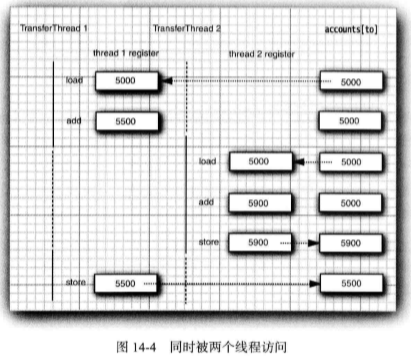
现在,假定第 1 个线程执行步骤 1 和 2, 然后, 它被剥夺了运行权。假定第 2 个线程被 唤醒并修改了 accounts 数组中的同一项。然后,第 1 个线程被唤醒并完成其第 3 步。
这样, 这一动作擦去了第二个线程所做的更新。于是, 总金额不再正确。(见图 14-4)

 浙公网安备 33010602011771号