
第十三章 部 署 Java 应用程序
JAR 文件
创建 JAR 文件
可以使用jar 工具制作 JAR 文件(在默认的 JDK 安装中,位于jdk/bin 目录下)。创建一 个新的 JAR 文件应该使用的常见命令格式为:
jar cvf JARFileNameFile:File2 . . .
例如:
jar cvf CalculatorClasses.jar'class icon.gif
通常,jar 命令的格式如下: jar options File File2 . . .
表 13-1 列出了所有 jar 程序的可选项。它们类似于 UNIX tar 命令的选项。
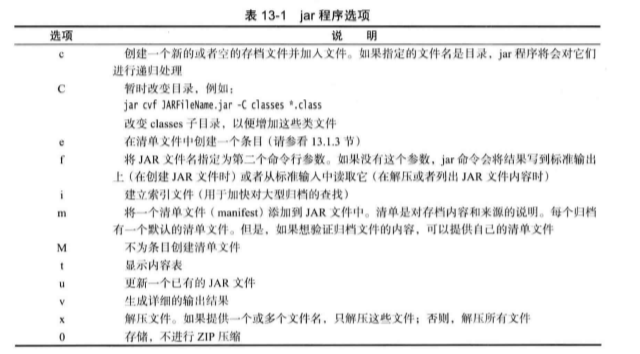
清单文件
除了类文件、 图像和其他资源外, 每个 JAR 文件还包含一个用于描述归档特征的清单文 件(manifest)。
清单文件被命名为 MANIFEST.MF, 它位于 JAR 文件的一个特殊 META-INF 子目录中。 最小的符合标准的清单文件是很简单的:
Manifest-Version: 1.0
复杂的清单文件可能包含更多条目。这些清单条目被分成多个节。第一节被称为主节 ( main section) 0 它作用于整个 JAR 文件。随后的条目用来指定已命名条目的属性,这些已命 名的条目可以是某个文件、 包或者 URL。它们都必须起始于名为 Name 的条目。节与节之间用空行分开。
可执行 JAR 文件
可以使用jar命令中的 e选项指定程序的人口点, 即通常需要在调用java 程序加载器时 指定的类:
jar cvfe HyPrograni.jar com.myconipany.iiiypkg.MainAppClass files toadd
或者,可以在清单中指定应用程序的主类,包括以下形式的语句:
Main-C1ass: com.nycompany.mypkg.MainAppClass
不要将扩展名 .class 添加到主类名中。
不论哪一种方法,用户可以简单地通过下面命令来启动应用程序:
java -jar MyProgram.jar
根据操作系统的配置, 用户甚至可以通过双击 JAR 文件图标来启动应用程序。下面是各 种操作系统的操作方式:
•在 Windows 平台中,Java运行时安装器将建立一个扩展名为 jar 的文件与javaw -jar 命令相关联来启动文件(与java 命令不同,javaw 命令不打开 shell 窗口) 。
•在 Solaris 平台中, 操作系统能够识别 JAR 文件的“ 魔法数” 格式,并用java -jar命 令启动它。
•在 Mac OS X 平台中,操作系统能够识别 .jar 扩展名文件。当双击 JAR 文件时就会执 行 Java 程序可以运行。
资源
在 applet 和应用程序中使用的类通常需要使用一些相关的数据文件, 例如:
•图像和声音文件。
•带有消息字符串和按钮标签的文本文件。
•二进制数据文件, 例如, 描述地图布局的文件。
在 Java中,这些关联的文件被称为资源(resource)。
类加载器知道如何搜索类文件,直到在类路径、存档 文件或 web 服务器上找到为止。利用资源机制, 对于非类 文件也可以同样方便地进行操作。下面是必要的步骤:
1 ) 获得具有资源的 Class 对象,例如, AboutPanel.class。
2 ) 如果资源是一个图像或声音文件, 那么就需要调用 getresource (filename) 获得作为 URL 的资源位置,然后利用 getlmage 或 getAudioClip 方法进行读取。
3 ) 与图像或声音文件不同,其他资源可以使用 getResourceAsStream 方法读取文件中的 数据。
程序清单 13-1 显示了这个程序的源代码。这个程序演示了资源加载。编译、创建 JAR 文件和执行这个程序的命令是:
javac resource/ResourceTest.java
jar cvfm ResourceTest.jar resource/ResourceTest.mf resource/.class resource/.gif resource/*.txt
java -jar ResourceTest.jar
将 JAR 文件移到另外一个不同的目录中,再运行它, 以便确认程序是从 JAR 文件中而 不是从当前目录中读取的资源。
//程序清单 13-1 resource/ResourceTest.java package resource; import java.awt.*; import java.io.*; import java.net.*; import java.util.*; import javax.swing.*; /** * @version 1.4 2007-04-30 * @author Cay Horstmann */ public class ResourceTest { public static void main(String[] args) { EventQueue.invokeLater(new Runnable() { public void run() { JFrame frame = new ResourceTestFrame(); frame.setTitle("ResourceTest"); frame.setDefaultCloseOperation(JFrame.EXIT_ON_CLOSE); frame.setVisible(true); } }); } } /** * A frame that loads image and text resources. */ class ResourceTestFrame extends JFrame { private static final int DEFAULT_WIDTH = 300; private static final int DEFAULT_HEIGHT = 300; public ResourceTestFrame() { setSize(DEFAULT_WIDTH, DEFAULT_HEIGHT); URL aboutURL = getClass().getResource("about.gif"); Image img = new ImageIcon(aboutURL).getImage(); setIconImage(img); JTextArea textArea = new JTextArea(); InputStream stream = getClass().getResourceAsStream("about.txt"); Scanner in = new Scanner(stream); while (in.hasNext()) textArea.append(in.nextLine() + "\n"); add(textArea); } }
密封
可以将 Java 包密封 ( seal ) 以保证不会有其他的类加人到其中。
如果在代码中使用了包可见的类、方法和域,就可能希望密封包。如果不密封, 其他类就有 可能放在这个包中,进而访问包可见的特性。
例如, 如果密封了 com.mycompany.util 包, 就不能用下面的语句顶替密封包之外的类:
package com.mycompany.util;
要想密封一个包,需要将包中的所有类放到一个 JAR 文件中。在默认情况下,JAR 文件 中的包是没有密封的。可以在清单文件的主节中加人下面一行:
Sealed: true
来改变全局的默认设定。对于每个单独的包,可以通过在 JAR 文件的清单中增加一节, 来指 定是否想要密封这个包。例如:
Name: com/mycoinpany/util/
Sealed: true
Name: com/myconpany/misc/
Sealed: false
要想密封一个包,需要创建一个包含清单指令的文本文件。然后用常规的方式运行jar 命令:
jar cvfw MyArchive.jar manifest.mffilestoadd
应用首选项的存储
属性映射
属性映射(property map) 是一种存储键 / 值对的数据结构。属性映射通常用来存储配置 信息,它有 3 个特性:
•键和值是字符串。
•映射可以很容易地存人文件以及从文件加载。
•有一个二级表保存默认值。
实现属性映射的 Java 类名为 Properties。
属性映射对于指定程序的配置选项很有用。例如:
Properties settings - new Properties。 ;

settings.setProperty("width", "200");

settings.setProperty("title", "Hello, World!");
可以使用 store方法将属性映射列表保存到一个文件中。在这里, 我们将属性映射保存 在文件 program.properties 中。第二个参数是包含在这个文件中的注释。
如果觉得在每个 getProperty 调用中指定默认值太过麻烦, 可以把所有默认值都放在一个 二级属性映射中,并在主属性映射的构造器中提供这个二级映射。
Properties defaultSettings = new Properties(); defaultSettings.setPropertyC'ividth", "300"); defaultSettings.setProperty("height", "200"); defaultSettings.setPropertyftitie", "Default title"); ... Properties settings = new Properties(defaultSettings);
没错, 如果为 defaultSettings 构造器提供另一个属性映射参数,甚至可以为默认值指定 默认值, 不过一般不会这么做。
程序清单 13-2 显示了如何使用属性来存储和加载程序状态。程序会记住框架位置、大小 和标题。也可以手动编辑主目录中的文件 .corejava/program.properties 把程序的外观改成你希 望的样子。
//程序清单 13-2 properties/PropertiesTest.java package properties; import java.awt.EventQueue; import java.awt.event.*; import java.io.*; import java.util.Properties; import javax.swing.*; /** * A program to test properties. The program remembers the frame position, size, and title. * @version 1.00 2007-04-29 * @author Cay Horstmann */ public class PropertiesTest { public static void main(String[] args) { EventQueue.invokeLater(new Runnable() { public void run() { PropertiesFrame frame = new PropertiesFrame(); frame.setVisible(true); } }); } } /** * A frame that restores position and size from a properties file and updates the properties upon * exit. */ class PropertiesFrame extends JFrame { private static final int DEFAULT_WIDTH = 300; private static final int DEFAULT_HEIGHT = 200; private File propertiesFile; private Properties settings; public PropertiesFrame() { // get position, size, title from properties String userDir = System.getProperty("user.home"); File propertiesDir = new File(userDir, ".corejava"); if (!propertiesDir.exists()) propertiesDir.mkdir(); propertiesFile = new File(propertiesDir, "program.properties"); Properties defaultSettings = new Properties(); defaultSettings.put("left", "0"); defaultSettings.put("top", "0"); defaultSettings.put("width", "" + DEFAULT_WIDTH); defaultSettings.put("height", "" + DEFAULT_HEIGHT); defaultSettings.put("title", ""); settings = new Properties(defaultSettings); if (propertiesFile.exists()) try { FileInputStream in = new FileInputStream(propertiesFile); settings.load(in); } catch (IOException ex) { ex.printStackTrace(); } int left = Integer.parseInt(settings.getProperty("left")); int top = Integer.parseInt(settings.getProperty("top")); int width = Integer.parseInt(settings.getProperty("width")); int height = Integer.parseInt(settings.getProperty("height")); setBounds(left, top, width, height); // if no title given, ask user String title = settings.getProperty("title"); if (title.equals("")) title = JOptionPane.showInputDialog("Please supply a frame title:"); if (title == null) title = ""; setTitle(title); addWindowListener(new WindowAdapter() { public void windowClosing(WindowEvent event) { settings.put("left", "" + getX()); settings.put("top", "" + getY()); settings.put("width", "" + getWidth()); settings.put("height", "" + getHeight()); settings.put("title", getTitle()); try { FileOutputStream out = new FileOutputStream(propertiesFile); settings.store(out, "Program Properties"); } catch (IOException ex) { ex.printStackTrace(); } System.exit(0); } }); } }
首选项 API
使用属性 文件有以下缺点:
•有些操作系统没有主目录的概念, 所以很难找到一个统一的配置文件位置。
•关于配置文件的命名没有标准约定, 用户安装多个 Java 应用时,就更容易发生命名冲 突。
有些操作系统有一个存储配置信息的中心存储库。最著名的例子就是 Microsoft Windows 中的注册表。Preferences 类以一种平台无关的方式提供了这样一个中心存储库。在 Windows 中, Preferences 类使用注册表来存储信息;在 Linux 上, 信息则存储在本地文件系统中。当 然,存储库实现对使用 Preferences 类的程序员是透明的。
Preferences 存储库有一个树状结构, 节点路径名类似于 /com/mycompany/myapp。类似 于包名, 只要程序员用逆置的域名作为路径的开头, 就可以避免命名冲突。实际上, API 的 设计者就建议配置节点路径要与程序中的包名一致。
存储库的各个节点分别有一个单独的键 / 值对表,可以用来存储数值、字符串或字节数 组,但不能存储可串行化的对象= API 设计者认为对于长期存储来说, 串行化格式过于脆弱, 并不合适。当然,如果你不同意这种看法,也可以用字节数组保存串行化对象。
为了增加灵活性,可以有多个并行的树。每个程序用户分别有一棵树;另外还有一棵系 统树, 可以用于存放所有用户的公共信息。Preferences类使用操作系统的“ 当前用户” 概念 来访问适当的用户树。
若要访问树中的一个节点,需要从用户或系统根开始:
Preferences root = Preferences.userRoot();
或
Preferences root = Preferences.systemRoot();
然后访问节点。可以直接提供一个节点路径名:
Preferences node = root.node("/com/mycompany/myapp");
如果节点的路径名等于类的包名,还有一种便捷方式来获得这个节点。只需要得到这个类的一个对象,然后调用:
Preferences node = Preferences.userNodeForPackage(obj.getClass());
或
Preferences node = Preferences.systemNodeForPackage(obj.getClass()):
一般来说, Obj 往往是 this 引用。
如果你的程序使用首选项, 要让用户有机会导出和导人首选项, 从而可以很容易地将设 置从一台计算机迁移到另一台计算机。程序清单 13-3 中的程序展示了这种技术。这个程序只 保存了主窗口的位置、 大小和标题。试着调整窗口的大小, 然后退出并重启应用。窗口的状 态与之前退出时是一样的。
//程序清单 13-3 preferences/PreferencesTest.java package preferences; import java.awt.EventQueue; import java.awt.event.*; import java.io.*; import java.util.prefs.*; import javax.swing.*; /** * A program to test preference settings. The program remembers the frame position, size, and title. * @version 1.02 2007-06-12 * @author Cay Horstmann */ public class PreferencesTest { public static void main(String[] args) { EventQueue.invokeLater(new Runnable() { public void run() { PreferencesFrame frame = new PreferencesFrame(); frame.setDefaultCloseOperation(JFrame.EXIT_ON_CLOSE); frame.setVisible(true); } }); } } /** * A frame that restores position and size from user preferences and updates the preferences upon * exit. */ class PreferencesFrame extends JFrame { private static final int DEFAULT_WIDTH = 300; private static final int DEFAULT_HEIGHT = 200; public PreferencesFrame() { // get position, size, title from preferences Preferences root = Preferences.userRoot(); final Preferences node = root.node("/com/horstmann/corejava"); int left = node.getInt("left", 0); int top = node.getInt("top", 0); int width = node.getInt("width", DEFAULT_WIDTH); int height = node.getInt("height", DEFAULT_HEIGHT); setBounds(left, top, width, height); // if no title given, ask user String title = node.get("title", ""); if (title.equals("")) title = JOptionPane.showInputDialog("Please supply a frame title:"); if (title == null) title = ""; setTitle(title); // set up file chooser that shows XML files final JFileChooser chooser = new JFileChooser(); chooser.setCurrentDirectory(new File(".")); // accept all files ending with .xml chooser.setFileFilter(new javax.swing.filechooser.FileFilter() { public boolean accept(File f) { return f.getName().toLowerCase().endsWith(".xml") || f.isDirectory(); } public String getDescription() { return "XML files"; } }); // set up menus JMenuBar menuBar = new JMenuBar(); setJMenuBar(menuBar); JMenu menu = new JMenu("File"); menuBar.add(menu); JMenuItem exportItem = new JMenuItem("Export preferences"); menu.add(exportItem); exportItem.addActionListener(new ActionListener() { public void actionPerformed(ActionEvent event) { if (chooser.showSaveDialog(PreferencesFrame.this) == JFileChooser.APPROVE_OPTION) { try { OutputStream out = new FileOutputStream(chooser.getSelectedFile()); node.exportSubtree(out); out.close(); } catch (Exception e) { e.printStackTrace(); } } } }); JMenuItem importItem = new JMenuItem("Import preferences"); menu.add(importItem); importItem.addActionListener(new ActionListener() { public void actionPerformed(ActionEvent event) { if (chooser.showOpenDialog(PreferencesFrame.this) == JFileChooser.APPROVE_OPTION) { try { InputStream in = new FileInputStream(chooser.getSelectedFile()); Preferences.importPreferences(in); in.close(); } catch (Exception e) { e.printStackTrace(); } } } }); JMenuItem exitItem = new JMenuItem("Exit"); menu.add(exitItem); exitItem.addActionListener(new ActionListener() { public void actionPerformed(ActionEvent event) { node.putInt("left", getX()); node.putInt("top", getY()); node.putInt("width", getWidth()); node.putInt("height", getHeight()); node.put("title", getTitle()); System.exit(0); } }); } }
服务加载器
通常, 提供一个插件时, 程序希望插件设计者能有一些自由来确定如何实现插件的特 性。另外还可以有多个实现以供选择。利用 ServiceLoader 类可以很容易地加载符合一个公共 接口的插件。
定义一个接口(或者, 如果愿意也可以定义一个超类), 其中包含服务的各个实例应当提 供的方法。例如,假设你的服务要提供加密。
 package serviceLoader;
public interface Cipher {
    byte[] encrypt(byte[] source, byte口 key);
    byte[] decrypt(byte[] source, byte[] key);
    int strength();
}
服务提供者可以提供一个或多个实现这个服务的类, 例如:
package serviceLoader.impl; public class CaesarCipher implements Cipher { public byte[] encrypt(byte[] source, byte[] key) { byte[] result = new byte[source.length]; for (int i = 0; i < source.length; i++) result[i] = (byte)(source[i] + key[0]); return result; } public byte[] decrypt(byte[] source, byte[] key) { return encrypt(source, new byte[] { (byte) -key[0] }); } public int strength() { return 1 ; } }
实现类可以放在任意包中, 而不一定是服务接口所在的包。每个实现类必须有一个无参 数构造器。
applet
applet 是包含在 HTML 页面中的 Java 程序。HTML 页面必须告诉浏览器要加载哪些 applet, 另 外 每 个 applet 要放在 Web页面的什么位置。
—个简单的 applet
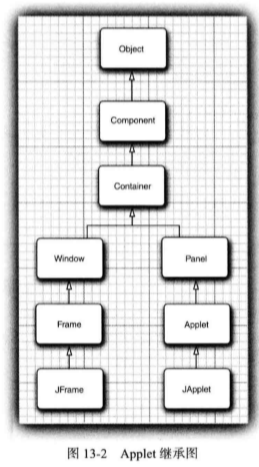
按传统, 我们首先编写一个 NotHelloWorld 程序,这里把它写为一个 applet。applet 就是 一个扩展了java.applet.Applet 类的 Java 类。这里我们将使用 Swing 来实现 applet。这 里的所有 applet 都将扩展 JApplet 类,它是 Swing applet 的超类。如图 13-2 所示, JApplet 是 Applet 类的一个直接子类。
程序清单 13«4显示了 applet 版本“ Not Hello World” 的代码。注意这个代码与第 10 章中 的相应程序很类似。不过,由于 applet 在 web 页面中,所以没有必要指定退出 applet 的方法。
//程序清单 13-4 applet/NotHelloWorld.java package applet; import java.awt.*; import javax.swing.*; /** * @version 1.23 2012-05-14 * @author Cay Horstmann */ public class NotHelloWorld extends JApplet { public void init() { EventQueue.invokeLater(new Runnable() { public void run() { JLabel label = new JLabel("Not a Hello, World applet", SwingConstants.CENTER); add(label); } }); } }
要执行 applet, 需要完成以下 3 个步骤:
1) 将 Java 源文件编译为类文件。
2) 将类打包到一个 JAR 文件中。
3 ) 创建一个 HTML 文件,告诉浏览器首先加载哪个类文件, 以及如何设定 applet 的 大小。
下面给出这个文件的内容:
<applet dass="applet/NotHel1olilorld.class" archive="NotHel1oWorld.jar" width="300i , height="300"> </applet>
在浏览器中査看 applet 之前,最好先在 JDK 自带的 applet viewer (applet 查看器)程序中 进行测试。要使用 applet 查看器测试我们的示例 applet, 可以在命令行输入:
appletviewer NotHelloWorldApplet.html applet
查看器程序的命令行参数是 HTML 文件 名,而不是类文件。
很容易把一个图形化 Java 应用转换为可以嵌入在 Web页面中的 applet。基本上来说, 所 有用户界面代码都可以保持不变。下面给出具体的步骤:
1 ) 建立4HTML 页面,其中包含加载 applet 代码的适当标记。
2 ) 提供 JApplet 类的一个子类。将这个类标记为 public。否则 applet 将无法加载。
3 ) 删去应用中的 main方法。不要为应用构造框架窗口。你的应用将在浏览器中显示。
4 ) 把所有初始化代码从框架窗口移至 applet 的 init 方法。不需要明确构造 applet 对象, 浏览器会实例化 applet 对象并调用 init方法。
5 ) 删除 setSize 调用;对 applet 来说, 用 HTML 文件中的 width 和 height 参数就可以指 定大小。
6 ) 删除 setDefaultCloseOperation 调用。applet 不能关闭;浏览器退出时 applet 就会终止 运行。
7 ) 如果应用调用 setTitle, 则删除这个方法调用。applet 没有标题栏。(当然,可以用 HTMLtitle 标记为 Web 页面本身指定标题。 )
8) 不要调用 setVisible(true)。applet 会自动显示。
applet HTML标记和属性
下面是一个最简形式的 applet标记示例:
<applet code="applet/NotHelloWorld.class" archive="NotHelloWorld.jar" width="300" height="100"></applet>
可以在 applet标记中使用以下属性:
•width,height
这些属性是必要的,指定了 applet 的宽度和高度(单位为像素) 。在 applet 查看器 中,这是 applet 的初始状态。可以调整 applet 查看器创建的任何窗口的大小。但在浏 览器中不能调整 applet 的大小。
•align
这个属性指定了 applet 的对齐方式。属性值与 HTML img标记的 align属性值 相同。
•vspace,hspace
这些属性是可选的,指定了 applet 上下的像素数(vspace) 以及左右两边的像素 数(hspace) 0
•code
这个属性指定了 applet 的类文件名。 路径名必须与 applet 类的包一致。
•archive
这个属性会列出包含 applet 的类以及其他资源的 JAR 文件(可能有多个 JAR 文 件)。这些文件会在加载 applet 之前从 Web 服务器获取。JAR 文件用逗号分隔。
•codebase
这个属性是加载 JAR 文件(早期还可以加载类文件)的 URL。
•object
这个属性已经过时, 可以指定包含串行化 applet 对象的文件的文件名,这个文件 用于持久存储applet 状态。
•alt
Java 禁用时,可以使用 alt 属性来显示一个消息。
•name
编写脚本的人可以为applet 指定一 个 name 属性, 用来指本所编写的 applet。 Netscape 和 Internet Explorer都允许通过 JavaScript 调用页面上的 applet 的方法。
使用参数向 applet 传递信息
与应用可以使用命令行信息一样,applet 可以使用内嵌在 HTML 文件中的参数。这是利 用 HTML param标记以及所定义的属性来完成的。例如,假设想让 Web 页面确定 applet 中使 用的字体样式。可以使用以下 HTML标记:
<applet code="FontParamApplet.class" ...> <param name="font" value="Helvetica"/> </applet>
然后使用 Applet 类的 getParameter方法得到参数的值:
public class FontParamApplet extends JApplet {
    public void init(){

        String fontName = getParameterffont");
        ...
    }
    ...
}
程序清单 13-5 是这个图表 applet 的源代码。 需要说明, init 方法读取了参数, 并由 paintComponent 方法绘制图表。
//代码清单 13-5 chart/Chart.java package chart; import java.awt.*; import java.awt.font.*; import java.awt.geom.*; import javax.swing.*; /** * @version 1.33 2007-06-12 * @author Cay Horstmann */ public class Chart extends JApplet { public void init() { EventQueue.invokeLater(new Runnable() { public void run() { String v = getParameter("values"); if (v == null) return; int n = Integer.parseInt(v); double[] values = new double[n]; String[] names = new String[n]; for (int i = 0; i < n; i++) { values[i] = Double.parseDouble(getParameter("value." + (i + 1))); names[i] = getParameter("name." + (i + 1)); } add(new ChartComponent(values, names, getParameter("title"))); } }); } } /** * A component that draws a bar chart. */ class ChartComponent extends JComponent { private double[] values; private String[] names; private String title; /** * Constructs a ChartComponent. * @param v the array of values for the chart * @param n the array of names for the values * @param t the title of the chart */ public ChartComponent(double[] v, String[] n, String t) { values = v; names = n; title = t; } public void paintComponent(Graphics g) { Graphics2D g2 = (Graphics2D) g; // compute the minimum and maximum values if (values == null) return; double minValue = 0; double maxValue = 0; for (double v : values) { if (minValue > v) minValue = v; if (maxValue < v) maxValue = v; } if (maxValue == minValue) return; int panelWidth = getWidth(); int panelHeight = getHeight(); Font titleFont = new Font("SansSerif", Font.BOLD, 20); Font labelFont = new Font("SansSerif", Font.PLAIN, 10); // compute the extent of the title FontRenderContext context = g2.getFontRenderContext(); Rectangle2D titleBounds = titleFont.getStringBounds(title, context); double titleWidth = titleBounds.getWidth(); double top = titleBounds.getHeight(); // draw the title double y = -titleBounds.getY(); // ascent double x = (panelWidth - titleWidth) / 2; g2.setFont(titleFont); g2.drawString(title, (float) x, (float) y); // compute the extent of the bar labels LineMetrics labelMetrics = labelFont.getLineMetrics("", context); double bottom = labelMetrics.getHeight(); y = panelHeight - labelMetrics.getDescent(); g2.setFont(labelFont); // get the scale factor and width for the bars double scale = (panelHeight - top - bottom) / (maxValue - minValue); int barWidth = panelWidth / values.length; // draw the bars for (int i = 0; i < values.length; i++) { // get the coordinates of the bar rectangle double x1 = i * barWidth + 1; double y1 = top; double height = values[i] * scale; if (values[i] >= 0) y1 += (maxValue - values[i]) * scale; else { y1 += maxValue * scale; height = -height; } // fill the bar and draw the bar outline Rectangle2D rect = new Rectangle2D.Double(x1, y1, barWidth - 2, height); g2.setPaint(Color.RED); g2.fill(rect); g2.setPaint(Color.BLACK); g2.draw(rect); // draw the centered label below the bar Rectangle2D labelBounds = labelFont.getStringBounds(names[i], context); double labelWidth = labelBounds.getWidth(); x = x1 + (barWidth - labelWidth) / 2; g2.drawString(names[i], (float) x, (float) y); } } }