<!--
   ⚠ 请注意,该图表不是 Apache ECharts 官方示例,而是由用户代码生成的。请注意鉴别其内容。
-->
<!DOCTYPE html>
<html lang="zh-CN" style="height: 100%">
<head>
  <meta charset="utf-8">
</head>
<body style="height: 100%; margin: 0">
  <div id="container" style="height: 100%"></div>


  <script type="text/javascript" src="https://fastly.jsdelivr.net/npm/echarts@5.4.2/dist/echarts.min.js"></script>
  <!-- Uncomment this line if you want to dataTool extension
  <script type="text/javascript" src="https://fastly.jsdelivr.net/npm/echarts@5.4.2/dist/extension/dataTool.min.js"></script>
  -->
  <!-- Uncomment this line if you want to use gl extension
  <script type="text/javascript" src="https://fastly.jsdelivr.net/npm/echarts-gl@2/dist/echarts-gl.min.js"></script>
  -->
  <!-- Uncomment this line if you want to echarts-stat extension
  <script type="text/javascript" src="https://fastly.jsdelivr.net/npm/echarts-stat@latest/dist/ecStat.min.js"></script>
  -->
  <!-- Uncomment this line if you want to use map
  <script type="text/javascript" src="https://fastly.jsdelivr.net/npm/echarts@4.9.0/map/js/china.js"></script>
  <script type="text/javascript" src="https://fastly.jsdelivr.net/npm/echarts@4.9.0/map/js/world.js"></script>
  -->
  <!-- Uncomment these two lines if you want to use bmap extension
  <script type="text/javascript" src="https://api.map.baidu.com/api?v=3.0&ak=YOUR_API_KEY"></script>
  <script type="text/javascript" src="https://fastly.jsdelivr.net/npm/echarts@5.4.2/dist/extension/bmap.min.js"></script>
  -->

  <script type="text/javascript">
    var dom = document.getElementById('container');
    var myChart = echarts.init(dom, null, {
      renderer: 'canvas',
      useDirtyRect: false
    });
    var app = {};

    var option;

    var data = [];
var data1 = [];
var data2 = [];
var data3 = [];
var data4 = [];
// Parametric curve
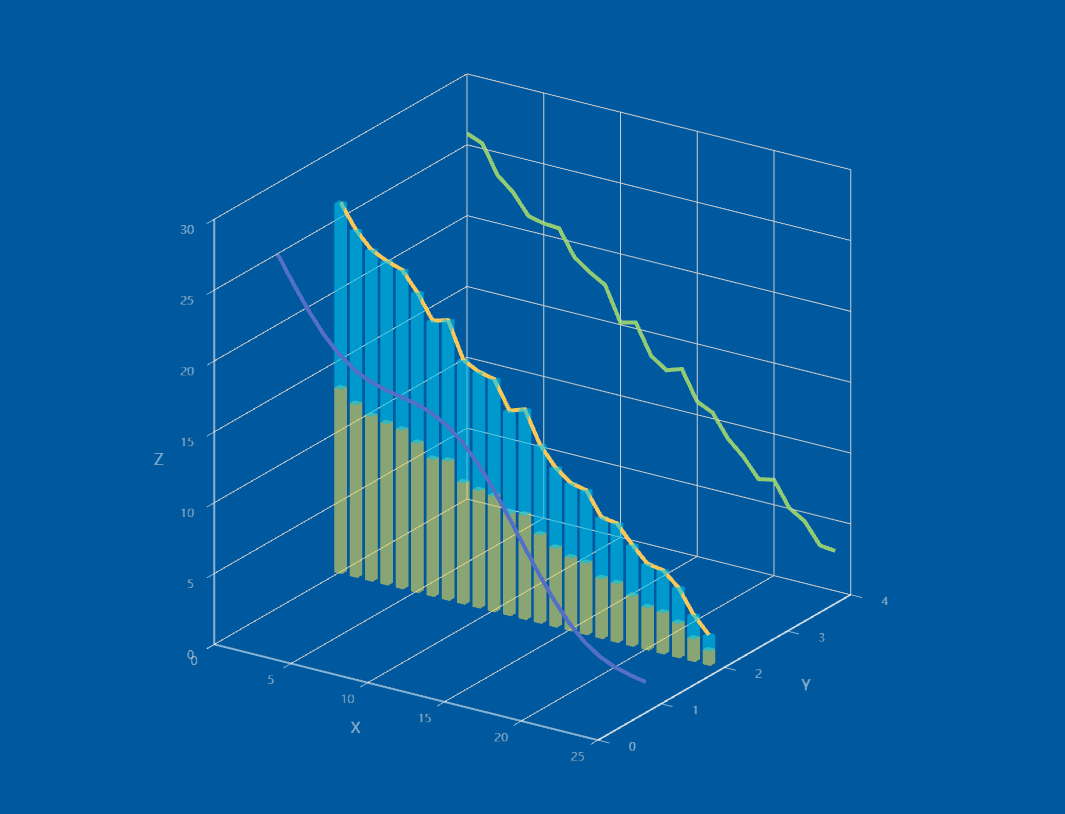
for (var t = 0; t < 25; t += 1) {
  var y = t;
  var z = 25- t  + 2.0 * Math.sin(75 * t);
  var z1 =25- t + 2.0 * Math.random().toFixed(2);
  var z2 =25- t + 2.0 * Math.random().toFixed(2);
  data.push([y, 1, z]);
  data1.push([y, 4, z1]);
  data2.push([y, 2, z2 / 2]);
  data3.push([y, 2, z2]);
  data4.push([y, 2, z2 / 2]);
}
console.log(data.length);
option = {
  tooltip: {},
  backgroundColor: '#00599f',
  // visualMap: {
  //   show: false,
  //   dimension: 2,
  //   min: 0,
  //   max: 30,
  //   inRange: {
  //     color: [
  //       '#313695',
  //       '#4575b4',
  //       '#74add1',
  //       '#abd9e9',
  //       '#e0f3f8',
  //       '#ffffbf',
  //       '#fee090',
  //       '#fdae61',
  //       '#f46d43',
  //       '#d73027',
  //       '#a50026'
  //     ]
  //   }
  // },
  xAxis3D: {
    type: 'value'
  },
  yAxis3D: {
    type: 'value',
    splitLine: {
      show: false
    }
  },
  zAxis3D: {
    type: 'value'
  },
  grid3D: {
    viewControl: {
      projection: 'orthographic'
    },
    axisLine: {
      lineStyle: { color: '#ffffff88' }
    },
    // axisPointer: {
    //   lineStyle: { color: '#ffffff33' }
    // },
    light: {
      main: {
        shadow: true,
        quality: 'ultra',
        intensity: 1.5
      }
    }
  },
  series: [
    {
      type: 'line3D',
      data: data,
      lineStyle: {
        width: 4
      }
    },
    {
      type: 'line3D',
      data: data1,
      lineStyle: {
        width: 4
      }
    },
    {
      type: 'line3D',
      data: data3,
      lineStyle: {
        width: 4
      }
    },
    {
      type: 'bar3D',
      barSize: [2, 2],
      data: data2.map(function (item) {
        return {
          value: [item[0], item[1], item[2]]
        };
      }),
      shading: 'color',
      label: {
        show: false,
        fontSize: 16,
        borderWidth: 1
      },
      itemStyle: {
        color: '#e5d856',
        opacity: 0.6
      },
      stack: 'stack',
      // shading: 'lambert',
      emphasis: {
        label: {
          fontSize: 20,
          color: '#900'
        },
        itemStyle: {
          color: '#900'
        }
      }
    },
    {
      type: 'bar3D',
      barSize: [2, 2],
      data: data4.map(function (item) {
        return {
          value: [item[0], item[1], item[2]]
        };
      }),
      shading: 'color',
      label: {
        show: false,
        fontSize: 16,
        borderWidth: 1
      },
      itemStyle: {
        color: '#00c4ec',
        opacity: 0.6
      },
      stack: 'stack',
      // shading: 'lambert',
      emphasis: {
        label: {
          fontSize: 20,
          color: '#900'
        },
        itemStyle: {
          color: '#900'
        }
      }
    }
  ]
};


    if (option && typeof option === 'object') {
      myChart.setOption(option);
    }

    window.addEventListener('resize', myChart.resize);
  </script>
</body>
</html>


 浙公网安备 33010602011771号