
centos 从零搭建yaf框架
注意:目前pecl官网的yaf版本是3.0.7,php7.3版本无法安装哦,需要到鸟哥的github上面去编译安装3.0.8版本https://github.com/laruence/yaf/releases
一、搭建环境
1.先去官网下载安装包、解压,我把它安装在/usr/local/lib64文件夹下
cd /usr/local/lib64
1、 wget https://github.com/laruence/yaf/archive/yaf-3.0.8.tar.gz

2、 tar -zxvf yaf-3.0.8.tar.gz

3、 cd yaf-3.0.8.tar.gz

4、 phpize

5、 ./configure --prefix=你的php-config文件的PATH
例如:
./configure --prefix=/usr/local/php/bin/php-config
在执行phpize命令时,假如出现报错,可以参考该链接 https://blog.csdn.net/alen_xiaoxin/article/details/80255766
如果你找不到php-config文件,可以使用命令
find / -name php-config find
查找下就好
6、 make && make install
7.修改php.ini,在php.ini文件末尾加如下配置:
[yaf]

yaf.use_namespace = 0

yaf.environ = 'product'

yaf.cache_config = 0

yaf.name_suffix = 1

yaf.lowcase_path = 1


extension = yaf.so
配置说明:
-
yaf.user_namespace 为1是开启命名空间模式。0关闭。
-
yaf.environ 是默认情况下Yaf读取的环境配置是什么。
-
yaf.cache_config 是否缓存项目配置。
-
yaf.name_suffix 开启后缀。即为1之后,类名将以XxxModel.php、XxxController.php模式加载。
-
yaf.lowcase_path 路径信息中的目录部分都会被转换成小写。
8.然后重启服务器,查看phpinfo()是否有yaf扩展了
二、创建一个yaf项目
1. cd yaf-3.0.8/tools/cg
3. 创建项目
./yaf_cg testAPI
4. 项目会出现在yaf_cg同级目录中的output文件夹中
cd output/testAPI
一个最精简的Yaf项目就生成了

5. 它的index.php是入口文件,使用conf中的配置文件调用Bootstrap,把这个项目跑起来

6. Bootstrap.php是开发过程中的入口,很多基础功能都是在这里先注册的
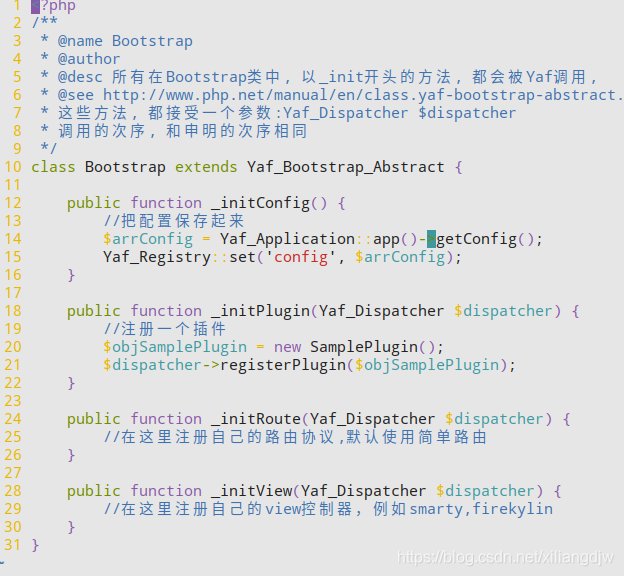
YAF_API
index.php --->>> 加载conf中的文件 --->>>调用Bootstrap.php --->>> 根据请求里的controller和action的定义找到对应的controller
YAF的rewrite规则,适合大部分项目
$router = Yaf_Dispatcher::getInstance()->getRouter();

$route = new Yaf_Route_Rewrite(
    'product/:ident',
    array(
        'controller' => 'products',
        'action' => 'view'
    )
);

$router->addRoute('product', $route);
该文章参考整合以下链接:
https://my.oschina.net/surjur/blog/375622
https://blog.csdn.net/xiliangdjw/article/details/88313203
在地址栏中输入http://localhost/sample显示Hello World! I am Stranger即为搭建成功

 浙公网安备 33010602011771号