

第二次作业
一、实验目的
1.掌握软件开发的基本流程。
2.掌握软件设计和开发的基本工具。
3.理解集成软件开发环境在软件开发过程中的作用。
4.模拟计算器的功能,对数据进行加减乘除以及开方运算并可保存历史计算记录。
二、实验要求
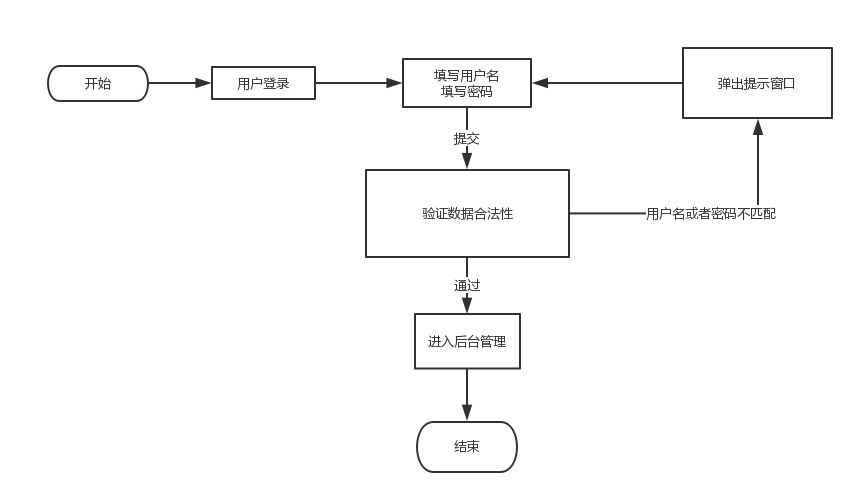
1.完成计算器软件的UI设计、使用Visio设计计算器软件中所涉及的流程图。
2.选择合适的集成开发环境和工具完成计算器软件的开发和功能测试。
3.自己设计登录页面并和简易计算器连接并将数据保存在数据库中。
三、实验环境
1.操作系统:Windows11
2.开发测试工具:IDEA编写登录界面以及计算器相关代码,连接MySQL数据库存储计算记录。
3.流程图:visio
四、基本功能描述
一、相关功能
简易计算器包括基本的四则运算(加、减、乘、除)及开方运算并可存储历史计算数据功能。
五、软件设计
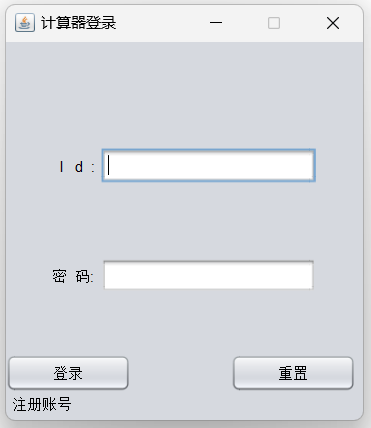
**********************************************用户登录界面************************************************88
package User;

public class Login {
    String id;
    String password;
    LoginDemo loginDemo;
    boolean loginSuccess = false;
    public void setLoginDemo(LoginDemo loginDemo) {
        this.loginDemo = loginDemo;
    }

    public String getId() {
        return id;
    }

    public void setId(String id) {
        this.id = id;
    }

    public String getPassword() {
        return password;
    }

    public void setPassword(String password) {
        this.password = password;
    }

    public boolean isLoginSuccess() {
        return loginSuccess;
    }

    public void setLoginSuccess(boolean loginSuccess) {
        this.loginSuccess = loginSuccess;
    }
}
package User;

import javax.swing.*;
import javax.swing.plaf.basic.BasicButtonUI;
import javax.swing.plaf.basic.BasicPanelUI;
import java.awt.*;
import java.sql.SQLException;


public class LoginDemo extends JFrame {
    public LoginDemo() {
        super("计算器登录");
        //获取显示屏的大小
        Dimension screenSize = Toolkit.getDefaultToolkit().getScreenSize();
        int sw = screenSize.width;
        int sh = screenSize.height;
        //设置窗口的位置
        int width = 300;
        int height = 340;
        this.setBounds((sw - width) / 2, (sh - height) / 2, width, height);

//      盒子模块
        Box ubox = Box.createHorizontalBox();
        Box pbox = Box.createHorizontalBox();
        Box vbox = Box.createVerticalBox();

        JLabel uLabel = new JLabel("  I   d  :");
        JTextField uField = new JTextField();

        JLabel pLabel = new JLabel("密  码:");
        JPasswordField pFd = new JPasswordField();
        pFd.setColumns(16);
        pFd.setEchoChar('●');

        JButton button1 = new JButton("登录");
        button1.setToolTipText("登录");
        JButton button2 = new JButton("重置");
        button2.setToolTipText("重置");
        JMenu Menubutton3 = new JMenu("注册账号");
        Menubutton3.setToolTipText("注册账号");

        button1.setBounds((this.getWidth() - 120 - 180) / 2, 250, 100, 30);
        button1.setCursor(new Cursor(Cursor.HAND_CURSOR));

        button2.setBounds((this.getWidth() - 120 + 180) / 2, 250, 100, 30);


        Menubutton3.setUI(new BasicButtonUI());
        Menubutton3.setBounds(5, 280, 85, 20);


        //小盒子,设计用户名模块
        ubox.add(uLabel);
        ubox.add(Box.createHorizontalStrut(5));
        ubox.add(uField);
        //小盒子,设计密码模块
        pbox.add(pLabel);
        pbox.add(Box.createHorizontalStrut(5));
        pbox.add(pFd);

        //大盒子
        vbox.add(Box.createVerticalStrut(80));
        vbox.add(ubox);
        vbox.add(Box.createVerticalStrut(60));
        vbox.add(pbox);

        JPanel panel = new JPanel();
        panel.setUI(new BasicPanelUI());
        panel.setOpaque(false);
        panel.add(vbox, BorderLayout.CENTER);
        this.setDefaultCloseOperation(EXIT_ON_CLOSE);

        button1.addActionListener(e -> {
            try {
                init(this,uField, pFd);
            } catch (Exception exception) {
                JOptionPane.showMessageDialog(null, "异常", "警告", JOptionPane.WARNING_MESSAGE);
            }
        });
        button2.addActionListener(e -> {
            uField.setText("");
            pFd.setText("");
        });
        Menubutton3.addActionListener(e -> {
            try {
                this.dispose();
                Thread.sleep(1000);
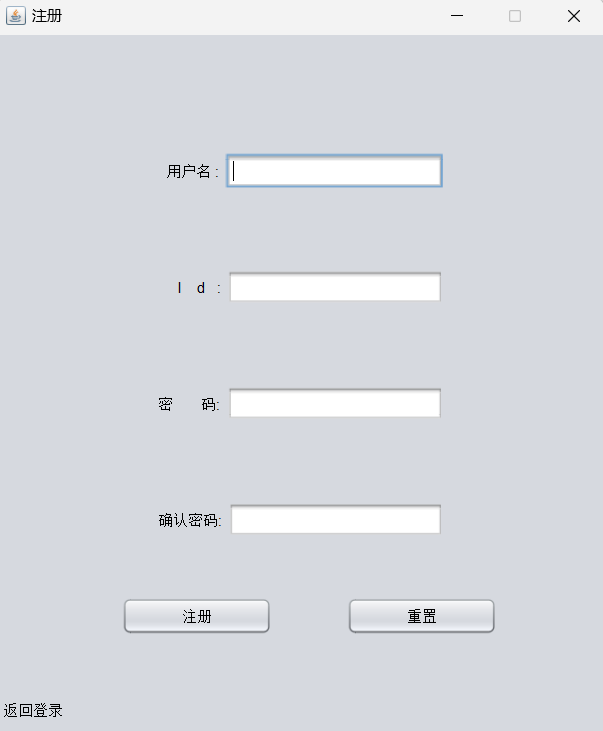
                new RegisterDemo();
            } catch (InterruptedException interruptedException) {
                JOptionPane.showMessageDialog(null, "异常", "警告", JOptionPane.WARNING_MESSAGE);
            }
        });

        this.add(button1);
        this.add(button2);
        this.add(Menubutton3);
        this.add(panel);
        this.setVisible(true);
        this.setResizable(false);
    }

    public void init(LoginDemo loginDemo,JTextField uField, JPasswordField pFd) {
        Login login;
        UserLogin UserLogin;
        try {
            login=new Login();
            login.setLoginDemo(loginDemo);
            login.setId(uField.getText());
            char[] p = pFd.getPassword();
            login.setPassword(new String(p));
            UserLogin = new UserLogin();
            UserLogin.readLogin(login);
        } catch (SQLException | ClassNotFoundException e) {
            JOptionPane.showMessageDialog(null, "异常", "警告", JOptionPane.WARNING_MESSAGE);
        }

    }
}
*************************************计算器界面*******************************************\
package POJO;
import java.math.BigDecimal;
import java.util.Stack;
public class calculate {

    // 符号栈
    private Stack<String> signStack = new Stack();

    // 数字栈
    private Stack<BigDecimal> numStack = new Stack();

    // switch可以判断引用类型变量的值相等吗{0:'+', 1:'-', 2:'x', 3:'/'}
    private static final String signCode = "+-x/()";

    // 计算器主体模块
    public BigDecimal work(BigDecimal caled, BigDecimal cal, String sign) {
        BigDecimal ans = null;
        switch (signCode.indexOf(sign)) {
            case 0:
                ans = caled.add(cal);
                break;
            case 1:
                ans = caled.subtract(cal);
                break;
            case 2:
                ans = caled.multiply(cal);
                break;
            case 3:
                try {
                    ans = caled.divide(cal);
                }catch (ArithmeticException AE) {
                    if(AE.getLocalizedMessage().equals("Non-terminating decimal expansion; no exact representable decimal result."))
                        ans = caled.divide(cal, 5, BigDecimal.ROUND_HALF_UP);
                    else
                        ans = BigDecimal.valueOf(32202);
                    System.out.println("Exception : "+AE.getLocalizedMessage());
                }
                break;
            case 4:
            case 5:
                this.numStack.push(caled);
                ans = cal;
                break;
            default:
                ans = null;
        }
        return ans;
    }

    // 设计开方(牛顿莱布尼兹)
    public static BigDecimal niuton(BigDecimal caled) {
        BigDecimal ans;
        if (caled.doubleValue() < 0) {
            System.out.println("Exception : Negative caled");
            return BigDecimal.valueOf(32202);
        }
        double x = 1;
        double y = x - (x * x - caled.doubleValue()) / (2 * x);
        while (x - y > 0.00000001 || x - y < -0.00000001) {
            x = y;
            y = x - (x * x - caled.doubleValue()) / (2 * x);
        }
        ans = BigDecimal.valueOf(y);
        return ans;
    }

    // 设计平方
    public static BigDecimal square(BigDecimal caled) {
        return caled.pow(2);
    }

    // 设计清屏
    public void refresh() {
        this.numStack.clear();
        this.signStack.clear();
        this.signStack.push("=");
        // 解决计算当(x+y)后输入符号时,需要出栈两个数进行括号运算(即将数按顺序压回去)时数字栈只有一个栈的问题。
        this.numStack.push(new BigDecimal(0));
    }
    // 索引
    private String index = "+-x/()=";

    // 数据,>为0,<为1,=为2,null为3
    private int[][] compareToSign = {{0, 0, 1, 1, 1, 0, 0}, {0, 0, 1, 1, 1, 0, 0}, {0, 0, 0, 0, 1, 0, 0},
            {0, 0, 0, 0, 1, 0, 0}, {1, 1, 1, 1, 1, 2, 3}, {0, 0, 0, 0, 3, 0, 0}, {1, 1, 1, 1, 1, 3, 2}};

    // 数字入栈
    public void numPush(String decimal) {
        this.numStack.push(new BigDecimal(decimal));
    }

    public void numPush(BigDecimal decimal) {
        this.numStack.push(decimal);
    }


    // 控制流
    public void calIOC(String topSign) {
        BigDecimal caled, cal;
        String temp;
        temp = this.signStack.peek();
        switch (this.compareToSign[index.indexOf(temp)][index.indexOf(topSign)]) {
            case 0:
                cal = this.numStack.pop();
                caled = this.numStack.pop();
                temp = this.signStack.pop();
                this.numStack.push(this.work(caled, cal, temp));
                this.signStack.push(topSign);
                break;
            case 1:
                this.signStack.push(topSign);
                break;
            case 2:
                this.signStack.pop();
                break;
            default:
                System.out.println("Exception : wrong I/O");
                break;
        }
    }


    // 等号入栈
    public BigDecimal equaIOC() {
        BigDecimal ans, caled, cal;
        String topSign;
        while (!"=".equals(this.signStack.peek())) {
            topSign = this.signStack.pop();
            cal = this.numStack.pop();
            caled = this.numStack.pop();
            this.numStack.push(this.work(caled, cal, topSign));
        }
        ans = this.numStack.pop();
        return ans;
    }

    // pow的IO流控制
    public void powIOC(String topSign) {
        BigDecimal temp;
        temp = this.numStack.pop();
        if (topSign.equals("^2")) {
            this.numStack.push(calculate.square(temp));
        } else {
            this.numStack.push(calculate.niuton(temp));
        }
    }
    public void barcketIOC() {
        BigDecimal caled, cal;
        String topSign;
        while (!"(".equals(this.signStack.peek())) {
            topSign = this.signStack.pop();
            cal = this.numStack.pop();
            caled = this.numStack.pop();
            this.numStack.push(this.work(caled, cal, topSign));
        }
        this.signStack.pop();
    }


}
package com.auqa.version;

// 导入自己的计算类

import POJO.calculate;

import javax.swing.*;
import java.awt.*;
import java.awt.event.ActionEvent;
import java.awt.event.ActionListener;
import java.math.BigDecimal;
import java.sql.SQLException;

// 计算器界面
public class calculator extends JFrame implements ActionListener {
    Records rec = new Records();

    // 获得显示屏大小
    public static final int SCREAM_HEIGHT = (int) Toolkit.getDefaultToolkit().getScreenSize().getHeight();
    // 根据显示屏高度设定计算器界面大小
    private static final int EXAMPLE = (int) (SCREAM_HEIGHT / 4.32);


    // 字体大小
    Font cu = new Font("粗体", Font.BOLD, (int) (EXAMPLE * 0.2));
    protected void __init__() {
        // 设置窗口名称
        this.setTitle("计算器");
        // 4比3固定窗口
        this.setSize(EXAMPLE * 3, EXAMPLE * 4);
        this.setResizable(false);
        this.setLocationRelativeTo(null);
        // 设置窗口可见
        this.setVisible(true);
        this.setBackground(Color.black);
        // 设置关闭按钮(释放进程)
        this.setDefaultCloseOperation(EXIT_ON_CLOSE);
        // 设置方向布局
        this.setLayout(new BorderLayout());
    }
    // 北面组件
    private JPanel northBox = new JPanel(new FlowLayout());
    private JTextField input = new JTextField();
    private JButton clear = new JButton();
    // 设置北面组件
    private void setNorth() {
        // 设置数字栏
        this.input.setPreferredSize(new Dimension((int) (EXAMPLE * 2.2), (int) (EXAMPLE * 0.4)));
        this.input.setFont(this.cu);
        this.input.setForeground(Color.BLACK);
        this.input.setEnabled(false);
        this.input.setHorizontalAlignment(SwingConstants.RIGHT);

        // 设置清空
        this.clear.setText("C");
        this.clear.setPreferredSize(new Dimension((int) (EXAMPLE * 0.4), (int) (EXAMPLE * 0.4)));
        this.clear.setFont(this.cu);
        this.clear.setForeground(Color.RED);

        // 安装北仪表
        this.northBox.add(this.input);
        this.northBox.add(this.clear);

        // 安装北仪表到主体
        this.add(this.northBox, BorderLayout.NORTH);
    }
    // 中部组件
    private JPanel CPU = new JPanel();
    private JButton[] cal = new JButton[20];
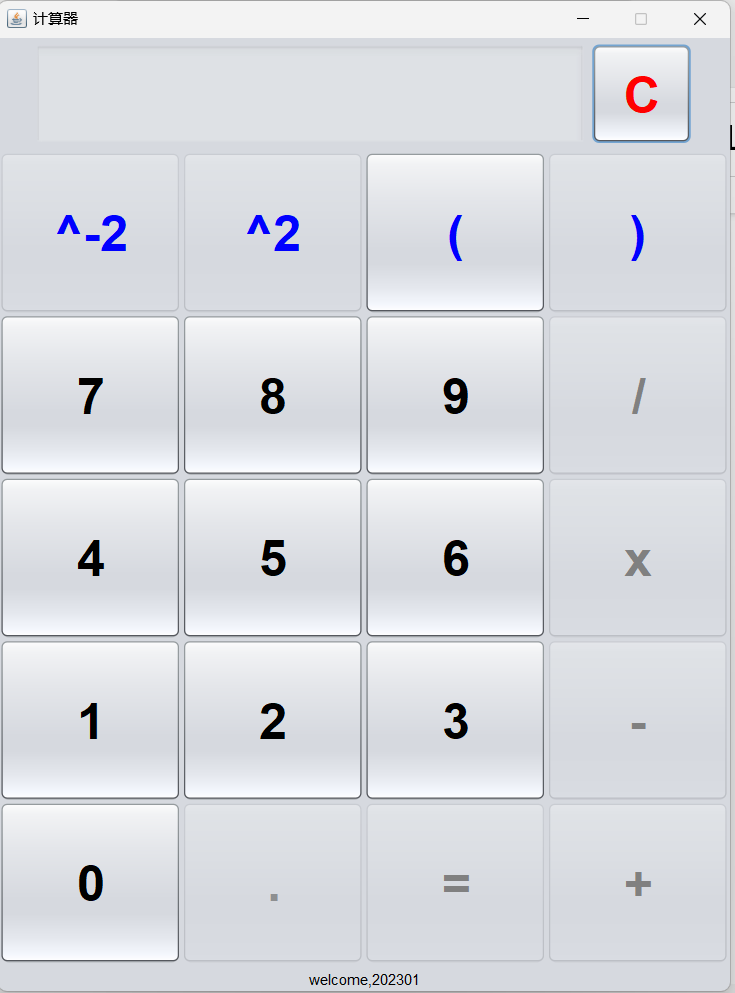
    String str = "789/456x123-0.=+";

    // 设置中部组件
    private void setCenter() {
        // 划分20格
        this.CPU.setLayout(new GridLayout(5, 4));
        // 设置开方按钮
        this.cal[0] = new JButton();
        this.cal[0].setText("^-2");
        this.cal[0].setPreferredSize(new Dimension((int) (EXAMPLE * 0.2), (int) (EXAMPLE * 0.15)));
        this.cal[0].setFont(this.cu);
        this.cal[0].setForeground(Color.BLUE);
        // 设置括号按钮
        this.cal[1] = new JButton();
        this.cal[1].setText("^2");
        this.cal[1].setPreferredSize(new Dimension((int) (EXAMPLE * 0.2), (int) (EXAMPLE * 0.15)));
        this.cal[1].setFont(this.cu);
        this.cal[1].setForeground(Color.BLUE);
        this.cal[2] = new JButton();
        this.cal[2].setText("(");
        this.cal[2].setPreferredSize(new Dimension((int) (EXAMPLE * 0.2), (int) (EXAMPLE * 0.15)));
        this.cal[2].setFont(this.cu);
        this.cal[2].setForeground(Color.BLUE);

        // 设置清除按钮
        this.cal[3] = new JButton();
        this.cal[3].setText(")");
        this.cal[3].setPreferredSize(new Dimension((int) (EXAMPLE * 0.2), (int) (EXAMPLE * 0.15)));
        this.cal[3].setFont(this.cu);
        this.cal[3].setForeground(Color.BLUE);

        // 设置后16个按钮
        for (int i = 4; i < 20; i++) {
            String temp = this.str.substring(i - 4, i - 3);
            this.cal[i] = new JButton();
            this.cal[i].setText(temp);
            this.cal[i].setPreferredSize(new Dimension((int) (EXAMPLE * 0.2), (int) (EXAMPLE * 0.15)));
            this.cal[i].setFont(this.cu);
            if ("+-x/=".contains(temp)) {
                this.cal[i].setForeground(Color.GRAY);
            }
        }
        // 添加按钮
        for (int i = 0; i < 20; i++) {
            this.CPU.add(this.cal[i]);
        }
        this.add(this.CPU,BorderLayout.CENTER);
    }
    public String uid;

    public void setUid(String id) {
        this.uid = id;
    }

    // 南面组件
    private JLabel message = new JLabel("welcome,", SwingConstants.CENTER);

    // 设置南面组件
    private void setSouth() {
        this.message.setText("welcome," + this.uid);
        this.message.setPreferredSize(new Dimension((int) (EXAMPLE * 0.1), (int) (EXAMPLE * 0.1)));
        this.message.setForeground(Color.BLACK);
        this.add(this.message, BorderLayout.SOUTH);
    }

    // 给按钮添加监听
    private void setListener() {
        for (JButton j : cal) {
            j.addActionListener(this);
        }
        this.clear.addActionListener(this);
    }

    // 监听事件设置
    @Override
    public void actionPerformed(ActionEvent e) {
        String listen = e.getActionCommand();
        if ("0.1^23456789+-x/()^-2".contains(listen)) {
            this.input.setText(this.input.getText() + listen);
        }
        this.bigWork(listen);
    }
    // 小数点信号
    private Boolean pointSignal = false;
    // 括号信号
    private int barcketNum = 0;

    private String num = "0123456789";
    private String sign = "+-x/(";

    // 输入的最后一位为数字时的状态,详细见详细设计表格
    public void inNum() {
        // 只能输入pow函数,右括号,数字和符号按钮,不能输入左括号,若小数点信号为真,则可以输入小数点
        for (int i=0;i<20;i++) {
            if("(".equals(this.cal[i].getText())) {
                this.cal[i].setEnabled(false);
            }
            else {
                this.cal[i].setEnabled(true);
            }
        }
        // 根据信号设置
        this.cal[17].setEnabled(this.pointSignal);
    }

    // 输入的最后一位为符号或左括号时
    public void inSign() {
        // 只能输入非小数点数字及左括号,小数点信号开启
        for (int i=0;i<20;i++) {
            if("(".equals(this.cal[i].getText()) || this.num.contains(this.cal[i].getText())) {
                this.cal[i].setEnabled(true);
            }
            else {
                this.cal[i].setEnabled(false);
            }
        }
        this.pointSignal = true;
    }

    // 输入最后一位为右括号或pow运算时
    public void inPow() {
        // 只能输入符号和右括号和pow函数
        for (int i=0;i<20;i++) {
            if("(".equals(this.cal[i].getText()) || this.num.contains(this.cal[i].getText()) || ".".equals(this.cal[i].getText())) {
                this.cal[i].setEnabled(false);
            }
            else {
                this.cal[i].setEnabled(true);
            }
        }
    }

    // 输入最后一位为小数点时
    public void inPoint() {
        // 只能输入非小数点数字,小数点信号关闭
        for (int i=0;i<20;i++) {
            if(this.num.contains(this.cal[i].getText())) {
                this.cal[i].setEnabled(true);
            }
            else {
                this.cal[i].setEnabled(false);
            }
        }
        this.pointSignal = false;
    }

    public void inEqual() {
        for (int i=0;i<20;i++) {
            this.cal[i].setEnabled(false);
        }
    }
    // 真正的超级初始化块
    public calculator() throws HeadlessException, SQLException, ClassNotFoundException {
        // 界面设置
        this.__init__();
        this.setNorth();
        this.setCenter();
        this.setSouth();
        // 交互设置
        this.setListener();
        JOptionPane.showMessageDialog(this, "由于框架原因,本计算器打开时可能按钮显示不全,请最小化后打开");
        this.inSign();
        this.calculate.refresh();
    }

    calculate calculate = new calculate();
    private String temStr = "";
    private String records;
    private String result;

    public void setCaled(String caled) {
        this.records = caled;
    }

    public void setAns(BigDecimal ans) {
        this.result = ans.toString();
    }

    public String getCaled() {
        return records;
    }

    public String getAns() {
        return result;
    }


    // 控制器
    public void bigWork(String listen) {

        // 记录括号信号
        if ("(".equals(listen)) {
            this.barcketNum++;
        }
        if (")".equals(listen)) {
            this.barcketNum--;
        }


        // 基础状体转换
        if (this.num.contains(listen)) {
            this.temStr = this.temStr +listen;
            this.inNum();
        } else if (this.sign.contains(listen)) {
            if(!"".equals(temStr)) {
                this.calculate.numPush(this.temStr);
                this.temStr = "";
            }
            this.calculate.calIOC(listen);
            this.inSign();
        } else if (")".equals(listen) || listen.contains("^")) {
            if(!"".equals(temStr)) {
                this.calculate.numPush(this.temStr);
                this.temStr = "";
            }
            if (listen.contains("^")) {
                calculate.powIOC(listen);
            } else {
                this.calculate.barcketIOC();
            }
            this.inPow();
        } else if (".".equals(listen)) {
            this.temStr = this.temStr +listen;
            this.inPoint();
        }  else if ("=".equals(listen)) {
            if(!"".equals(temStr)) {
                this.calculate.numPush(this.temStr);
                this.temStr = "";
            }
            this.setCaled(this.input.getText());
            this.setAns(this.calculate.equaIOC());
            try {
                rec.excuteins(uid,records,result);
            } catch (Exception e) {
                throw new RuntimeException(e);
            }

            this.input.setText(this.result);
            this.inEqual();
        }else if ("C".equals(listen)) {
            this.calculate.refresh();
            this.input.setText("");
            this.temStr = "";
            this.barcketNum = 0;
            this.inSign();
        } else {
            JOptionPane.showMessageDialog(this, "error : unvaild input");
        }

        // 限制用户输入
        if (this.barcketNum < 0) {
            JOptionPane.showMessageDialog(this,"error : wrong number of barcket");
        }
        if(this.barcketNum == 0) {
            this.cal[3].setEnabled(false);
        }

        if (this.barcketNum > 0) {
            this.cal[18].setEnabled(false);
        }
    }


    public calculator(String uid) throws HeadlessException, SQLException, ClassNotFoundException {
        // 界面设置
        this.__init__();
        this.setNorth();
        this.setCenter();
        // 获取uid
        this.setUid(uid);
        this.setSouth();
        // 交互设置
        this.setListener();
        JOptionPane.showMessageDialog(this, "由于框架原因,本计算器打开时可能按钮显示不全,请最小化后打开");
        this.inSign();
        this.calculate.refresh();
    }

}
******************************************数据库连接**************************************************
package User;

import com.mysql.cj.jdbc.MysqlDataSource;

import javax.swing.*;
import java.sql.Connection;
import java.sql.PreparedStatement;
import java.sql.SQLException;

public class UserRegister {
    Connection connection = null;
    PreparedStatement presql;

    public UserRegister() throws SQLException {
        try {
            MysqlDataSource mysqlDataSource = new MysqlDataSource();
            mysqlDataSource.setURL("jdbc:mysql://localhost:3306/test?useUnicode=true&characterEncoding=utf8&useSSL=false");
            mysqlDataSource.setUser("root");
            mysqlDataSource.setPassword("123456");
            connection = mysqlDataSource.getConnection();
        } catch (SQLException throwables) {
            JOptionPane.showMessageDialog(null,"数据库连接失败","警告",JOptionPane.WARNING_MESSAGE);
        }
    }
    public void writeRegister(Register register){
        int flag;
        try {
            String sql = "INSERT INTO test.User VALUES (?,?,?)";
            presql = connection.prepareStatement(sql);
            presql.setString(1,register.getId());
            presql.setString(2,register.getPassword());
            presql.setString(3,register.getName());
            flag = presql.executeUpdate();
            connection.close();
            if (flag!=0){
                JOptionPane.showMessageDialog(null,"注册成功");
            }else {
                JOptionPane.showMessageDialog(null,"注册失败","提示",JOptionPane.WARNING_MESSAGE);
            }
        } catch (SQLException e) {
            JOptionPane.showMessageDialog(null,"ID已存在!","警告",JOptionPane.WARNING_MESSAGE);
        }

    }
}
package com.auqa.version;

import com.mysql.cj.jdbc.MysqlDataSource;

import javax.swing.*;
import java.sql.*;

public class Records {
    Connection connection = null;
    Statement statement = null;

    public Records() throws SQLException, ClassNotFoundException {

        try {
            MysqlDataSource mysqlDataSource = new MysqlDataSource();
            mysqlDataSource.setURL("jdbc:mysql://localhost:3306/test?useUnicode=true&characterEncoding=utf8&useSSL=false");
            mysqlDataSource.setUser("root");
            mysqlDataSource.setPassword("123456");
            this.connection = mysqlDataSource.getConnection();
            this.statement = this.connection.createStatement();
        } catch (Exception e) {
            JOptionPane.showMessageDialog(null, "数据库连接失败", "提示", JOptionPane.WARNING_MESSAGE);
        }
    }

    public int excuteins(String uid,String records, String result) throws Exception {
        int temp = this.statement.executeUpdate("INSERT INTO record VALUE ('"+uid+"','"+records+"',"+result+")");
        return temp;
    }

}

 浙公网安备 33010602011771号