

第二次作业
一、基本功能概述
包含登陆界面的计算器软件,该软件可实现加、减、乘、除的功能,并保存用户的历史计算记录。
二、实验环境
1、操作系统:Windows 11
2、开发工具:IDEA
三、程序流程图
1、登录界面的流程图
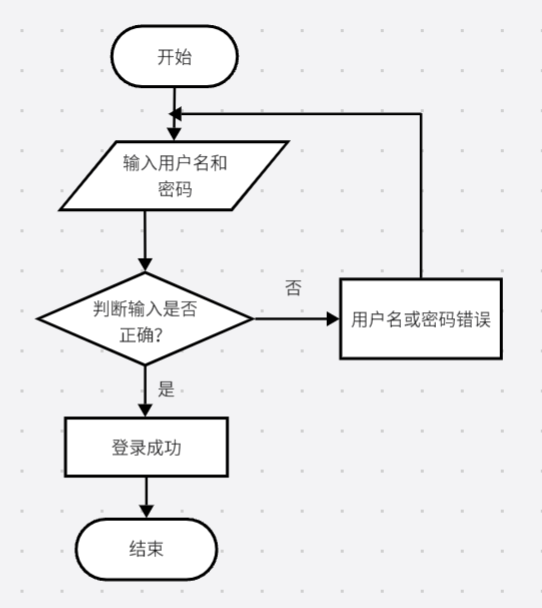
2、计算器流程图
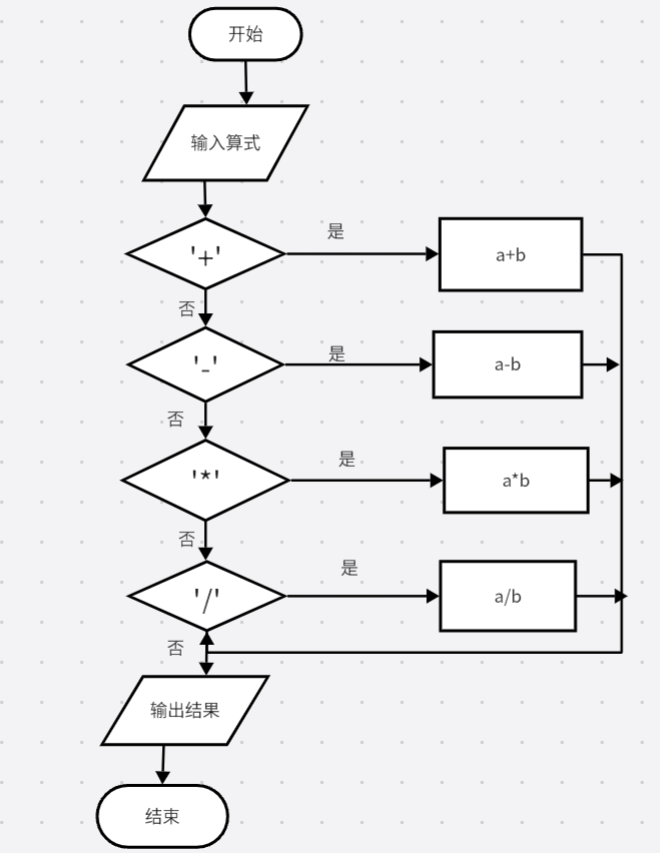
四、完整源代码
(一)、登录界面
1、完整代码
package aaa;
import javax.swing.*;

import java.awt.*;
import java.awt.event.ActionEvent;
import java.awt.event.ActionListener;
public class Jisuan {
    public static void main(String[] args) {
        JFrame frame = new JFrame("计算器登录界面");
        frame.setSize(300, 400);
        frame.setDefaultCloseOperation(JFrame.EXIT_ON_CLOSE);

        JPanel panel = new JPanel();
        frame.add(panel);
        placeComponents(panel);

        frame.setVisible(true);
    }

    private static void placeComponents(JPanel panel) {
        panel.setLayout(null);

        JLabel userLabel = new JLabel("用户名:");
        userLabel.setBounds(10, 20, 80, 25);
        panel.add(userLabel);

        JTextField userText = new JTextField(20);
        userText.setBounds(100, 20, 165, 25);
        panel.add(userText);

        JLabel passwordLabel = new JLabel("密码:");
        passwordLabel.setBounds(10, 50, 80, 25);
        panel.add(passwordLabel);

        JPasswordField passwordText = new JPasswordField(20);
        passwordText.setBounds(100, 50, 165, 25);
        panel.add(passwordText);

        JButton loginButton = new JButton("登录");
        loginButton.setBounds(10, 80, 80, 25);
        panel.add(loginButton);
        loginButton.addActionListener(new ActionListener() {
            @Override
            public void actionPerformed(ActionEvent e) {
                String username = userText.getText();
                String password = new String(passwordText.getPassword());
                if (username.equals("田静雯") && password.equals("123456")) {
                    JOptionPane.showMessageDialog(null, "登录成功!");
                } else {
                    JOptionPane.showMessageDialog(null, "用户名或密码错误!");
                }
            }
        });

        JButton registerButton = new JButton("注册");
        registerButton.setBounds(180, 80, 80, 25);
        panel.add(registerButton);
    }
}
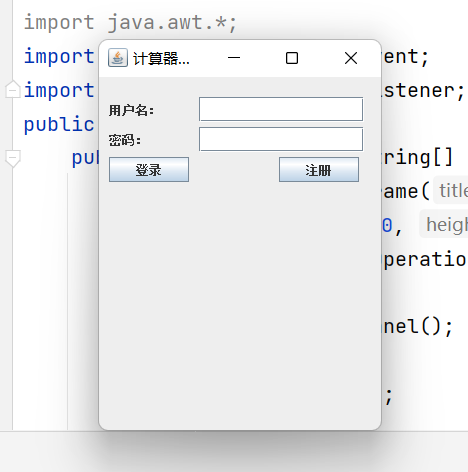
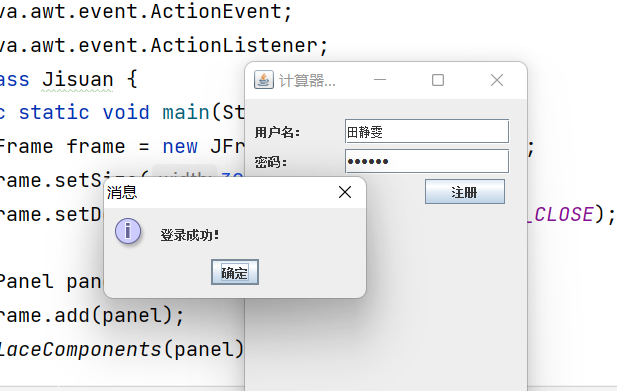
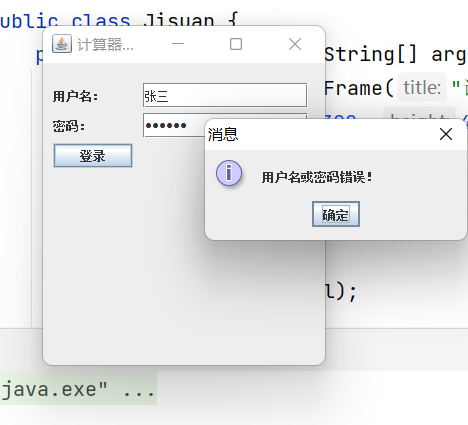
2、测试结果:
①登录界面
②登陆成功
③用户名或密码错误
(二)、计算器界面
1、完整代码
package aaa;

import javax.swing.*;

import java.awt.*;
import java.awt.event.ActionEvent;
import java.awt.event.ActionListener;

public class CalculatorFrame extends JFrame {
    private JTextField displayField;
    private String currentInput;
    private String operator;
    private double firstOperand;
    private boolean waitingForSecondOperand = false;

    public CalculatorFrame() {
        setTitle("田静雯的计算器");
        setSize(400, 400);
        setDefaultCloseOperation(JFrame.EXIT_ON_CLOSE);
        setLocationRelativeTo(null);

        JPanel panel = new JPanel();
        panel.setLayout(new BorderLayout());

        displayField = new JTextField();
        displayField.setEditable(false);
        panel.add(displayField, BorderLayout.NORTH);

        JPanel buttons = new JPanel();
        buttons.setLayout(new GridLayout(4, 4));

        String[] buttonLabels = {"7", "8", "9", "/", "4", "5", "6", "*", "1", "2", "3", "-", "0", ".", "=", "+"};
        for (String label : buttonLabels) {
            JButton button = new JButton(label);
            button.addActionListener(new ActionListener() {
                @Override
                public void actionPerformed(ActionEvent e) {
                    handleButtonClick(label);
                }
            });
            buttons.add(button);
        }
        panel.add(buttons, BorderLayout.CENTER);

        add(panel);
    }

    private void handleButtonClick(String label) {
        if (label.equals("=")) {
            performOperation();
        } else if (label.equals("/") || label.equals("*") || label.equals("-") || label.equals("+")) {
            handleOperator(label);
        } else {
            handleNumber(label);
        }
    }

    private void handleOperator(String label) {
        operator = label;
        currentInput = displayField.getText();
        firstOperand = Double.parseDouble(currentInput);
        waitingForSecondOperand = true;
    }

    private void handleNumber(String number) {
        if (waitingForSecondOperand) {
            displayField.setText(number);
            waitingForSecondOperand = false;
        } else {
            displayField.setText(displayField.getText() + number);
        }
    }

    private void performOperation() {
        double secondOperand = Double.parseDouble(displayField.getText());
        double result;
        switch (operator) {
            case "/":
                result = firstOperand / secondOperand;
                break;
            case "*":
                result = firstOperand * secondOperand;
                break;
            case "-":
                result = firstOperand - secondOperand;
                break;
            case "+":
                result = firstOperand + secondOperand;
                break;
            default:
                return;
        }
        displayField.setText(String.valueOf(result));
    }

    public static void main(String[] args) {
        SwingUtilities.invokeLater(new Runnable() {
            @Override
            public void run() {
                new CalculatorFrame().setVisible(true);
            }
        });
    }
}
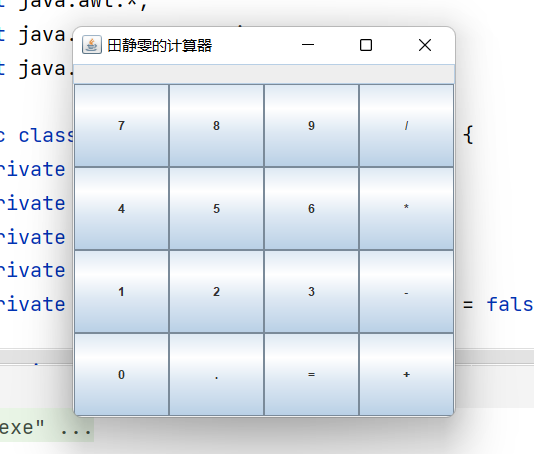
2、测试结果
(三)连接数据库代码
package aaa;

import java.sql.*;

public class connectionMysql {
//    打开数据库连接
    Connection con=null;
    ResultSet res =null;
    public Connection openMysql(){
        try {
            Class.forName("com.mysql.jdbc.Driver");
/*
       本机IP的几种表示
       1,计算机名
       2.ip cmd
       3,localhost
       4,127.0.0.1
 */
//        连接数据库
            String url="jdbc:mysql://127.0.0.1:3306/test?characterEncoding=UTF-8";
            String uname="root";
            String upass="123456";
            con = DriverManager.getConnection(url,uname,upass);

        }catch (Exception e){
            e.printStackTrace();
        }
        return con ;
    }

    //增删改
    public int update(String sql) {
        //保存返回值
        int re = 0;
        try {
            //创建执行对象
            Statement sta = con.createStatement();
            re = sta.executeUpdate(sql);

        } catch (Exception e) {
            e.printStackTrace();
        }


        return re;
    }
    //查询
    public ResultSet select(String sql){
        try {
            //创建执行对象
            Statement sta = con.createStatement();
            res = sta.executeQuery(sql);

        } catch (Exception e) {
            e.printStackTrace();
        }
        return res;
    }
}

 浙公网安备 33010602011771号