
关于在Struts2框架下实现文件的上传功能
struts2的配置过程
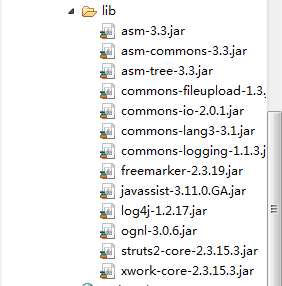
(1)在项目中加入jar包
(2)web.xml中filter(过滤器)的配置
<?xml version="1.0" encoding="UTF-8"?>
<web-app version="2.5"
	xmlns="http://java.sun.com/xml/ns/javaee"
	xmlns:xsi="http://www.w3.org/2001/XMLSchema-instance"
	xsi:schemaLocation="http://java.sun.com/xml/ns/javaee
	http://java.sun.com/xml/ns/javaee/web-app_2_5.xsd">
  <display-name></display-name>
    <filter>
    <filter-name>struts2</filter-name>
    <filter-class>org.apache.struts2.dispatcher.ng.filter.StrutsPrepareAndExecuteFilter</filter-class>
  </filter>
  <filter-mapping>
    <filter-name>struts2</filter-name>
    <url-pattern>/*</url-pattern>
  </filter-mapping>
</web-app>
(3)struts.xml配置文件的编写
<?xml version="1.0" encoding="UTF-8"?>
<web-app version="2.5"
	xmlns="http://java.sun.com/xml/ns/javaee"
	xmlns:xsi="http://www.w3.org/2001/XMLSchema-instance"
	xsi:schemaLocation="http://java.sun.com/xml/ns/javaee
	http://java.sun.com/xml/ns/javaee/web-app_2_5.xsd">
  <display-name></display-name>
    <filter>
    <filter-name>struts2</filter-name>
    <filter-class>org.apache.struts2.dispatcher.ng.filter.StrutsPrepareAndExecuteFilter</filter-class>
  </filter>
  <filter-mapping>
    <filter-name>struts2</filter-name>
    <url-pattern>/*</url-pattern>
  </filter-mapping>
</web-app>
(4)action类的编写
package com.xmgc.sc.action;

import java.io.File;
import java.io.FileInputStream;
import java.io.FileOutputStream;
import java.io.IOException;


import org.apache.struts2.ServletActionContext;

public class MyUpLoadAction {

	private String title;
	private File upload;//与form表单中的file文件类型的名字是一样的
	private String uploadContentType;//前缀必须要是上面的upload
	private String uploadFileName;


	public String getTitle() {
		return title;
	}

	public void setTitle(String title) {
		this.title = title;
	}

	public File getUpload() {
		return upload;
	}

	public void setUpload(File upload) {
		this.upload = upload;
	}

	public String getUploadContentType() {
		return uploadContentType;
	}

	public void setUploadContentType(String uploadContentType) {
		this.uploadContentType = uploadContentType;
	}

	public String getUploadFileName() {
		return uploadFileName;
	}

	public void setUploadFileName(String uploadFileName) {
		this.uploadFileName = uploadFileName;
	}

/*	public String getSavePath() {
		//ServletContext cxt=ServletActionContext.getServletContext();
		//String path=cxt.getRealPath("/");
		//这个获取的path为:http://localhost:8080/sc
		//上传以后变为E:\software\apache-tomcat-6.0.45\webapps\sc


		return savePath;

	}

	public void setSavePath(String savePath) {
		//E:\software\apache-tomcat-6.0.45\webapps\sc/myupload
		this.savePath = ServletActionContext.getServletContext().getRealPath("/myupload");
	}*/


	public String execute() throws IOException{

		System.out.println(title);//标题
		System.out.println(uploadContentType);//准备上传的文件的文件类型
		System.out.println(uploadFileName);//准备上传的文件的文件名,记住还有扩展名
		System.out.println(upload);

		String realPath=ServletActionContext.getServletContext().getRealPath("/");

		String path=realPath+"myupload/"+uploadFileName;

		System.out.println(realPath);
		System.out.println(path);

		FileInputStream fis=new FileInputStream(upload);
		FileOutputStream fos=new FileOutputStream(path);

		byte[] bytes=new byte[1024];//定义一个1024大小的字节数组
		int len=-1;//用来做标志位


		while((len=fis.read(bytes))>0){
			fos.write(bytes, 0, len);
		}

		return null;
	}
}
(5)JSP页面的编写
<%@ page contentType="text/html;charset=utf-8"%>

<!-- enctype="multipart/form-data",这个是最重要的配置 -->
<form action="myupload.action" enctype="multipart/form-data" method="post">
      文件名:<input type="text" name="title"/><br/>
         上传:<input type="file" name="upload"/><br/>
        <input type="submit" value="上传"/>
</form>
经过这次总结,感觉struts2框架下的单文件的上传还是非常简单的,只要获取要存储在什么地方的地址,再通过输入输出流,写到这个地址中去就行了。绝大部分工作,struts2已经帮我们做好了

 浙公网安备 33010602011771号