
QT实战项目一 翻金币
开发日志
1.项目初始化和基础搭建
创建一个父类 继承自 QMainWindow


#include "mainwindow.h"
#include "ui_mainwindow.h"
#include<qpainter.h>
#include"mypushb.h"
#include"three.h"
#include"QFile"
#include<QFileDialog>
#include<QString>
#include<qdebug.h>
#include<qmessagebox.h>
MainWindow::MainWindow(QWidget *parent) :
    QMainWindow(parent),
    ui(new Ui::MainWindow)
{
    ui->setupUi(this);
    this->setWindowTitle("翻金币");
    this->setFixedSize(320,588);
    this->setWindowIcon(QIcon(":/new/prefix1/as.jpg"));

}

MainWindow::~MainWindow()
{
    delete ui;
}

void MainWindow::paintEvent(QPaintEvent *event)
{
    QPainter painter(this);
    QPixmap pix;
     pix.load(":/new/prefix1/jinbi.png");
     painter.drawPixmap(0,0,this->width(),this->height(),pix);
}
2.开始按钮动画 --创建fanmian 第一界面
这里开始后按钮需要上下移动--创建一个按钮类mypushb
同时我们的返回需要 按下与取消不同图片 我们创建信号 重写 按下与按上 函数
#include "fanmain.h"
#include"mypushb.h"
#include<QTimer>

fanmain::fanmain(QWidget *parent) : MainWindow(parent)
{
this->setWindowTitle("开始场景");
    //开始游戏按钮

 mypushb *as=new mypushb(":/new/prefix1/a.png",":/new/prefix1/a.png",this);
 as->resize(114,114);
 as->move(
             (this->width()-as->width())/2,
          this->height()*3/4-as->height()/2
          );
 //赞助按钮
mypushb *zanzu=new mypushb(":/new/prefix1/zanzhu2.png",":/new/prefix1/zanzhu.png",this);
zanzu->resize(100,100);
zanzu->move(
            (this->width()-as->width())/2-100,
         this->height()*3/4-as->height()/2-100
         );
//配置按钮

mypushb *peizhi=new mypushb(":/new/prefix1/peizhi.png",":/new/prefix1/peizhi.png",this);
peizhi->resize(100,100);
peizhi->move(
            (this->width()-as->width())/2+100,
         this->height()*3/4-as->height()/2-100
         );

//以下信号基本就是显示界面和隐藏界面
connect(peizhi,&mypushb::clicked,
        [=]()
{

    shezhi.show();


}

        );

connect(zanzu,&mypushb::clicked,
        [=]()
{

    zz.show();
}

        );

connect(&this->zzzz,&two::backbtn,[=]()
{
this->zzzz.hide();
this->show();
    this->move(this->zzzz.pos());


}

        );
//mypushb发送 产生上下移动的效果
connect(as,&mypushb::clicked,
        [=]()
{
   as->setEnabled(false);//禁止按钮移动
   //向下
   as->movedonw();
    QTimer::singleShot(150,[=]()
    {
        //向上
     as->moveup();
    }
    );
    //允许点击
    QTimer::singleShot(300,[=]()
    {
     as->setEnabled(true);
//进入下一界面
     this->hide();
this->zzzz.show();
    }
    );


}


);
#include "mypushb.h"
#include<qpainter.h>
#include<QPropertyAnimation>
mypushb::mypushb(QString img,QString imgg, QWidget *parent) : QPushButton(parent)
{
//双图 返回用
    this->zz=img;
    this->zb=imgg;
}

void mypushb::paintEvent(QPaintEvent *ev)
{

    QPainter painter(this);
    QPixmap pix;
    //自定义信号 达到按下载入不同的图片
    if(sta==pressed)
    {
           pix.load(zz);
    }else
    {
        pix.load(zb);
    }

    painter.drawPixmap(0,0,this->width(),this->height(),pix);

}
//上下移动效果实现
void mypushb::moveup()
{
    QPropertyAnimation* an=new QPropertyAnimation(this,"geometry",this);
    an->setStartValue(this->geometry());
    an->setEndValue(
                QRect(this->x(),this->y()-10,this->width(),this->height() )
                          );


    an->setDuration(100);
    an->start(QAbstractAnimation::DeleteWhenStopped);

}

void mypushb::movedonw()
{
    QPropertyAnimation* an=new QPropertyAnimation(this,"geometry",this);
    an->setStartValue(this->geometry());
    an->setEndValue(
                QRect(this->x(),this->y()+10,this->width(),this->height() )
                          );


    an->setDuration(100);
    an->start(QAbstractAnimation::DeleteWhenStopped);


}
//重写按下 与不按
void mypushb::mousePressEvent(QMouseEvent *e)
{
    this->sta=pressed;
    update();
    //必须将信号返回给父类 不然会丢失
    QPushButton::mousePressEvent(e);
}

void mypushb::mouseReleaseEvent(QMouseEvent *e)
{
    this->sta=normal;
    update();
    QPushButton::mouseReleaseEvent(e);
}
3.写入20个按钮表示关卡 -包括第三界面的返回 进入第2界面 two
#include "two.h"
#include"mypushb.h"
#include<QPushButton>
#include"three.h"

int two::gk2=0;
two::two(QWidget *parent) : MainWindow(parent)
{
this->setWindowTitle("关卡选择");
    //返回功能实现
  mypushb *as=new mypushb(":/new/prefix1/fan.png",":/new/prefix1/fan2.png",this);
 connect(as,QPushButton::clicked,this,&two::backbtn
             );


 as->move(this->width()-as->width()
       ,this->height()-as->height()   );
 //20按钮创建

 const int rowheight=70;
 const int colheight=70;
const int  pyx=25;
const int ypy=130;
 for(int i=0;i<20;i++)
 {
     QPushButton *btn=new QPushButton(QString::number(i+1),this);
     gkm[i]=btn;
     int row=i/4;
     int col=i%4;

     int x=col*rowheight+pyx;
     int y=row*colheight+ypy;

     btn->resize(57,57);
     btn->move(x,y);

     //i是关卡 20
     //1 2
         connect(btn,&QPushButton::clicked,
                 [=]()
         {
             //创建第三界面
             three *zzd=new three(i+1);
             zzd->show();
             this->hide();
    //第三界面的返回 直接销毁
             zzd->setAttribute(Qt::WA_DeleteOnClose);
             connect(zzd,&three::backbtn,[=]()
             {
                 zzd->close();
                 this->show();
             });

         });

 }


}
4.第三场景创建搭建three 再次创建新的按钮类 newbutton
#include "newbutton.h"
#include"qthread.h"
newbutton::newbutton(QWidget *parent) : QPushButton(parent)
{

    //
    connect(&this->qtime,&QTimer::timeout,[=]()
    {
        //单一翻金币实现定时器效果
        this->mframe++;
       QString fr=QString(":/new/prefix1/fan%1.jpg").arg((this->mframe));
       this->setIcon(QIcon(fr));
       //停止
       if(this->mframe==2)
       {
           if(mstat==1)
           {
               this->setIcon(QIcon(":/new/prefix1/jinbi1.png"));
           }else
           {
               this->setIcon(QIcon(":/new/prefix1/yinbi0.png"));
           }

           this->qtime.stop();
       }
    });


}
//获取金币状态
int newbutton::getMstat() const
{
    return mstat;
}
//设置值 并且 改变图标
void newbutton::setMstat(int value)
{

    mstat = value;
    if(mstat==1)
    {
          this->setIcon(QIcon(":/new/prefix1/jinbi1.png"));
    }else
    {
          this->setIcon(QIcon(":/new/prefix1/yinbi0.png"));
    }
    this->setIconSize(this->size());

}

void newbutton::fl()
{


//实现金币动画效果 采用定时器
jdaoy(!this->getMstat());


}

void newbutton::jdaoy(int sule)
{
      this->mstat=sule;
    //金币到银币 1 -从0-1 银翻金
    //0 1-0
    if(this->mstat)
    {
        this->mframe=0;
        this->qtime.start(50);

    }
    else
    {
        this->mframe=0;
        this->qtime.start(50);
    }


}

void newbutton::ydaoj(int sule)
{


}
#include "three.h"
#include "two.h"
#include"mypushb.h"
#include<QPushButton>
#include"three.h"
#include<qpainter.h>
#include<qlabel.h>
#include<qdebug.h>
#include<qmessagebox.h>
#include<qsound.h>
//全局变量写法 配置读取
int::three::zuobi=0;

    char::three::guankashengli[]={'a','a','a','a','a',
                                 'a','a','a','a','a',
                                  'a','a','a','a','a',
                                  'a','a','a','a','a'

                                 };


three::three(int age,QWidget *parent) : MainWindow(parent)
{
    //判断是否胜利 用于控制按钮
    panduansl=false;

    this->setWindowTitle("翻金币");
    //返回实现
      mypushb *as=new mypushb(":/new/prefix1/fan.png",":/new/prefix1/fan2.png",this);

      connect(as,QPushButton::clicked,this,&three::backbtn
                  );


     as->move(this->width()-as->width()
              ,this->height()-as->height()   );
     //添加左下角labe
     QLabel *zm=new QLabel(this);
     zm->setText(QString("level: %1").arg(age));
     zm->resize(150,50);
    //设置字体
     zm->setFont(QFont("华文新魏",20));
     //移动
      zm->move(30,this->height()-zm->height());
      //读取关卡配置文件
dataConfig data;
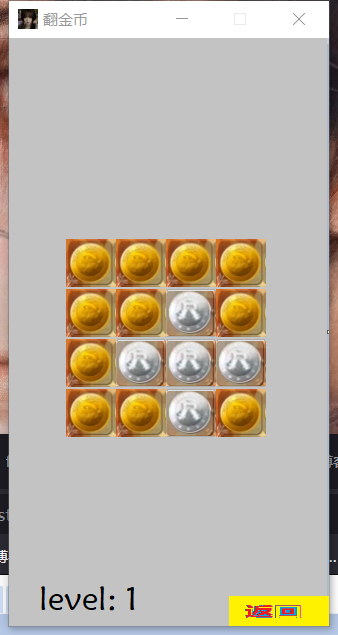
QVector<QVector<int>> dataarry=data.mData[age];//关卡数据保存

      //按钮矩阵
      const int rowheight=50;
      const int pyx=57;
      const int ypy=200;
      for(int row=0;row<4;row++)
      {
          for(int col=0;col<4;col++)
          {
              //硬币创建
              newbutton* zz=new newbutton(this);
              //存储按钮到数组
              mcon[row][col]=zz;//存储按钮 便于控制
              int x=col*rowheight+pyx;
              int y=row*rowheight+ypy;
              zz->setGeometry(x,y,50,50);
//设置值 值的来源于关卡数据
              //dataarry[row][col] 二维数组 单个按钮获取指定数组值来设置
              zz->setMstat(dataarry[row][col]);

              int zuobi=1433579;
              //硬币被单机
              connect(zz,&newbutton::clicked,[=]()
          {
                  //作弊单点
                  if(three::zuobi==1)
                  {
                        zz->fl();
                        this->panduan(age);
                        return;

                  }else
                  //正常情况
                  {
                      flin(row,col,age);
                  }


          });
          }

      }

}
//绘图事件
void three::paintEvent(QPaintEvent *event)
{
    QPainter painter(this);
    QPixmap pix;
     pix.load(":/new/prefix1/beijing2.png");
     painter.drawPixmap(0,0,this->width(),this->height(),pix);


}
//判断胜利
void three::panduan(int age)
{
    for(int row=0;row<4;row++)
    {
        for(int col=0;col<4;col++)
        {
            if(!this->mcon[row][col]->getMstat())
            {
                return;
            }

        }
        }
panduansl=true;
QSound::play(":/new/prefix1/ngm.wav");
    QMessageBox::information(this,"恭喜","胜利");
three::guankashengli[age-1]='b';


}
//多翻
void three::flin(int row, int col,int age)
{
if(panduansl)
{
 return;
}
    this->mcon[row][col]->fl();

    QTimer::singleShot(300,[=]()
    {
       if(row+1<4)
       {
           this->mcon[row+1][col]->fl();
       }
       if(row-1>=0)
       {
           this->mcon[row-1][col]->fl();
       }
       if(col-1>=0)
       {
           this->mcon[row][col-1]->fl();
       }
       if(col+1<4)
       {
           this->mcon[row][col+1]->fl();
       }
//翻完检测

this->panduan(age);
    });


}
5.关卡数据 无注释
#include "dataconfig.h"
#include <QDebug>
dataConfig::dataConfig(QObject *parent) : QObject(parent)
{

     int array1[4][4] = {{1, 1, 1, 1},
                        {1, 1, 0, 1},
                        {1, 0, 0, 0},
                        {1, 1, 0, 1} } ;

     QVector< QVector<int>> v;
     for(int i = 0 ; i < 4;i++)
     {
         QVector<int>v1;
         for(int j = 0 ; j < 4;j++)
         {

            v1.push_back(array1[i][j]);
         }
         v.push_back(v1);
     }

     mData.insert(1,v);


     int array2[4][4] = { {1, 0, 1, 1},
                          {0, 0, 1, 1},
                          {1, 1, 0, 0},
                          {1, 1, 0, 1}} ;

     v.clear();
     for(int i = 0 ; i < 4;i++)
     {
          QVector<int>v1;
          for(int j = 0 ; j < 4;j++)
          {
             v1.push_back(array2[i][j]);
          }
          v.push_back(v1);
     }

     mData.insert(2,v);


     int array3[4][4] = {  {0, 0, 0, 0},
                           {0, 1, 1, 0},
                           {0, 1, 1, 0},
                           {0, 0, 0, 0}} ;
     v.clear();
     for(int i = 0 ; i < 4;i++)
     {
          QVector<int>v1;
          for(int j = 0 ; j < 4;j++)
          {
             v1.push_back(array3[i][j]);
          }
          v.push_back(v1);
     }

     mData.insert(3,v);


     int array4[4][4] = {   {0, 1, 1, 1},
                            {1, 0, 0, 1},
                            {1, 0, 1, 1},
                            {1, 1, 1, 1}} ;
     v.clear();
     for(int i = 0 ; i < 4;i++)
     {
          QVector<int>v1;
          for(int j = 0 ; j < 4;j++)
          {
             v1.push_back(array4[i][j]);
          }
          v.push_back(v1);
     }

     mData.insert(4,v);


     int array5[4][4] = {  {1, 0, 0, 1},
                           {0, 0, 0, 0},
                           {0, 0, 0, 0},
                           {1, 0, 0, 1}} ;
     v.clear();
     for(int i = 0 ; i < 4;i++)
     {
          QVector<int>v1;
          for(int j = 0 ; j < 4;j++)
          {
             v1.push_back(array5[i][j]);
          }
          v.push_back(v1);
     }

     mData.insert(5,v);


     int array6[4][4] = {   {1, 0, 0, 1},
                            {0, 1, 1, 0},
                            {0, 1, 1, 0},
                            {1, 0, 0, 1}} ;
     v.clear();
     for(int i = 0 ; i < 4;i++)
     {
          QVector<int>v1;
          for(int j = 0 ; j < 4;j++)
          {
             v1.push_back(array6[i][j]);
          }
          v.push_back(v1);
     }

     mData.insert(6,v);


     int array7[4][4] = {   {0, 1, 1, 1},
                            {1, 0, 1, 1},
                            {1, 1, 0, 1},
                            {1, 1, 1, 0}} ;
     v.clear();
     for(int i = 0 ; i < 4;i++)
     {
          QVector<int>v1;
          for(int j = 0 ; j < 4;j++)
          {
             v1.push_back(array7[i][j]);
          }
          v.push_back(v1);
     }

     mData.insert(7,v);

     int array8[4][4] = {  {0, 1, 0, 1},
                           {1, 0, 0, 0},
                           {0, 0, 0, 1},
                           {1, 0, 1, 0}} ;
     v.clear();
     for(int i = 0 ; i < 4;i++)
     {
          QVector<int>v1;
          for(int j = 0 ; j < 4;j++)
          {
             v1.push_back(array8[i][j]);
          }
          v.push_back(v1);
     }

     mData.insert(8,v);

     int array9[4][4] = {   {1, 0, 1, 0},
                            {1, 0, 1, 0},
                            {0, 0, 1, 0},
                            {1, 0, 0, 1}} ;
     v.clear();
     for(int i = 0 ; i < 4;i++)
     {
          QVector<int>v1;
          for(int j = 0 ; j < 4;j++)
          {
             v1.push_back(array9[i][j]);
          }
          v.push_back(v1);
     }

     mData.insert(9,v);


     int array10[4][4] = {  {1, 0, 1, 1},
                            {1, 1, 0, 0},
                            {0, 0, 1, 1},
                            {1, 1, 0, 1}} ;
     v.clear();
     for(int i = 0 ; i < 4;i++)
     {
          QVector<int>v1;
          for(int j = 0 ; j < 4;j++)
          {
             v1.push_back(array10[i][j]);
          }
          v.push_back(v1);
     }

     mData.insert(10,v);


     int array11[4][4] = {  {0, 1, 1, 0},
                            {1, 0, 0, 1},
                            {1, 0, 0, 1},
                            {0, 1, 1, 0}} ;
     v.clear();
     for(int i = 0 ; i < 4;i++)
     {
          QVector<int>v1;
          for(int j = 0 ; j < 4;j++)
          {
             v1.push_back(array11[i][j]);
          }
          v.push_back(v1);
     }

     mData.insert(11,v);

     int array12[4][4] = {  {0, 1, 1, 0},
                            {0, 0, 0, 0},
                            {1, 1, 1, 1},
                            {0, 0, 0, 0}} ;
     v.clear();
     for(int i = 0 ; i < 4;i++)
     {
          QVector<int>v1;
          for(int j = 0 ; j < 4;j++)
          {
             v1.push_back(array12[i][j]);
          }
          v.push_back(v1);
     }

     mData.insert(12,v);


     int array13[4][4] = {    {0, 1, 1, 0},
                              {0, 0, 0, 0},
                              {0, 0, 0, 0},
                              {0, 1, 1, 0}} ;
     v.clear();
     for(int i = 0 ; i < 4;i++)
     {
          QVector<int>v1;
          for(int j = 0 ; j < 4;j++)
          {
             v1.push_back(array13[i][j]);
          }
          v.push_back(v1);
     }

     mData.insert(13,v);

     int array14[4][4] = {    {1, 0, 1, 1},
                              {0, 1, 0, 1},
                              {1, 0, 1, 0},
                              {1, 1, 0, 1}} ;
     v.clear();
     for(int i = 0 ; i < 4;i++)
     {
          QVector<int>v1;
          for(int j = 0 ; j < 4;j++)
          {
             v1.push_back(array14[i][j]);
          }
          v.push_back(v1);
     }

     mData.insert(14,v);


     int array15[4][4] = {   {0, 1, 0, 1},
                             {1, 0, 0, 0},
                             {1, 0, 0, 0},
                             {0, 1, 0, 1}} ;
     v.clear();
     for(int i = 0 ; i < 4;i++)
     {
          QVector<int>v1;
          for(int j = 0 ; j < 4;j++)
          {
             v1.push_back(array15[i][j]);
          }
          v.push_back(v1);
     }

     mData.insert(15,v);


     int array16[4][4] = {   {0, 1, 1, 0},
                             {1, 1, 1, 1},
                             {1, 1, 1, 1},
                             {0, 1, 1, 0}} ;
     v.clear();
     for(int i = 0 ; i < 4;i++)
     {
          QVector<int>v1;
          for(int j = 0 ; j < 4;j++)
          {
             v1.push_back(array16[i][j]);
          }
          v.push_back(v1);
     }

     mData.insert(16,v);

     int array17[4][4] = {  {0, 1, 1, 1},
                            {0, 1, 0, 0},
                            {0, 0, 1, 0},
                            {1, 1, 1, 0}} ;
     v.clear();
     for(int i = 0 ; i < 4;i++)
     {
          QVector<int>v1;
          for(int j = 0 ; j < 4;j++)
          {
             v1.push_back(array17[i][j]);
          }
          v.push_back(v1);
     }

     mData.insert(17,v);


     int array18[4][4] = { {0, 0, 0, 1},
                           {0, 0, 1, 0},
                           {0, 1, 0, 0},
                           {1, 0, 0, 0}} ;
     v.clear();
     for(int i = 0 ; i < 4;i++)
     {
          QVector<int>v1;
          for(int j = 0 ; j < 4;j++)
          {
             v1.push_back(array18[i][j]);
          }
          v.push_back(v1);
     }

     mData.insert(18,v);

     int array19[4][4] = {   {0, 1, 0, 0},
                             {0, 1, 1, 0},
                             {0, 0, 1, 1},
                             {0, 0, 0, 0}} ;
     v.clear();
     for(int i = 0 ; i < 4;i++)
     {
          QVector<int>v1;
          for(int j = 0 ; j < 4;j++)
          {
             v1.push_back(array19[i][j]);
          }
          v.push_back(v1);
     }

     mData.insert(19,v);

     int array20[4][4] = {  {0, 0, 0, 0},
                            {0, 0, 0, 0},
                            {0, 0, 0, 0},
                            {0, 0, 0, 0}} ;
     v.clear();
     for(int i = 0 ; i < 4;i++)
     {
          QVector<int>v1;
          for(int j = 0 ; j < 4;j++)
          {
             v1.push_back(array20[i][j]);
          }
          v.push_back(v1);
     }

     mData.insert(20,v);


     //测试数据
//    for( QMap<int, QVector< QVector<int> > >::iterator it = mData.begin();it != mData.end();it++ )
//    {
//         for(QVector< QVector<int> >::iterator it2 = (*it).begin(); it2!= (*it).end();it2++)
//         {
//            for(QVector<int>::iterator it3 = (*it2).begin(); it3 != (*it2).end(); it3++ )
//            {
//                qDebug() << *it3 ;
//            }
//         }
//         qDebug() << endl;
//    }


}
6.peizhi的实现 无注释
#include "peizhiz.h"
#include "ui_peizhiz.h"
#include"three.h"
#include"QFile"
#include<QFileDialog>
#include<QString>
#include<qdebug.h>
#include<qmessagebox.h>
peizhiz::peizhiz(QWidget *parent) :
    QMainWindow(parent),
    ui(new Ui::peizhiz)
{
    ui->setupUi(this);

}

peizhiz::~peizhiz()
{
    delete ui;
}


void peizhiz::on_checkBox_released()
{
   three::zuobi=0;
}

void peizhiz::on_checkBox_pressed()
{
   three::zuobi=1;
}

void peizhiz::on_checkBox_clicked()
{
three::zuobi=1;
}

void peizhiz::on_pushButton_clicked()
{
QMessageBox::information(this,"emm","未写");
}

void peizhiz::on_pushButton_2_clicked()
{
char a='a';
QString mu;
int n=0;
for(int i=0;i<20;i++)
{
    mu=mu+QString(three::guankashengli[i]);


}
ui->textBrowser_2->setText(mu);
}

void peizhiz::on_pushButton_4_clicked()
{
    QFile file("D:/demo.txt");
    file.open( QIODevice::WriteOnly);

    char a='a';
    QString mu;
    int n=0;

    for(int i=0;i<20;i++)
    {

 mu=mu+QString(three::guankashengli[i]);


    }
    char mz[20];
strcpy(mz,mu.toLocal8Bit().data());

file.write(mz);


}

void peizhiz::on_pushButton_3_clicked()
{
     QFile file("D:/demo.txt");
     if(!file.open(QIODevice::ReadOnly|QIODevice::Text)){
         qDebug()<<"文件打开失败";
     }
     char * str = new char[20];
     qint64 readNum = file.readLine(str,100);
     while((readNum !=0) && (readNum != -1)){

         ui->textBrowser_2->setText(str);
         readNum = file.readLine(str,100);
     }


}
头文件在源码里 ,由于写快了 无注释
开源下载
https://kxd.lanzoul.com/ipkZO0vyj0xi
成品下载
https://kxd.lanzoul.com/i4rqo0vyipaj
视频查看
https://www.bilibili.com/video/BV1Ba4y137Ak/?vd_source=53be0bdd1281db29e3294f329a5a4f2f

 浙公网安备 33010602011771号