


使用ESP32开发LVGL
基础概念
LVGL 在ESP32上使用版本差别是比较大的,主要有V7和V8的区别,具体应该是适配性以及一些比较高级的控件,相较而言感觉V7会更加稳定。在ESP32移植的话可以参考这个链接。但是其中也有一些小细节需要注意。
具体注意点
首先如果按照他的步骤走下去会卡在最后的编译上面,具体现象是会发现无法找到对应的demo文件。这个文件主要是演示的Demo
在此时就需要新建一些文件。如下图所示,具体会添加CMake文件以及Component以及 lv_ex_conf.h。其他的KConfig文件可以选择不添加。
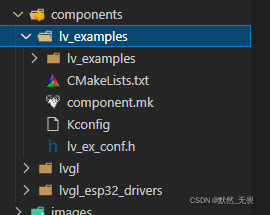
针对每个文件我们需要添加的代码也是不一样的
对于CMake文件,我们需要告诉编译器
if(ESP_PLATFORM)


file(GLOB_RECURSE SOURCES lv_examples/*.c)


idf_component_register(SRCS ${SOURCES}

                        INCLUDE_DIRS .

                        REQUIRES lvgl)


endif()
对于Component.mk文件我们需要把路径下的每个文件夹包含完全
#

# Component Makefile

#


CFLAGS += -DLV_CONF_INCLUDE_SIMPLE


COMPONENT_SRCDIRS := lv_examples          \

    lv_examples/src/lv_demo_benchmark      \

    lv_examples/src/lv_demo_keypad_encoder \

    lv_examples/src/demo_stress            \

    lv_examples/src/lv_demo_widgets        \

    lv_examples/src/lv_ex_style            \

    lv_examples/src/lv_ex_widgets          \

    lv_examples/assets


COMPONENT_ADD_INCLUDEDIRS := $(COMPONENT_SRCDIRS) .
KConfig则是选择哪个Demo
# Kconfig for lv_examples v7.4.0


menu "lv_examples configuration"


    config LV_EX_PRINTF

        bool "Enable printf-ing data in demos and examples."


    choice LV_EX_CHOICE

        prompt "Select the demo you want to run."

        default LV_USE_DEMO_WIDGETS


        config LV_USE_DEMO_WIDGETS

            bool "Show demo widgets."


        config LV_DEMO_WIDGETS_SLIDESHOW

            bool "Slide demo widgets automatically."

            depends on LV_USE_DEMO_WIDGETS

            default y


        config LV_USE_DEMO_KEYPAD_AND_ENCODER

            bool "Demonstrate the usage of encoder and keyboard."


        config LV_USE_DEMO_BENCHMARK

            bool "Benchmark your system."


        config LV_USE_DEMO_STRESS

            bool "Stress test for LVGL."

    endchoice

endmenu
在conf文件则是最简单的配置文件
/**

 * @file lv_ex_conf.h

 * Configuration file for v7.4.0

 *

 */

/*

 * COPY THIS FILE AS lv_ex_conf.h

 */


#if 1 /*Set it to "1" to enable the content*/


#ifndef LV_EX_CONF_H

#define LV_EX_CONF_H


/*******************

 * GENERAL SETTING

 *******************/


/* Enable printf-ing data in demoes and examples */

#ifdef CONFIG_LV_EX_PRINTF

#define LV_EX_PRINTF       1

#else

#define LV_EX_PRINTF       0

#endif


#define LV_EX_KEYBOARD     0       /*Add PC keyboard support to some examples (`lv_drivers` repository is required)*/

#define LV_EX_MOUSEWHEEL   0       /*Add 'encoder' (mouse wheel) support to some examples (`lv_drivers` repository is required)*/


/*********************

 * DEMO USAGE

 *********************/


/*Show some widget*/

#ifdef CONFIG_LV_USE_DEMO_WIDGETS

#define LV_USE_DEMO_WIDGETS       1

#else

#define LV_USE_DEMO_WIDGETS       0

#endif


#if LV_USE_DEMO_WIDGETS

#ifdef CONFIG_LV_DEMO_WIDGETS_SLIDESHOW

#define LV_DEMO_WIDGETS_SLIDESHOW   1

#else

#define LV_DEMO_WIDGETS_SLIDESHOW   0

#endif

#endif


/*Printer demo, optimized for 800x480*/

#define LV_USE_DEMO_PRINTER     0


/*Demonstrate the usage of encoder and keyboard*/

#ifdef CONFIG_LV_USE_DEMO_KEYPAD_AND_ENCODER

#define LV_USE_DEMO_KEYPAD_AND_ENCODER  1

#else

#define LV_USE_DEMO_KEYPAD_AND_ENCODER  0

#endif


/*Benchmark your system*/

#ifdef CONFIG_LV_USE_DEMO_BENCHMARK

#define LV_USE_DEMO_BENCHMARK   1

#else

#define LV_USE_DEMO_BENCHMARK   0

#endif


/*Stress test for LVGL*/

#ifdef CONFIG_LV_USE_DEMO_STRESS

#define LV_USE_DEMO_STRESS  1

#else

#define LV_USE_DEMO_STRESS  0


#endif


#endif /*LV_EX_CONF_H*/


#endif /*End of "Content enable"*/
当然在最后的main文件夹下的CMake文件也需要注意,需要包含整个component中的组件。
set(SOURCES main.c)

idf_component_register(SRCS ${SOURCES}

                    INCLUDE_DIRS .

                    REQUIRES lvgl_esp32_drivers lvgl lv_examples)


target_compile_definitions(${COMPONENT_LIB} PRIVATE LV_CONF_INCLUDE_SIMPLE=1)
最重要的是lv_examples这个文件夹,需要注意在LVGL v8.0.0版本以及以上都采用的是lv_demo这个文件夹。在LVGL v7.x.x版本情况下才会是lv_examples。如果发现在Git上下载的是lv_demo需要看一下自己的LVGL版本号是否支持。
移植时需要注意的位置
如果出现花屏则需要考虑时钟速率。如果时钟速率过高或者过低都会导致花屏。
如果出现花屏需要检查是否没有选择此选项
Swap the 2 bytes of RGB565 color. Useful if the display has a 8 bit interface (e.g. SPI).
同时需要注意ESP32_S2选FSPI。

 浙公网安备 33010602011771号