
字符串
1.字符串注意事项
- 字符串(单、双、三引号引起来的内容)
- 字符串要跨越多行,可使用三引号,或在行尾加上反斜杠
- 原始字符串,即不会对反斜杠等做特殊处理,让字符串包含的每个字符都保持原样
- 原始字符串用前缀 r 表示(例外,引号需要像通常那样进行转义,但意味着用于执行转义的反斜杠也将包含在最终的字符串中)
- 原始字符串不能以单个反斜杠结尾(除非对其进行转义,但用于转义的反斜杠也将是字符串的一部分),因为python将无法判断字符串是否到此结束。要解决该问题,一个基本技巧是将反斜杠单独作为一个字符串
- 所有标准序列的操作(索引、切片、乘法、成员资格检查、长度、最值)都适合用于字符串,但因为字符串不可变,元素赋值和切片赋值是非法的
- len()、join()、for循环、索引、切片等不仅适用于字符串,也适用于列表等其他数据类型
- ★★★字符串在内存中一旦创建,就不可修改。一旦修改或拼接,实际上是生成了新的字符串
2.字符串常见操作、方法
 1 # 常见操作及方法如下(示例见后文):
 2 字符串通过索引获取具体元素
 3 用str表示字符串
 4 字符串加法(拼接)
 5 字符串乘法(让字符串重复出现)
 6 capitalize():首字母大写
 7 casefold():大写字母转换为小写字母,可以处理特殊字符
 8 islower(self):判断是否都是小写
 9 isupper(self):判断是否都是大写
10 ★★★lower(self):全部转换为小写,不管其他非字母字符。字符串全部为非字母字符也是合法的,但返回原字符串
11 ★★★upper(self):全部转换为大写,不管其他非字母字符。字符串全部为非字母字符也是合法的,但返回原字符串
12 center(self, width, fillchar=None):(fillchar=None表示默认为None)设置宽度,并将内容居中
13 ljust(self, width, fillchar=None):返回长度为width,左对齐的字符串,最右边填充fillchar,默认为空格。width要大于len(str),否则返回原字符串
14 rjust(self, width, fillchar=None):返回长度为width,右对齐的字符串,最左边填充fillchar,默认为空格。width要大于len(str),否则返回原字符串
15 zfill(width):返回长度为width的数字字符串,最左边填充0。如果width小于等于原字符串长度,则返回原字符串。主要用于数字类字符串的格式化
16 count(self, sub, start=None, end=None):去字符串中寻找子序列出现的次数,可设置起始位置与结束位置
17 encode():编码
18 decode():解码
19 endswith(self, suffix, start=None, end=None):是否以什么什么结尾
20 startswith(self, suffix, start=None, end=None):是否以什么什么开头
21 ★★★find(self, sub, start=None, end=None):获取字符串第一次出现时的索引,未找到打印-1
22 format(*args, **kwargs):格式化,将一个字符串中的占位符替换为指定的值,占位符可以是变量名,也可以是数字
23 format_map(self, mapping):格式化,该方法传入的值必须是键值对
24 index(self, sub, start=None, end=None):获取字符串第一次出现时的索引,未找到直接报错
25 isalnum(self):判断字符串中是否只是包含字母和数字
26 expandtabs(self, tabsize=None):将tab转换为空格
27 isalpha(self):判断字符串中是否只是包含字母
28 isdecimal(self):判断字符串是否包含十进制字符
29 isdigit(self):判断字符串是否是数字,支持特殊字符,但不支持中文数字
30 isnumeric(self):判断字符串是否是数字,支持特殊字符、中文数字
31 isidentifier(self):判断字符串是否是合法的标识符(字符串包含中文字符也是合法的),实际上这里判断的是变量名是否合法
32 isprintable(self):判断字符串所包含的字符是否全部可打印。字符串包含不可打印字符,如转义字符、制表符、换行符,将返回False
33 isspace(self):判断是否全部是空格
34 istitle(self):字符串中每个单词的首字母大写,其余小写。单词的首字符为非字母字符也可转换。字符串仅包含非字母字符合法,但返回原字符串
35 ★★★★★join(self, iterable):将字符串中的每一个元素按照指定分隔符进行拼接
36 lstrip(self, chars=None):默认去除左边空白、\t、\n,也可去除指定字符串,优先去除最长公共子序列
37 rstrip(self, chars=None):默认去除右边空白、\t、\n,也可去除指定字符串,优先去除最长公共子序列
38 ★★★strip(self, chars=None):默认去除两边空白、\t、\n,也可去除指定字符串,优先去除最长公共子序列
39 maketrans(self, *args, **kwargs):返回一个转换表,以供str.translate()方法使用
40 translate(map):和str.maketrans()函数配合使用,替换相应的字符
41 partition(self, sep):用于拆分字符串,返回一个包含三个元素的元组。如果未能在原字符串中找到Sep,则元组的三个元素为:原字符串,空串,空串;否则,从原字符串中遇到的第一个Sep字符开始拆分,元组的三个元素为:Sep之前的字符串,Sep字符,Sep之后的字符串
42 rpartition(self, sep):从原字符串的最右边开始拆分,但是同样返回包含三个元素的元组:倒数第一个Sep之前的字符串,Sep字符,Sep之后的字符串
43 split(self, sep=None, maxsplit=-1):返回一个以Sep分隔的列表,maxsplit指定拆分次数(因此,列表中元素的个数为maxsplit + 1)。Sep默认为空格,maxsplit默认不限制拆分次数。如果未能在原字符串中找到Sep,则返回一个仅包含一个元素的列表,这个元素就是原字符串
44 rsplit(self, sep=None, maxsplit=-1):与str.split()类似,只是它从最右边开始拆分
45 splitlinse(self, keepends=None):根据换行分割
46 swapcase(self):大写换小写,小写换大写
47 ★★★replace(self, old, new, count):替换。count表示替换几个,默认全部替换
48 根据索引获取字符串中的字符
49 根据len()获取字符串中由几个字符组成
50 利用索引与循环,输出字符串中的每一个字符
51 通过range()将文字对应的索引打印出来
# 原始字符串用前缀 r
print(r'D:\BaiduYunDownload''\\')
# D:\BaiduYunDownload\
#-----------------------------------------------------

# 字符串通过索引获取具体元素
s = 'lucy'
v = s[3]
print(v)
# y
#-----------------------------------------------------

# 字符串用str表示
name1 = 'wawa'
v1 = name1.upper()
name2 = 'haha'
v2 = name2.upper()
print(v1)
print(v2)

#WAWA
#HAHA
#-----------------------------------------------------

# 字符串加法
n1 = 'lucy'
n2 = 'nice'
n3 = n1 + n2
print(n3)
#则n3 = 'lucynice'
#-----------------------------------------------------

# 字符串乘法(表示让字符串重复出现)
n1 = 'lucy'
n2 = n1 * 5
print(n2)
#则n2 = 'lucylucylucylucylucy'
#-----------------------------------------------------

# capitalize():首字母大写
test = 'tom'
v = test.capitalize()
print(v)
#Tom
#-----------------------------------------------------

# casefold():大写字母转换为小写字母,可以处理特殊字符
test = 'aLeX'
v = test.casefold()
print(v)
#alex
#-----------------------------------------------------

# islower(self)、isupper(self):判断是否都是小写、大写
# lower(self)、upper(self):全部转换为小写、大写
test = 'Lucy'
v1 = test.islower()
v2 = test.lower()
print(v1,v2)
# False lucy

v1 = test.isupper()
v2 = test.upper()
print(v1,v2)
# False LUCY
#-----------------------------------------------------

# center(self, width, fillchar=None):设置宽度,并将内容居中
test = 'aLeX'
v = test.center(20,'*')
print(v)
# ********aLeX********
# 20代指总长度
# *表示空白位置填充物,一个字符,可有可无
#-----------------------------------------------------

# ljust、rjust、zfill
test = 'tom'
v = test.ljust(20,'*')
print(v)
# tom*****************

v = test.rjust(20,'*')
print(v)
# *****************tom

v = test.zfill(20)
print(v)
# 00000000000000000tom
#-----------------------------------------------------

# count(self, sub, start=None, end=None):去字符串中寻找子序列出现的次数,可设置起始位置与结束位置
test = 'aLeXaLeXr'
v1 = test.count('e')
v2 = test.count('f')
v3 = test.count('r')
v4 = test.count('eX')
print(v1,v2,v3,v4)
# 2 0 1 2
v5 = test.count('eX',5)
print(v5)
# 1,从第5个位置开始往后找“eX”
v6 = test.count('eX',5,6)
print(v6)
# 0,从第5个位置到第6个位置,找不到“eX”
#-----------------------------------------------------

# encode()、decode()、endswith(...)、startswith(suffix, start=None, end=None)
test = 'aLeX'
v = test.endswith('a')
print(v)
# False,不是以a结尾

test2 = 'backend 1.1.1.1'
v = test2.startswith('ba')
print(v)
# True
#-----------------------------------------------------

# find(self, sub, start=None, end=None):获取字符串第一次出现时的索引,未找到打印-1
test = 'aLeXaLeX'
v = test.find('eX')
v2 = test.find('eX',5,7)
v3 = test.find('eX',5,8)
print(v)
print(v2)
print(v3)
# 2,从开始往后找,找到字符串第一次出现的位置,获取其索引
# -1,表示没找到,因为包左不包右
# 6
#-----------------------------------------------------

# format(*args, **kwargs):格式化,将一个字符串中的占位符替换为指定的值,占位符可以是变量名,也可以是数字
test = 'I am {name}, age {a}'
print(test)
# I am {name}, age {a}
v = test.format(name='Tom',a=19)
print(v)
# I am Tom, age 19

test1 = 'I am {0}, age {1}'
print(test1)
# I am {0}, age {1}
v1 = test1.format('Tom',19)
print(v1)
# I am Tom, age 19
#-----------------------------------------------------

# format_map(self, mapping):格式化,该方法传入的值必须是键值对
test = 'I am {name}, age {a}'
print(test)
# I am {name}, age {a}
#原来用format()方法这样写,v = test.format(name='Tom',a=19)
v = test.format_map({'name':'Tom','a':19})
# 字典,键值对
print(v)
# I am Tom, age 19
#-----------------------------------------------------

# index(self, sub, start=None, end=None):获取字符串第一次出现时的索引,未找到直接报错
test = 'aLeXaLeX'
v = test.index('eX')
print(v)
# 2
v2 = test.index('8')
print(v2)
# index方法找不到索引直接报错,find方法找不到打印-1
#-----------------------------------------------------

# isalnum(self)方法:判断字符串中是否只是包含字母和数字
test = 'uasf890_+'
test2 = 'uasf890'
v = test.isalnum()
v2 = test2.isalnum()
print(v,v2)
# False,True
# 判断字符串中是否只是包含字母和数字
#-----------------------------------------------------

# expandtabs(self, tabsize=None):将tab转换为空格
s = 'abc\tdef'
v = s.expandtabs(6)
v2 = s.expandtabs()
print(v)
print(v2)
# abc   def,断句6个一组,6个中包含tab了,则将tab转换为空格补齐abc   def
# abc     def,将tab转换成空格,默认一个tab转换成8个空格

test = 'username\temail\tpassword\ntom\ttom@163.com\t123\nlucy\tlucy@sina.com\t678\n'
v3 = test.expandtabs(20)
print(v3)
'''
username            email               password
tom                 tom@163.com         123
lucy                lucy@sina.com       678
'''
#-----------------------------------------------------

# isalpha(self):判断字符串中是否只是包含字母
test = 'abcd'
test2 = 'abcd中'
test3 = 'abc2'
v = test.isalpha()
v2 = test2.isalpha()
v3 = test3.isalpha()
print(v,v2,v3)
# True,True,False
# 汉字也算字母
#-----------------------------------------------------

# isdecimal(self):判断字符串是否包含十进制字符
# isdigit(self):判断字符串是否是数字,支持特殊字符,但不支持中文数字
# isnumeric(self):判断字符串是否是数字,支持特殊字符、中文数字

# 三种方法均判断字符串是否是数字
test = '123'
v1 = test.isdecimal()
v2 = test.isdigit()
v3 = test.isnumeric()
print(v1,v2,v3)
# True True True

test2 = 'a123'
v1 = test2.isdecimal()
v2 = test2.isdigit()
v3 = test2.isnumeric()
print(v1,v2,v3)
# False False False

test3 = '⑦'
v1 = test3.isdecimal()
v2 = test3.isdigit()
v3 = test3.isnumeric()
print(v1,v2,v3)
# False True True

test4 = '三'
v1 = test4.isdecimal()
v2 = test4.isdigit()
v3 = test4.isnumeric()
print(v1,v2,v3)
# False False True

test5 = '捌'
v1 = test5.isdecimal()
v2 = test5.isdigit()
v3 = test5.isnumeric()
print(v1,v2,v3)
# False False True

test6 = '天'
v1 = test6.isdecimal()
v2 = test6.isdigit()
v3 = test6.isnumeric()
print(v1,v2,v3)
# False False False
#-----------------------------------------------------

# isidentifier(self):判断字符串是否是合法的标识符(字符串包含中文字符也是合法的),实际上这里判断的是变量名是否合法
test1 = '_a'
test2 = '3a'
test3 = '计算机3a'
v1 = test1.isidentifier()
v2 = test2.isidentifier()
v3 = test3.isidentifier()
print(v1,v2,v3)
# True False True
#-----------------------------------------------------

# isprintable(self):判断字符串所包含的字符是否全部可打印。字符串包含不可打印字符,如转义字符、制表符、换行符,将返回False
test = 'good'
v = test.isprintable()
print(v)
# True
test2 = 'nice\n'
v = test2.isprintable()
print(v)
# False
#-----------------------------------------------------

# isspace(self):判断是否全部是空格
test = 'abc'
v = test.isspace()
print(v)
# False
test2 = '   '
v = test2.isspace()
print(v)
# True
#-----------------------------------------------------

# istitle(self):字符串中每个单词的首字母大写,其余小写。单词的首字符为非字母字符也可转换。字符串仅包含非字母字符合法,但返回原字符串。
test = 'ab cd'
v = test.title()
print(v)
# Ab Cd

test2 = '北京ab 123cd'
v = test2.title()
print(v)
# 北京Ab 123Cd
# 即使首字符为非字母字符,也可以进行转换

test3 = '北京 123'
v = test3.title()
print(v)
# 北京 123
#-----------------------------------------------------

# join(self, iterable):将字符串中的每一个元素按照指定分隔符进行拼接
test = '朝辞白帝彩云间'
print(test)
v = ' '.join(test)
v2 = '*'.join(test)
print(v)
print(v2)
# 朝辞白帝彩云间
# 朝 辞 白 帝 彩 云 间
# 朝*辞*白*帝*彩*云*间
#-----------------------------------------------------

# lstrip(self, chars=None):默认去除左边空白、\t、\n,也可去除指定字符串,优先去除最长公共子序列
# rstrip(self, chars=None):默认去除右边空白、\t、\n,也可去除指定字符串,优先去除最长公共子序列
# strip(self, chars=None):默认去除两边空白、\t、\n,也可去除指定字符串,优先去除最长公共子序列
test = '  tom  '
v1 = test.lstrip()
v2 = test.rstrip()
v3 = test.strip()
print(v1)
print(v2)
print(v3)
# 'tom  '
# '  tom'
# tom

test2 = '\nlucy'
v = test2.lstrip()
print(v)
# lucy。之前的空白行被去除了

test3 = 'xalex'
v = test3.lstrip('x')
v2 = test3.rstrip('9exlexex')
# 只要有相关字符,均可去除,先进行最多匹配(lex最多)
print(v,v2)
# alex xa
#-----------------------------------------------------

# maketrans(self, *args, **kwargs):返回一个转换表,以供str.translate()方法使用
# translate(map):和str.maketrans()函数配合使用,替换相应的字符
v = '锄禾日当午,手可摘星辰'
test = '锄禾日当午'
test1 = '危楼高百尺'
m = str.maketrans(test,test1)
new_v = v.translate(m)
print(new_v)
# 危楼高百尺,手可摘星辰

test3 = 'aeiou'
test4 = '12345'
m = str.maketrans(test3,test4)
v2 = 'abcdefg'
new_v2 = v2.translate(m)
print(new_v2)
# 1bcd2fg
#-----------------------------------------------------

# partition(sep)、rpartition(sep)
# split(self, sep=None, maxsplit=-1)
# rsplit(self, sep=None, maxsplit=-1)
# splitlinse(self, keepends=None)

test = 'testasdsddfg'
v = test.partition('s')
print(v)
# ('te', 's', 'tasdsddfg')
# 按照找到的第一个s进行分割

v = test.rpartition('s')
print(v)
# ('testasd', 's', 'ddfg')
# 按照从右边找到的第一个s进行分割

v = test.split('s')
print(v)
# ['te', 'ta', 'd', 'ddfg']

v = test.split('s',1)
print(v)
# ['te', 'tasdsddfg']
# 分割1次

v = test.split('s',2)
print(v)
# ['te', 'ta', 'dsddfg']
# 分割2次

v = test.rsplit('s',1)
print(v)
# ['testasd', 'ddfg']

test2 = 'abc\ndef\nghi'
v1 = test2.splitlines()
v2 = test2.splitlines(True)
v3 = test2.splitlines(False)
print(v1)
print(v2)
print(v3)
# 只能根据换行分割,True、False用于设置是否保留换行符,默认不保留
# ['abc', 'def', 'ghi']
# ['abc\n', 'def\n', 'ghi']
# ['abc', 'def', 'ghi']
#-----------------------------------------------------

#  swapcase(self):大写换小写,小写换大写
test = 'LuCy'
v = test.swapcase()
print(v)
# lUcY
#-----------------------------------------------------

# replace(self, old, new, count):替换。count表示替换几个,默认全部替换。
test = 'abca'
v = test.replace('a','xxx')
print(v)
# xxxbcxxx

v = test.replace('a','xxx',1)
print(v)
# xxxbca
#-----------------------------------------------------

# 根据索引获取字符串中的字符
# 获取字符串中由几个字符组成

test = 'alex'
v = test[3]
print(v)
# x

# 切片
v = test[0:2]
print(v)
# 获取索引>=0 <1范围内的字符
# al

v = test[0:-1]
print(v)
# ale
# -1表示直接到最后的位置

v = len(test)
print(v)
# 4
# 字符串中有多少个字符

test2 = '杨景天'
v = len(test2)
print(v)
# 3
# python2.7 中,utf-8,汉字由3个字节组成,得到的是9
#-----------------------------------------------------

# 利用索引与循环,输出字符串中的每一个字符
test = '朝辞白帝彩云间'

index = 0
while index < len(test):
    v = test[index]
    print(v,end=' ')
    index += 1
# 朝 辞 白 帝 彩 云 间
print()
for item in test:
    print(item, end='_')
# 朝_辞_白_帝_彩_云_间_
#-----------------------------------------------------

# 通过range()将文字对应的索引打印出来
v = range(100)
print(v)
# range(0,100)。python3 中没有立刻创建数字0-99,当进行for循环时才创建。这样效率高,省内存
# python2.7 中,立即创建了数字0-99

for item in v:
    print(item)
# 数字0-99

v2 = range(0,100,5)
for item in v2:
    print(item)
# 5为步长,每5个创建1个
# 数字0、5、10、15...95

test = input('>>>')
# >>>朝辞白帝彩云间
print(test)
# 朝辞白帝彩云间
l = len(test)
print(l)
# 7 当前字符串长度
r = range(0,l)
for item in r:
    print(item, test[item], end=' ')
# 将文字对应的索引打印出来
# 0 朝 1 辞 2 白 3 帝 4 彩 5 云 6 间

#即就是
test = input('>>>')
for item in range(0,len(test)):
    print(item, test[item])
3.字符串格式化
- python的字符串格式化有两种方式:百分号方式、format方式
- 百分号方式相对较老,format方式相对较先进,目前两者并存
(1)% 格式化
# 通过 + 拼接(+ 会不断开辟新的内存空间,尽量不要这样用,效率非常低)
msg = 'I am lanny,'+' my hobby is lucy.'
print(msg)
# I am lanny, my hobby is lucy.

# 以指定分隔符拼接
print('root','x','0','0',sep=':')
# root:x:0:0

# 通过% 做字符串拼接
# %代表标识,%s 代表接收字符串,但实际可以接收任意类型
# 但%s 代码可读性差,一眼看不出传的是什么类型
msg = 'I am %s, my hobby is lucy.' %'lanny'
print(msg)
# I am lanny, my hobby is lucy.

# 通过% 传多个值
msg = 'I am %s, my hobby is %s.' %('lanny','lucy')
print(msg)
# I am lanny, my hobby is lucy.

msg = 'I am %s, my hobby is %s.' %('lanny',1)
print(msg)
# I am lanny, my hobby is 1.
msg = 'I am %s, my hobby is %s.' %('lanny',[1,2])
print(msg)
# I am lanny, my hobby is [1, 2].
msg = 'I am %s, my hobby is %s.' %('lanny',(1,2))
print(msg)
# I am lanny, my hobby is (1, 2).
msg = 'I am %s, my hobby is %s.' %('lanny',{'k1':'v1'})
print(msg)
# I am lanny, my hobby is {'k1': 'v1'}
msg = 'I am %s, my hobby is %s.' %('lanny',{1,2,3})
print(msg)
# I am lanny, my hobby is {1, 2, 3}.
msg = 'I am %s, my hobby is %s.' %('lanny',True)
print(msg)
# I am lanny, my hobby is True.

# %.ns表示传入数据的前n个字符
msg = 'I love %.4s.' %'Lucyyyyy'
print(msg)
# I love Lucy.

# %d 只能传数字
msg = 'My favourite number is %d.' %7
print(msg)
# My favourite number is 7.

# %f 传浮点数,默认保留小数点后6位。可用%.nf表示保留小数点后n位。
tpl = 'percent %f' %99.978951897
print(tpl)
# percent 99.978952
tpl = 'percent %.3f' %99.978951897
print(tpl)
# percent 99.979

# 打印百分比
tpl = 'percent %.2f %%' %99.978951897
print(tpl)
# percent 99.98 %

# 以键值对形式拼接字符串
tpl = "I'm %(name)s, I'm %(age)d years old." % {'name':'Lanny','age':21}
print(tpl)
# I'm Lanny, I'm 21 years old.
tpl = 'percent %(pp).2f %%' % {'pp':87.6753}
print(tpl)
# percent 87.68 %
(2)format 格式化
# format 格式化
tpl = "I'm {}, age {}, {}.".format('seven',21,'lanny')
print(tpl)
# I'm seven, age 21, lanny.
# 少给一个参数,不一一对应,会报错 IndexError: tuple index out of range
# tpl = "I'm {}, age {}, {}.".format('seven',21)
# print(tpl)

# 按照索引传递
tpl = "I'm {2}, age {1}, {0}.".format('seven',21,'lanny')
print(tpl)
# I'm lanny, age 21, seven.
tpl = "I'm {1}, age {1}, {1}.".format('seven',21)
print(tpl)
# I'm 21, age 21, 21.

# 按照字典形式传递
tpl = "I'm {name}, age {age}, really {name}.".format(**{'name':'seven','age':21})
print(tpl)
# I'm seven, age 21, really seven.
tpl = "I'm {name}, age {age}, really {name}.".format(name='seven',age=21)
print(tpl)
# I'm seven, age 21, really seven.
tpl = "I'm {name:s}, age {age:d}.".format(**{'name':'seven','age':21})
print(tpl)
# 同时限制传入类型
# I'm seven, age 21.

# 其他方式
tpl = "I'm {0[0]}, age {0[1]}, really {0[2]}.".format([1,2,3],[11,22,33])
print(tpl)
# I'm 1, age 2, really 3.

# *[...] 代表传入的是列表
tpl = "I'm {:s}, age {:d}.".format(*['seven',21])
print(tpl)
# I'm seven, age 21.

# :b 表示二进制 :o 表示八进制 :d 表示int
# :s 表示str  :f 表示浮点数
# :x 表示十六进制(小写a-f) :X 表示十六进制(大写a-f)
# :% 显示传入数字乘以100%,默认显示小数点后六位
tpl = "I'm {:s}, age {:d}, money {:f}.".format('seven',21,8767.99)
print(tpl)
# I'm seven, age 21, money 8767.990000.
tpl = 'numbers: {:b},{:o},{:d},{:x},{:X},{:%}'.format(15,15,15,15,15,0.15876575)
print(tpl)
# numbers: 1111,17,15,f,F,15.876575%
4.其他
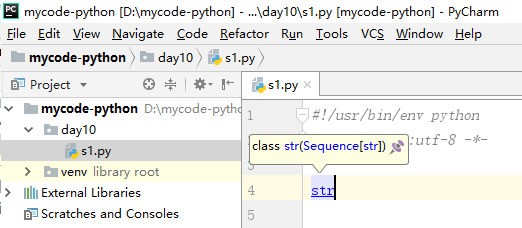
输入str,按住Ctrl键点击即可查看源码,查看字符串各方法具体如何使用

 浙公网安备 33010602011771号