

mysql基本语法
mysql基础语法
一.环境搭建
- my.ini配置文件
[client]
# 设置mysql客户端默认字符集
default-character-set=utf8

[mysqld]
# 设置3306端口
port = 3306
# 设置mysql的安装目录
basedir=C:\\web\\mysql-8.0.11
# 设置 mysql数据库的数据的存放目录,MySQL 8+ 不需要以下配置,系统自己生成即可,否则有可能报错
# datadir=C:\\web\\sqldata
# 允许最大连接数
max_connections=20
# 服务端使用的字符集默认为8比特编码的latin1字符集
character-set-server=utf8
# 创建新表时将使用的默认存储引擎
default-storage-engine=INNODB
- 初始化data目录
mysqld --initialize-insecure
- 忘记密码
- 修改my.ini
skip-grant-tables=1- 重启服务
net stop mysql57 net start mysql57- 设定新密码
use mysql;
update user set authentication_string = password('新密码'),password_last_changed = now() where user='root'
二.python代码操作mysql
import pymysql
#连接 游标
con=pymysql.connect(host='localhost',port=3306,password='',database='table',charset='utf8')
cur=con.cursor()

# 发送指令
sql='''
    show databases
'''
cur.execute(sql)

#获取结果,没有返回none
result=cur.fetchall()
print(result)

#增删改
sql='''
    create database if not exists db1 default charset utf8 collate utf8_general_ci
'''
cur.execute(sql)
con.commit()

#关闭连接
cur.close()
con.close()
三.数据表的管理
- 创建数据表:
create table if not exists tbl(
   `runoob_id` int unsigned auto_increment,
   `runoob_title` varchar(16) not null,
   `runoob_author` varchar(40)  null,
   `submission_date` date,
   primary key ( runoob_id )
)engine=innodb default charset=utf8;
- 删除表:
drop table tb1;
- 清空表:
delete from tb1; --清空表
delete from tb1 where caption='709';--删除一行数据
-
修改表:
- 添加列
alter table 表名 add 列名 类型 not null primary key auto_increment;- 删除列
alter table 表名 drop column 列名;- 修改列类型
alter table 表名 modify column 列名 类型;- 修改列类型和名称
alter table tb change id id int not null default 5;- 修改列默认值和删除列默认值
alter table 表名 alter 列名 set default 100; alter table 表名 alter 列名 drop default;- 添加主键和删除主键
alter table 表名 add primary key(列名);
alter table 表名 drop primary key;
四.各种数据类型
- 数值型
| int | 有符号 |
|---|---|
| int unsigned | 无符号 |
| int(5)zerofill | 00002 |
| 类型 | 大小 | 范围 | 用途 |
|---|---|---|---|
| tinyint | 1B | (-128-127) (0-255) | 小整数 |
| smallint | 2B | (-32768-32767) (0-65535) | 大整数 |
| mediumint | 3B | ||
| int | 4B | ||
| bigint | 8B | ||
| float | 4B | ||
| double | 8B | ||
| decimal | decimal(8,2)总位数是8,小数点后是2位。 |
-
字符串
- char
定长字符串 char(3)不管输入多少字符长度是3个字符,超出报错。一个中文也是一个字符。 最多char(255)- varchar
变长字符串 varchar(16)最多16个字符,具体大小要看存的什么。utf8一个汉字3个Byte 最多varchar(65535) -
时间
-
datetime
YYYY-MM-DD HH:MM:SS
存多少写多少 -
timestamp
YYYY-MM-DD HH:MM:SS
跟时区设置有关系查询,设置时区
mysql> show variables like '%time_zone%'; mysql> set time_zone='+0:00'; -
date
格式:YYYY-MM-DD
-
time
格式:HH:MM:SS
-
五.数据行的增删查改
-
新增数据
insert into 表名 (列名,列名,列名) values(对应的值,对应的值,对应的值); insert into tb values('xxx','123123'),('lyj','hehe');--表中只有两列数据 -
删除数据
delete from 表名;--删除整个表的数据 delete from 表名 where 条件;--按条件删除数据行 -
修改(更新)数据
update 表名 set 列名=值; update 表名 set 列名=值 where 条件; update user set name=concat(name,'123') where id =2;--concat,可以拼接函数 -
查询数据
select 列名,列名 as 别名,列名 from 表名 where 条件;

select * from info where exists (select * from depart where id=5)--判断条件是否存在,存在则执行前面的查询语句
六.数据行查询详解
- 通配符
select * from info where name like '%骏';--%代指n个字符的意思
select * from info where name like '__骏';--_代表一个字符的意思
- 映射
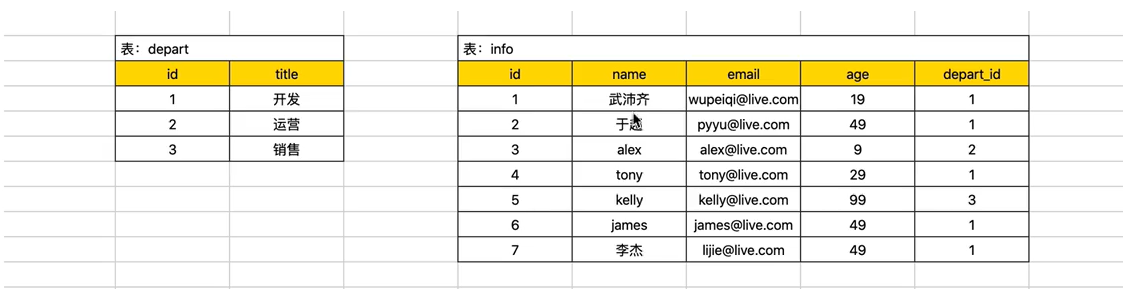
select
    id,
    name
    (select title from depart where depart.id=info.depart_id) as x1
from info;

select
    id,
    namem
    case depart_id when 1 then '第1部门' end v1,
    case depart_id when 2 then '第2部门' else '其他' end v2,
    case when age<18 then '少年' end v3,
    case when age<18 then '少年' when age<30 then '青年' else '油腻男' end v4
from info;
- 排序
select * from info where id > 6 or name like '%y' order by age asc ,id desc;--asc 升序 desc 降序
- 取部分
select * from info limit 3 offset 2;--从第二条数据开始获取后面的三条数据,不包含2
- 分组
select age ,max(id),min(id),count(depart_id) from info group by age having count(depart_id)>2;
--age相同合并为一条,其他列得有聚合函数max,min等知道取哪个值,聚合条件为having。
- sql执行顺序美化
select
    列名,max(列名),映射
from
    表1,表2,(连表)
where
    条件
group by
    分组列
having
    聚合条件
order by
    排序
limit
- 左右连表
主表 left outer join 从表 on 主表.x=从表.y;
select
    info.id,info.name,info.email,depart.title
from
    info left outer join depart on info.depart_id=depart.id;
- 上下连表
select
    id,title
from
    depart
union--自动去重,如果要全部保留 union all
select
    id,name
from
    info;
七.表关系(外键)
- 建立表的时候连接外键
create table info(
    depart_id int not null,
    constraint fx_info_depart foreign key info(depart_id) references depart(id)
)default charset=uft8;
- 表结构已经建立好了增加外键
alter table info add constraint fx_info_depart foreign key info(depart_id) references depart(id);
- 删除外键
alter table info drop foreign key fx_info_depart;
八.用户授权管理
-
创建和删除用户
create user '用户名'@'连接者的ip地址' identified by '密码'; drop user '用户名' @ '连接者的ip地址'; -
修改用户
rename user '用户名'@'ip地址' to '用户名'@'ip地址'; -
修改密码
set password for '用户名'@'ip地址'=Password('新密码'); -
用户权限
- 授权
grant 权限 on 数据库.表 to '用户' @ 'ip地址'; grant select,insert on *.* to 'lyj'@'localhost';- 查看授权
show grants for '用户'@'ip地址';- 取消授权
revoke 权限 on 数据库.表 from '用户'@'ip地址';
revoke ALL PRIVILEGES on *.* from 'lyj'@'localhost';
九.导入导出
- 导入
mysql -u root -p db1 < /users/.../name.sql;
- 导出
--结构和数据
mysqldump -u root -p db1>/users/.../name.sql;
--结构
mysqldump -u root -p -d db1>/users/.../name.sql;
十.学生系统

 浙公网安备 33010602011771号