
Vue基础语法+双向绑定+小练习
渐进式js框架
作者是尤雨溪
注意:
-
需要导入包 <script src = "js/vue.js"></script>
-
插值表达式 vue2有小bug插值闪烁 网络差会显示插值表达式 网络好的时候无所谓 可以使用"<h1 v-text> </h1> 解决"
基础语法
-
创建一个vue const 名字 = new Vue({}); 例const app = new Vue({});
-
el用来给Vue实例一个作用域 el:"id名" 例el: "#app",
-
data:{...} 给给Vue定义一些相关的数据 定义键和值
-
<input type = "button" v-on:click = "addage"> 绑定方法 其定义为addage:function (){},
-
<input type = "button" @click = "addage"> 请方法定义为 addage(){};
-
’<h1 v-show= "true/false"> </h1> ‘ false隐藏 相当于 hide
-
‘<h1 v-if = "true/false"></h1>'
直接控制底层 true正常显示 false 直接抹掉该对象 该dom消失 不可再调用
-
v-bind 绑定属性 当绑定样式时 可以决定是否显示例 v-bind:class = "{类名:true/false}"
也可以使用 :属性名 = "{类名:true/false}"
-
v-for 遍历 哪里需要遍历并创建多个 就在哪里创建v-for
v-for= "(value , key , index) in 表名" 参数列表 最右侧必须是index
注意 : 在使用v-for 的时候 一定要加入:key 用来给vue内部提供重用和排序的唯一的值
1. html部分发生变化 js vue 实例 对应的属性也会变化
-
vue 中 发生变化 html中同样发生变化
v-model 绑定 例<input type = "text" v-model = "message"> 绑定text 和 message
需要绑定能动的 例如文本框 列表 。。。
MVVM架构
Model :数据
View :页面 页面展示数据
VM ViewModel 监听器 时刻监听二者变化
<!DOCTYPE html>
<html lang="en">
<head>
<meta charset="UTF-8">
<title>vue练习</title>
</head>
<body>
<div id = "app">
<!-- 插值表达式 只能作用于div-->
<h1> {{msg}} </h1> <!--插值表达式 存在插值闪烁bug 但是因为较灵活 所以使用较多-->
<h1 v-text = "msg"> </h1> <!-- 可以使用 v-text 解决插值闪烁 -->
<h1 v-html = "aaa"> </h1>
<h1>{{user.name}}</h1>
<h1>{{users[0]}}</h1>
</div>
<script src = "js/vue.js"></script>
<script>
// 1.创建一个vue实例
const app = new Vue({
// el用来给Vue实例一个作用域
el: "#app",
data: {
//给Vue定义一些相关的数据 定义键和值
msg:"欢迎使用Vue",
aaa:"<em>hello!!!</em>",
//定义一个带有多个属性的对象
user:{
name:"user name",
msg:"hello Vue",
},
//定义数组
users: [{name:"张三" , age:18},{name:"李四",age:18}]
//数组users: [{...,...}]
},
});
</script>
</body>
</html>
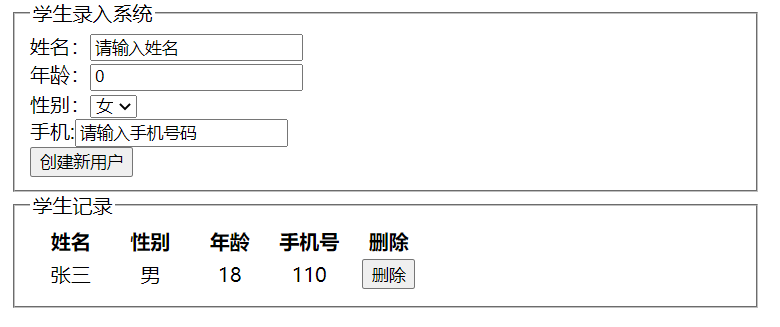
学生信息管理小练习
界面如下图:
<!DOCTYPE html>
<html lang="en">
<head>
    <meta charset="UTF-8">
    <title>vue练习  学生信息管理练习</title>
    <style>
        #app{
            width: 600px;
        }
        th{
            width: 60px;
            text-align: center;
        }
        tr{
            text-align: center;
        }
    </style>
</head>
<body>
    <div id = "app" >
        <fieldset>
            <legend>学生录入系统</legend>
        姓名:<input type="text"  v-model = "msg1" @click = "n1">
        <br>
        年龄:<input type="text"  v-model = "msg2" @click = "n2">
        <br>
        性别: <select v-model="sex">
        <option value="男">男</option>
        <option value="女">女</option>
        </select>
        <br>
        手机:<input type="text"  v-model = "msg3" @click = "n3">
        <br>
        <button @click = "get1">创建新用户</button>
        </fieldset>
        <fieldset>
            <legend>学生记录</legend>
        <table>
           <tr><th>姓名</th><th>性别</th><th>年龄</th><th>手机号</th><th>删除</th></tr>
           <tr v-for="(user,index) in users">
               <td>{{user.name}}</td>
               <td>{{user.sex}}</td>
               <td>{{user.age}}</td>
               <td>{{user.phone}}</td>
               <td><input type="button" value="删除" @click = "del"></td>
           </tr>
        </table>

        </fieldset>
    </div>

    <script src = "js/vue.js"></script>
    <script>
        const app = new Vue({
            el: "#app",
            data:{
                sex:"女",
                msg1:"请输入姓名",
                msg2:"0",
                msg3:"请输入手机号码",
                user:{name:"",age:"",sex:"",phone:""},
                users:[{name:"张三",age:"18",sex:"男",phone:"110"}],
            },
            methods:{
                get1(){
                        this.user.name = this.msg1;
                        this.user.sex = this.sex;
                        this.user.age = this.msg2;
                        this.user.phone = this.msg3;
                        this.users.push(this.user);
                        this.msg1="请输入姓名";
                        this.msg2="0";
                        this.msg3="请输入手机号码";
                },
                n1(){
                    this.msg1 = "";
                },
                n2(){
                    this.msg2 = "";
                },
                n3(){
                    this.msg3 = "";
                },
                del(){
                    this.users.splice(this.index,1);
                },
            }
        });
    </script>

</body>
</html>

 浙公网安备 33010602011771号