


MyBatis
在mapper中如何传递多个参数?
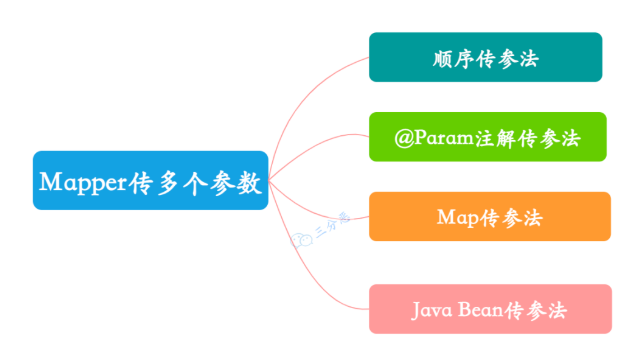
方法1:顺序传参法
public User selectUser(String name, int deptId);
<select id="selectUser" resultMap="UserResultMap">
select * from user
where user_name = #{0} and dept_id = #{1}
</select>
方法2:@Param注解传参法
public User selectUser(@Param("userName") String name, int @Param("deptId") deptId);
<select id="selectUser" resultMap="UserResultMap">
select * from user
where user_name = #{userName} and dept_id = #{deptId}
</select>
方法3:Map传参法
public User selectUser(Map<String, Object> params);
public User selectUser(Map<String, Object> params);
<select id="selectUser" parameterType="java.util.Map" resultMap="UserResultMap">
select * from user
where user_name = #{userName} and dept_id = #{deptId}
</select>
方法4:Java Bean传参法
public User selectUser(User user);
<select id="selectUser" parameterType="com.jourwon.pojo.User" resultMap="UserResultMap">
select * from user
where user_name = #{userName} and dept_id = #{deptId}
</select>
实体类属性名和表中字段名不一样 ,怎么办?
第1种:通过在查询的SQL语句中定义字段名的别名,让字段名的别名和实体类的属性名一致。
<select id="getOrder" parameterType="int" resultType="com.jourwon.pojo.Order">
select order_id id, order_no orderno ,order_price price form orders where order_id=#{id};
</select>
第2种:通过resultMap 中的<result>来映射字段名和实体类属性名的一一对应的关系。
<select id="getOrder" parameterType="int" resultMap="orderResultMap">
select * from orders where order_id=#{id}
</select>
<resultMap type="com.jourwon.pojo.Order" id="orderResultMap">
<!–用id属性来映射主键字段–>
<id property="id" column="order_id">
<!–用result属性来映射非主键字段,property为实体类属性名,column为数据库表中的属性–>
<result property ="orderno" column ="order_no"/>
<result property="price" column="order_price" />
</reslutMap>
#{}和${}的区别?
#{}和${}比较
#{}是占位符,预编译处理;${}是拼接符,字符串替换,没有预编译处理。- Mybatis在处理
#{}时,#{}传入参数是以字符串传入,会将SQL中的#{}替换为?号,调用PreparedStatement的set方法来赋值。 #{}可以有效的防止SQL注入,提高系统安全性;${}不能防止SQL 注入#{}的变量替换是在DBMS 中;${}的变量替换是在 DBMS 外
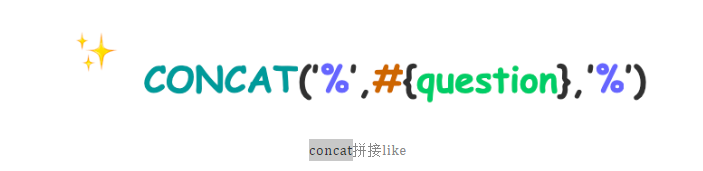
模糊查询like语句该怎么写?
- 一对一<association>
比如订单和支付是一对一的关系,这种关联的实现:
实体类:
public class Order {
    private Integer orderId;
    private String orderDesc;

    /**
     * 支付对象
     */
    private Pay pay;
    //……
}
结果映射
<!-- 订单resultMap -->
<resultMap id="peopleResultMap" type="cn.fighter3.entity.Order">
    <id property="orderId" column="order_id" />
    <result property="orderDesc" column="order_desc"/>
    <!--一对一结果映射-->
    <association property="pay" javaType="cn.fighter3.entity.Pay">
        <id column="payId" property="pay_id"/>
        <result column="account" property="account"/>
    </association>
</resultMap>
查询就是普通的关联查
<select id="getTeacher" resultMap="getTeacherMap" parameterType="int">
    select * from order o
     left join pay p on o.order_id=p.order_id
    where  o.order_id=#{orderId}
</select>
- 一对多
<collection>
比如商品分类和商品,是一对多的关系。
- 实体类
public class Category {
    private int categoryId;
    private String categoryName;

    /**
    * 商品列表
    **/
    List<Product> products;
    //……
}
- 结果映射
<resultMap type="Category" id="categoryBean">
    <id column="categoryId" property="category_id" />
    <result column="categoryName" property="category_name" />

    <!-- 一对多的关系 -->
    <!-- property: 指的是集合属性的值, ofType:指的是集合中元素的类型 -->
    <collection property="products" ofType="Product">
        <id column="product_id" property="productId" />
        <result column="productName" property="productName" />
        <result column="price" property="price" />
    </collection>
</resultMap>
- 查询
查询就是一个普通的关联查询
<!-- 关联查询分类和产品表 -->
<select id="listCategory" resultMap="categoryBean">
    select c.*, p.* from category_ c left join product_ p on c.id = p.cid
</select>
如何获取生成的主键?
- 新增标签中添加:keyProperty=" ID " 即可
<insert id="insert" useGeneratedKeys="true" keyProperty="userId" >
    insert into user(
    user_name, user_password, create_time)
    values(#{userName}, #{userPassword} , #{createTime, jdbcType= TIMESTAMP})
</insert>
- 这时候就可以完成回填主键
mapper.insert(user);
user.getId;
MyBatis支持动态SQL吗?
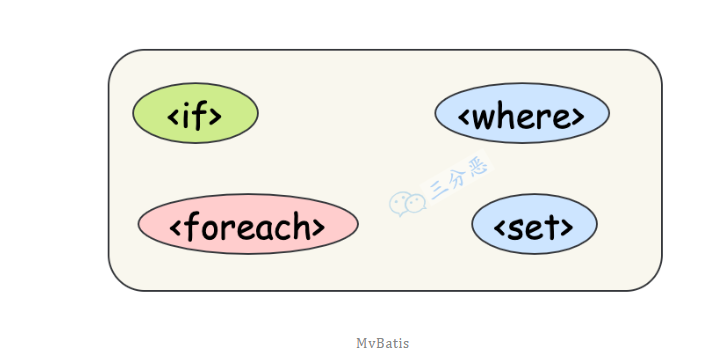
MyBatis中有一些支持动态SQL的标签,它们的原理是使用OGNL从SQL参数对象中计算表达式的值,根据表达式的值动态拼接SQL,以此来完成动态SQL的功能。
- if
根据条件来组成where子句
<select id="findActiveBlogWithTitleLike"
   resultType="Blog">
SELECT * FROM BLOG
WHERE state = ‘ACTIVE’
<if test="title != null">
  AND title like #{title}
</if>
</select>
- choose (when, otherwise)
这个和Java 中的 switch 语句有点像
<select id="findActiveBlogLike"
   resultType="Blog">
SELECT * FROM BLOG WHERE state = ‘ACTIVE’
<choose>
  <when test="title != null">
    AND title like #{title}
  </when>
  <when test="author != null and author.name != null">
    AND author_name like #{author.name}
  </when>
  <otherwise>
    AND featured = 1
  </otherwise>
</choose>
</select>
-
trim (where, set)
-
<where>可以用在所有的查询条件都是动态的情况
<select id="findActiveBlogLike"
   resultType="Blog">
SELECT * FROM BLOG
<where>
  <if test="state != null">
       state = #{state}
  </if>
  <if test="title != null">
      AND title like #{title}
  </if>
  <if test="author != null and author.name != null">
      AND author_name like #{author.name}
  </if>
</where>
</select>
- <set> 可以用在动态更新的时候
<update id="updateAuthorIfNecessary">
  update Author
    <set>
      <if test="username != null">username=#{username},</if>
      <if test="password != null">password=#{password},</if>
      <if test="email != null">email=#{email},</if>
      <if test="bio != null">bio=#{bio}</if>
    </set>
  where id=#{id}
</update>
-
foreach
看到名字就知道了,这个是用来循环的,可以对集合进行遍历
<select id="selectPostIn" resultType="domain.blog.Post">
SELECT *
FROM POST P
<where>
  <foreach item="item" index="index" collection="list"
      open="ID in (" separator="," close=")" nullable="true">
        #{item}
  </foreach>
</where>
</select>
使用foreach标签
foreach的主要用在构建in条件中,它可以在SQL语句中进行迭代一个集合。foreach标签的属性主要有item,index,collection,open,separator,close。
- item 表示集合中每一个元素进行迭代时的别名,随便起的变量名;
- index 指定一个名字,用于表示在迭代过程中,每次迭代到的位置,不常用;
- open 表示该语句以什么开始,常用“(”;
- separator 表示在每次进行迭代之间以什么符号作为分隔符,常用“,”;
- close 表示以什么结束,常用“)”。
在使用foreach的时候最关键的也是最容易出错的就是collection属性,该属性是必须指定的,但是在不同情况下,该属性的值是不一样的,主要有以下3种情况:
- 如果传入的是单参数且参数类型是一个List的时候,collection属性值为list
- 如果传入的是单参数且参数类型是一个array数组的时候,collection的属性值为array
- 如果传入的参数是多个的时候,我们就需要把它们封装成一个Map了,当然单参数也可以封装成map,实际上如果你在传入参数的时候,在MyBatis里面也是会把它封装成一个Map的,map的key就是参数名,所以这个时候collection属性值就是传入的List或array对象在自己封装的map里面的key
看看批量保存的两种用法:
<!-- MySQL下批量保存,可以foreach遍历 mysql支持values(),(),()语法 --> //推荐使用
<insert id="addEmpsBatch">
    INSERT INTO emp(ename,gender,email,did)
    VALUES
    <foreach collection="emps" item="emp" separator=",">
        (#{emp.eName},#{emp.gender},#{emp.email},#{emp.dept.id})
    </foreach>
</insert>
<!-- 这种方式需要数据库连接属性allowMutiQueries=true的支持
 如jdbc.url=jdbc:mysql://localhost:3306/mybatis?allowMultiQueries=true -->
<insert id="addEmpsBatch">
    <foreach collection="emps" item="emp" separator=";">
        INSERT INTO emp(ename,gender,email,did)
        VALUES(#{emp.eName},#{emp.gender},#{emp.email},#{emp.dept.id})
    </foreach>
</insert> 
 浙公网安备 33010602011771号