

MyBatis Generator使用方法
第一步:在resources文件夹下创建一个目录mybatis-generator,在目录mybatis-generator下创建文件generatorConfig.xml(此处的目录名可任意取)
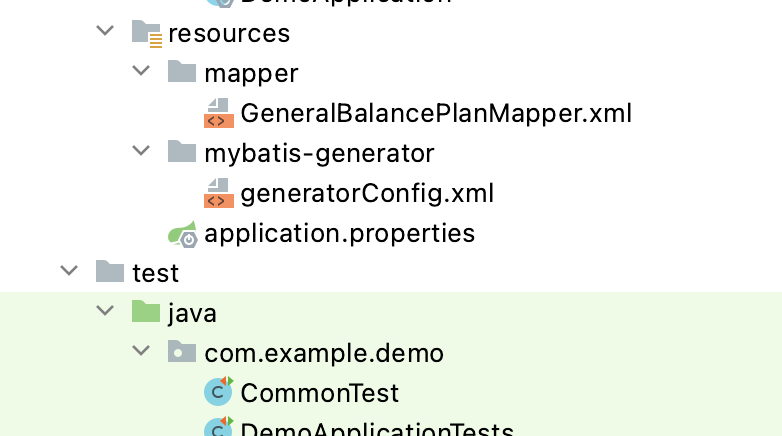
第二步:在pom文件标签<plugins>处引入依赖
<plugin>
    <groupId>org.mybatis.generator</groupId>
    <artifactId>mybatis-generator-maven-plugin</artifactId>
    <version>1.3.5</version>
    <configuration>
        <configurationFile>${basedir}/src/main/resources/mybatis-generator/generatorConfig.xml
        </configurationFile>
        <overwrite>true</overwrite>
        <verbose>true</verbose>
    </configuration>
</plugin>
第三步:配置generatorConfig.xml
注:①标红处即为需要修改处
②"http://mybatis.org/dtd/mybatis-generator-config_1_0.dtd" 在xml中会报错,可忽略
<?xml version="1.0" encoding="UTF-8"?> <!DOCTYPE generatorConfiguration PUBLIC "-//mybatis.org//DTD MyBatis Generator Configuration 1.0//EN" "http://mybatis.org/dtd/mybatis-generator-config_1_0.dtd"> <generatorConfiguration> <!-- 连接数据库jar包的路径--> <classPathEntry location="/Users/dxm1/.m2/repository/mysql/mysql-connector-java/5.1.48/mysql-connector-java-5.1.48.jar"/> <context id="DB2Tables" targetRuntime="MyBatis3"> <commentGenerator> <property name="suppressDate" value="true"/> <!-- 是否去除自动生成的注释 true:是 : false:否 --> <property name="suppressAllComments" value="true"/> </commentGenerator> <!--数据库连接参数 --> <jdbcConnection driverClass="com.mysql.jdbc.Driver" connectionURL="jdbc:mysql://localhost:3306/test_db?serverTimezone=UTC&useSSL=false" userId="root" password="zu273334ly"> </jdbcConnection> <javaTypeResolver> <property name="forceBigDecimals" value="false"/> </javaTypeResolver> <!-- 实体类的包名和存放路径 --> <javaModelGenerator targetPackage="com.example.demo.model" targetProject="src/main/java"> <property name="enableSubPackages" value="true"/> <property name="trimStrings" value="true"/> </javaModelGenerator> <!-- 生成映射文件*.xml的位置--> <sqlMapGenerator targetPackage="mapper" targetProject="src/main/resources"> <property name="enableSubPackages" value="true"/> </sqlMapGenerator> <!-- 生成DAO的包名和位置 --> <javaClientGenerator type="XMLMAPPER" targetPackage="com.example.demo.dao" targetProject="src/main/java"> <property name="enableSubPackages" value="true"/> </javaClientGenerator> <!-- tableName:数据库中的表名或视图名;domainObjectName:生成的实体类的类名--> <table tableName="GENERAL_BALANCE_PLAN" domainObjectName="GeneralBalancePlan" enableCountByExample="false" enableUpdateByExample="false" enableDeleteByExample="false" enableSelectByExample="false" selectByExampleQueryId="false"/> <!-- <table tableName="xxx" domainObjectName="xxx" enableCountByExample="false" enableUpdateByExample="false" enableDeleteByExample="false" enableSelectByExample="false" selectByExampleQueryId="false"/> ... <table tableName="xxx" domainObjectName="xxx" enableCountByExample="false" enableUpdateByExample="false" enableDeleteByExample="false" enableSelectByExample="false" selectByExampleQueryId="false"/> --> </context> </generatorConfiguration>
如何找连接数据库jar包的路径,可参考 https://blog.csdn.net/weixin_43228497/article/details/83114594
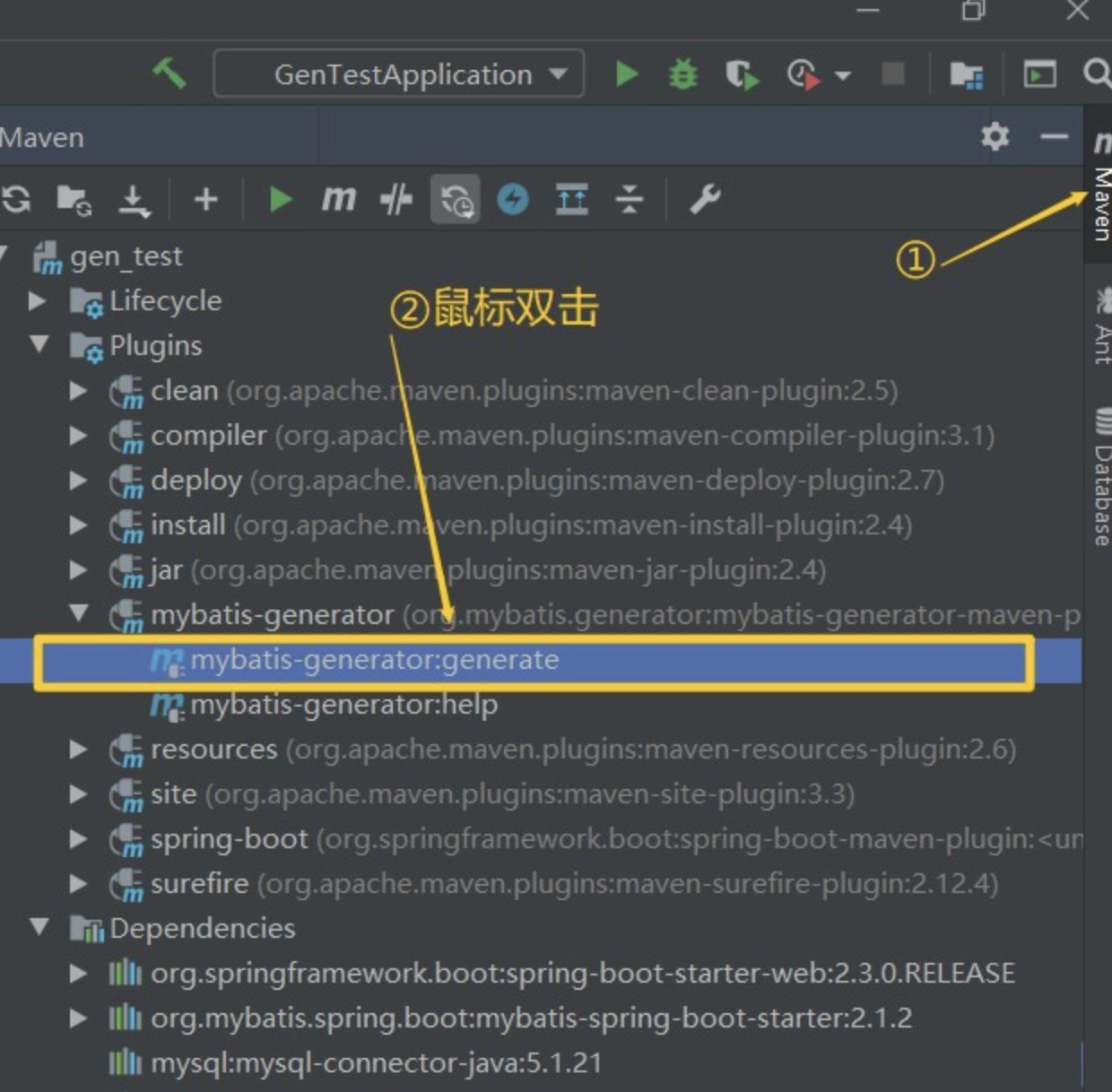
第四步:启动
参考资料: https://blog.csdn.net/weixin_42250302/article/details/106986707

 浙公网安备 33010602011771号