
DataX二次开发详解-Kingbasees86Reader、Kingbasees86Writer插件
一、前提
国产数据库的崛起元年,不得不提人大金仓(Kingbase)、南大通用数据库(Gbase)、达梦数据库(DM)、华为数据库(GaussDB)、阿里数据库(Oceanbase)等,此文章介绍采用datax作为同步人大金仓Kingbase86数据库的工具。目前github上的datax版本功能仅支持Kingbase82系列产品。而项目上如果要用Kingbase86版本作为数据库,所以要对Datax源码进行二次开发,自己构建Kingbasees86Reader和Kingbasees86Writer插件。
二、实施
Kingbase的背景不赘述,同样基于JDBC协议进行远程连接数据库并执行相应的SQL语句将数据从KingbaseES库中SELECT出来,以前玩过Datax工具的同学可以简单把Kingbase理解成Mysql的同步脚本。
2.1 Kingbasees86Reader插件开发
目前Kingbasees86Reader支持大部分KingbaseES类型,但也存在部分个别类型没有支持的情况,请注意检查你的类型。
下面列出Kingbasees86Reader针对KingbaseES类型转换列表:
| DataX内部类型 | KingbaseES数据类型 |
| Long | bigint, bigserial, integer, smallint, serial |
| Double | double precision, money, numeric, real |
| String | varchar, char, text, bit, inet |
| Date | date, time, timestamp |
| Boolean | bool |
| Bytes | bytea |
2.1.1 配置样例
下面是一个从KingbaseES数据库中同步抽取数据到本地作业的展示脚本
{
    "job": {
        "setting": {
            "speed": {
            //设置传输速度,单位为byte/s,DataX运行会尽可能达到该速度但是不超过它.
                 "byte": 1048576
            },
            //出错限制
                "errorLimit": {
                //出错的record条数上限,当大于该值即报错。
                "record": 0,
                //出错的record百分比上限 1.0表示100%,0.02表示2%
                "percentage": 0.02
            }
        },
        "content": [
            {
                "reader": {
                    "name": "kingbasees86reader",
                    "parameter": {
                        // 数据库连接用户名
                        "username": "xx",
                        // 数据库连接密码
                        "password": "xx",
                        "column": [
                            "id","name"
                        ],
                        //切分主键
                        "splitPk": "id",
                        "connection": [
                            {
                                "table": [
                                    "table"
                                ],
                                "jdbcUrl": [
     "jdbc:kingbase86://host:port/database"
                                ]
                            }
                        ]
                    }
                },
               "writer": {
                    //writer类型
                    "name": "streamwriter",
                    //是否打印内容
                    "parameter": {
                        "print":true,
                    }
                }
            }
        ]
    }
}
纯净版(验证可执行通过)
{
    "job": {
        "setting": {
            "speed": {
                 "byte": 1048576
            },
                "errorLimit": {
                 "record": 0,
          "percentage": 0.02
            }
        },
        "content": [
            {
                "reader": {
                    "name": "kingbasees86reader",
                    "parameter": {
                        "username": "root",
                        "password": "123456",
                        "column": ["id","name"],
                        "splitPk": "id",
                        "connection": [
                            {
                                "table": [
                                    "t1"
                                ],
                                "jdbcUrl": [
                                    "jdbc:kingbase8://192.168.12.104:54321/test"
                                ]
                            }
                        ]
                    }
                },
               "writer": {
                    "name": "streamwriter",
                    "parameter": {
                        "print":true
                    }
                }
            }
        ]
    }
}
配置一个自定义SQL的数据库同步任务到本地内容的作业:
{
    "job": {
        "setting": {
            "speed": 1048576
        },
        "content": [
            {
                "reader": {
                    "name": "kingbasees86reader",
                    "parameter": {
                        "username": "xx",
                        "password": "xx",
                        "where": "",
                        "connection": [
                            {
                                "querySql": [
                                    "select db_id,on_line_flag from db_info where db_id < 10;"
                                ],
                                "jdbcUrl": [
                                    "jdbc:kingbase86://host:port/database", "jdbc:kingbase86://host:port/database"
                                ]
                            }
                        ]
                    }
                },
                "writer": {
                    "name": "streamwriter",
                    "parameter": {
                        "print": false,
                        "encoding": "UTF-8"
                    }
                }
            }
        ]
    }
}
2.1.2 代码实现
代码架构
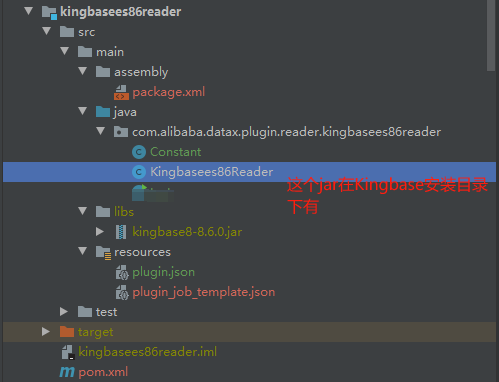
代码-package.xml
<assembly
        xmlns="http://maven.apache.org/plugins/maven-assembly-plugin/assembly/1.1.0"
        xmlns:xsi="http://www.w3.org/2001/XMLSchema-instance"
        xsi:schemaLocation="http://maven.apache.org/plugins/maven-assembly-plugin/assembly/1.1.0 http://maven.apache.org/xsd/assembly-1.1.0.xsd">
    <id></id>
    <formats>
        <format>dir</format>
    </formats>
    <includeBaseDirectory>false</includeBaseDirectory>
    <fileSets>
        <fileSet>
            <directory>src/main/resources</directory>
            <includes>
                <include>plugin.json</include>
                <include>plugin_job_template.json</include>
            </includes>
            <outputDirectory>plugin/reader/kingbasees86reader</outputDirectory>
        </fileSet>
        <fileSet>
            <directory>target/</directory>
            <includes>
                <include>kingbasees86reader-0.0.1-SNAPSHOT.jar</include>
            </includes>
            <outputDirectory>plugin/reader/kingbasees86reader</outputDirectory>
        </fileSet>
        <fileSet>
            <directory>src/main/libs</directory>
            <includes>
                <include>*.*</include>
            </includes>
            <outputDirectory>plugin/reader/kingbasees86reader/libs</outputDirectory>
        </fileSet>
    </fileSets>

    <dependencySets>
        <dependencySet>
            <useProjectArtifact>false</useProjectArtifact>
            <outputDirectory>plugin/reader/kingbasees86reader/libs</outputDirectory>
            <scope>runtime</scope>
        </dependencySet>
    </dependencySets>
</assembly>
代码-Constant
package com.alibaba.datax.plugin.reader.kingbasees86reader;

public class Constant {

    public static final int DEFAULT_FETCH_SIZE = 1000;

}
代码-Kingbasees86Reader
package com.alibaba.datax.plugin.reader.kingbasees86reader;

import com.alibaba.datax.common.exception.DataXException;
import com.alibaba.datax.common.plugin.RecordSender;
import com.alibaba.datax.common.spi.Reader;
import com.alibaba.datax.common.util.Configuration;
import com.alibaba.datax.plugin.rdbms.reader.CommonRdbmsReader;
import com.alibaba.datax.plugin.rdbms.util.DBUtilErrorCode;
import com.alibaba.datax.plugin.rdbms.util.DataBaseType;

import java.util.List;

public class Kingbasees86Reader extends Reader {

    private static final DataBaseType DATABASE_TYPE = DataBaseType.KingbaseES86;

    public static class Job extends Reader.Job {

        private Configuration originalConfig;
        private CommonRdbmsReader.Job commonRdbmsReaderMaster;

        @Override
        public void init() {
            this.originalConfig = super.getPluginJobConf();
            int fetchSize = this.originalConfig.getInt(com.alibaba.datax.plugin.rdbms.reader.Constant.FETCH_SIZE,
                    Constant.DEFAULT_FETCH_SIZE);
            if (fetchSize < 1) {
                throw DataXException.asDataXException(DBUtilErrorCode.REQUIRED_VALUE,
                        String.format("您配置的fetchSize有误,根据DataX的设计,fetchSize : [%d] 设置值不能小于 1.", fetchSize));
            }
            this.originalConfig.set(com.alibaba.datax.plugin.rdbms.reader.Constant.FETCH_SIZE, fetchSize);

            this.commonRdbmsReaderMaster = new CommonRdbmsReader.Job(DATABASE_TYPE);
            this.commonRdbmsReaderMaster.init(this.originalConfig);
        }

        @Override
        public List<Configuration> split(int adviceNumber) {
            return this.commonRdbmsReaderMaster.split(this.originalConfig, adviceNumber);
        }

        @Override
        public void post() {
            this.commonRdbmsReaderMaster.post(this.originalConfig);
        }

        @Override
        public void destroy() {
            this.commonRdbmsReaderMaster.destroy(this.originalConfig);
        }

    }

    public static class Task extends Reader.Task {

        private Configuration readerSliceConfig;
        private CommonRdbmsReader.Task commonRdbmsReaderSlave;

        @Override
        public void init() {
            this.readerSliceConfig = super.getPluginJobConf();
            this.commonRdbmsReaderSlave = new CommonRdbmsReader.Task(DATABASE_TYPE, super.getTaskGroupId(), super.getTaskId());
            this.commonRdbmsReaderSlave.init(this.readerSliceConfig);
        }

        @Override
        public void startRead(RecordSender recordSender) {
            int fetchSize = this.readerSliceConfig.getInt(com.alibaba.datax.plugin.rdbms.reader.Constant.FETCH_SIZE);

            this.commonRdbmsReaderSlave.startRead(this.readerSliceConfig, recordSender,
                    super.getTaskPluginCollector(), fetchSize);
        }

        @Override
        public void post() {
            this.commonRdbmsReaderSlave.post(this.readerSliceConfig);
        }

        @Override
        public void destroy() {
            this.commonRdbmsReaderSlave.destroy(this.readerSliceConfig);
        }

    }

}
代码-plugin.json
{
  "name": "kingbasees86reader",
  "class": "com.alibaba.datax.plugin.reader.kingbasees86reader.Kingbasees86Reader",
  "description": "useScene: prod. mechanism: Jdbc connection using the database, execute select sql, retrieve data from the ResultSet. warn: The more you know about the database, the less problems you encounter.",
  "developer": "alibaba"
}
代码-plugin_job_template.json
{
  "name": "kingbasees86reader",
  "parameter": {
    "username": "",
    "password": "",
    "connection": [
      {
        "table": [],
        "jdbcUrl": []
      }
    ]
  }
}
注意1:在根目录的package.xml文件下添加
		<fileSet>
            <directory>kingbasees86reader/target/datax/</directory>
            <includes>
                <include>**/*.*</include>
            </includes>
            <outputDirectory>datax</outputDirectory>
        </fileSet>
注意2:在根目录的pom.xml文件下添加
<module>kingbasees86reader</module>
注意3:在DataBaseType中注册Reader信息


2.1.3 打包上传
可以在根目录下注释掉不需要的module,加速打包过程。
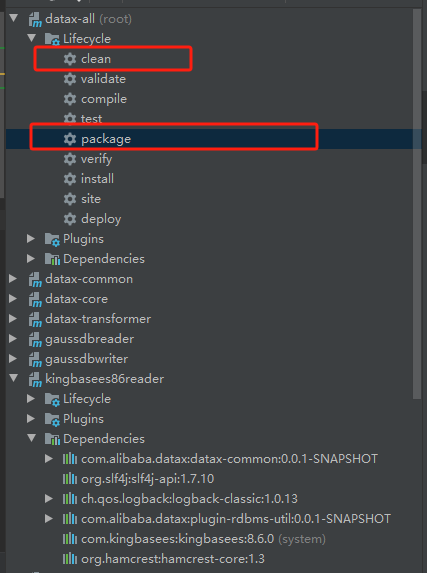
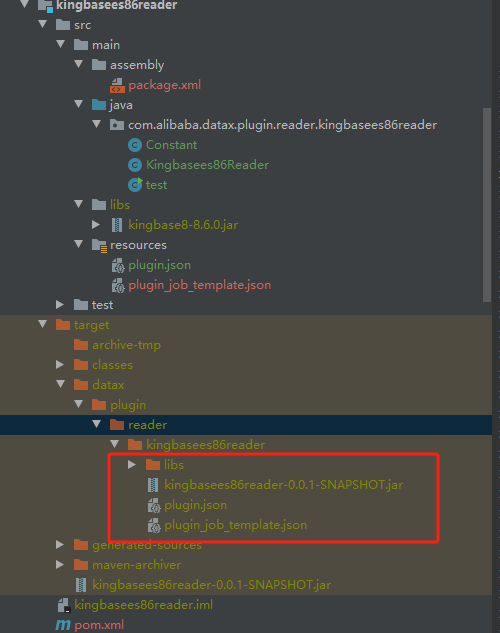
将下面的几个文件复制到Kingbase安装目录下对应的plugin文件夹下

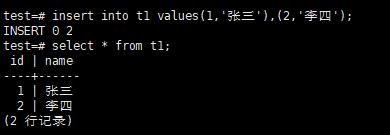
2.1.4 KingbaseES创建测试表
注意:需要先启动kingbase Server服务以及检查防火墙是否关闭
启动Kingbase Server服务
cd /opt/Kingbase/ES/V8/Server/bin
./sys_ctl start -D /opt/Kingbase/ES/V8/data
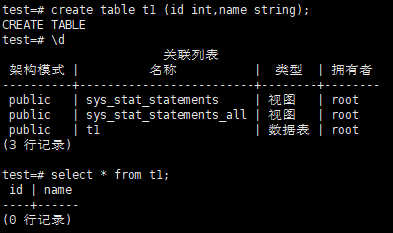
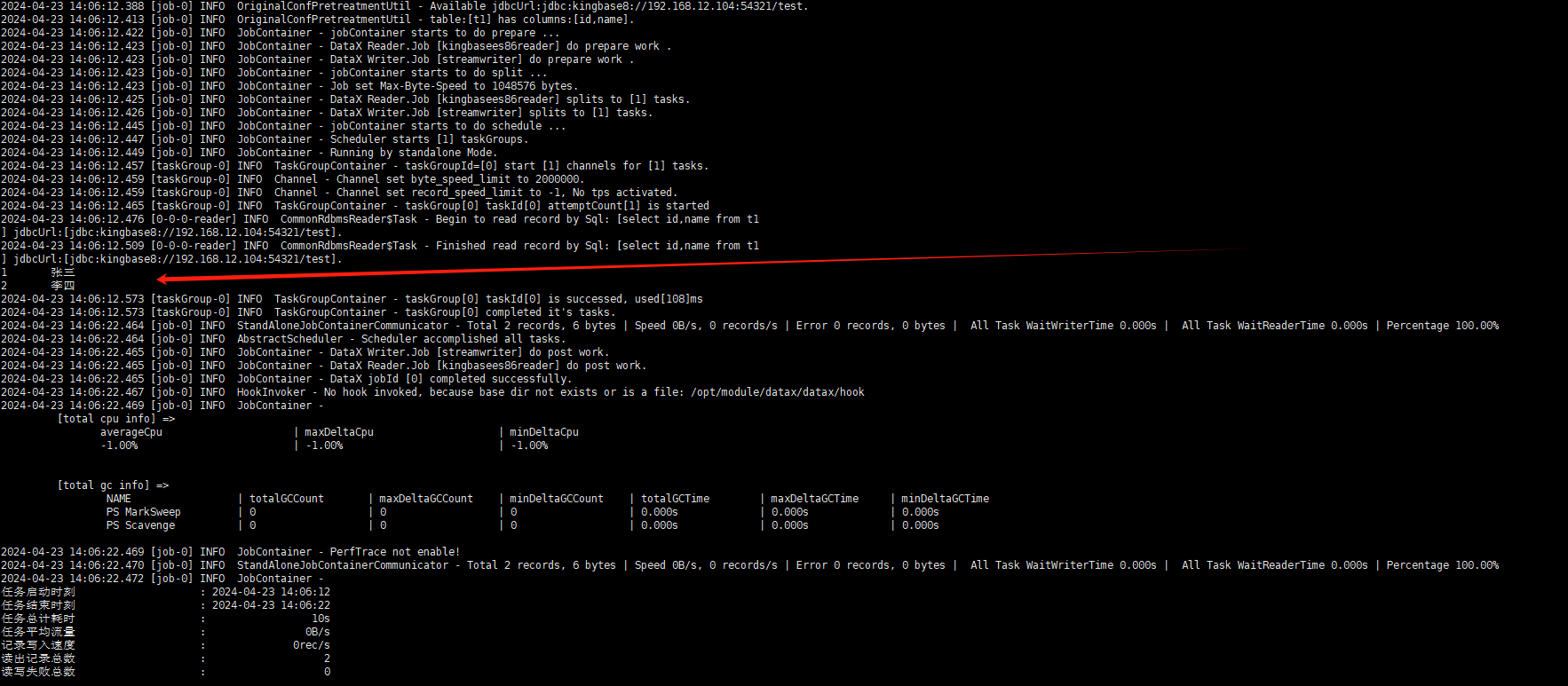
2.1.5 执行DataX同步脚本进行测试
2.1.6 可能遇到的问题
Description:[DataX引擎配置错误,该问题通常是由于DataX安装错误引起,请联系您的运维解决 .]. - 在有总bps限速条件下,单个channel的bps值不能为空,也不能为非正数

解决办法:
进入DataX安装目录,修改文件datax/conf/core.json
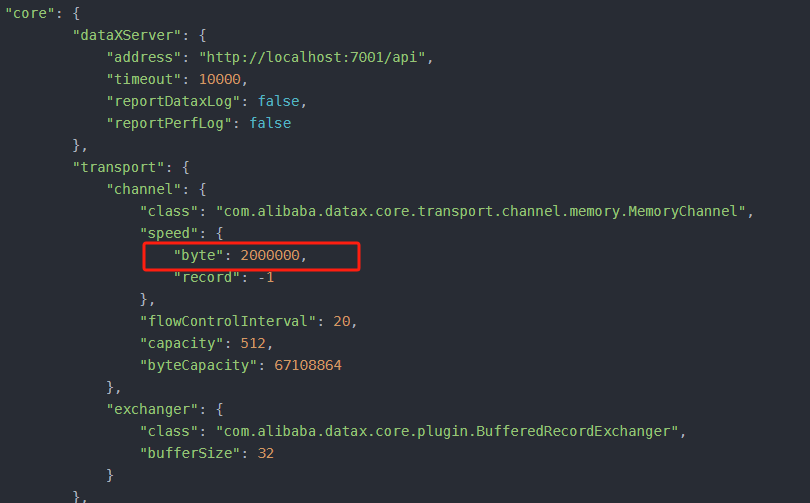
修改core -> transport -> channel -> speed -> “byte”: 2000000,将单个channel的大小改为2MB即可。
补充部分
从Kingbase中读取数据并写入Mysql中
{
    "job": {
        "setting": {
            "speed": {
                 "byte": 1048576
            },

                "errorLimit": {
                "record": 0,
                "percentage": 0.02
            }
        },
        "content": [
            {
                "reader": {
                    "name": "kingbasees86reader",
                    "parameter": {

                        "username": "root",
                        "password": "123456",
                        "column": ["id","name"],
                        "splitPk": "id",
                        "connection": [
                            {
                                "table": [
                                    "t1"
                                ],
                                "jdbcUrl": [
                                    "jdbc:kingbase8://192.168.12.104:54321/prod"
                                ]
                            }
                        ]
                    }
                },
                   "writer": {
                    "parameter": {
                        "username": "root",
                        "password": "123456",
                        "writeMode": "insert",
                        "connection": [
                            {
                                "table": [
                                    "t1"
                                ],
                                "jdbcUrl": "jdbc:mysql://hadoop101:3306/gmall_report?useUnicode=true&characterEncoding=utf-8"
                            }
                        ],
                        "column": [
                            "id",
                            "name"
                        ]
                    },
                    "name": "mysqlwriter"
                }
            }
        ]
    }
}
相关文档
github:https://github.com/alibaba/DataX/tree/master
https://gitee.com/mirrors/DataX/tree/master
阿里云Maven仓库:https://developer.aliyun.com/mvn/search

 浙公网安备 33010602011771号