
一、内容大纲
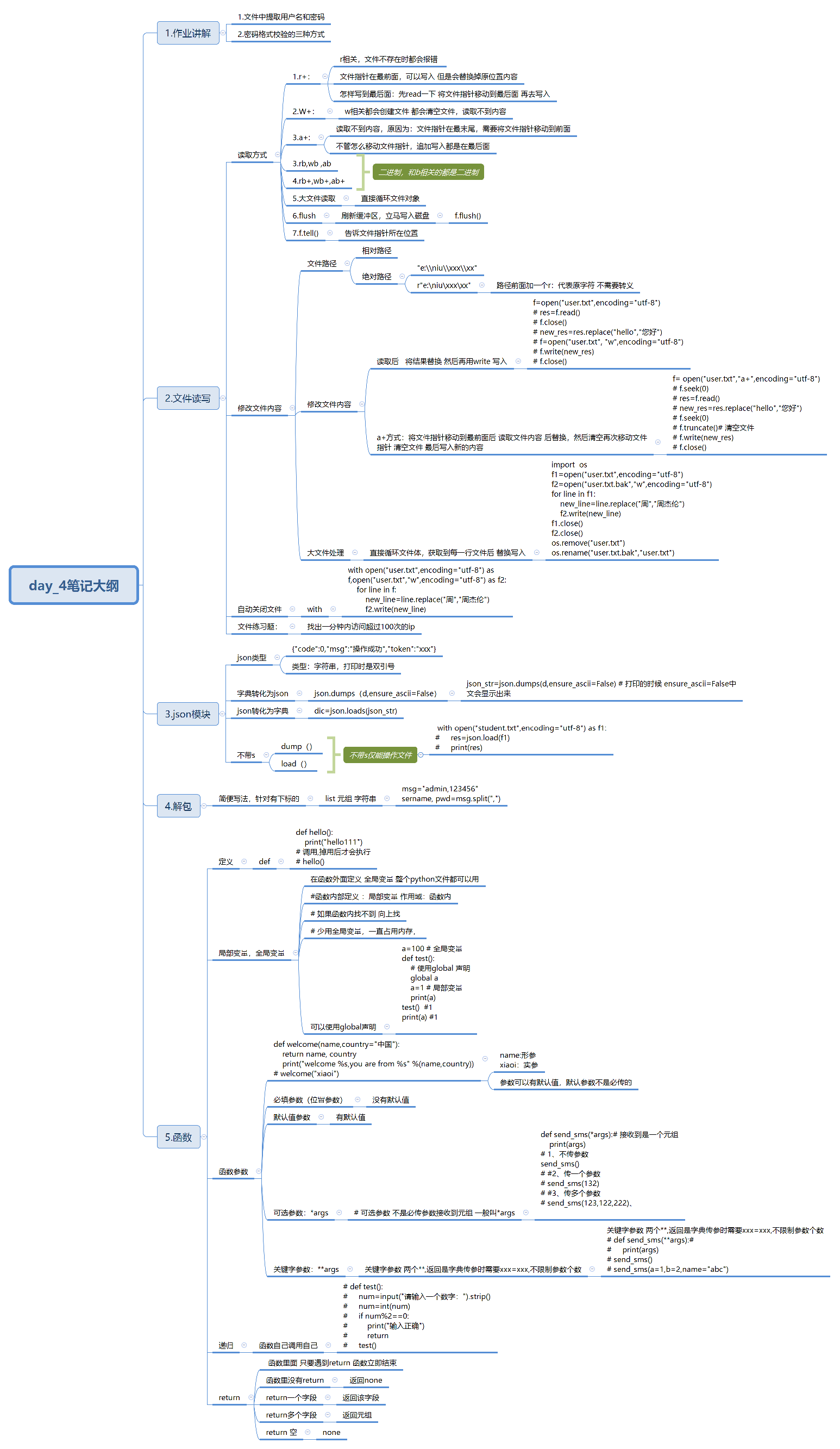
二、作业讲解
2.1解包
解包是一种简便写法,针对所有有下标的类型都可以,如list,元组,字符串
原写法:
msg="admin,123456"
username=msg.split(",")[0]
password=msg.split(",")[1]
解包写法:
(1) list里面有几个元素,就可以定义几个变量
(2) 字典的items()就是该原理
username, pwd=msg.split(",")
2.2密码校验的两种种方式
1.交集方式
import string
pwd=input("请输入密码:")
#第一种:取交集
pwd=set(pwd)
if pwd& set(string.digits) and pwd & set(string.ascii_uppercase) and pwd & set(string.ascii_uppercase)\
    and pwd & set(string.punctuation):
    print("密码格式正确")
else:
    print("密码格式错误")
2.循环变量方式
n,u,l,p=False,False,False,False# 定义四个变量 后面要写四个值 不管是不是一样的值
for i in pwd:
    if i in string.digits:
        n=True
    elif i in string.ascii_uppercase:
        u=True
    elif i in string.ascii_lowercase:
        l=True
    elif i in string.punctuation:
        p=True
if n and u and l and p:
    print("密码格式正确")
else:
    print("密码格式错误")
2.3从文件中提取账号密码
user_pwd={}
with open("users.txt","r",encoding="utf-8" ) as f:
    # 获取到列表
    res=f.readlines()
    # 循环遍历,对每一个元素进行春丽
    for line in res:

        # 去掉换行符
        line = line.strip()
        # 防止line为空报错
        if line:
            # 将用户名密码分别复制
            username,password=line.split(",")
            # 添加到字典里面
            user_pwd[username]=password
print(user_pwd)
三、文件读写
3.1其他文件读写模式
1.读写,写读,追加读模式
r+:r相关文件不存在时都会报错,支持写入 由于r+模式文件指针在最前面 所以写入时从最文件指针为0开始 会替换掉原位置内容
f=open("users.txt","r+",encoding="utf-8")
print(f.read())
结果:admin,Aa1234@
f=open("users.txt","r+",encoding="utf-8")
# print(f.read())
f.write("123")
f.seek(0) # 写入时移动了文件指针,所以需要将文件指针归零
print(f.read())
结果:123in,Aa1234@
总结:文件中前三位变为了新写入内容
w+:w相关都可以创建文件,都会清空文件中内容 所以读取内容为空
f=open("users.txt","w+",encoding="utf-8")
print(f.read())
 结果:读取不到内容,文件内容被清空
a+:a相关都会可以创建文件,支持读取内容 但是由于 a+模式文件指针在末尾,所以读取到内容为空,需要将文件指着移动到最前面
f=open("users.txt","a+",encoding="utf-8")
f.seek(0)
print(f.read())
2.rb wb,ab以及rb+,wb+,ab+:b相关都是二进制相关
3.flush(),tell()
f.flush():刷新一下缓冲区域 立马写入磁盘
f.tell():告诉文件指针当前所在位置
4.大文件读写:直接循环文件对象:
f=open("user.txt",encoding="utf-8")
for line in f:
    print(line)
f.close()
3.2修改文件内容
1.文件路径:
相对路径:文件相对于当前调用的相对位置
绝对路径:遇到\n的处理:
(1)使用双引号;
f=open("e:\\niu\\xxx\\xx")
(2)前面加上r: 原字符,不需要特殊处理
f=open(r"e:\niu\xxx\xx") #原字符 不要做特殊字符处理
2.替换文件内容
第一种方法:
# 修改文件内容:将源文件内容读取出来进行修改 然后重新写入进去
with open("users.txt","r",encoding="utf=8") as f:
    res=f.read()
    new_res=res.replace("a","1")
with open("users.txt","w+",encoding="utf=8") as f1:
    f1.write(new_res)
    f1.seek(0)
    r=f1.read()
print(r)
第二种方法:
# 大文件修改内容
import os
with open("user.txt",encoding="utf-8") as f1, open("user_bak.txt","w",encoding="utf-8") as f2:
    for line in f1:
       new_line= line.replace("周杰伦","Jack")
       f2.write(new_line)
os.remove("user.txt")
os.rename("user_bak.txt","user.txt")
第三种方法:a+:
# a+方法
with open("user.txt","a+",encoding="utf-8") as f:
    # 将文件指针移动到最前面
    f.seek(0)
    # 读取文件内容
    res=f.read()
    new_res=res.replace("Jack","周杰伦")
    # 移动文件指针到最前面
    f.seek(0)
    # 清空文件
    f.truncate()
    # 将新的内容写入
    f.write(new_res)
3.3文件读写练习题
找出访问超过100次的ip
FILE_NAME="access.log"
with open(FILE_NAME,encoding="utf-8") as f:
    while True:
        # 定义字典 存放ip以及ip出现次数
        ips = {}
        f.seek(point)
        for line in f:
            line=line.strip()
            if line:
                ip=line.split()[0]
                if ip in ips:
                    ips[ip]+=1
                else:
                    ips[ip] = 1
        point= f.tell()
        for ip,count in ips.items():
            if count>=100:
                print("黑名单为:%s" %ip)
        time.sleep(60)
3.4自动关闭文件
使用with方法可以自动关闭文件,不需要写f.close()
with open("user.txt",encoding="utf-8") as f,open("user.txt","w",encoding="utf-8") as f2:
    for line in f:
        new_line=line.replace("周","周杰伦")
        f2.write(new_line)
四、json模块
4.1json转化为python字典
1.json格式,本身是一个字符串 只是有特殊格式限制
d='{"code":0,"msg":"操作成功","token":"xxx"}'
print(d)结果:{"code":0,"msg":"操作成功","token":"xxx"}  # json打印为双引号引起

字典:
d={"code":0,"msg":"操作成功","token":"xxx"}
print(d)
结果:{'code': 0, 'msg': '操作成功', 'token': 'xxx'}# 字典打印时都是单引号
2.json转化为字典:json.loads("json_str") 字符串类型必须合法 否则无法转换
json_str='{"code":0,"msg":"操作成功","token":"xxx"}' # json数据类型必须合法,格式正确
print(json_str)  # 结果:{"code":0,"msg":"操作成功","token":"xxx"} 双引号
dic=json.loads(json_str)
pprint.pprint(dic) # 结果:{'code': 0, 'msg': '操作成功', 'token': 'xxx'} 单引号 为字典
4.2字典转化为json格式
字典转化为json:json.dumps(dict)
d={"code":0,"msg":"操作成功","token":"xxx"}
json_str=json.dumps(d,ensure_ascii=False) # 打印的时候 ensure_ascii=False中文会显示出来
print(json_str) # 结果:{"code": 0, "msg": "操作成功", "token": "xxx"} 双引号
4.3 dump以及load
json.load()以及json.dump()仅能操作文件相关
load()
with open("student.txt",encoding="utf-8") as f1:
    res=json.load(f1)
    print(res) # 结果:将文件中的json转化为字典:{'code': 0, 'msg': '操作成功', 'token': 'xxx', 'addr': 'xxx', 'phone': '123'}
dump()
with open("student.txt","w",encoding="utf-8") as f:
    # 将d这个字典写入到f里面
    json.dump(d,f,ensure_ascii=False)
五、函数
5.1函数定义
1.定义:def
2.调用:只有调用后 函数才会执行
例:
def hello():
    print("hello111")
hello()# 调用
3.return:返回值,函数遇到return便会立即结束
(1)函数没有return 返回none
def hello():
    print("hello111")
print(hello())#  none
(2)return一个 :有一个返回值
def welcome(name,country="中国"):
    return name
print(welcome("小黑"))  # 小黑
(3)return多个:返回一个元组
def welcome(name,country="中国"):
    return name,country
print(welcome("小黑")) #结果:('小黑', '中国')
5.2函数参数
1.必填参数(位置参数)
2.默认值参数
见下例:name:必填参数 country为默认值参数 已经给出默认值 如果调用是不传country值就默认为china
def test(name,country="China"):
    print(name)
    print(country)
调用:
(1)
a="小黑"
b="japan"
test(a,b)
(2)
test(country=b,name=a)
(3)
test("小黑",country="Japan")

错误写法:
test(country="japan","小河哦") # 错误的写法
3.可选参数:不是必填参数,一般定义为*args 接收到的为一个元组
例:
def send_sms(*args):# 接收到是一个元组
    print(args)
(1)不传参数:
send_sms() # 结果:()
(2)传一个参数
send_sms(132) # 结果:(132,)
(3)传多个参数
send_sms(123,122,222) # 结果:(123, 122, 222)
4.关键字参数:两个** 返回字典 传参是需要xx=xx;不限制参数个数
def send_sms(**args):#
    print(args)
(1)不传参数
send_sms() # 结果:{}
(2)一个或多个参数
send_sms(a=1,b=2,name="abc") # 结果:{'a': 1, 'b': 2, 'name': 'abc'}
5.3变量
1.全局变量,:在函数外部定义,整个python文件都可以使用
2.局部变量:在函数内部定义,作用域为函数内部,如果函数和内部找不到会向上找
尽量少使用全局变量,会一直占用内存
a=100 # 全局变量
def test():
a=1 # 局部变量
print(a)
test()  #1
print(a) #100
3.变量声明:global
a=100 # 全局变量
def test():
    # 使用global 声明
    global a
    a=1 # 局部变量
    print(a)
test()  #1
print(a) #1
4.函数读取练习:函数从调用处读取,没调用不会运行
练习一:c的值:报错 原因为test1()没有调用不会运行
def test():
    global a
    a=5
def test1():
    c=a+5
    return c
test()
练习二:运行结果:0 原因:函数遇到return停止 所以为0
def test():
    for i in range(50):
        if i % 2==0:
            return i
print(test())
5.4递归
递归 就是自己调用自己
例: 偶数返回 奇数继续输入
def test():
    num=input("请输入一个数字").strip()
    if num:
        num=int(num)
        if num%2==0:
            return num
        test() # 自己调用自己 递归
print(test())
5.5函数练习
1、是否为浮点数判断
def is_float(s):
    # 将输入转化为字符串 方便分割
    s=str(s)
    # 判断是否只有一个小数点
    if s.count(".")==1:
        #按照小输掉分割
        left,right=s.split(".")
        # 正数
        if left.isdigit() and right.isdigit():
            return  True
        # 负数
        elif left.startswith("-") and left.count("-")==1 and right.isdigit() and left[1:].isdigit():
            return True
    return False
print(is_float("-12.11"))
2、实现replace功能
def replace(src,old,new):
    if old in src:
        # 使用旧的字符串分割 就去掉了旧字符串
        src=src.split(old)
        # 使用新字符串链接 就加入了新字符串
        return new.join(src)
a="123qwdcqsd123ert123wed"
b="000"
res=replace(a,"123",b)
print(res)

 浙公网安备 33010602011771号