


Maven工程的聚合和继承(实例)
Maven工程的聚合和继承
一、聚合
什么是拆分和聚合
为什么要拆分
对于一个大型的项目,如果我们直接作为一个工程开发,由于相互之间的依赖我们只能从头到尾由一组人开发,否则会出现一个类由多人开发,局面会十分混乱,这个时候我们就需要将项目进行横向和纵向的拆分
横向拆分
所谓的横向的拆分就是我们平时说的三层架构,讲项目分为web层,service层、dao层(web层也被叫做表现层,service也被叫做业务层,dao层也被叫做持久层),可以理解为将一个功能模块的不同调用过程进行了水平方向的拆分。
纵向拆分
所谓的纵向拆分就是将一个项目的多个功能模块进行了,可以理解为为了完成一个系统,深度(纵向)分析需要哪些功能,然后将这些功能独立出来,进行了(纵向)拆分。
聚合工程的意义
横向拆分后,每个功能模块进行了独立的开发之后,项目整合的时候就需要有一个能够整合这些项目或者模块的工程,这就是所谓聚合工程的意义。
二、继承
了解概念
我们都知道Maven工程质检可以完成依赖的传递性,实际上就是各个jar包和war包之间存在依赖的传递性,但是不必须是complie范围的依赖才具有传递性,才可以根据传递性统一的管理一个依赖的版本。
面对于test范围的依赖,只是孤零零的存在某个项目中,各个项目中的依赖版本可能不同,容易造成问题。所以test范围的依赖的统一版本的问题依靠依赖的传递性是不能解决的。所以我们使用继承这个概念来解决。
继承能够提高代码的复用性,还有可以让项目更安全。
创建一个继承的项目
我们还是用以上的ebuy-1和ebuy-2项目
项目来源
ebuy-2的pom.xml文件
<?xml version="1.0" encoding="UTF-8"?>
<project xmlns="http://maven.apache.org/POM/4.0.0"
         xmlns:xsi="http://www.w3.org/2001/XMLSchema-instance"
         xsi:schemaLocation="http://maven.apache.org/POM/4.0.0 http://maven.apache.org/xsd/maven-4.0.0.xsd">
    <modelVersion>4.0.0</modelVersion>


    <!--ebuy-2继承了ebuy-1的项目-->
    <parent>
        <groupId>cn.ebuy</groupId>
        <artifactId>ebuy-1</artifactId>
        <version>1.0-SNAPSHOT</version>
    </parent>


    <groupId>cn.ebuy</groupId>
    <artifactId>ebuy-2</artifactId>
    <version>1.0-SNAPSHOT</version>

    <properties>
        <java.version>13</java.version>
        <maven.compiler.source>${java.version}</maven.compiler.source>
        <maven.compiler.target>${java.version}</maven.compiler.target>
    </properties>


    <dependencies>


    </dependencies>

</project>
发现
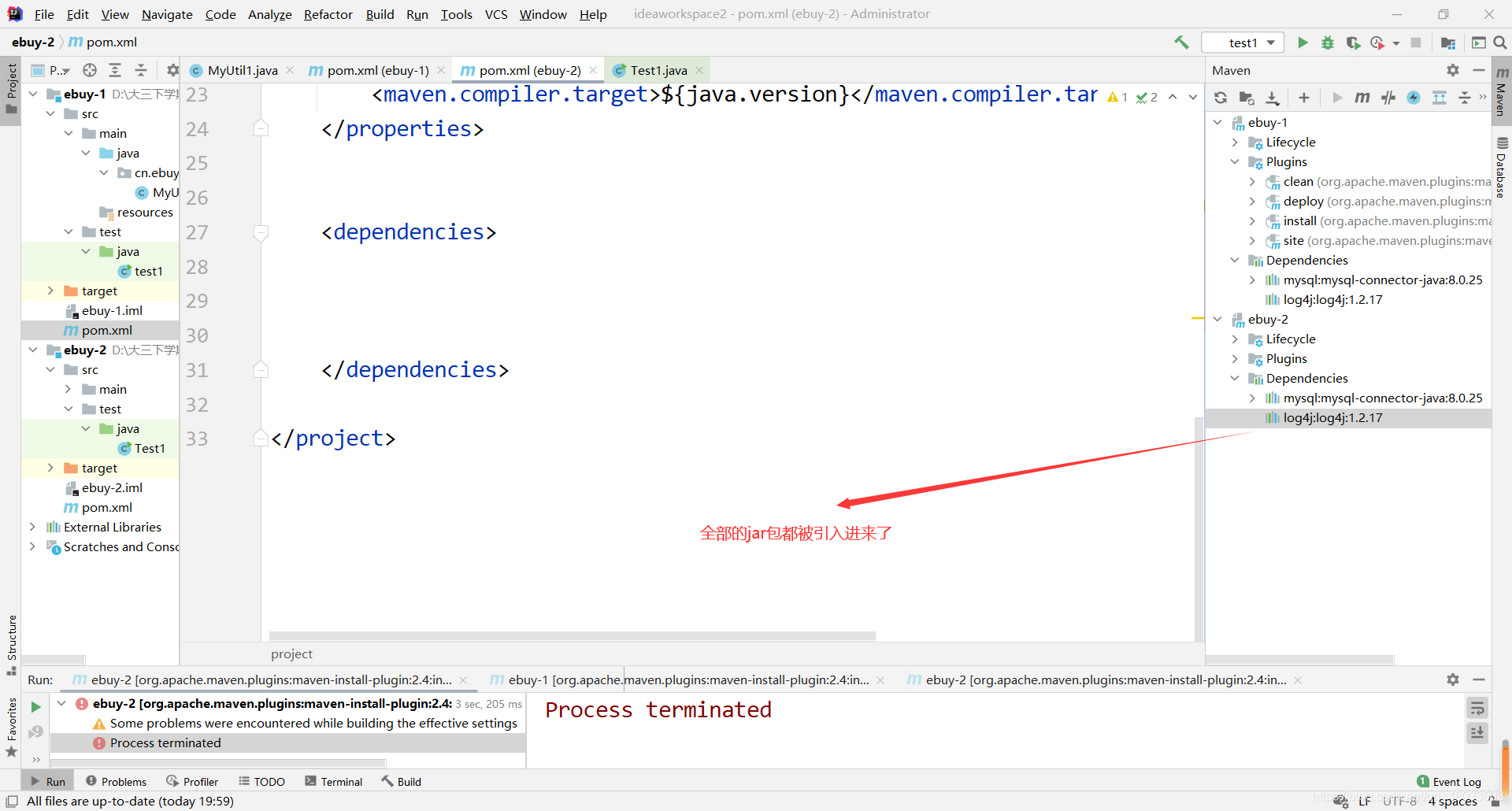
但是我不想要那么多的jar怎么办呢?
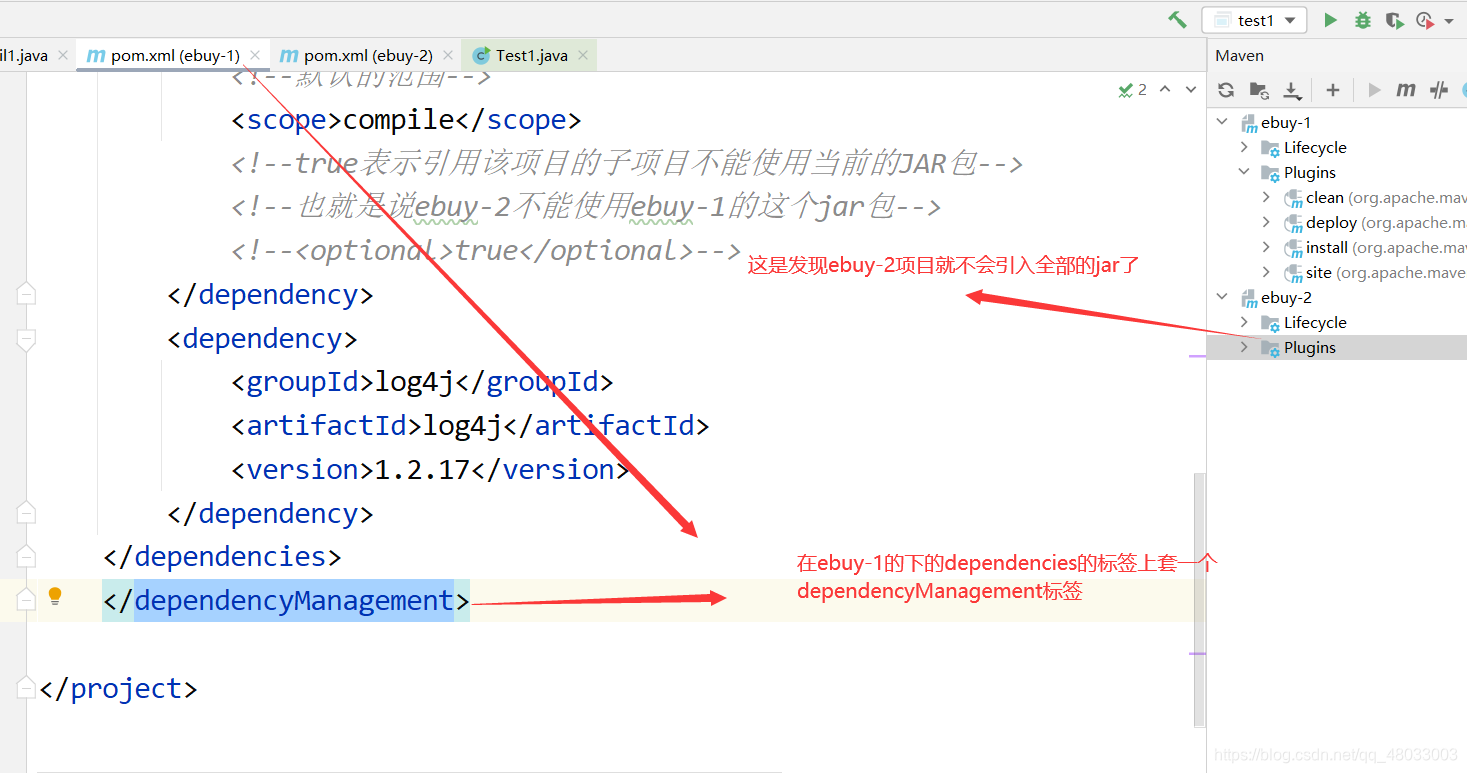
自己就可以引入ebuy-1的jar包了
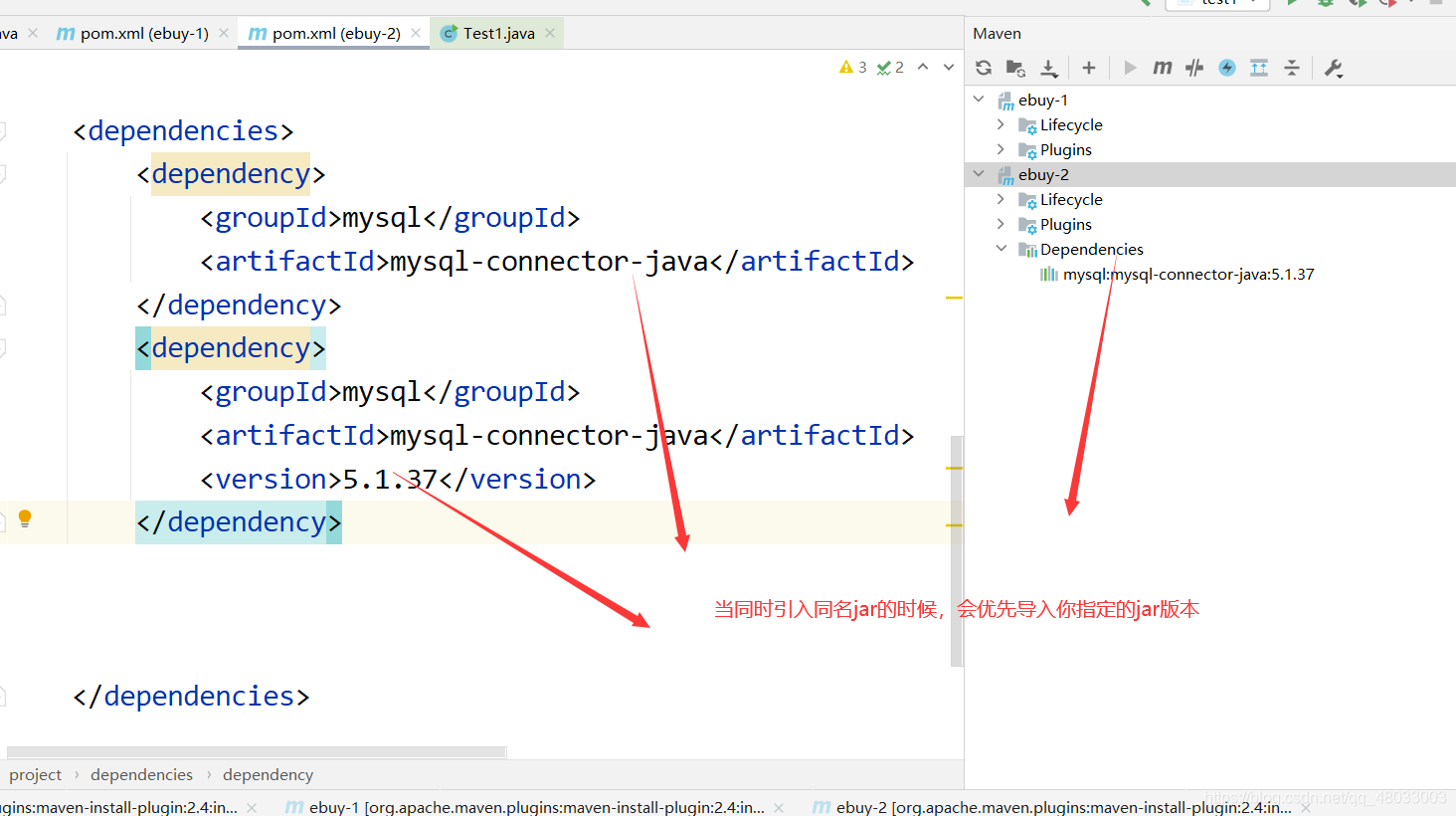
当你引入同名jar时,优先你指定的jar版本
三、创建聚合工程
打包总结
war:需要部署到服务器的项目打war包
pom:用于统一管理依赖的父工程,打pom包,聚合工程的父工程打pom
jar:其他的情况打jar包
了解工程结构
了解工程的结构思路
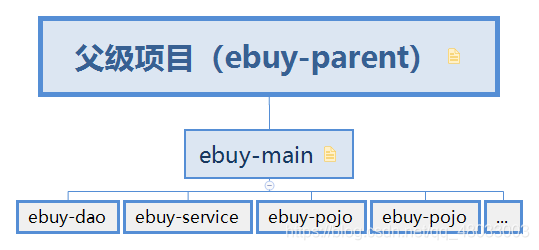
解读:
- ebuy-parent:
ebuy-parent是一个Maven项目
主要功能: 统一管理ebuy项目中所需的jar包
- ebuy-main:
主要功能: ebuy-main整合一下的几个模块为一个项目,是聚合工程的父级项目
关系: ebuy项目继承了ebuy-parent项目
- ebuy-…
聚合项目
创建parent项目
- 只需要创建一个maven项目,不需要web
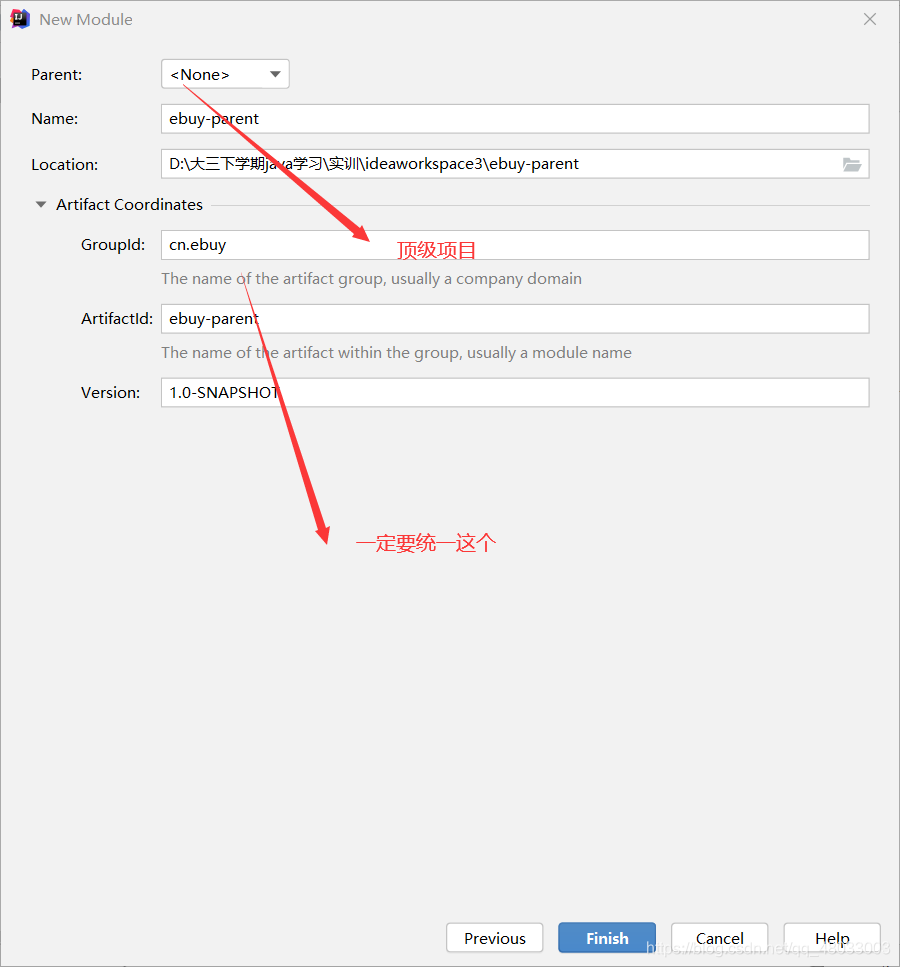
- 设置打包方式
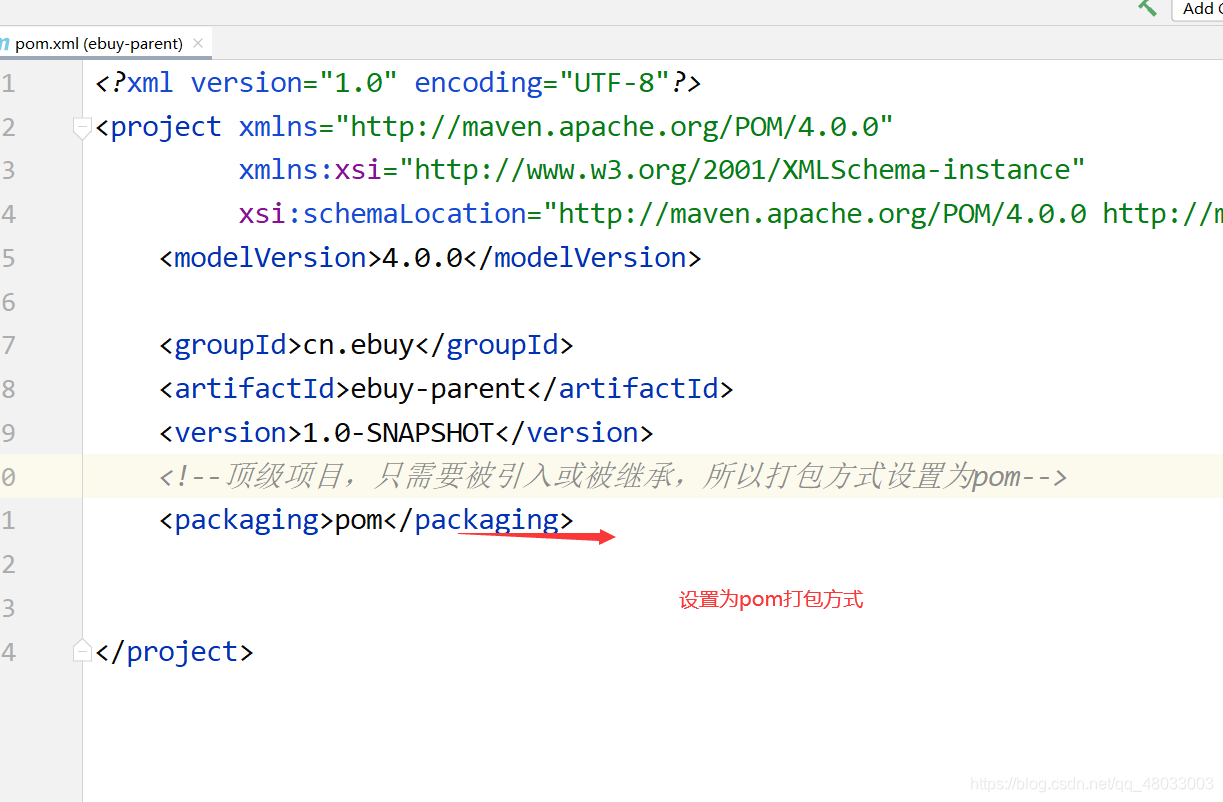
- 配置pom.xml文件
注意打包是pom形式
<?xml version="1.0" encoding="UTF-8"?>
<project xmlns="http://maven.apache.org/POM/4.0.0"
         xmlns:xsi="http://www.w3.org/2001/XMLSchema-instance"
         xsi:schemaLocation="http://maven.apache.org/POM/4.0.0 http://maven.apache.org/xsd/maven-4.0.0.xsd">
    <modelVersion>4.0.0</modelVersion>

    <groupId>cn.ebuy</groupId>
    <artifactId>ebuy-parent</artifactId>
    <version>1.0-SNAPSHOT</version>
    <!--1.顶级项目,只需要被引入或被继承,所以打包方式设置为pom-->
    <packaging>pom</packaging>

    <!--2.properties:统一管理版本号-->
    <properties>
        <junit.version>4.12</junit.version>
        <jstl.version>1.2</jstl.version>
        <servlet-api.version>2.5</servlet-api.version>
        <jsp-api.verison>2.0</jsp-api.verison>
    </properties>

    <!---->

    <dependencyManagement>
        <dependencies>

            <!--单元测试-->
            <dependency>
                <groupId>junit</groupId>
                <artifactId>junit</artifactId>
                <!--version引用上面的properties中配置的版本号-->
                <version>${junit.version}</version>
                <scope>test</scope>
            </dependency>

            <!--jsp相关-->
            <dependency>
                <groupId>jstl</groupId>
                <artifactId>jstl</artifactId>
                <version>${jstl.version}</version>
                <scope>provided</scope>
            </dependency>
            <dependency>
                <groupId>javax.servlet</groupId>
                <artifactId>servlet-api</artifactId>
                <version>${servlet-api.version}</version>
                <scope>provided</scope>
            </dependency>

        </dependencies>

    </dependencyManagement>

</project>
综上,就完成了parent项目了
明白:
parent项目主要就是管理jar包版本,方便子级引用和继承,统一版本号
创建main项目
- 同样不用选择web什么的,直接来到
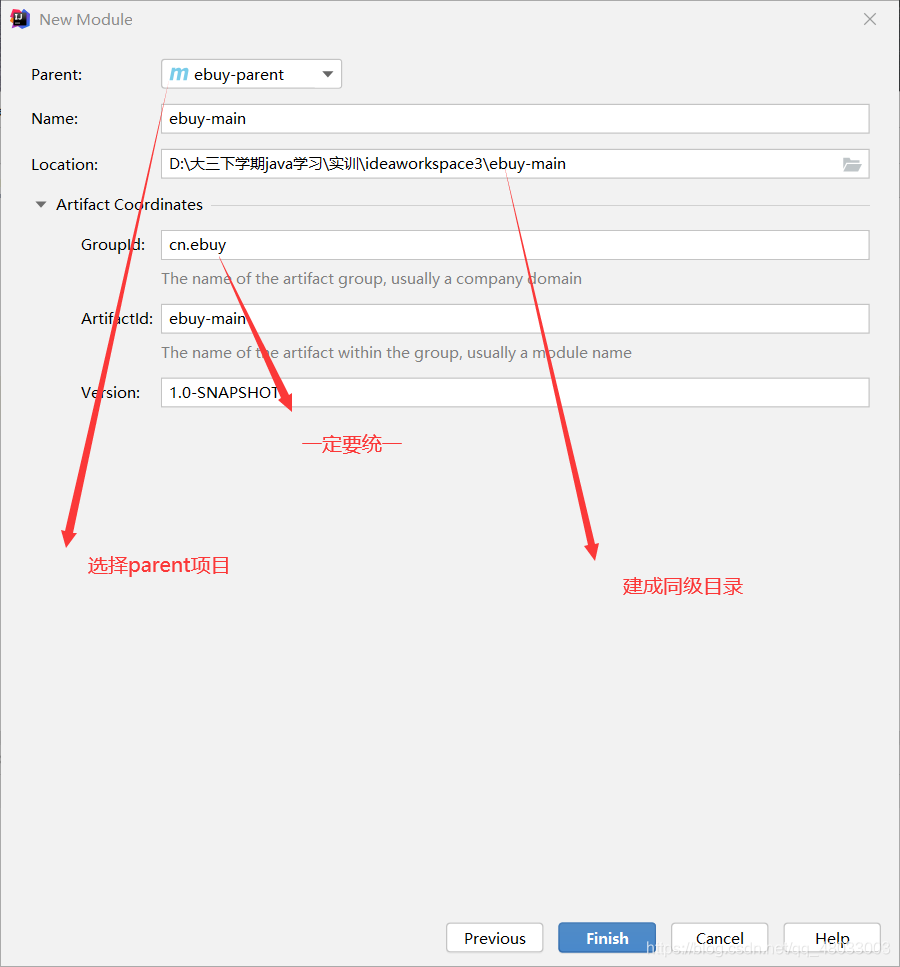
注意这个
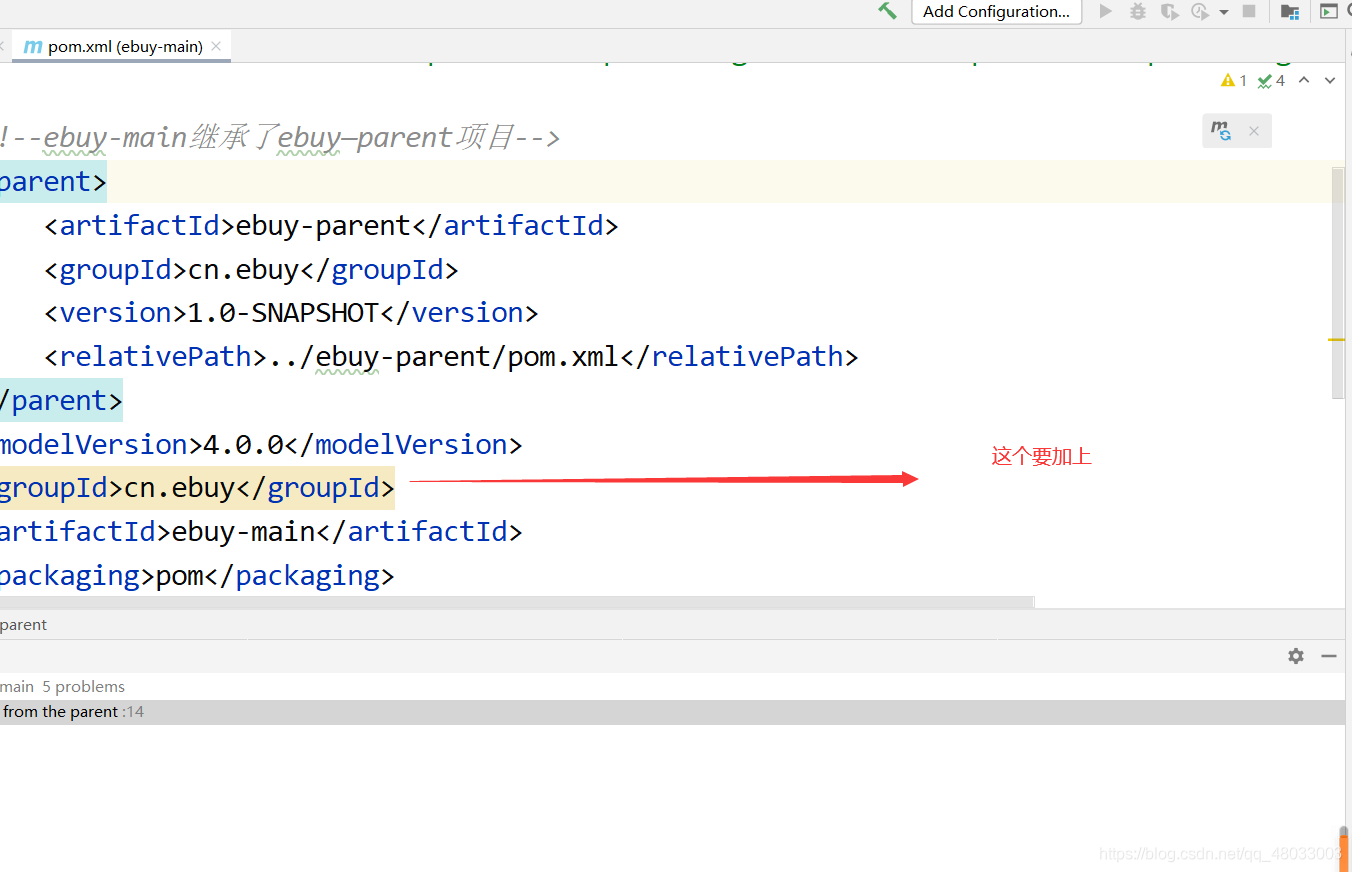
pom.xml文件
注意打包是pom形式
<?xml version="1.0" encoding="UTF-8"?>
<project xmlns="http://maven.apache.org/POM/4.0.0"
         xmlns:xsi="http://www.w3.org/2001/XMLSchema-instance"
         xsi:schemaLocation="http://maven.apache.org/POM/4.0.0 http://maven.apache.org/xsd/maven-4.0.0.xsd">

    <!--ebuy-main继承了ebuy—parent项目-->
    <parent>
        <artifactId>ebuy-parent</artifactId>
        <groupId>cn.ebuy</groupId>
        <version>1.0-SNAPSHOT</version>
        <relativePath>../ebuy-parent/pom.xml</relativePath>
    </parent>
    <modelVersion>4.0.0</modelVersion>
    <groupId>cn.ebuy</groupId>
    <artifactId>ebuy-main</artifactId>
    <packaging>pom</packaging>


</project>
创建dao项目
- 同上面直接到
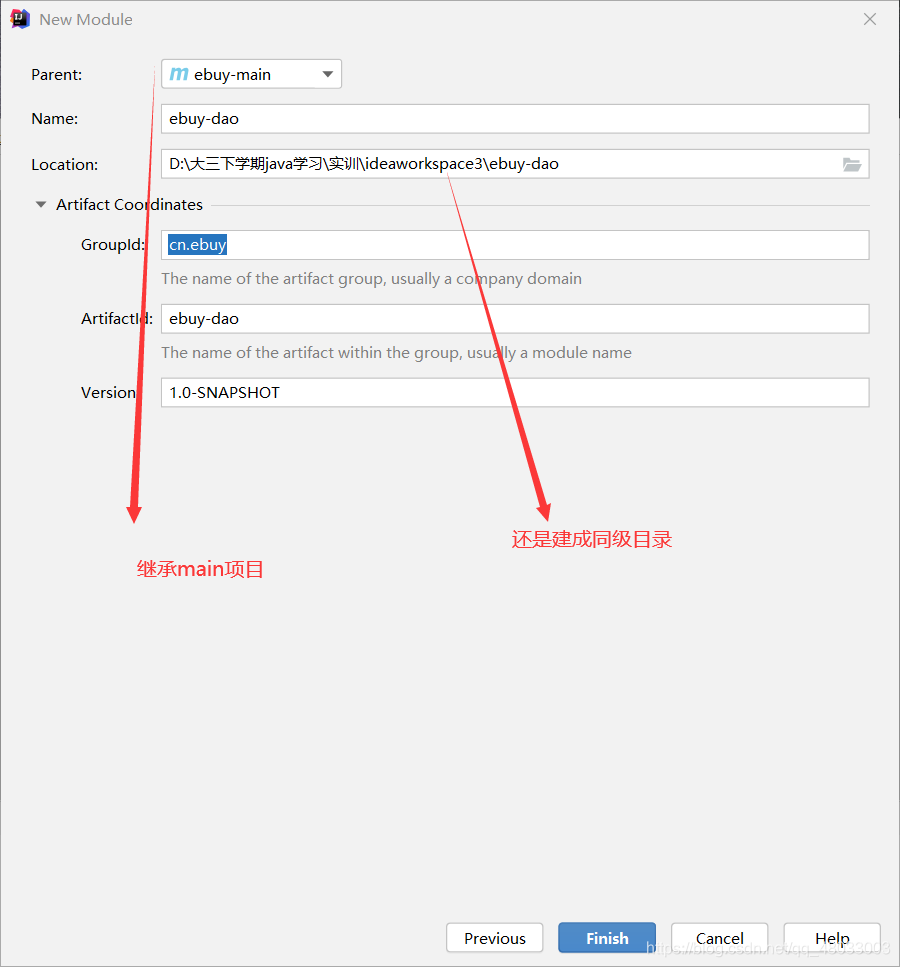
pom.xml文件
<?xml version="1.0" encoding="UTF-8"?>
<project xmlns="http://maven.apache.org/POM/4.0.0"
         xmlns:xsi="http://www.w3.org/2001/XMLSchema-instance"
         xsi:schemaLocation="http://maven.apache.org/POM/4.0.0 http://maven.apache.org/xsd/maven-4.0.0.xsd">
    <parent>
        <artifactId>ebuy-main</artifactId>
        <groupId>cn.ebuy</groupId>
        <version>1.0-SNAPSHOT</version>
        <relativePath>../ebuy-main/pom.xml</relativePath>
    </parent>
    <modelVersion>4.0.0</modelVersion>
    <groupId>cn.ebuy</groupId>
    <artifactId>ebuy-dao</artifactId>
    <!--这个打包为jar!!-->
    <packaging>jar</packaging>


</project>
创建pojo项目
同样
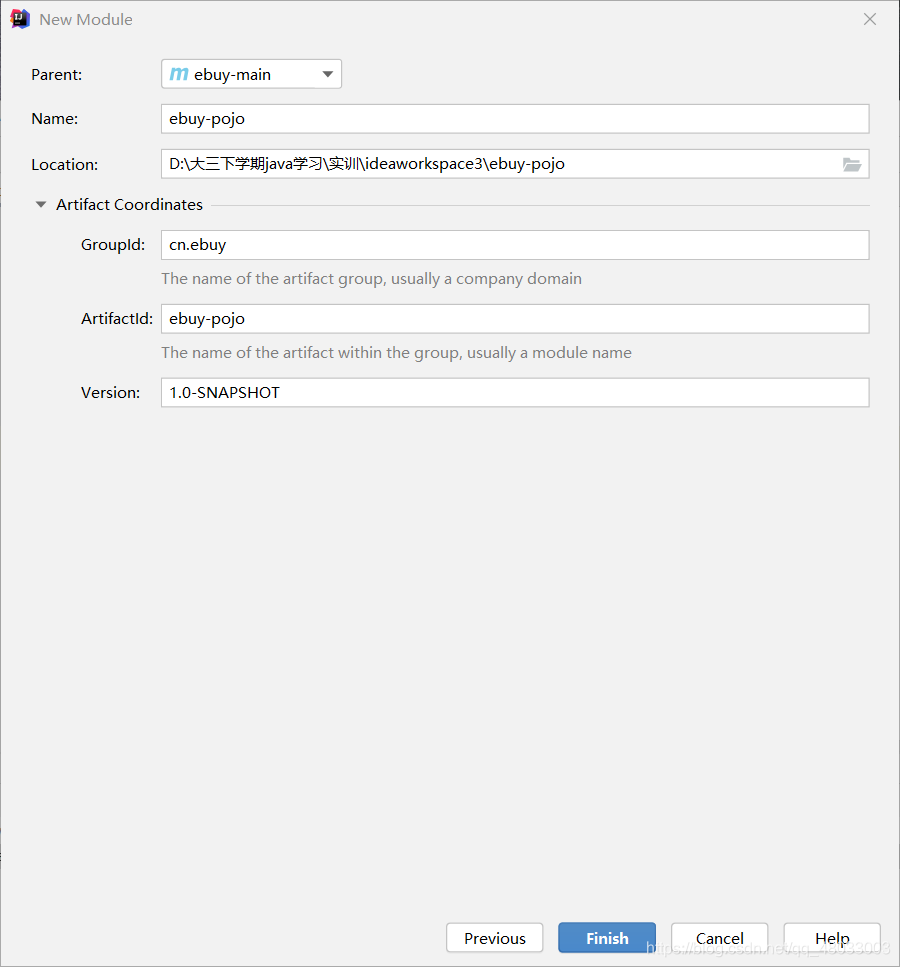
pom.xml文件
<?xml version="1.0" encoding="UTF-8"?>
<project xmlns="http://maven.apache.org/POM/4.0.0"
         xmlns:xsi="http://www.w3.org/2001/XMLSchema-instance"
         xsi:schemaLocation="http://maven.apache.org/POM/4.0.0 http://maven.apache.org/xsd/maven-4.0.0.xsd">
    <parent>
        <artifactId>ebuy-main</artifactId>
        <groupId>cn.ebuy</groupId>
        <version>1.0-SNAPSHOT</version>
        <relativePath>../ebuy-main/pom.xml</relativePath>
    </parent>
    <modelVersion>4.0.0</modelVersion>
    <groupId>cn.ebuy</groupId>
    <artifactId>ebuy-pojo</artifactId>
    <packaging>jar</packaging>


</project>
创建service项目
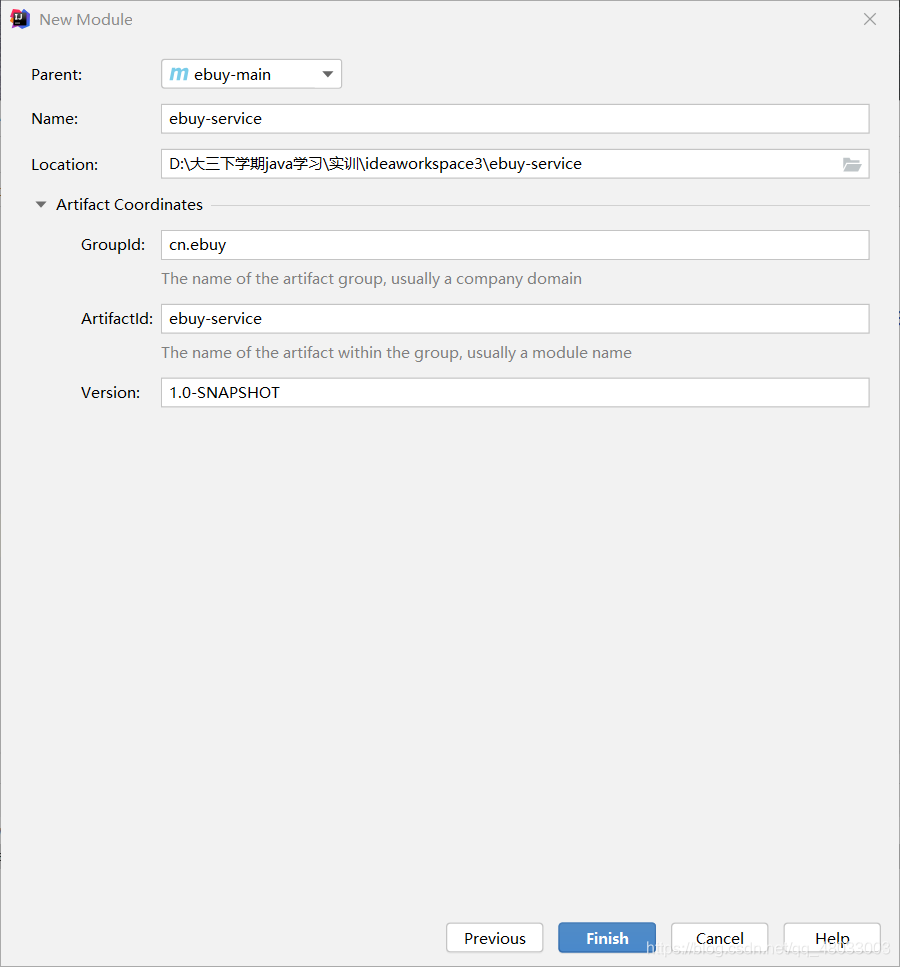
pom.xml
<?xml version="1.0" encoding="UTF-8"?>
<project xmlns="http://maven.apache.org/POM/4.0.0"
         xmlns:xsi="http://www.w3.org/2001/XMLSchema-instance"
         xsi:schemaLocation="http://maven.apache.org/POM/4.0.0 http://maven.apache.org/xsd/maven-4.0.0.xsd">
    <parent>
        <artifactId>ebuy-main</artifactId>
        <groupId>cn.ebuy</groupId>
        <version>1.0-SNAPSHOT</version>
        <relativePath>../ebuy-main/pom.xml</relativePath>
    </parent>
    <modelVersion>4.0.0</modelVersion>
    <groupId>cn.ebuy</groupId>
    <artifactId>ebuy-service</artifactId>
    <packaging>jar</packaging>


</project>
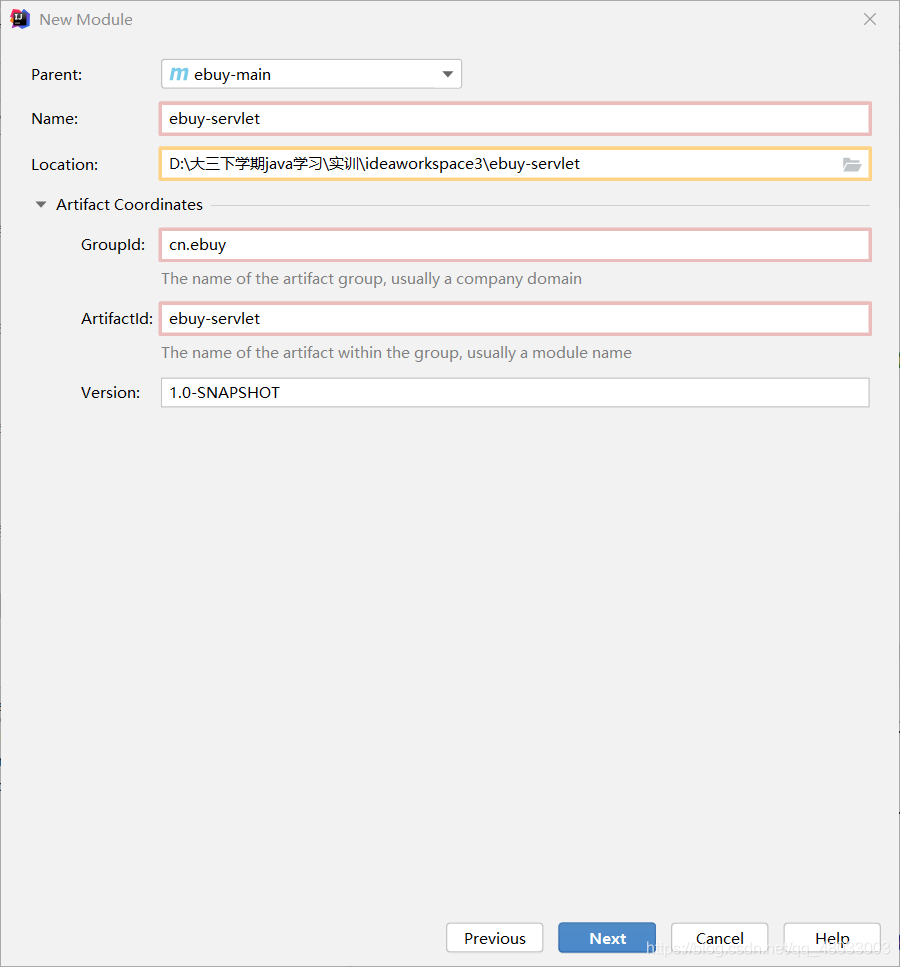
创建servlet项目
首先选择
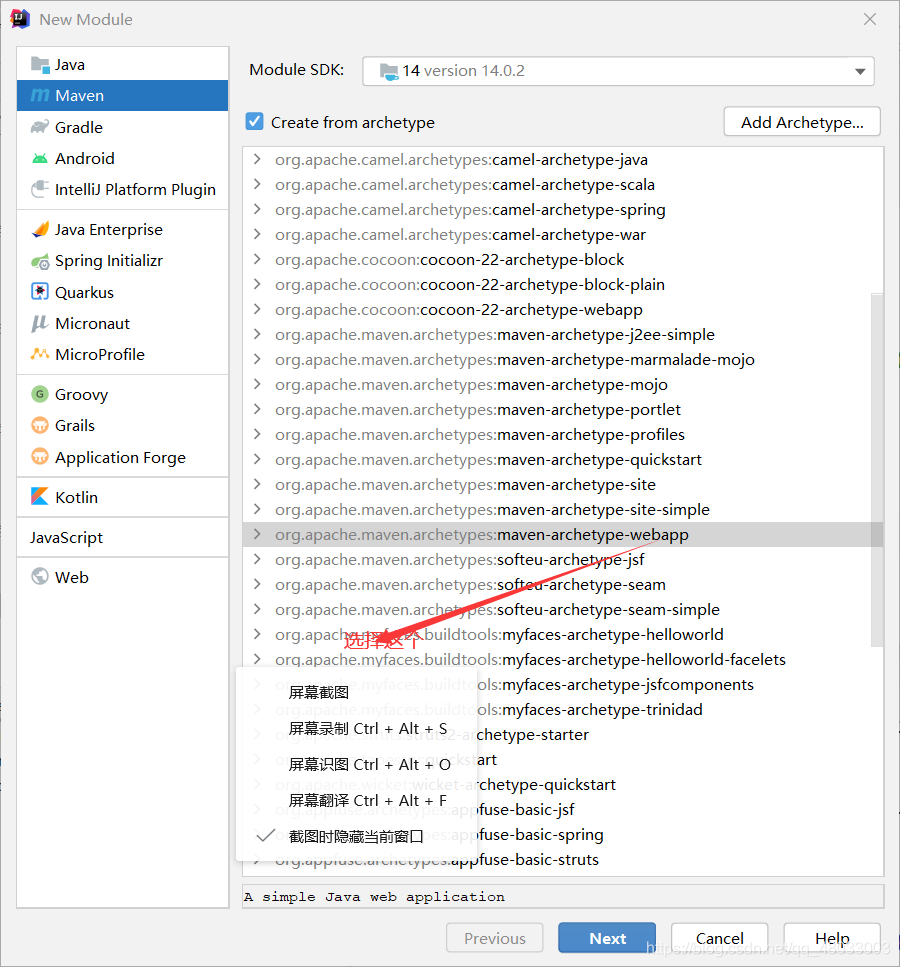
然后
pom.xml文件
打包方式为war
<?xml version="1.0" encoding="UTF-8"?>

<project xmlns="http://maven.apache.org/POM/4.0.0" xmlns:xsi="http://www.w3.org/2001/XMLSchema-instance"
  xsi:schemaLocation="http://maven.apache.org/POM/4.0.0 http://maven.apache.org/xsd/maven-4.0.0.xsd">
  <modelVersion>4.0.0</modelVersion>

  <groupId>cn.ebuy</groupId>
  <artifactId>ebuy-servlet</artifactId>
  <version>1.0-SNAPSHOT</version>
  <packaging>war</packaging>

  <name>ebuy-servlet Maven Webapp</name>
  <!-- FIXME change it to the project's website -->
  <url>http://www.example.com</url>

  <properties>
    <project.build.sourceEncoding>UTF-8</project.build.sourceEncoding>
    <maven.compiler.source>1.7</maven.compiler.source>
    <maven.compiler.target>1.7</maven.compiler.target>
  </properties>

  <dependencies>
    <dependency>
      <groupId>junit</groupId>
      <artifactId>junit</artifactId>
      <version>4.11</version>
      <scope>test</scope>
    </dependency>
  </dependencies>

  <build>
    <finalName>ebuy-servlet</finalName>
    <pluginManagement><!-- lock down plugins versions to avoid using Maven defaults (may be moved to parent pom) -->
      <plugins>
        <plugin>
          <artifactId>maven-clean-plugin</artifactId>
          <version>3.1.0</version>
        </plugin>
        <!-- see http://maven.apache.org/ref/current/maven-core/default-bindings.html#Plugin_bindings_for_war_packaging -->
        <plugin>
          <artifactId>maven-resources-plugin</artifactId>
          <version>3.0.2</version>
        </plugin>
        <plugin>
          <artifactId>maven-compiler-plugin</artifactId>
          <version>3.8.0</version>
        </plugin>
        <plugin>
          <artifactId>maven-surefire-plugin</artifactId>
          <version>2.22.1</version>
        </plugin>
        <plugin>
          <artifactId>maven-war-plugin</artifactId>
          <version>3.2.2</version>
        </plugin>
        <plugin>
          <artifactId>maven-install-plugin</artifactId>
          <version>2.5.2</version>
        </plugin>
        <plugin>
          <artifactId>maven-deploy-plugin</artifactId>
          <version>2.8.2</version>
        </plugin>
      </plugins>
    </pluginManagement>
  </build>
</project>
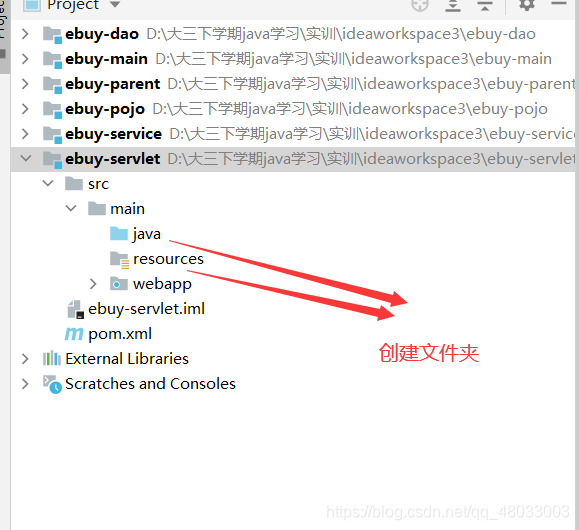
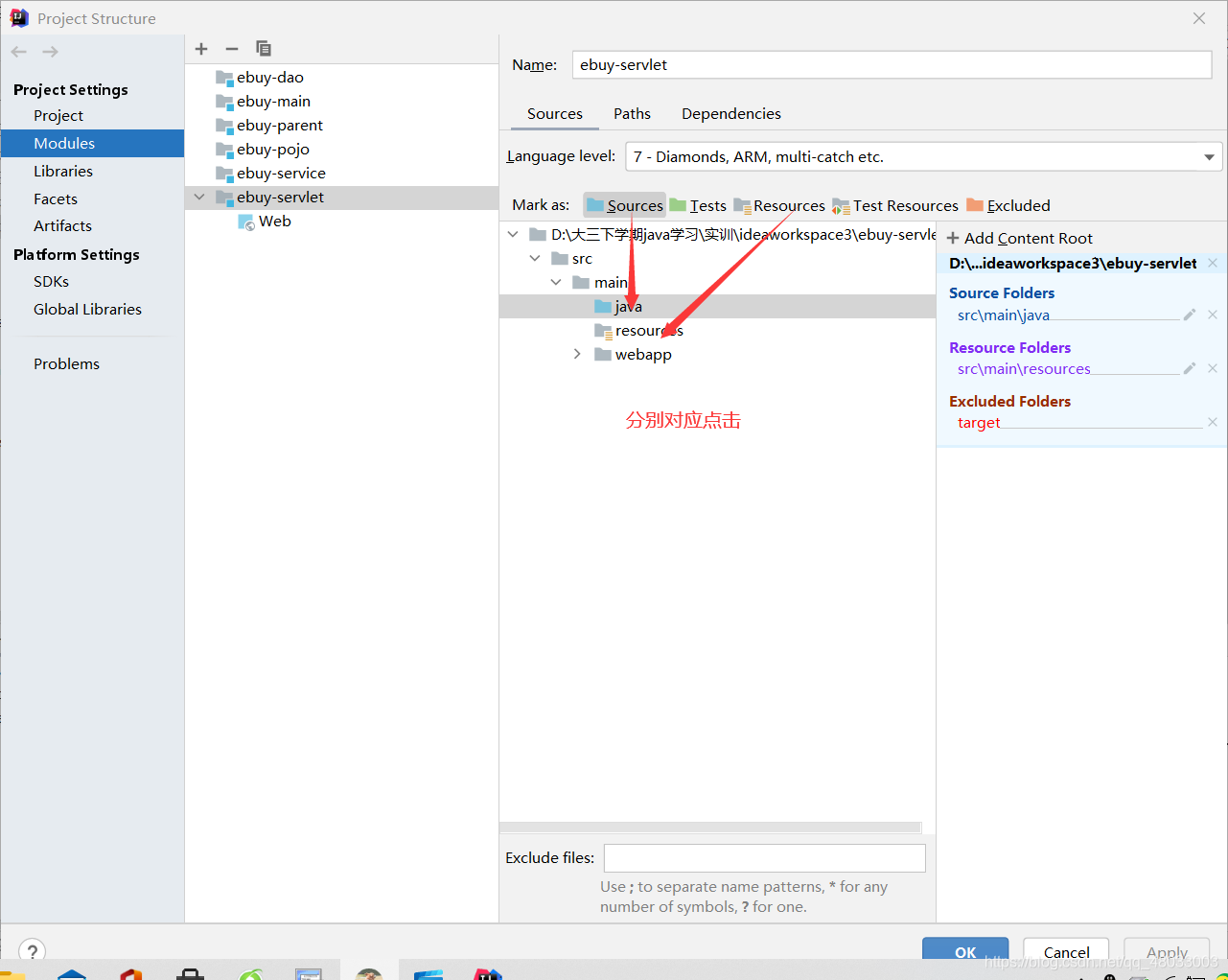
创建文件夹

 浙公网安备 33010602011771号