


Nginx 高级配置指南:Rewrite、If判断、浏览器分离与防盗链
一、Rewrite 功能详解
1.1 基本概念
与Apache等Web服务软件类似,Rewrite的主要功能是实现URL地址的重定向。Nginx的rewrite功能需要PCRE软件的支持,即通过perl兼容正则表达式语句进行规则匹配的。默认参数编译nginx就会支持rewrite的模块,但是也必须要PCRE的支持
功能特点:
- 默认编译Nginx即支持Rewrite模块(需PCRE支持)
- 使用Nginx全局变量或自定义变量结合正则表达式实现URL重写
- 只能放置在
server{}、location{}、if{}块中 - 默认只对域名后的路径部分起作用(不包含参数)
例如
http://www.cy.com/abc/aa/index.php?a=1&b=2 只对/abc/aa/index.php重写URL与URI区别:
- URL:具体路径/位置
- URI:相同类型/特性的对象集合
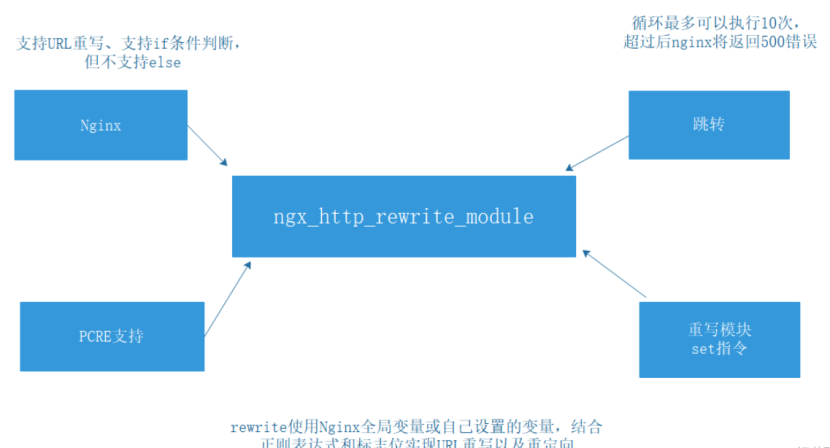
Nginx:通过ngx_http_rewrite_module模块支持URL重写,支持if条件判断,但不支持else。
1.2 Rewrite语法与标记
rewrite [flag]; 参数说明:
regex:正则匹配规则replacement:跳转后的内容flag:重写标记(last、break、redirect、permanent)
Flag标记详解:
last:继续向下匹配新的location规则(常用于server和if中)break:不在匹配后面的任何规则(常用于location中)redirect:302临时重定向(浏览器显示跳转后URL)permanent:301永久重定向(浏览器显示跳转后URL)
1.3 正则表达式元字符
| 字符 | 含义 |
|---|---|
^ | 必须以指定实体开头 |
$ | 必须以指定实体结尾 |
. | 匹配任意单个字符 |
[] | 匹配指定字符集的任意字符 |
[^] | 匹配不在指定字符集内的任意字符串 |
| ` | ` |
() | 分组,组成一组用于匹配的实体,通常会有 |
\ | 转义字符 |
* | 匹配前面的字符出现零次或者多次,如“ab*”能匹配a、ab、abb |
+ | 匹配前面的字符出现一次或者多次,如“ab+”能匹配ab、abb,但是不能匹配a |
? | 匹配前面的字符出现零次或者一次,如“ab(cd)?”能匹配ab、abcd |
捕获组示例:^(hello|chenyu)$ 匹配"hello chenyu"时:
$1 = hello$2 = chenyu
二、企业级Rewrite应用场景
2.1 主要应用领域
- URL规范化:调整用户浏览URL,符合开发和产品需求
- 伪静态化:将动态URL伪装成静态地址,提升搜索引擎收录和用户体验
- 域名迁移:旧域名跳转到新域名(如360buy.com→jd.com)
- 智能重定向:根据变量、目录、客户端信息进行URL调整
三、Rewrite配置实战
3.1 基础环境准备
# nginx访问自定义网页
# 创建测试目录和文件
[root@nginx ~] cd /usr/local/nginx/html/
[root@nginx html] mkdir imgs
[root@nginx html] cd imgs
[root@nginx imgs] ls
linux.linux
# 上传测试图片(如linux.jpg)
[root@nginx imgs] vim /usr/local/nginx/conf/nginx.conf
location /imgs {
}
[root@nginx imgs] nginx -s reload
3.2 Break标记应用/usr/local/nginx/html
[root@nginx html] ls
50x.html  imgs  index.html
[root@nginx html] mv imgs/ images
[root@nginx html] ls
50x.html  images  index.html
再次访问会发现404找不到网页
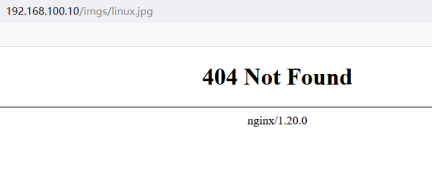
场景: 目录名称变更重定向
location /imgs {
    rewrite ^/imgs/(.*\.jpg)$ /images/$1 break;
}
再次浏览器访问访问,路径不变http://192.168.100.10/imgs/linux.jpg

外部跳转示例:
还可以使用break,让我们访问得站点跳转到百度得首页
location /imgs {
    rewrite ^/imgs/(.*\.jpg)$ http://www.baidu.com break;
}
//浏览器访问http://192.168.100.10/imgs/linux.jpg
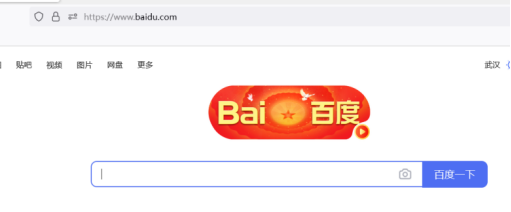
3.3 Last标记应用
location /imgs {
    rewrite ^/imgs/(.*\.jpg)$ /images/$1 last;
}
location /images {
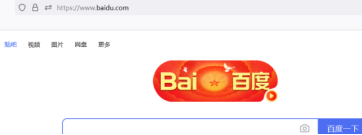
    rewrite ^/images/(.*\.jpg)$ http://www.baidu.com last;
}
3.4 Redirect标记应用(302临时重定向)
location /imgs {
    rewrite ^/imgs/(.*\.jpg)$ /images/$1 redirect;
}
3.5 Permanent标记应用(301永久重定向)
location /imgs {
    rewrite ^/imgs/(.*\.jpg)$ /images/$1 permanent;
}
四、If判断语句
可以使用在server段和location段
4.1 语法结构
if (condition) { ... }4.2 常用条件判断
- 变量名:直接判断变量是否存在
- 比较表达式:使用
=,!=等比较运算符 - 正则匹配:
~:区分大小写匹配~*:不区分大小写匹配
- 文件测试:
-f,!-f:测试路径是否为文件-d,!-d:测试路径是否为目录-e,!-e:测试文件是否存在-x,!-x:测试文件执行权限
4.3 基于域名的跳转配置
场景: 旧域名跳转到新域名vim /usr/local/nginx/conf/nginx.conf
server {
    listen 80;
    server_name www.cy.com;	#设置域名
    location / {
        if ($host = 'www.cy.com') {		#变量host为rewrite的全局变量
            rewrite ^/(.*)$ http://www.chenyu.com/$1 permanent;	#$1是匹配http://www.cy.com/后面的字段
        }
        root html;
        index index.html index.htm;
    }
}[root@www html] echo "chenyu test" > /usr/local/nginx/html/index.html
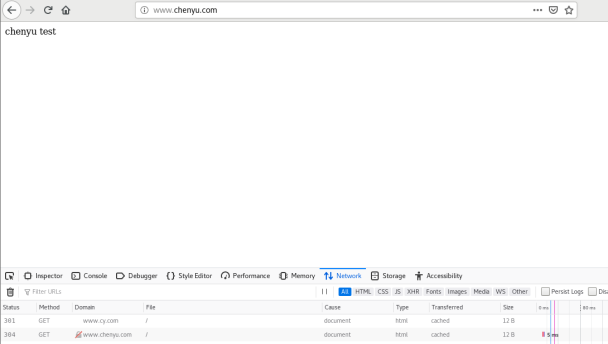
[root@www html] nginx -s reload客户端使用浏览器访问–http://www.cy.com—我们会发现自动跳转到新的域名www.chenyu.com中
4.4 基于客户端IP的访问控制
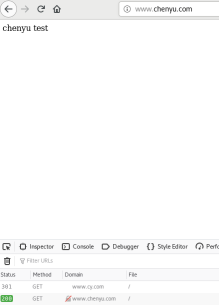
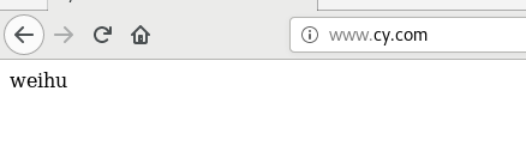
**场景:**假如今天公司业务新版本上线,要求所有ip访问任何内容都显示一个固定维护页面,只有公司ip:192.168.100.20访问正常vim /usr/local/nginx/conf/nginx.conf
server {
    listen 80;
    server_name www.cy.com;
    set $rewrite true;
    if ($remote_addr = "192.168.100.20") {
        set $rewrite false;
    }
    if ($rewrite = true) {
        rewrite (.+) /weihu.html;
    }
    location = /weihu.html {
        root /var/www/html;
    }
    location / {
        root html;
        index index.html index.htm;
    }
}
# 新建/var/www/html目录,并往该目录下写入文件weihu.html,内容为weihu
[root@www html] mkdir /var/www/html -p
[root@www html] echo "weihu" > /var/www/html/weihu.html
[root@www html] nginx -s reload
# 将nginx服务器的/etc/hosts文件发送给客户端2(192.168.100.30)
[root@www html] scp /etc/hosts root@192.168.100.30:/etc/hosts进入客户端1(192.168.100.20),访问http://www.cy.com
进入客户端2(192.168.100.30),访问http://www.cy.com
五、浏览器分离技术
5.1 环境准备
# 创建浏览器特定目录
[root@www html] mkdir /usr/local/nginx/html/firefox
[root@www html] mkdir /usr/local/nginx/html/chrome
# 创建测试文件
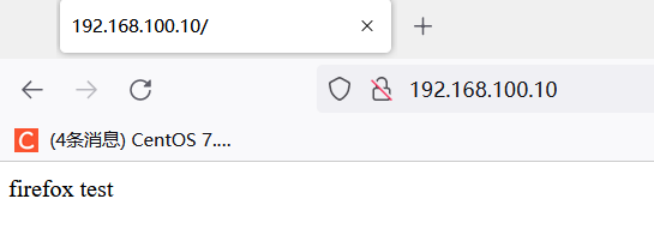
[root@www html] echo "firefox test" > firefox/index.html
[root@www html] echo "chrome test" > chrome/index.html
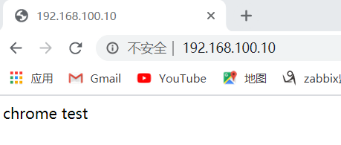
5.2 浏览器识别配置vim /usr/local/nginx/conf/nginx.conf
server {
    listen 80;
    server_name localhost;
        #charset koi8-r;
        #access_log  logs/host.access.log  main;
    location / {
        if ($http_user_agent ~ Firefox) {
            rewrite ^(.*)$ /firefox/$1 break;
        }
        if ($http_user_agent ~ Chrome) {
            rewrite ^(.*)$ /chrome/$1 break;
        }
        root html;
        index index.html index.htm;
    }
    location /firefox {
        root html;
        index index.html;
    }
    location /chrome {
        root html;
        index index.html;
    }
}
#使用nginx -t 测试配置文件是否正确
[root@www html] nginx -t
nginx: the configuration file /usr/local/nginx/conf/nginx.conf syntax is ok
nginx: configuration file /usr/local/nginx/conf/nginx.conf test is successful
//重载nginx
[root@www html] nginx -s reload1、chrome谷歌浏览器访问
2、Firefox浏览器访问
六、防盗链配置
6.1 Referer原理
了解防盗链的原理之前,我们得先学习一个HTTP的头信息Referer,当浏览器向web服务器发送请求的时候,一般都会带上Referer,来告诉浏览器该网页是从哪个页面链接过来的。
后台服务器可以根据获取到的这个Referer信息来判断是否为自己信任的网站地址,如果是则放行继续访问,如果不是则可以返回403(服务端拒绝访问)的状态信息。

6.2 防盗链语法
valid_referers none blocked server_names string;参数说明:
none:Header中的Referer为空时允许访问blocked:Header中的Referer不为空,但是该值被防火墙或代理进行伪装过,如不带"http://" 、"https://"等协议头的资源允许访问。server_names:指定信任的域名或IPstring:支持正则表达式的字符串(以~开头)
6.3 防盗链实战配置
修改Windows的C:\Windows\System32\dirvers\etc\hosts文件,设置域名和映射关系
192.168.100.10    www.cy.com
192.168.100.10    www.chenyu.com
cd /usr/local/nginx/html
mkdir cy
mkdir chenyu
cd cy
# 上传图片到此
vim index.html
<h1>cy<h1><img src=linux.jpg>
cd chenyu
<h1>cy<h1><img src="http://cy.example.com/linux/jpg"># 使用命令查看referer信息,此时还未配置防盗链
[root@www abc] curl --referer http://baidu.com -I http://192.168.100.10/linux.jpg
HTTP/1.1 200 OK
Server: nginx/1.20.0
Date: Thu, 13 Oct 2022 16:00:28 GMT
Content-Type: image/jpeg
Content-Length: 72736
Last-Modified: Mon, 19 Sep 2022 09:57:26 GMT
Connection: keep-alive
ETag: "63283d06-11c20"
Accept-Ranges: bytesserver {
listen 80;
server_name www.cy.com;
root /var/www/cy;
location / {
}
location ~ \.(jpg|png)$ {
valid_referers none blocked www.chenyu.com;
if ($invalid_referer) {
return 403;
}
}
}
server {
listen 80;
server_name www.chenyu.com;
root /var/www/chenyu;
index index.html
location / {
}
}6.4 测试验证
# 正常访问测试
curl -I http://192.168.100.10/linux.jpg
# 模拟盗链访问测试
curl --referer http://baidu.com -I http://192.168.100.10/linux.jpg
# 应返回403状态码- 再次使用浏览器访问,我们发现是可以访问的

- 但是使用命令查看referer信息的时候,会发现返回了403了
[root@www abc] curl --referer http://baidu.com -I http://192.168.100.10/linux.jpg
HTTP/1.1 403 Forbidden
Server: nginx/1.20.0
Date: Thu, 13 Oct 2022 16:30:11 GMT
Content-Type: text/html
Content-Length: 153
Connection: keep-alive
rl --referer http://baidu.com -I http://192.168.100.10/linux.jpg
应返回403状态码
- 再次使用浏览器访问,我们发现是可以访问的
 [外链图片转存中...(img-HNrIQeGV-1759057042146)]
- 但是使用命令查看referer信息的时候,会发现返回了403了
```bash
[root@www abc] curl --referer http://baidu.com -I http://192.168.100.10/linux.jpg
HTTP/1.1 403 Forbidden
Server: nginx/1.20.0
Date: Thu, 13 Oct 2022 16:30:11 GMT
Content-Type: text/html
Content-Length: 153
Connection: keep-alive
那么此时防盗链已经做好了

 浙公网安备 33010602011771号