
HTL Option@的一些用法
参考视频:AEM Sightly #4 | Include files and resources using data-sly-include and data-sly-resource in sightly
@
目录格式:
+htlsightly
    +files
        -include3.html
    -include4.html
    -htlsightly.html(this page)
prependPath
进到/files下找include3.html
<div data-sly-include="${'include3.html' @ prependPath='/files'}"></div>
@file = xxx
<div data-sly-include="${@ file = 'include4.html'}"></div>
appendPath prependPath
<div data-sly-include="${'include4.html'@ appendPath='/append', prependPath='/prepend'}"></div>//这两个分别将路径加在include4.html的前和后
data-sly-resource
首先,其实URL路径就是content下页面的实际路径
@加页面路径下的组件
这样就会将这个组件添加到其中,难道这就是baked-in?
<div data-sly-resource="${'/content/xxx/us/en/generic-page/jcr:content/root/responsivegrid/header'}"></div>
或者
<div data-sly-resource="${'/content/xxx/us/en/generic-page' @ appendPath='/jcr:content/root/responsivegrid/header'}"></div>
addSelectors
注意:
- @符号后面多项内容用逗号隔开即可,不需要再写@符号了
- resource不能resource自己,不然会重复很多出来,会出问题
已知:resource路径是页面路径下的组件
此时在header组件下添加一个goodbye.html
然后再addSelectors='goodbye'
这样header就不会显示header.html而是goodbye.html了
<div data-sly-resource="${'/content/xxx/us/en/generic-page'@ appendPath='/jcr:content/root/responsivegrid/header', addSelectors='goodbye'}"></div>
resourceType
这个意思应该是直接添加组件进去,但是如果dialog没有填的话会出问题的。好像是和页面下的路径配合着用,但是感觉没啥用的样子
resourceType这个路径把最开头的/apps去掉了
<div data-sly-resource="${@ resourceType='xxx/components/content/header', addSelectors='goodbye'}"></div>
但是 加了一个path='header'之后,header就变为了一个可以操控的组件 然后加了进来。不知道这个path又有什么用
<div data-sly-resource="${@ path='header', resourceType='xxx/components/content/header'}"></div>
路径问题
如果单单用${'list'}那么这个路径到底是指什么呢?页面下的?还是组件内的?
其实是组件的位置,与组件同级的名为list的组件。
而且!如果list中并没有list.html是不行的,此时你要加上list的resourceType。因为这个list是继承了父类的list。
<div data-sly-resource="${'list' @ resourceType='core/wcm/components/list/v2/list'}"></div>
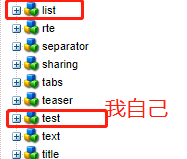
所以,如果你在单引号中间写绝对路径也是ok的
盲猜path和直接单引号代表一个意思,
resourceType其实就是字面意思,确定了他的类型罢了
rte只显示字符串
加个@ context='html'
${contact.caption @ context='html'}
知识离开了脑子,就只是一堆文字

 浙公网安备 33010602011771号