

css实践笔记
一、关于position中fixed和absoluted定位问题
之前看其他博客文章大多数关于fixed的定位都是相对于body来定位的,而absolute在祖先元素的position不满足非static的情况下是相对于body来定
位。
亲自试了下,以上说法都不对,当然测试的浏览器是目前最新的,所以说如果以上说法是和浏览器有关的话,需要自行去验证不同浏览器版本了。
在祖先元素position值不满足非static的情况下是相对浏览器窗口定位
position:absolute
html布局
<body>
    <main>
      <div>第一个div</div>
      <div>
        <span> 第二个div</span>
      </div>
    </main>
    <span>body的背景色</span>
  </body>
css代码
html {
        background-color: yellow;
        width: 700px;
        height: 300px;
        margin-left: 20px;
        margin-top: 20px;
        /* position: relative; */
      }
      body {
        width: 500px;
        height: 200px;
        background-color: lightblue;
        margin-left: 40px;
        margin-top: 40px;
      }
      main div:nth-child(2) {
        background-color: lightcoral;
        height: 50px;
        width: 180px;
        position: absolute;
        top: 0;
        left: 0;
      }
      main div:nth-child(1) {
        height: 100px;
        background-color: lightgreen;
      }
效果:
html和body都没加相应的position属性值
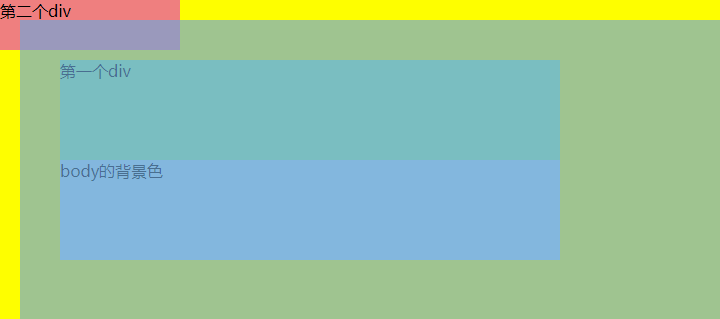
html中的position:relative取消注释 效果:
相对于html进行偏移。

是相对于浏览器窗口定位的
可将上面代码第二div的position值改为fixed进行测试查看效果
position:fixed

 浙公网安备 33010602011771号