
Centos安装python和git
centos默认自带Python2.7,接下来我们一步步安装Python3 使Python2 Python3共存。
一、安装python
centos安装的时候最好带上developtools,很多包就不必再安装了,比如wget。
登录系统后,用root登录吧。
安装依赖包:
yum -y install zlib*
1、下载python。
cd /
mkdir download
cd download
wget https://www.python.org/ftp/python/3.8.13/Python-3.8.13.tgz

2、解压并安装
tar -zxvf Python-3.8.13.tgz
cd Python-3.8.13
#安装到目录/usr/local/python3
mkdir -p /usr/local/python3
./configure --prefix=/usr/local/python3
make && make install

3、将python3/bin 配置到环境变量
vi /etc/profile
#在末尾加上
export PYTHON_PATH=/usr/local/python3
export PATH=$PATH:$PYTHON_PATH/bin
:wq#保存退出
source /etc/profile #使环境变量生效
这个时候python3 -V,或者pip3 -V可以看到。上面的是2.7,下面的是3.8

这里安装完成后发现pip没有。试了一个安装。
先安装扩展源EPEL,这个扩展源提供了很多软件包的下载。
yum -y install epel-release
安装 pip3

Centos系统
yum install python3-pip -y


Ubuntu等系统
sudo apt install python3-pip -y
4、更改python为centos默认Python 即配置软连接
mv /usr/bin/python /usr/bin/python.bak
ln -s /usr/local/pyhon3/bin/python3 /usr/bin/python
## 原来没有pip,这奇怪了。
mv /usr/bin/pip /usr/bin/pip.bak
ln -s /usr/local/pyhon3/bin/pip3 /usr/bin/pip
5、更改yum配置 因为yum默认使用Python2。
vim /usr/libexec/urlgrabber-ext-down
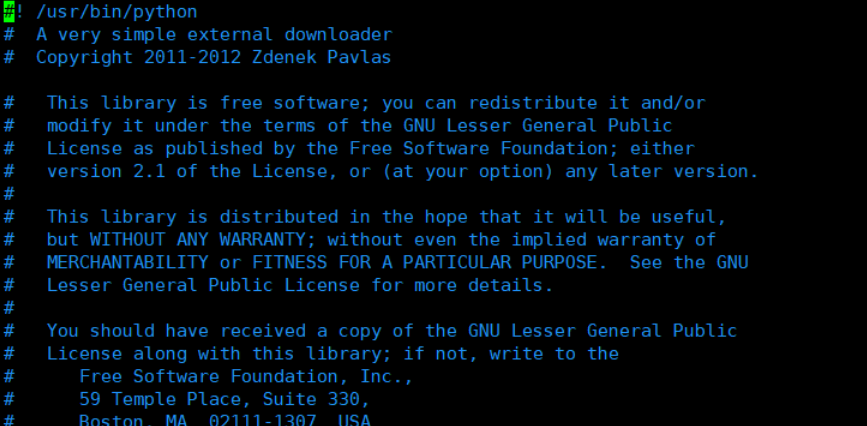
同理 vim /usr/bin/yum

这里不该python3的软连接也好,这样容易分清楚。
6、卸载python3
卸载Python3的步骤

#卸载python3
rpm -qa|grep python3|xargs rpm -ev --allmatches --nodeps

#删除所有残余文件
whereis python3 |xargs rm -frv

#查看现有安装的python,验证是否删除干净
whereis python
二、 安装GIT
1、不要求版本号时,只需要一行代码:
yum -y install git
2、查看版本,确认安装完成。
git --version

(二)升级版本
1、上述步骤的git其实是被安装在/usr/libexec/git-core目录下

2、进入git在GitHub上发布版本页面
https://github.com/git/git/releases
这个页面经常打不开。。
选择最新版的tar.gz包

wget下载文件:

wget下载会有问题。 在浏览器上下载到本地,再用XFtp传上去。

3、解压安装:
#解压
tar -zxvf v2.36.1.tar.gz
#进入解压后的目录
cd git

#删除之前安装的git
yum -y remove git

#安装依赖包
yum install curl-devel expat-devel gettext-devel openssl-devel zlib-devel gcc perl-ExtUtils-MakeMaker

#创建git文件夹
mkdir /usr/local/git

#编译源码
make prefix=/usr/local/git all

#安装git至/usr/local/git路径
make prefix=/usr/local/git install

#配置环境变量
vi /etc/profile

#增加:
export PATH=$PATH:/usr/local/git/bin

刷新完环境变量,在看version,就是最新的了。

三、遇到报错,需要升级OPENSSL
pip is configured with locations that require TLS/SSL, however the ssl module in Python is not available.
1、下载 openssl 编译安装
(1)下载方法1:openssl 官方下载地址:https://www.openssl.org/source/

(2)下载方法2:
wget https://github.com/openssl/openssl/archive/OpenSSL_1_1_1d.tar.gz
2、解压
tar -zxvf OpenSSL_1_1_1d.tar.gz
3、编译安装
cd  openssl-OpenSSL_1_1_1d
./config --prefix=/usr/local/openssl // 指定安装路径
make && make install
4、替换当前系统的旧版本 openssl 「先保存原来的
mv /usr/bin/openssl /usr/bin/openssl.old
mv /usr/lib64/openssl /usr/lib64/openssl.old
mv /usr/lib64/libssl.so /usr/lib64/libssl.so.old
ln -s /usr/local/openssl/bin/openssl /usr/bin/openssl
ln -s /usr/local/openssl/include/openssl /usr/include/openssl
ln -s /usr/local/openssl/lib/libssl.so /usr/lib64/libssl.so
echo "/usr/local/openssl/lib" >> /etc/ld.so.conf
ldconfig -v // 建立动态链接
5、查看当前系统 openssl 版本
openssl version
6、重新编译
cd Python-3.8
./configure --prefix=/usr/local/python3 --with-openssl=/usr/local/openssl
make
make install
ln -s /usr/local/python3/bin/python3 /usr/bin/python3
ln -s /usr/local/python3/bin/pip3 /usr/bin/pip3

 浙公网安备 33010602011771号