

家园志改版--登录验证加密处理
上一篇关于登录模块遗留下了加密问题。
开始的时候我认为即使要加密也没有多大意义,因为开始判断用户是否登录的方法只判断客户端是否有名为"UserName"和"UserID"的Cookie,如下代码:
public static LoginState CheckLogin() {
    HttpCookieCollection CookieCollection = GetSavedCookieCollection();
        if (CookieCollection.AllKeys.Length < keys.Length)
        {
            return LoginState.UnLogin;
        }
        else
        {
            return LoginState.Success;
        }
    }
}
所以,即使对Cookie加密也没有半点意义。但是我知道这样很不安全,只要客户端添加两个Cookie就可以登录了,岂不是很不安全。penpen的提议给了我思路:将同一个字段的用两种不同方法加密,判断时再各自解密并判断是否相等。具体流程如下图示意:
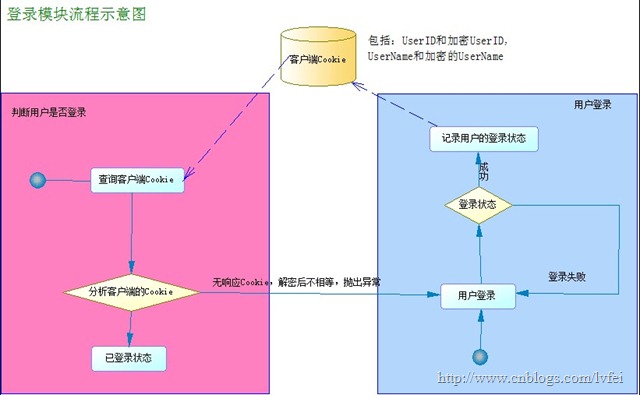
改进后的代码:
保存Cookie的时候就要将UserID以两个不同密钥加密保存,UserName也是如此。现在保存到Cookie的值如下:
private static string[] keys = { "UserID","UserEID", "UserName","UserEName" }; //需要存放在Cookie里面的信息
保存Cookie的方法如下:
public static void SaveCookie(bool saveLong, string username) {
    int userid = GetUserIDByUserName(username);
    if (userid != -1)
    {
        Hashtable CookieValues = new Hashtable();
        CookieValues["UserID"] = Encryptor.Encrypt(userid.ToString());
        CookieValues["UserEID"] = Encryptor.Encrypt(userid.ToString(), "7E52PDK9");
        CookieValues["UserName"] =Encryptor.Encrypt( username);
        CookieValues["UserEName"] = Encryptor.Encrypt(username, "7E52PDK9");
        HttpCookieCollection cookieCollection = GetCookieCollection();
        foreach (string key in keys)
        {
            cookieCollection[key].Value = CookieValues[key].ToString();
            if (saveLong)
            {    //如果用户要求记住密码,则让Cookie在14天后过期
                cookieCollection[key].Expires = DateTime.Now.AddDays(14d);
            }
            HttpContext.Current.Response.Cookies.Add(cookieCollection[key]);
        }
    }
}
这样保存到客户端的Cookie是加过密的,很小的概率用户添加的Cookie值经过解密后会相等(但是还是有概率的)。
现在需要改进判断用户是否已登录的方法,
public static LoginState CheckLogin() {
    HttpCookieCollection CookieCollection = GetSavedCookieCollection(); //7E52PDK9
    try
    {
        if (CookieCollection.AllKeys.Length < keys.Length || Encryptor.Decrypt(CookieCollection["UserID"].Value) != Encryptor.Decrypt(CookieCollection["UserEID"].Value, "7E52PDK9") || Encryptor.Decrypt(CookieCollection["UserName"].Value) != Encryptor.Decrypt(CookieCollection["UserEName"].Value, "7E52PDK9"))
        {
            return LoginState.UnLogin;
        }
        else
        {
            return LoginState.Success;
        }
    }
    catch (Exception)
    {
        return LoginState.UnLogin;
    }
}
这里增加了三个条件说明用户未登录:解密后的UserName和UserEName不相等;解密后的UserID和UserEID不相等;客户端的Cookie少于必须的Cookie。然而在我测试的时候发现如果我将Cookie值改变成长度大于8的时候,程序就会报错,所以加上Try{}Catch{},当然此时用户肯定未登录。
下面是对字符串加密的方法,引用金色海洋--自然框架里面的:
public static string Encrypt(string sourceData) { //加密,固定密钥 //set key and initialization vector values //Byte[] key = new byte[] {0x21, 2, 0x88, 4, 5, 0x56, 7, 0x99}; //Byte[] iv = new byte[] {0x21, 2, 0x88, 4, 5, 0x56, 7, 0x99}; Byte[] key = new byte[] { 1, 2, 3, 4, 5, 6, 7, 8 }; Byte[] iv = new byte[] { 1, 2, 3, 4, 5, 6, 7, 8 }; try { //convert data to byte array Byte[] sourceDataBytes = System.Text.ASCIIEncoding.UTF8.GetBytes(sourceData); //get target memory stream MemoryStream tempStream = new MemoryStream(); //get encryptor and encryption stream DESCryptoServiceProvider encryptor = new DESCryptoServiceProvider(); CryptoStream encryptionStream = new CryptoStream(tempStream, encryptor.CreateEncryptor(key, iv), CryptoStreamMode.Write); //encrypt data encryptionStream.Write(sourceDataBytes, 0, sourceDataBytes.Length); encryptionStream.FlushFinalBlock(); //put data into byte array Byte[] encryptedDataBytes = tempStream.GetBuffer(); //convert encrypted data into string return System.Convert.ToBase64String(encryptedDataBytes, 0, (int)tempStream.Length); } catch (Exception ex) { throw (ex); } }由于篇幅的问题,这就不一一写出来了。可以下载源程序。

 浙公网安备 33010602011771号