

家园志改版--登录模块
虽然标题上写着标题上写着“家园志改版”,但实际上作为登录模块来说他是独立的。登录模块这一部分以前我从未涉及到,所以大部分的功能都是从原来的Ncuhome.Login组件里面分析、copy得来的,当然有人喜欢用.net内置的Membership,它功能强大、使用方便。可对于我个人来说,在配置Membership上经常存在问题,自己心里对它也有防范,会问些问题:如果出现错误我该从那解决····
用户登录流程

为了充分的保证用户的个人信息的安全,网站需要通过要求用户登录区分不同的用户、设置不同权限。从而需要记录用户的登录用户名和密码等信息,下图是记录用户登录信息的表的设计:
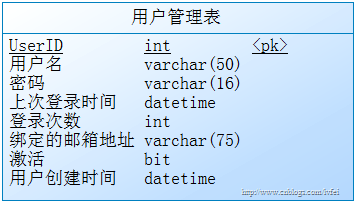
对于数据库操作的代码:
访问数据库判断该用户是否存在
public static bool UserExist(string username) {
    int num = 0;   //记录符合查询的 记录数
    string cmdtxt = "select count(*) from Users where UserName=@username";
    SqlParameter UserName = new SqlParameter("@username", username);
    SqlConnection conn = new SqlConnection(connString);
    SqlCommand cmd = new SqlCommand(cmdtxt, conn);
    cmd.Parameters.Add(UserName);
    conn.Open();
    num = Convert.ToInt32(cmd.ExecuteScalar());
    conn.Close();
    if (num > 0)
    {
        if (num != 1) ;//记录到系统异常日志中
        return true;
    }
    else { return false; }
}
访问数据库判断此用户名和密码的记录是否存在
public static bool CheckPassword(string username, string password) {
    int num = 0;//记录符合查询的记录数
    string cmdtxt = "select count(*) from Users where UserName=@username and Password=@password";
    SqlParameter UserName = new SqlParameter("@username", username);
    SqlParameter Password = new SqlParameter("@Password", password);
    SqlConnection conn = new SqlConnection(connString);
    SqlCommand cmd = new SqlCommand(cmdtxt, conn);
    cmd.Parameters.Add(UserName);
    cmd.Parameters.Add(Password);
    conn.Open();
    num = Convert.ToInt32(cmd.ExecuteScalar());
    conn.Close();
    if (num > 0)
    {
        if (num != 1) ;//记录到系统异常日志中
        return true;
    }
    else { return false; }
}
第一步:验证当前用户是否注册
设置一个枚举类型,记录用户登录状态:
public enum LoginState {
    WithoutUser = 0,    //不存在该用户
    PasswordError = 1,  //密码错误
    Success = 2,        //登录成功
    UnLogin = 3         //未登录用户
}
public static LoginState CheckLogin(string username, string password, bool saveLong) {
    if (UserExist(username))
    {
        if (CheckPassword(username, password))
        {
            //SaveCookie(saveLong, username);    记录用户的登录状态
            return LoginState.Success;
        }
        else { return LoginState.PasswordError; }
    }
    else
    { return LoginState.WithoutUser; }
}
第二步:记录用户的登录状态,即对Cookie的操作(登录成功)
定义需要保存到Cookie的信息
private static string[] keys = { "UserID", "UserName" }; //需要存放在Cookie里面的信息
public static void SaveCookie(bool saveLong, string username) {
    int userid = GetUserIDByUserName(username);
    if (userid != -1)
    {
        Hashtable CookieValues = new Hashtable();
        CookieValues["UserID"] = userid;
        CookieValues["UserName"] = username;
        HttpCookieCollection cookieCollection = GetCookieCollection();
        foreach (string key in keys)
        {
            cookieCollection[key].Value = CookieValues[key].ToString();
            if (saveLong)
            {    //如果用户要求记住密码,则让Cookie在14天后过期
                cookieCollection[key].Expires = DateTime.Now.AddDays(14d);
            }
            HttpContext.Current.Response.Cookies.Add(cookieCollection[key]);
        }
    }
}
获取已保存的Cookie,以用来判断用户是否登录:
public static HttpCookieCollection GetSavedCookieCollection() {
    HttpCookieCollection cookieCollection = new HttpCookieCollection();

    foreach (string key in keys)
    {
        HttpCookie cookie = HttpContext.Current.Request.Cookies[key];

        if (cookie != null)
        {
            cookieCollection.Add(cookie);
        }
    }
    return cookieCollection;
}
用户退出的时候需要清除一保存的Cookie:
public static void ClearCookieCollection() {
    HttpCookieCollection CookieCollection = GetSavedCookieCollection();
    for (int i=0;i<CookieCollection.Count;i++)
    {
        HttpCookie item=CookieCollection[i];
        if (item != null)
        {
            item.Expires = DateTime.Now.AddDays(-1d);
            item.Values.Clear();
            HttpContext.Current.Response.Cookies.Set(item);
        }
    }
}
还有待完成的:
- 保存的Cookie需要加密,在判断用户是否登录的同时判断Cookie是否被更改;
- 登录和退出方法需要提供一个参数--链接,以方便登录后重定向到那;
- 关于keys里面该放什么我并没有经验,我现在暂时还不能对代码进一步的改进。

 浙公网安备 33010602011771号