
记一次Angular中Ueditor报错:Uncaught TypeError: UE.getEditor is not a function
刚刚进入新的公司,新公司使用angular开发,给我分配的需求主要是前端方面的,从零接触angular. 废话不多说,从一个问题入手:UE.getEditor() is not a function(). 我会从 问题定位locate、问题分析analyse、问题解决三步曲分析,如果着急解决问题,直接跳到 Fix 即可.
前言
由于上家公司做运营商的外包,偏重运维、后端java的活儿,所以我是第一次在工作开发中使用Ueditor、或者ngx-ueditor,没关系,问题还是很容易复现出来的.
hello-world
先复制官方[ueditor github]: https://github.com/fex-team/ueditor 搭一个最基本的例子吧.
按照官方的如下步骤:clone一份代码下来、安装依赖、grunt构建(需要全局安装grunt)
git  clone
npm install
grunt  default
构建完成之后会生成dist目录,dist里的内容就是官方使用demo,这里提供一份构建后的dist下的文件夹utf8-php [utf8-php]: https://files.cnblogs.com/files/lvbinbin2yujie/ueditor-demo.zip .
目录结构如下:

demo.html是一份缩写版的index.html,代码如下(HTML简单,引入了ueditor.config.js、ueditor.all.js文件,然后调用UE.getEditor方法):
<!DOCTYPE HTML>
<html lang="en-US">
<head>
	<meta charset="UTF-8">
	<title>ueditor demo</title>
</head>
<body>
	<!-- 加载编辑器的容器 -->
	<script id="container" name="content" type="text/plain">Hello World</script>
	<!-- 配置文件 -->
	<script type="text/javascript" src="ueditor.config.js"></script>
	<!-- 编辑器源码文件 -->
	<script type="text/javascript" src="ueditor.all.js"></script>
	<!-- 实例化编辑器 -->
	<script type="text/javascript">
	    var ue = UE.getEditor('container');
	</script>
</body>
</html>
打开浏览器运行效果介样的. 具体配置信息在 ueditor.config.js里,具体的用到了再去看文档、注释也很详细.

1.问题定位locate
分配给我的问题单中描述,代码会报错 Uncaught TypeError: UE.getEditor is not a function,且还是概率性出现。
在本地跑的demo刷新了几次都没有复现问题,看到别的博客有说 ueditor.config.js、 ueditor.all.js文件顺序颠倒了,正确顺序是ueditor.config.js在前,ueditor.all.js在后. 灵机一动觉得说的有道理.
尝试从这个思路去 在本地环境调测公司实际项目代码.
2.问题分析analyse
项目中前端的依赖angular8、ngx-ueditor,在本地搭建了类似的环境调测.
2.1本地搭建
step1. angular版本为8.x,ngx-ueditor版本为2.1.3
ng new myUeditorAngular --skip-install
npm install
npm install ngx-ueditor@2.1.3 --save
ng serve --open
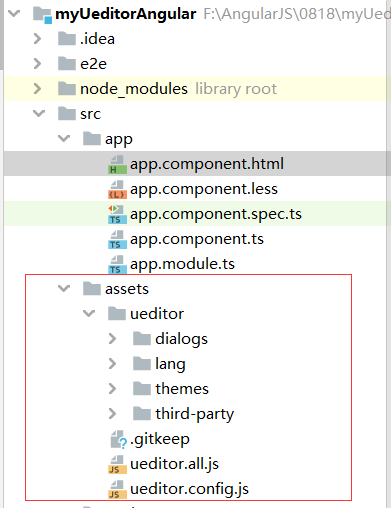
step2. 引入依赖之后,app.module.ts引入ueditor模块,其中 ueditor.config.js、ueditor.all.js、dialogs目录、lang目录、theme目录、third-party目录从之前上一步的dist目录中复制到 项目assets目录下.
import { BrowserModule } from '@angular/platform-browser';
import { NgModule } from '@angular/core';

import { AppComponent } from './app.component';
import {UEditorModule} from 'ngx-ueditor';

@NgModule({
  declarations: [
    AppComponent
  ],
  imports: [
    BrowserModule,
    UEditorModule.forRoot({
      js:[
        '../assets/ueditor.config.js',
        '../assets/ueditor.all.js'
      ],
      options:{
        UEDITOR_HOME_URL:'../assets/ueditor/'
      }
    })
  ],
  providers: [],
  bootstrap: [AppComponent]
})
export class AppModule { }
引入静态资源文件后目录如下.
step3. 根页面 app.module.html
打开界面成功显示ueditor文本编辑器正常!
<ueditor>Hello World!</ueditor>
2.2 本地定位到问题
本地调试的时候一直没复现出来bug,按照上面说的ueditor.config.js和ueditor.all.js加载顺序有问题,但是config文件20KB,all.js文件1MB,有时候前者2S后者20s, 想要 ueditor.config.js加载比ueditor.all.js慢比较依赖网络.

于是我们手动让config.js 大一点(给js里多写点注释),达到config.js加载比all.js加载解析的还要慢。在我们的努力下, ueditor.config.js加载比ueditor.all.js慢了20ms,界面上的富文本编辑器消失了,取而代之的是 加载中...

如愿以偿的在本地复现了 环境上出现的问题,废话了这么久下面就该直接到解决方案了.

2.3 本地解决问题 fix
ueditor.config.js文件末尾有一行代码:
window.UE = {
   getUEBasePath: getUEBasePath
};
看到这里你应该明白问题了: 当ueditor.config.js加载比ueditor.all.js慢的时候,UE对象的属性就只剩下getUEBasePath了,也就是为什么页面会报错 getUEditor is not a function !
聪明的你一定可以看懂解决方法:
if(window.UE){
    window.UE.getUEBasePath = getUEBasePath;
  }else{
    window.UE = {
      getUEBasePath: getUEBasePath
    };
  }
2.4 解决方案可行吗?
个人观点:
- 其一,ueditor.config.js中这样写,可以保证无论加载顺序, UE对象的属性方法不会被冲刷掉;
- 其二,ueditor.config.js存在的意义是啥,就是为了配置富文本编辑器的个性化配置(工具栏、图片、媒体地址),就算ueditor.config.js后加载了,配置保存在 windows的UEDITOR_CONFIG对象里,每次实例化富文本编辑器都会用到这个配置对象,保证了 个性化配置能够生效.
3.知其所以然.
3.1 ngx-ueditor.js如何加载config/all.js
刚接触angular,我也不会调试ngx-ueditor,但是有了上面的报错,很容易看到一行 ngx-ueditor.ts文件的错误堆栈:
遍历要加载的js文件,通过Promise异步往HTML的head标签中追加script标签,来达到加载js文件的方法,通过Promise.all()来保证动态加载js.

3.2 动态标签script
<script>标签,先来粗略的讲讲是如何加载的吧,如果有不对的欢迎指正,我知错能改。<script>标签加载的时候会阻塞页面的渲染,HTML代码执行到script的地方,就会等待加载执行JS代码,可以理解为<script>标签是同步行为, script标签还有额外的属性,只了解async以及defer,async是异步的,就是加载js时候会异步的执行,不阻塞页面渲染.
给<script>标签赋予异步方式
- 通过async属性,2是通过JS动态的往HTML页面写script标签
- 通过 JS 动态往HTML里写script元素,就是
var sc = document.createElement("script"); sc.type="text/javascript"; sc.src="xxxx.js"; sc.onload=function(){//加载完成回调;},参考ngx-ueditor.js或者百度.
如何证明方式2的script标签是动态的?
script标签的dom元素有个属性 async 可以证明是异步还是同步的, true代表异步, 下图可以证明动态往HTML写的script标签是异步的吧?

总结
当然了页面上写死两个 <script async src="ueditor.config/all.js">也可以试试异步加载js。其实刚开始想到的解决方案是把config.js的内容全部挪到all.js文件里,不过既然人家把config.js分离出来了也一定有他的道理。不给ueditor.config.js扩容,模拟下场景。
进入任意目录A执行:
npm init -y
npm install express --save
在目录A下添加文件app.js,并且将ueditor相关文件放到目录下执行node app:

app.js如下(这里设置setTimeout目的很简单,模拟网络加载ueditor.config.js 与 ueditor.all.js出现快慢的情况):
const express= require("express");
const app = express();

app.get('/',(req,resp)=>{
	resp.sendFile(__dirname + "/demo.html");
})

app.get('/*.js',(req,resp)=>{
	const delay =  Math.random()*1000;
	setTimeout( ()=>{
		resp.sendFile(__dirname + req.url);
	},delay);
});

app.get('/*.css',(req,resp)=>{
	resp.sendFile(__dirname + req.url);
});
app.get('/*.png',(req,resp)=>{
	resp.sendFile(__dirname + req.url);
})


app.get('/ueditor.all.js',(req,resp)=>{
	resp.sendFile(__dirname + "/ueditor.all.js");
})

app.listen(8080,()=>{
	console.log('服务器启动成功');
});
demo.html如下:
<!DOCTYPE HTML>
<html lang="en-US">
<head>
	<meta charset="UTF-8">
	<title>ueditor demo</title>
</head>
<body>
	<!-- 加载编辑器的容器 -->
	<script id="container" name="content" type="text/plain">Hello World</script>

	<!-- 配置文件 -->
	<script type="text/javascript" src="ueditor.config.js" async></script>
	<!-- 编辑器源码文件 -->
	<script type="text/javascript" src="ueditor.all.js" async></script>

	<!-- 实例化编辑器 -->
	<script type="text/javascript">
	window.onload=function(){
	console.log(UE);
	    var ue = UE.getEditor('container');
	}
	</script>
</body>
</html>
就写到这里了,总结下解决方案: ueditor.config.js修改成上面说的方法,另外了解了script异步加载的方式.

 浙公网安备 33010602011771号