
ChalikatSoft9.5.0.80 C++类库 Clion CMakeLists.txt (Mingw w64)
此项目是用来测试买回来的类库是否可以正常使用的,若可以正常使用,最后会输出对应版本的信息,激活时间,激活码
- 环境版本信息
编译器版本信息:![]()
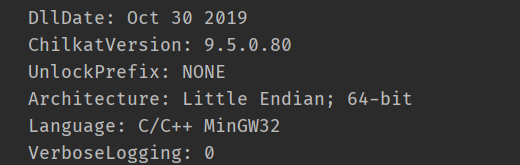
ChaliKat类库信息:![]()
Clion版本信息:
CLion 2019.2.5
Build #CL-192.7142.39, built on October 30, 2019
Licensed to 。。。
Subscription is active until August 13, 2020
For educational use only.
Runtime version: 11.0.4+10-b304.77 amd64
VM: OpenJDK 64-Bit Server VM by JetBrains s.r.o
Windows 10 10.0
GC: ParNew, ConcurrentMarkSweep
Memory: 1987M
Cores: 8
Registry: run.processes.with.pty=TRUE
Non-Bundled Plugins:
------------------------------------------------------------------------------------------------------
之所以写出版本信息,是因为,软件开发经常出现新老版本的兼容问题,这也许是软件设计人员的问题。所以开发软件时要思考如何设计出更合理的接口,在写代码之前要思考(一次性使用的代码除外)怎么可以更加完美地解决当前遇到的问题以及以后可能会遇到的问题。(X:根据你所使用的编译器,选择相对应编译器编译的静态库)
------------------------------------------------------------------------------------------------------ - CMakeLists.txt 内容编写 (以下可以作为CMakeLists.txt的模板来使用)
 1 cmake_minimum_required(VERSION 3.15)
 2 project(helloworld)
 3
 4 set(CMAKE_CXX_STANDARD 11)
 5
 6 set(INC_DIR include)
 7 set(LIB_DIR lib)
 8 include_directories(${INC_DIR})
 9 link_directories(${LIB_DIR})
10 link_libraries(libchilkat-9.5.0.a libcrypt32.a libws2_32.a libdnsapi.a)
11
12 add_executable(${PROJECT_NAME} main.cpp)
13 target_link_libraries(${PROJECT_NAME} libchilkat-9.5.0.a)
注:本次创建使用的是静态库(因为该静态库并不是很大,只有二十几M,使用Debug模式编译链接出来的.exe已经很小了,release模式的就更小了),ChilKat官网说明Mingw w64 编译链接时,需要额外链接 libcrypt32.a ,libws2_32.a,libdnsapi.a这三个库
静态链接库大小:![]()
可执行文件:![]()
- 项目目录
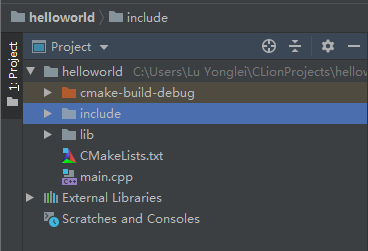
![]()
-
源代码
 1 #include <iostream>
 2 #include "CkGlobal.h"
 3
 4 void ChilkatUnlock(const char *unlock_code) {
 5 CkGlobal glob;
 6
 7 // 传入key,用于解锁此类库
 8 bool success = glob.UnlockBundle(unlock_code);
 9
10 // 类库解锁不成功且超过试用期,打印类库授权及版本信息
11 if (success != true) {
12 std::cout << glob.lastErrorText() << "\r\n";
13 return;
14 }
15
16 // 获取当前类库状态,类库在试用期内或激活成功
17 int status = glob.get_UnlockStatus();
18 if (status == 2) {
19 std::cout << "Unlocked using purchased unlock code." << "\r\n";
20 } else {
21 std::cout << "Unlocked in trial mode." << "\r\n";
22 }
23
24 // 打印类库授权及版本信息
25 std::cout << glob.lastErrorText() << "\r\n";
26 }
27
28 int main() {
29 // 输入类库解锁码
30 ChilkatUnlock("******************************");
31 return 0;
32 }
- 运行结果展示(运行成功)
 1 Unlocked using purchased unlock code.
 2 ChilkatLog:
 3   UnlockBundle:
 4     DllDate: Oct 30 2019
 5     ChilkatVersion: 9.5.0.80
 6     UnlockPrefix: NONE
 7     Architecture: Little Endian; 64-bit
 8     Language: C/C++ MinGW32
 9     VerboseLogging: 0
10     component: Global
11     unlockCode: ******************************
12     regKeyUnlock:
13       product: ChilkatBundle
14       mm: 12
15       yyyy: 2019
16       Component successfully unlocked using purchased unlock code.
17     --regKeyUnlock
18     Success.
19   --UnlockBundle
20 --ChilkatLog




 浙公网安备 33010602011771号